The B2B Demand Gen Prompt Library: ChatGPT and Claude Prompts That Actually Produce Pipeline

TL;DR
- Single, context-free prompts produce generic output. Use multi-step prompt chains where each prompt inherits context from the previous one.
- Always start with a system prompt that defines the AI's role (e.g., "You are a B2B demand gen strategist") before giving it a task.
- Break complex requests like building an outbound sequence into smaller, decomposed prompts for each component (hook, social proof, objection handling).
- Inject your actual business data—personas, CRM exports, win/loss themes—into the prompt context to ground the AI's output in your reality.
- Use different models for different tasks: ChatGPT for structured outputs (tables, rubrics) and Claude for reasoning over large datasets and nuanced copy.
You've seen the scenario. A marketer pastes 'Write me a cold email for my SaaS product' into ChatGPT, gets a bland template that could apply to any company, and concludes that AI is overhyped for demand gen. The problem isn't the AI; it's the prompt. When demand gen teams use prompts that produce generic personas and interchangeable email copy, the cost isn't wasted AI credits but wasted pipeline velocity.
The truth is, effective ai prompts for demand generation only produce usable output when they carry three things most prompt lists never mention: a system prompt that defines the AI's role and constraints, injected context about the ICP and product, and a chained sequence that builds on prior outputs rather than starting from zero.
This isn't a list of copy-paste templates. It's a methodology for building a demand generation engine, organized into four stages: ICP & Targeting, Content & Offers, Outbound Sequences, and Pipeline Analysis. Every prompt is designed for practitioners using ChatGPT (GPT-4o/GPT-5) and Claude, with notes on where each model excels.
ICP and Targeting Prompts: Build Personas That Actually Inform Campaigns
Most AI-generated personas read like demographic Mad Libs—job title, company size, generic pain points—because the prompt asks for a persona without specifying what it will be used for. The fix is persona-loaded prompt injection: telling the AI upfront that this persona will drive ad targeting, email copy, and content topics, so it must output behavioral triggers and objection patterns, not just demographics.
I once ran an experiment to generate personas for three ICP segments. The first attempt used a single mega-prompt asking for a full persona, pain points, and messaging in one shot. The output was coherent but completely interchangeable between segments. Only after rebuilding it as a five-step chain—where each prompt inherited the output of the previous one—did the model surface an objection pattern around implementation timelines that the sales team confirmed was the actual reason deals stalled. That's the level of specificity we're aiming for.
For this workflow, Claude often produces more nuanced persona narratives, while ChatGPT excels at structured, tabular outputs. A good process uses both in sequence.
Persona Building Prompts That Go Beyond Demographics
A usable persona identifies the specific moment a prospect's pain becomes acute enough to seek a solution. This two-step chained prompt is designed to find that moment.
First, set the stage with a system prompt. This tells the AI its role and gives it the foundational knowledge it needs to operate.
System Prompt (Step 1):
Why this matters: This system prompt scaffolding moves the AI from a generalist tool to a domain specialist, grounding all subsequent outputs in your competitive reality.
Next, use the user prompt to ask for the specific persona attributes that inform campaign execution.
User Prompt (Step 2):
Structure the output with these headings:
Role in Buying Committee: (e.g., Economic Buyer, Champion, Influencer, Blocker)
Primary Evaluation Criteria: (What they must see to consider a solution like ours)
Moment of Acute Pain: (Describe the specific workflow failure or business event that triggers their search for a solution)
Internal Objections to Overcome: (What arguments will they hear from their team (e.g., finance, IT) when they propose our product?)
Preferred Content Formats for Research: (e.g., Analyst reports, practitioner-led webinars, technical documentation, peer forums)
Why this matters: The 'Moment of Acute Pain' and 'Internal Objections' sections force the AI to generate insights that directly inform your messaging timing and content, turning a demographic profile into a strategic asset.
Intent Signal Identification Prompts
Most teams know they should use intent data from tools like 6sense or Demandbase, but struggle to define which signals actually indicate buying readiness versus casual research. This prompt generates a tiered framework to separate noise from signal. It works best in Claude due to its longer context window for processing large data exports.
User Prompt:
Ingest the following list of potential buyer activities: [Paste a list of activities your intent data provider tracks, e.g., 'visits pricing page,' 'downloads competitor ebook,' 'reads G2 reviews for our category,' 'searches for integration partners,' 'multiple stakeholders from same account visit website in one week'].
Organize these signals into three tiers:
Tier 1 (Research): Signals indicating top-of-funnel awareness and problem identification.
Tier 2 (Evaluation): Signals indicating active comparison of solutions.
Tier 3 (Decision): High-intent signals suggesting a purchase is imminent.
For each tier, provide a one-sentence explanation of why the signals belong there.
Why this matters: This prompt turns a raw list of activities into a structured, signal-based model your team can use to trigger the right follow-up at the right time.
Lead Scoring Criteria Prompts
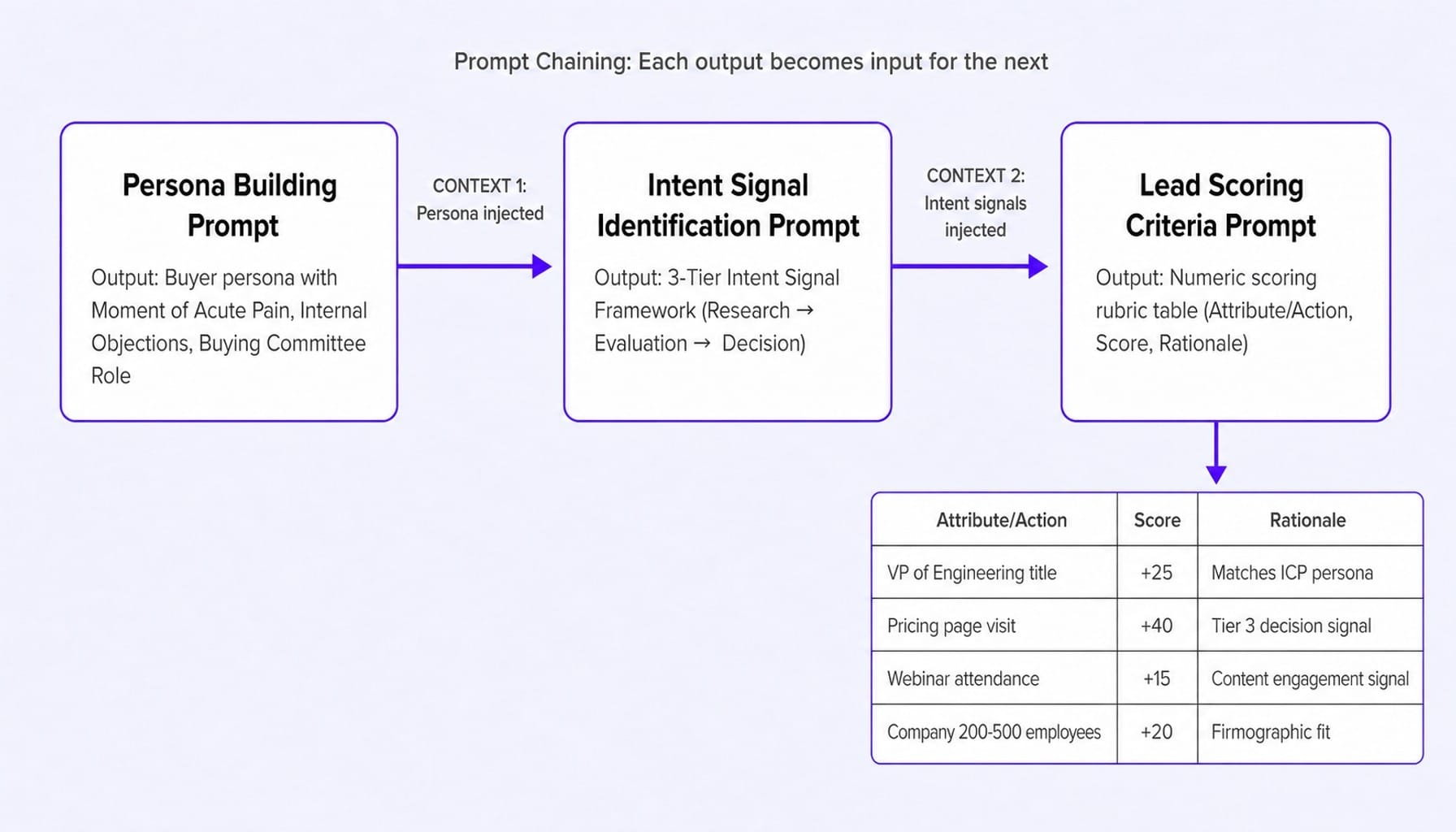
A lead scoring model built by an AI that has never seen your CRM data is just someone else's model with your company name on it. This prompt closes the loop by using the outputs from the previous two prompts—this is prompt chaining in action.
User Prompt:
CONTEXT 1 (Persona): [Paste the 'Persona' output from the first prompt]
CONTEXT 2 (Intent Signals): [Paste the 'Intent Signal Framework' output from the second prompt]
Based on this context, generate a numeric lead scoring rubric that weighs firmographic fit against behavioral signals.
The output should be a table with three columns: 'Attribute/Action', 'Score', and 'Rationale'.
Include scores for:
Firmographic attributes (e.g., Job Title, Company Size, Industry)
Behavioral signals (e.g., Tier 1, Tier 2, and Tier 3 intent signals)
Content engagement (e.g., Webinar attendance, Lead magnet download)
Key page views (e.g., Pricing page, Demo request page)
The rationale for each score should connect back to the provided persona and intent signal context.
Why this matters: By explicitly feeding the prior outputs back into the AI's context window, you ensure the scoring model is internally consistent with your persona and intent definitions, not based on generic best practices.
Content and Offer Prompts: Create Lead Magnets, Webinar Concepts, and Case Study Frameworks
The real problem with most AI-generated content ideas is they default to generic topics. The prompt asks for "content ideas" instead of specifying the belief shift the asset needs to create. By chaining these prompts off the persona outputs from Section 1, the AI already knows who you are targeting, so the prompts can focus on creating assets that move a prospect from one stage of awareness to the next.
For these prompts, temperature tuning is key. Set the temperature to 0.7-0.9 for ideation prompts (lead magnets, webinar topics) to get creative variation, but drop it to 0.2-0.3 for case study frameworks where structural consistency is more important.
Lead Magnet Concept Prompts
A great lead magnet solves a small piece of the prospect's problem for free, building trust and earning the right to talk about the bigger solution. This prompt is designed to generate concepts that do exactly that.
User Prompt:
Acting as a content strategist, propose five lead magnet concepts for this persona. For each concept, provide the format (e.g., Checklist, Calculator, Benchmark Report, Template, Mini-Course) and a one-sentence hook.
Constraint: Each concept must address a problem the prospect can partially solve with the lead magnet alone, creating enough value to build trust but leaving a clear gap that our product, [your product name], fills.
Rank the five concepts by their likely conversion rate for this specific ICP, and briefly explain your reasoning for the ranking.
Why this matters: The constraint forces the AI to think about value exchange. Instead of generic "Ultimate Guides," it will propose practical tools that create a small win for the prospect, making them more receptive to your full solution.
Read more: B2B SaaS Content Writing: How to Write Content That Moves Pipeline, Not Just Traffic
Webinar Topic and Positioning Prompts
The best webinars deliver so much value that attendees remember your brand even if they never click a link. This is zero-click content. This prompt, best run in ChatGPT for its strength in structured outputs, generates webinar concepts designed for this purpose.
User Prompt:
Generate three webinar concepts designed as 'zero-click content' for this persona. The goal is to deliver standalone value and build authority.
For each concept, provide:
Working Title: (Action-oriented and specific)
One-Paragraph Description: (Focus on the problem solved, not the product sold)
Three Key Takeaways: (Bulleted list of tangible skills or insights attendees will gain)
Suggested Co-Presenter Profile: (e.g., 'An industry practitioner from a non-competing company,' 'A data analyst with research on this topic')
Why this matters: Specifying a "co-presenter profile" forces the AI to think about credibility and audience draw beyond your own brand, leading to more compelling and trustworthy event concepts.
Case Study Framework Prompts
Most AI-generated case study templates produce feel-good stories without hard numbers because the prompt never demands measurement specificity. This prompt, which excels in Claude due to its ability to generate nuanced, conversational questions, builds a framework for data-driven storytelling.
User Prompt:
The output should have two parts:
Part 1: Interview Guide
A list of 8-10 open-ended questions to ask the customer.
Constraint: Questions must be designed to surface specific, quantifiable metrics (e.g., "Before using our product, what was your average time to complete X? What is it now?") and the business impact of those metrics. Avoid questions that lead to vague, qualitative answers.
Part 2: Narrative Outline
A 5-point story structure for the case study:
1. Situation: The customer's state before our product.
2. Complication: The specific business pain or bottleneck that prompted their search.
3. Resolution: How our product was implemented and used to solve the complication.
4. Quantified Result: The hard numbers that prove the impact (e.g., X% reduction in cost, Y% increase in efficiency).
5. Transferable Lesson: A one-sentence takeaway for other companies facing a similar situation.
Why this matters: By demanding questions that surface metrics, you ensure the resulting case study is a proof point, not just a story.
Outbound Sequence Prompts: Multi-Touch Cadences and Follow-Up Logic
Single-prompt email generation is the most common—and most wasteful—use of AI in demand gen. A single prompt produces a single email that sounds like every other AI-generated cold email. The alternative is prompt decomposition: breaking the sequence into discrete prompts for the value prop, the social proof, and the objection-handling, then chaining them together.
And let's be honest, no sales rep trusts a seven-touch sequence where every email sounds the same. These prompts, designed for deployment in tools like Instantly.ai or Apollo.io, build cadences with intentional variation.
Designing Multi-Touch Cadence Prompts with Prompt Decomposition
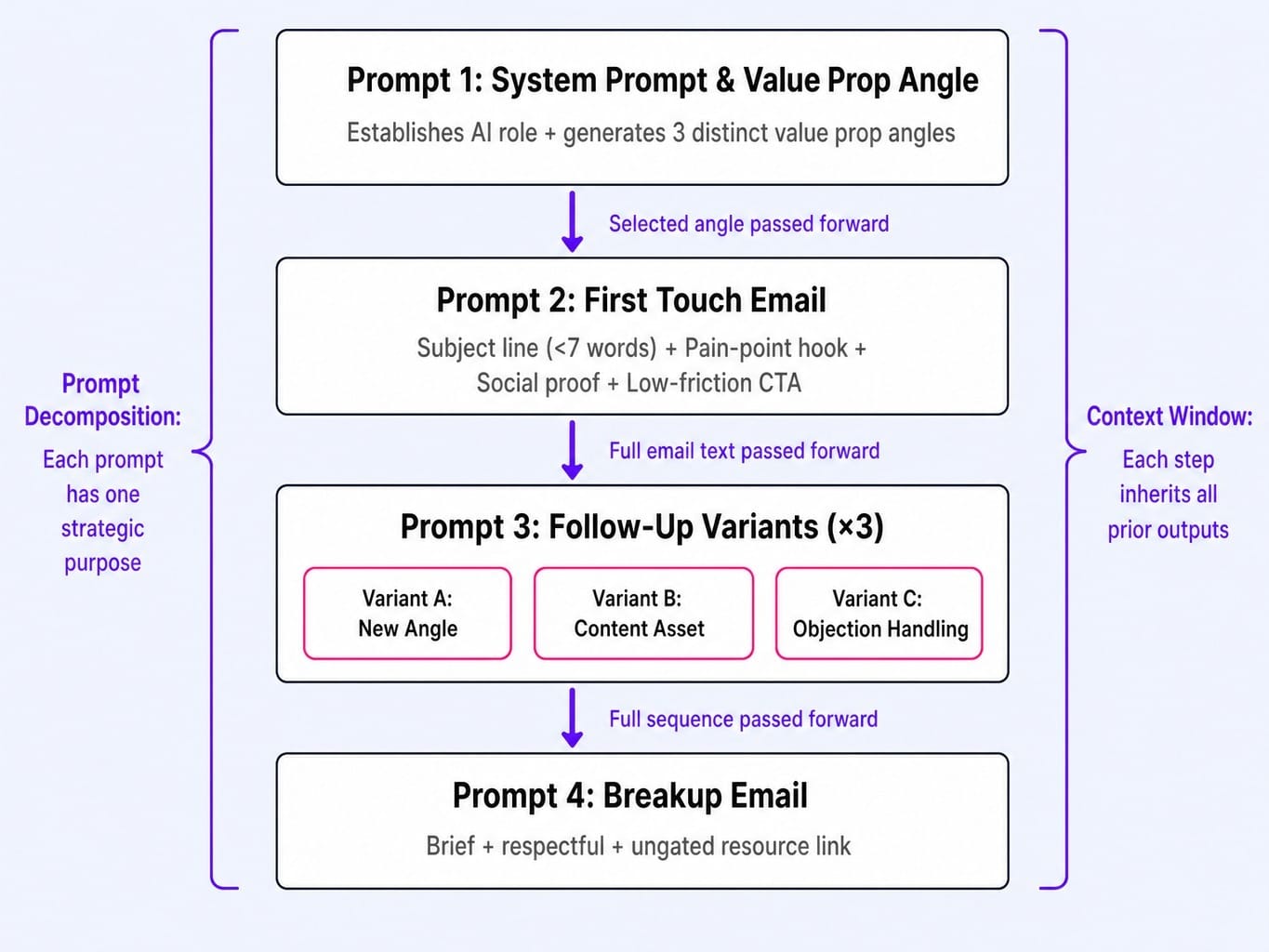
This four-prompt chain produces a complete five-touch outbound sequence. Each step builds on the last, ensuring the entire cadence is strategically coherent. Using a tool like Clay for waterfall enrichment can inject real prospect data into these templates at scale.
Prompt 1: System Prompt & Value Prop Angle
USER: CONTEXT (Persona): [Paste the 'Persona' output]
Generate three distinct value proposition angles for an outbound sequence targeting this persona. For each angle, provide a one-sentence summary.
Annotation: This establishes the AI's role and generates the core messaging themes for the entire sequence.
Prompt 2: The First Touch
Write the first email for a cold outbound sequence. It must include:
A subject line under 7 words that is specific and intriguing.
An opening hook (first sentence) that directly references the 'Moment of Acute Pain' from the persona context.
One sentence of social proof (e.g., "Companies like [Relevant Customer Name] use us to solve this.").
A low-friction Call-to-Action that asks a question, not for a meeting.
Annotation: This creates the critical first impression, grounded in a specific pain point.
Prompt 3: The Follow-Up Variants
Generate three distinct follow-up emails to be sent after no reply to the first email.
Variant 1 (New Angle): Introduce a secondary benefit of our product not mentioned in the first email.
Variant 2 (Content Asset): Reference a relevant content asset (e.g., a case study or benchmark report) that provides value related to their pain point.
Variant 3 (Objection Handling): Use role-play prompting. Acknowledge the most likely reason they haven't replied (based on the 'Internal Objections' in the persona context) and offer a brief counterpoint.
Annotation: This is prompt decomposition in action. Instead of asking for "three follow-ups," you specify the strategic purpose of each one, creating intentional variety.
Prompt 4: The Breakup Email
Write a final "breakup" email. It should be brief, respectful, and assume this is the last point of contact. End with a no-pressure link to a valuable, ungated resource as a final gesture of goodwill.
Annotation: This closes the loop professionally while leaving the door open with a final piece of value.
Follow-Up Logic Prompts: Moving Leads from MQL to SQL
The best follow-up isn't time-based; it's signal-based. This prompt generates conditional logic—not just copy—for what to send based on prospect behavior, which can then be built into workflows in a platform like HubSpot.
User Prompt:
CONTEXT (Prospect Behavior): A prospect matches our ICP. They opened email #2 of our outbound sequence but did not reply. Within 48 hours of opening, they visited our pricing page for over 30 seconds.
Task: Generate three distinct follow-up approaches to this specific signal, ranked by assertiveness (Low, Medium, High).
For each approach, provide:
The channel (e.g., Email, LinkedIn connection request).
The core message (1-2 sentences).
The rationale for why this approach fits the assertiveness level.
Constraint: Each message must explicitly reference the combination of signals (email open + pricing page visit) without sounding creepy or overly automated.
Why this matters: This moves beyond generic drip sequences. Signal-based prompting allows you to generate hyper-relevant outreach that reflects the prospect's actual journey, dramatically increasing the odds of a reply.
Read more: SaaS Marketing Automation in 2026: The Revenue-Event Framework That Works
Pipeline Analysis Prompts: Diagnose Funnel Gaps and Conversion Bottlenecks
Most teams use AI for creation but never for diagnosis. Pipeline analysis is the most underleveraged category of ai prompts for lead generation because it requires feeding structured data into the prompt context. This is where you close the loop, using AI to measure if your campaigns are actually working.
This work requires retrieval-augmented generation—feeding your CRM exports or analytics data into the prompt. As is widely recognized in B2B SaaS, average website conversion rates hover around 2%; this kind of analysis helps diagnose why. Claude's 200K token context window makes it the superior tool for ingesting and reasoning over these larger datasets.
Funnel Gap Analysis Prompts
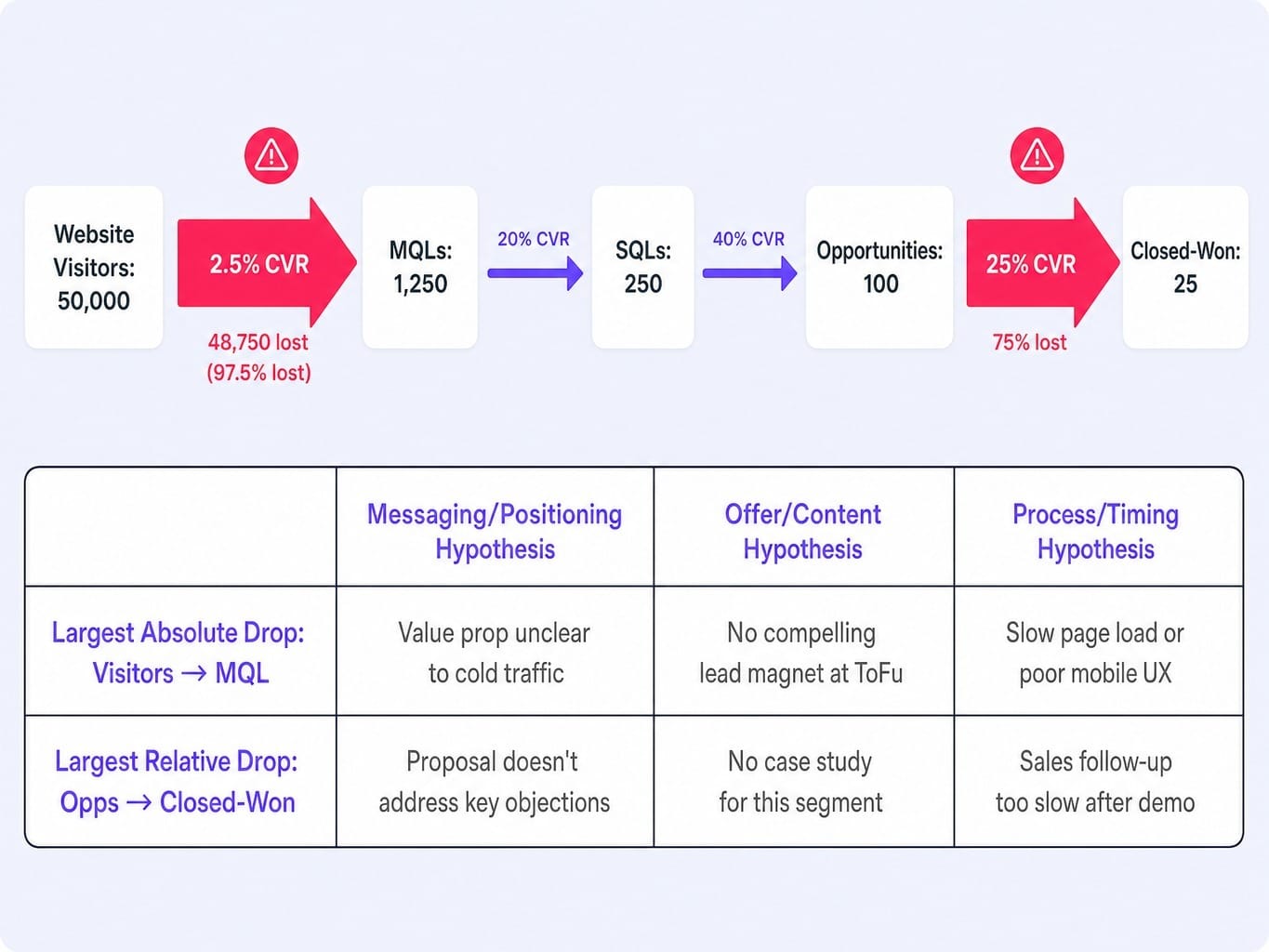
This prompt takes your raw funnel data and asks the AI to act as a growth analyst, identifying the highest-priority leaks in your B2B SaaS marketing funnel.
User Prompt:
CONTEXT (Funnel Data): [Paste a table of your funnel data with stages and conversion rates. e.g.,
| Stage | Count | CVR to Next Stage |
|---|---|---|
| Website Visitors | 50,000 | 2.5% |
| MQLs | 1,250 | 20% |
| SQLs | 250 | 40% |
| Opportunities | 100 | 25% |
| Closed-Won | 25 | N/A |
]
Analysis Task:
1. Identify the stage with the largest absolute drop-off in count.
2. Identify the stage with the largest relative (percentage) drop-off.
3. For each identified gap, hypothesize three potential causes: one rooted in messaging/positioning, one in offer/content, and one in process/timing.
4. Recommend one specific, low-effort experiment to test one of your hypotheses.
Why this matters: The three-lens constraint (messaging, offer, process) prevents the AI from giving generic advice like "improve your landing page." It forces a multi-faceted diagnosis that leads to a more robust testing roadmap.
Conversion Rate Diagnosis Prompts
This prompt focuses on a single, critical page—like a landing page or demo form—and asks the AI to perform a CRO audit.
User Prompt:
CONTEXT (Page Description): [Paste the full copy of the landing page, including headline, subheadings, body text, CTA button text, and a description of any images or social proof elements like logos or testimonials.]
The page's current conversion rate is [current conversion rate, e.g., 1.5%]. The goal is to get it to [goal conversion rate, e.g., 3%].
Audit Task:
Provide a list of recommendations to improve the conversion rate. For each recommendation:
State the proposed change clearly.
Explain the CRO principle behind the change.
Rank its estimated impact on conversion (High, Medium, Low).
Flag whether the change requires engineering resources or is a copy/CMS-only change.
Why this matters: The "engineering vs. copy" flag is critical for lean teams. It helps you prioritize marketing tasks with limited resources, creating a direct path from prompt output to a testable hypothesis and measurable pipeline impact. This is the essence of prompt-to-pipeline measurement.
Why Most AI Prompt Lists Produce Generic Output—and How to Fix It
The reason most AI prompt articles produce disappointing results isn't that the prompts are bad—it's that they're context-free. A prompt fired into a blank ChatGPT window has no knowledge of your ICP, your product positioning, or your competitive landscape. It produces output that could belong to any company.
The prompts in this article are different because they are built on a methodology. Here are the three principles that separate pipeline-grade output from generic filler.
- System Prompt Scaffolding: Always start a new chat session by defining the AI's role, expertise, and constraints before giving it a task. A system prompt like, "You are a RevOps analyst specializing in HubSpot data for Series B SaaS companies," instantly focuses the model. Collapsing the system prompt and the user prompt into a single instruction is why most outputs lose specificity.
- Prompt Decomposition: Break complex tasks into discrete micro-prompts that chain together. Instead of asking for a full outbound sequence in one go, use separate prompts for the value prop, the first touch, the follow-ups, and the breakup email. This isn't just about sequencing; it's about breaking a complex request into distinct cognitive tasks the model can handle more effectively.
- Context Injection: Paste your actual business reality into the prompt. This means using your persona documents, CRM exports of funnel data, and competitor positioning statements as context. The formal term for this is retrieval-augmented generation (RAG). This grounds the AI's reasoning in your world, not the statistical average of its training data. Both GPT-5 and Claude handle long context, but with different strengths: GPT-5 is often better at following complex, multi-constraint instructions, while Claude excels at synthesizing and reasoning over large, unstructured blocks of text.
These principles transform prompts from simple commands into components of a repeatable execution system.
What Happens When the Prompt Engineering Never Stops
The methodology in this article works. Building chained, context-aware prompts produces demand generation assets that are leagues better than the output of single, generic commands. But it reveals a new bottleneck: sustainability.
A perfectly engineered prompt chain is only as good as the context you feed it. The persona you defined last quarter is now slightly out of date. The funnel data from last month is stale. A new competitor just changed the landscape. To maintain quality, the entire system of prompts needs to be fed with fresh data, re-run, and the outputs redeployed—continuously. Most marketing teams can manage this for a focused sprint, but the discipline rarely survives the quarter. The prompts decay.
This is the execution gap Spike AI is built to close. It operates as a continuous optimization layer that doesn't just generate assets from prompts but constantly re-evaluates the highest-impact move for your business. Where this article teaches you how to prompt an AI for a funnel gap analysis, Spike AI runs that analysis every week, prioritizes the fix, and deploys it across your website. It turns the high-effort, manual discipline of prompt engineering into a system that runs for you, compounding gains through a steady weekly shipping cadence.
Conclusion
The single most important shift for any demand gen team is to stop treating AI prompts as templates to copy-paste. They are an engineering discipline. Useful output requires system prompts for context, chained sequences for coherence, and injected business data for relevance.
This article walked through the entire workflow: from targeting (knowing who to reach), to content and outbound (creating and delivering the message), to pipeline analysis (measuring if it worked). The common thread is that quality at each stage depends on the output from the stage before it.
The teams that win in 2026 won't be the ones with the best single prompts. They will be the ones that build reusable prompt libraries as operational assets and connect them to live data from their CRM and analytics. The prompt library isn't a document; it's a system.
Frequently Asked Questions
Can AI prompts replace a demand generation strategist?
No. AI prompts accelerate execution—generating personas, drafting sequences, diagnosing funnels—but they cannot set strategy, define positioning, or make judgment calls about brand risk. The strategist's role shifts from doing the work to directing and quality-checking the AI's output, making them more valuable, not less.
What is prompt chaining and why does it matter for demand generation?
Prompt chaining means feeding the output of one prompt as context into the next. For demand gen, this ensures a persona prompt's output informs the content prompt, which informs the outbound prompt. This creates internally consistent campaigns rather than a series of disconnected, generic assets.
Should I use ChatGPT or Claude for demand generation prompts?
Use both for different tasks. ChatGPT (GPT-4o/GPT-5) excels at structured outputs like tables, scoring rubrics, and following complex, multi-constraint instructions. Claude is often better for reasoning over large pasted datasets (like CRM exports) and generating nuanced, conversational copy. A strong workflow involves using both.
What role does temperature setting play when generating demand gen copy?
Temperature controls randomness. For ideation tasks like brainstorming lead magnet concepts, set it higher (0.7-0.9) to get creative variation. For structured tasks like building scoring models or analyzing funnel data, set it lower (0.2-0.3) to ensure consistency, precision, and replicability.
How do I use intent data to improve my AI-generated demand gen content?
Export intent signals from platforms like 6sense or Clearbit and paste them into your prompt's context window. For example, if data shows a target account is researching competitor comparisons, feed that specific signal into the prompt so the AI generates content that directly addresses the comparison, not generic awareness material.