AI Sales Prompts That Actually Work: 4 LLMs, 25+ Prompts, and a Decision Matrix by Pipeline Stage
TL;DR
- Stop treating all LLMs as interchangeable. Use ChatGPT for outreach copy, Claude for deep research, Perplexity for real-time intelligence, and Gemini for CRM data analysis.
- Generic prompts produce generic output. The best AI prompts for sales are rich with specific context: the prospect's pain point, your product's value prop, and the desired tone and format.
- Map your prompts to your pipeline. The right prompt for a first-touch cold email is wrong for re-engaging a stalled deal post-demo.
- A prompt that sounds good is not the same as a prompt that performs. Track reply rates and meeting-booked rates per prompt variant to find what actually moves deals forward.
- The highest-performing sales teams build a system around their prompts: model selection, context injection, stage-gating, and continuous performance measurement.
An SDR copies a viral ChatGPT sales prompt from LinkedIn. It promises to book 10 meetings a week. They paste it in, swap the placeholders, and get a bland, three-paragraph email that sounds exactly like every other AI-generated message flooding their prospect's inbox. The reply rate, predictably, drops below their pre-AI baseline.
This scenario isn't a failure of the SDR or even the prompt. It's a system failure.
The real cost of unstructured prompt usage across a sales organization is invisible until you audit it: duplicated effort, unmeasured output quality, and zero feedback loops between what an AI generates and what actually books meetings. Most lists of ai prompts for sales treat all large language models (LLMs) as interchangeable black boxes. They ignore the sales context—pipeline stage, buyer persona, deal complexity—and they never tell you how to know if the output is actually good.
This guide fixes that.
It delivers LLM-specific prompt banks for ChatGPT, Claude, Perplexity, and Gemini, each matched to the sales tasks where that model excels. We'll compare them head-to-head on the same cold email task and provide a decision matrix to help you choose the right model for every stage of your pipeline.
Why Most AI Sales Prompts Produce Generic Output (And What to Fix)
The prompt itself is rarely the problem. The failure is structural, stemming from three common mistakes that turn powerful AI into a generator of mediocre, ignorable sales copy.
First is model mismatch. Sales teams use the wrong tool for the job. You wouldn't use a hammer to turn a screw. Yet, reps feed a 40-page RFP into ChatGPT, which has a limited context window and truncates the document, instead of using Claude, which can process the entire file in one pass. Conversely, they ask Claude for quick email variations when ChatGPT's speed and superior tone calibration are better suited for the task. Each model has a distinct architecture and excels at different classes of problems. Using the wrong one guarantees subpar results.
Second is context starvation. Most prompts are information-poor. A prompt like, "Write a cold email to a VP of Marketing," forces the model to guess. It lacks the critical context: the prospect's company stage, their recent funding round, their current tech stack, or the specific pain point your solution addresses. The result is the same generic email for a Series A startup and a Fortune 500 enterprise—an immediate signal to the prospect that the outreach is automated and uninformed.
Third is the absence of an evaluation loop. I once helped an outbound team build a shared prompt library. Within six weeks, it was useless. Reps modified prompts ad hoc without version control, and nobody tracked which variants correlated with booked meetings. They were optimizing for prose that sounded polished in internal reviews, not for prospect behavior. A prompt library without output measurement is just a shared Google Doc that rots. This is where prompt drift occurs, and the initial performance gains from AI messaging degrade as novelty wears off and unmeasured changes dilute effectiveness.
The rest of this article is the fix for all three failures.
ChatGPT Prompts for Sales Outreach and Email Sequencing
For pure outreach copy, ChatGPT is your go-to model. Its primary strengths are speed, strong tone calibration via system prompts, and the ability to generate multiple variations quickly for A/B testing. It excels at top-of-funnel messaging where creativity and speed matter most.
Its weakness is deep research on long documents; those tasks belong to other models we'll cover later. Use ChatGPT for the words, not the research behind them. For a deeper comparison of how ChatGPT stacks up against other AI writing tools for marketing tasks, see our breakdown of Copy.ai vs ChatGPT.
Cold Outreach and First-Touch Email Prompts
ChatGPT outreach prompts work best when they specify tone, length, and CTA format explicitly. Setting the right temperature is also key; a setting of 0.7 is good for creative first drafts, while 0.3 delivers more focused, polished final versions.
1. The ICP-Aligned Cold Email
Rationale: Generates a highly specific first-touch email by defining the AI's persona and providing rich context.
Prompt:
User Prompt: Write a cold email to [Prospect Name], the [Prospect Title, e.g., 'VP of Engineering'] at [Company Name].
Context:
- Company: [Company Name] is a [Company Description, e.g., '200-person Series B fintech company'].
- Trigger Event: [Recent event, e.g., 'They just announced a major platform migration in their latest press release'].
- Pain Point: Similar engineering leaders struggle with [Specific Pain Point, e.g., 'prolonged code-to-deployment cycles during migrations, leading to missed deadlines'].
- Value Prop: Our product, [Your Product], solves this by [Specific Capability, e.g., 'automating the creation of staging environments, cutting deployment time by 40%'].
The CTA question should relate to their [Trigger Event or Pain Point].
Refinement Tip: Follow up with: Now, rewrite this at half the length and make the tone more direct.
2. The Trigger-Based LinkedIn Connection Request
Rationale: Creates a concise, relevant connection request that is far more likely to be accepted than a generic one.
Prompt:
Refinement Tip: Follow up with: Make it more conversational and remove any mention of my company.
3. The 3-Step Multi-Touch Sequence
Rationale: Designs a logical follow-up sequence that builds on a single theme instead of sending disconnected "just checking in" emails.
Prompt:
- Theme: The core theme is [Sequence Theme, e.g., 'the hidden cost of inaccurate lead scoring'].
- Email 1: Hook them with a surprising statistic about the theme. End with a question.
- Email 2 (3 days later): Provide a short, actionable tip related to the theme. Reference Email 1.
- Email 3 (5 days later): Share a one-paragraph case study of a similar company that solved the problem. Use a soft breakup CTA.
Keep each email under 100 words.
Refinement Tip: Follow up with: Generate 3 alternative subject lines for Email 1. They should be intriguing and under 5 words.
Read more: 38 ChatGPT Prompts for Sales: A B2B Prompt Library by Deal Stage
Follow-Up and Re-Engagement Prompts
Follow-up prompts require more context than cold outreach. The model needs to know what happened in previous interactions to generate relevant, non-generic messaging.
1. The Post-Demo Ghosting Follow-Up
Rationale: Re-engages a prospect who went silent after a promising demo by reminding them of the value they saw.
Prompt:
Context from the demo:
- They were most interested in [Feature or Capability, e.g., 'our automated reporting dashboard'].
- Their stated priority was [Prospect's Goal, e.g., 'reducing the manual hours their team spends on weekly reporting'].
- The main objection raised was [Objection, e.g., 'concern about the implementation timeline'].
The email should be brief (under 80 words), reference their priority, gently address the objection, and propose a clear, low-friction next step.
Refinement Tip: Follow up with: Now write a version that is just two sentences and focuses only on their stated priority.
2. The Value-Based Breakup Email
Rationale: Creates respectful urgency and often elicits a response from prospects who have deprioritized the conversation.
Prompt:
Refinement Tip: Follow up with: Generate a subject line for this email that is a simple question.
Claude Prompts for Deep Prospect Research and Objection Handling
When the task requires analyzing long documents or generating nuanced, reasoned arguments, switch to Claude. Its key advantages are a massive 200K-token context window—capable of processing entire 10-K filings, earnings call transcripts, and multi-page RFPs in a single prompt—and a reasoning style that tends to be more balanced and less prone to confident-sounding hallucinations.
Claude is generally slower and can be more expensive per token, so reserve it for high-stakes tasks where accuracy and depth trump speed. Think of it as your AI research analyst, not your copywriter.
Account Research and Discovery Call Preparation Prompts
Claude's value here is its ability to process large volumes of unstructured source material in a single pass, something smaller context windows handle less reliably. You can also guide its output format using few-shot examples directly in the prompt.
1. The Earnings Call Synthesis Brief
Rationale: Turns a dense, hour-long transcript into a scannable brief of strategic priorities and sales-relevant talking points.
Prompt:
Analyze the following earnings call transcript. Extract the following information and format it as a one-page brief:
1. Top 3 Strategic Priorities: What are the company's main stated goals for the next 6-12 months?
2. Mentioned Challenges/Headwinds: What risks or problems did the executives mention?
3. Key Quotes: Pull 2-3 direct quotes that reveal their biggest priorities or pain points.
4. Sales Talking Points: Based on the above, draft 3 open-ended questions I can ask that connect their priorities to our solution.
Here is the transcript:
[Paste the full earnings call transcript here]
Refinement Tip: Follow up with: Based on this brief, what is the single biggest risk to this company that our solution could help mitigate? Explain your reasoning in one paragraph.
2. The Pre-Call Persona Brief
Rationale: Synthesizes a prospect's digital footprint into a "cheat sheet" with personalized conversation starters.
Prompt:
The format should be:
- Professional Focus: What are their core responsibilities and stated interests based on their LinkedIn?
- Recent Activity: What have they recently posted, commented on, or written?
- Potential Conversation Starters: Draft 3 personalized, non-creepy questions based on their activity.
Here is the source material:
- LinkedIn Profile Bio: [Paste bio]
- Recent LinkedIn Post: [Paste post text]
- Company Blog Post they authored: [Paste blog post text]
Refinement Tip: Follow up with: What is one contrarian or non-obvious question I could ask them based on this research?
3. The ICP-Based Discovery Question Framework
Rationale: Generates a structured set of discovery questions tailored to a prospect's specific business model and stage.
Prompt:
The framework should cover these areas:
- Current Process & Tools
- Biggest Bottlenecks & Their Business Impact
- Metrics & How They Measure Success
- Strategic Goals for the Next Year
- "Magic Wand" Question (What they would fix if they could)
Generate 2-3 thoughtful, open-ended questions for each area.
Refinement Tip: Follow up with: Which of these questions is most likely to uncover a pain point related to [Your Solution's Core Value]?
Objection Handling and Competitive Battlecard Prompts
Claude's strength in objection handling comes from its tendency to produce balanced, non-aggressive responses. It naturally avoids the hard-sell tone that other models can sometimes default to.
1. The Empathetic Objection Handling Model
Rationale: Generates nuanced responses that validate the prospect's concern before reframing it.
Prompt:
For each response, use the A-R-V model:
- Acknowledge: Validate their concern directly.
- Reframe: Offer a different perspective that connects to a higher-level business goal.
- Value: End with a question that pivots back to the value they care about.
Objections:
1. "Your price is 20% higher than [Competitor]."
2. "We don't have the engineering resources to implement this right now."
3. "We're happy with our in-house solution."
Refinement Tip: Follow up with: For objection #1, rewrite the response to focus more on the long-term ROI and less on features.
2. The Publicly Sourced Competitive Battlecard
Rationale: Creates a battlecard using only verifiable public information, making it a credible asset to use in conversations.
Prompt:
The battlecard should have these sections:
- Strengths (Competitor): Where do they typically win?
- Weaknesses (Competitor): Where are their known gaps?
- Our Differentiator: What is our unique advantage against them?
- Landmine Questions: What questions can I ask a prospect to expose the competitor's weakness?
Source Information:
- Competitor G2 Reviews Summary: [Paste summary]
- Competitor Pricing Page Excerpt: [Paste excerpt]
- Analyst Report Quote about Competitor: [Paste quote]
Refinement Tip: Follow up with: Summarize our core differentiator into a single, memorable sentence.
Perplexity Prompts for Real-Time Company Intelligence
Perplexity holds a unique position in the AI sales stack: it's the only major LLM that performs real-time web searches and provides inline citations for its claims. This makes it the ideal tool for account intelligence that needs to be current and verifiable, not hallucinated from stale training data.
The key is to understand its role. Perplexity's outputs are research-grade, not copy-grade. Use it to gather intelligence, then feed that intelligence into ChatGPT or Claude to craft the messaging. Always check the citation dates; if the sources are old, add a time-based modifier like in the last 90 days to your query.
Pre-Call Company Research Prompts
Use Perplexity to replace 30 minutes of manual Googling and news searches before every important call.
1. The 360-Degree Company News Brief
Rationale: Quickly gathers the most recent, verifiable news and events about a target company.
Prompt:
Include the following sections:
- Recent Funding Rounds
- Key Executive Hires or Departures
- Major Product Launches or Announcements
- Public Statements about their Strategic Roadmap
Verification Tip: Click on the citation numbers to check the source. Pay attention to the publication date to ensure the information is fresh.
2. The Stated Strategic Priorities Finder
Rationale: Identifies a company's official goals directly from their own content, providing powerful fodder for personalization.
Prompt:
Verification Tip: Perplexity sometimes cites a source that doesn't perfectly support the claim. Always skim the source article to confirm the context is accurate.
3. The Public Tech Stack Identifier
Rationale: Uncovers a prospect's technology stack, revealing integration opportunities or competitive vulnerabilities.
Prompt:
Verification Tip: Job postings are a strong signal but can be for future hires. Cross-reference with other sources to confirm a tool is currently in use.
Competitive and Market Intelligence Prompts
Perplexity is excellent for generating cited competitive intelligence that you can confidently share with prospects and your internal team.
1. The Cited Competitor Comparison
Rationale: Builds a fact-based comparison against a competitor using only verifiable sources.
Prompt:
Verification Tip: Use Perplexity's "Focus" mode and select "Academic" or "Writing" to adjust the depth and style of the search and synthesis.
2. The Industry Trend & Urgency Creator
Rationale: Identifies market shifts that create a compelling reason for a prospect to act now.
Prompt:
Verification Tip: Look for reports from reputable industry analysts (e.g., Gartner, Forrester) or major publications in the citations.
Gemini Prompts for CRM Data Analysis and Pipeline Insights
Gemini's superpower is its native integration with the Google Workspace ecosystem (Sheets, Docs, Gmail) and its strength in processing structured data, like CSV exports from your CRM. Position Gemini as the RevOps and analytics layer of your AI sales stack.
Use it to answer questions about pipeline health, sales performance, and data hygiene—tasks that typically require a dedicated BI tool or hours of spreadsheet manipulation. The ability to reference files directly in Google Drive using @file syntax is a unique workflow accelerator.
Pipeline Analysis and Forecasting Prompts
These prompts turn raw CRM data into actionable insights about where deals are getting stuck and where your team should focus its effort.
1. The Pipeline Bottleneck Identifier
Rationale: Analyzes a pipeline export to pinpoint conversion rate drop-offs between stages.
Prompt:
Analyze this data to identify the sales stage with the highest drop-off rate (i.e., where the most deals are lost). Calculate the conversion rate from each stage to the next and present your findings in a simple table.
Integration Tip: Export your pipeline data from HubSpot or Salesforce as a CSV, upload it to Google Drive, and then use the @ mention in Gemini to reference it.
2. The Weighted Pipeline Forecast Generator
Rationale: Creates a more realistic sales forecast by weighting deals based on historical performance.
Prompt:
Use these stage-based probabilities (or calculate them from the data if possible):
- Discovery: 10%
- Proposal: 40%
- Negotiation: 70%
Multiply the 'Amount' of each deal by its stage probability and sum the results to get the weighted forecast.
Integration Tip: Ensure your CSV headers are clean and consistently named for Gemini to parse them correctly.
3. The Closed-Lost Pattern Analysis
Rationale: Surfaces the most common reasons deals are being lost, revealing coaching opportunities or product gaps.
Prompt:
Integration Tip: This works best if your CRM uses a standardized, dropdown list for 'Closed-Lost Reason' to ensure data consistency.
Read more: B2B RevOps in 2026: What to Measure, What to Build, and Where Most Teams Stall
Data Hygiene and Activity Summarization Prompts
Use Gemini for the operational grunt work that consumes hours of a sales rep's or manager's week.
1. The CRM Data Cleaning Assistant
Rationale: Scans a contact list for common data quality issues and suggests corrections.
Prompt:
- Duplicate contacts based on email address.
- Rows with missing 'Job Title' or 'Company Name'.
- Job titles that seem outdated (e.g., contain '2022').
Output a summary of the issues found and suggest a cleaned version in a table format.
Integration Tip: For large files, you can ask Gemini to write a Google Apps Script to perform the cleaning directly within the Sheet.
2. The Weekly Sales Activity Summarizer
Rationale: Condenses a week's worth of raw activity notes into a concise executive summary for sales leadership.
Prompt:
- Top 3 wins of the week.
- Biggest risks or blockers identified.
- Key meetings scheduled for next week.
Integration Tip: Create a shared Google Doc template for reps to fill out weekly, making it easy for Gemini to parse the information consistently.
Head-to-Head: Four LLMs Write the Same Cold Email
Let's make this concrete. We've all seen the generic lists, but what actually happens when you give four different LLMs the exact same task?
The Scenario: You are an SDR at a SaaS company selling "FlowState," a project management tool for engineering teams. You need to write a cold email to a VP of Engineering at "Financr," a 200-person fintech company that just raised a Series B.
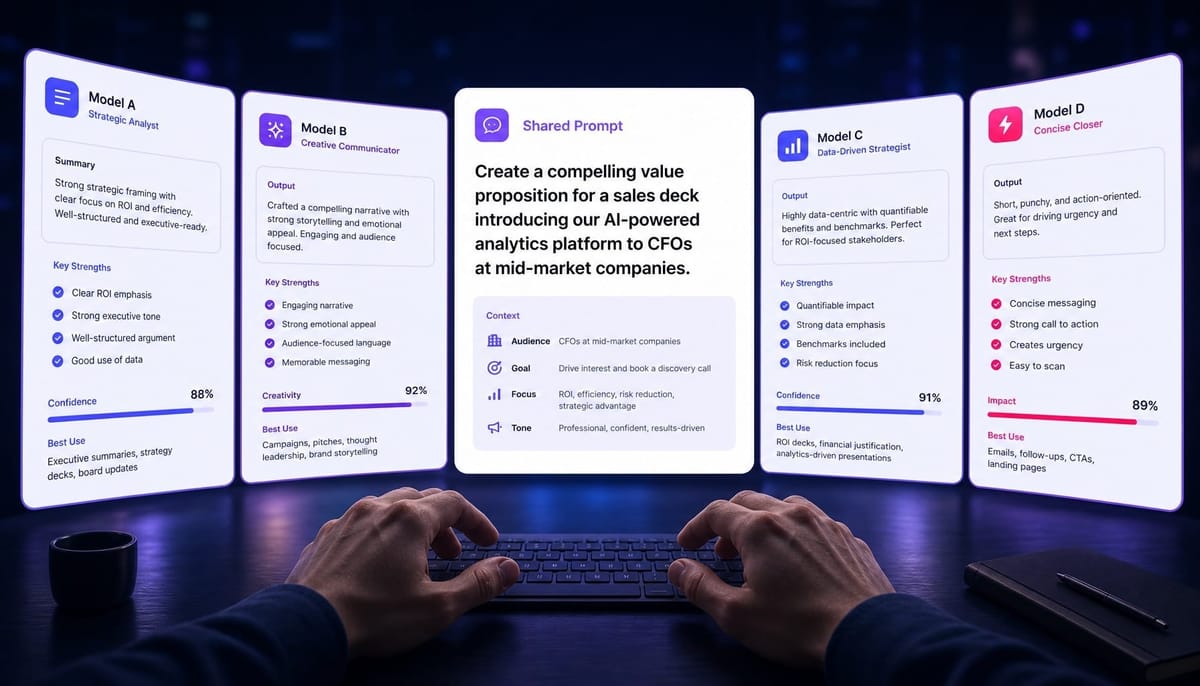
The Shared Prompt:
The goal is to highlight how FlowState helps teams like theirs avoid the project delays that often follow a new funding round and increased hiring.
The tone should be consultative, not salesy. Keep the email under 120 words and end with a question about how they're currently managing their product roadmap.
ChatGPT-4 Output:
Subject: Financr's Series B & engineering roadmap
Hi [Name],
Congrats on Financr's recent Series B. It's an exciting time of rapid growth.
Often, post-funding, engineering teams find their existing project management tools can't keep up with the influx of new projects and hires, leading to roadmap friction.
FlowState is designed specifically for this scaling phase, providing the visibility engineering leaders need to keep complex projects on track without the overhead.
Out of curiosity, how are you currently managing your product roadmap to accommodate the new growth?
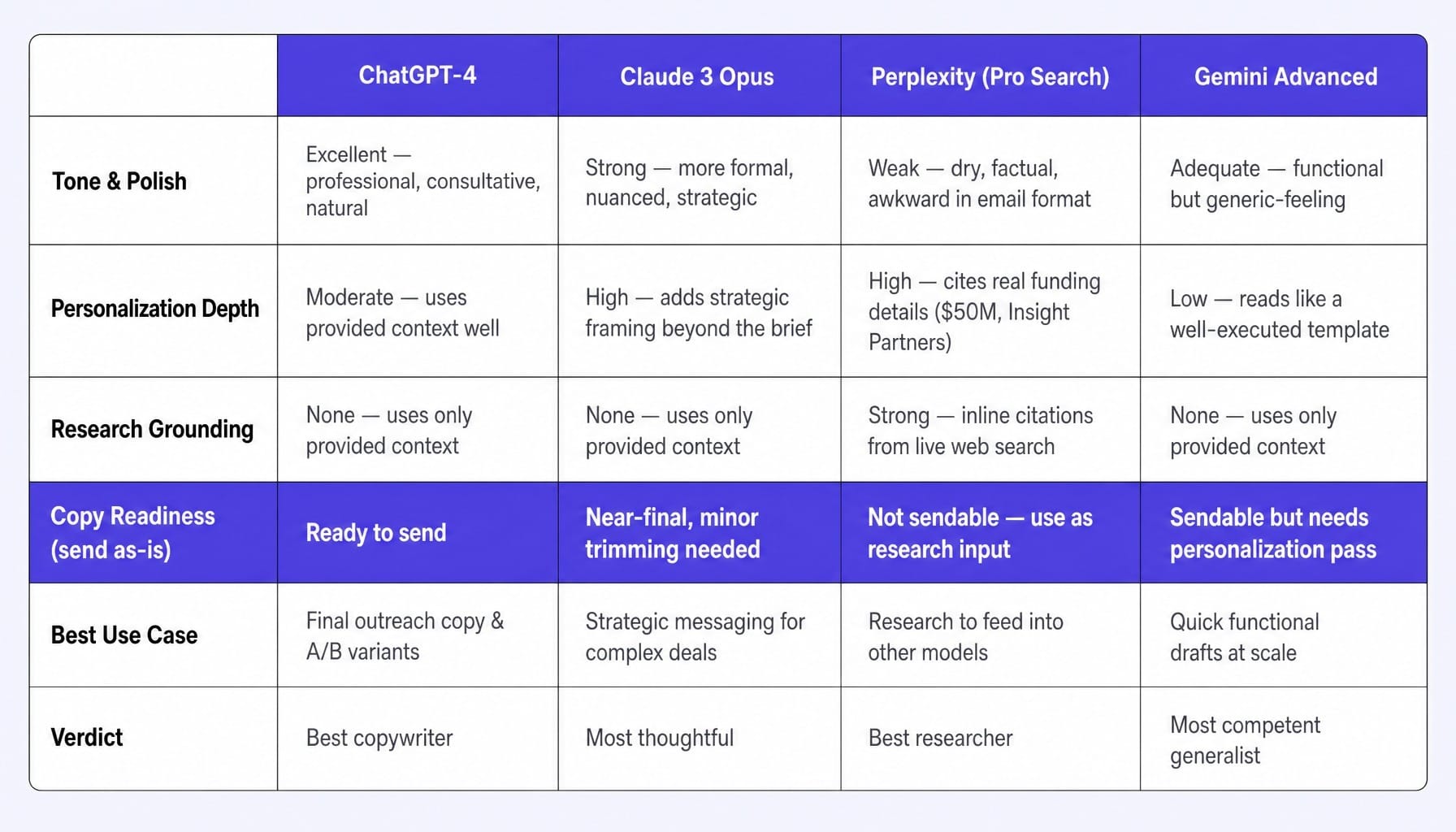
Analysis: Polished, tonally perfect, and follows all instructions. The language ("roadmap friction," "scaling phase") is professional and demonstrates an understanding of the prospect's world. This is a ready-to-send email.
Claude 3 Opus Output:
Subject: Navigating post-Series B growth at Financr
Hi [Name],
Congratulations to the team at Financr on closing your Series B. Scaling an engineering organization during such a high-growth period presents a unique set of challenges.
I've seen many fintech engineering leaders struggle to maintain velocity as new headcount and project complexity increase post-funding. Roadmaps become stretched, and visibility can suffer. Our tool, FlowState, is built to provide a clear, unified view of engineering work, helping teams like yours avoid those very delays.
As you plan for the coming quarters, how are you thinking about evolving your project management process to support the team's expansion?
Analysis: More nuanced and slightly more formal ("Navigating," "presents a unique set of challenges"). It's a bit longer but feels more thoughtful and less like a template. The final question is broader and more strategic.
Perplexity Output (with Pro Search):
Subject: Regarding Financr's Engineering Projects
Hello [Name],
Following Financr's recent $50 million Series B funding round led by Insight Partners [1], engineering teams often face significant pressure to accelerate their product roadmap. This can lead to project delays as new engineers are onboarded and complexity grows [2].
FlowState is a project management tool that helps engineering teams manage this complexity.
How is Financr currently managing its product roadmap to handle the post-funding expansion?
Analysis: The most research-grounded, citing the funding round details. However, the copy is dry and less persuasive. The citations, while factually correct, feel awkward in a cold email. This is better as research for an email than the email itself.
Gemini Advanced Output:
Subject: Project Management at Financr
Hello [Name],
Congratulations on your recent Series B funding. This period of growth often brings challenges in managing an expanding list of engineering projects.
To avoid the delays that can occur, our tool, FlowState, helps engineering teams streamline their workflows and improve visibility across their entire product roadmap. It's designed for companies exactly like Financr that are scaling quickly.
How are you currently approaching project management to ensure your roadmap stays on track with this new growth?
Analysis: Competent, clear, and follows instructions. It's a solid, functional email but lacks the polish of ChatGPT or the nuance of Claude. It feels slightly more generic, like a well-executed template.
The takeaway isn't that one model is "best." It's that they are different. The right choice depends entirely on the task at hand.
Decision Matrix: Which LLM to Use at Each Sales Pipeline Stage
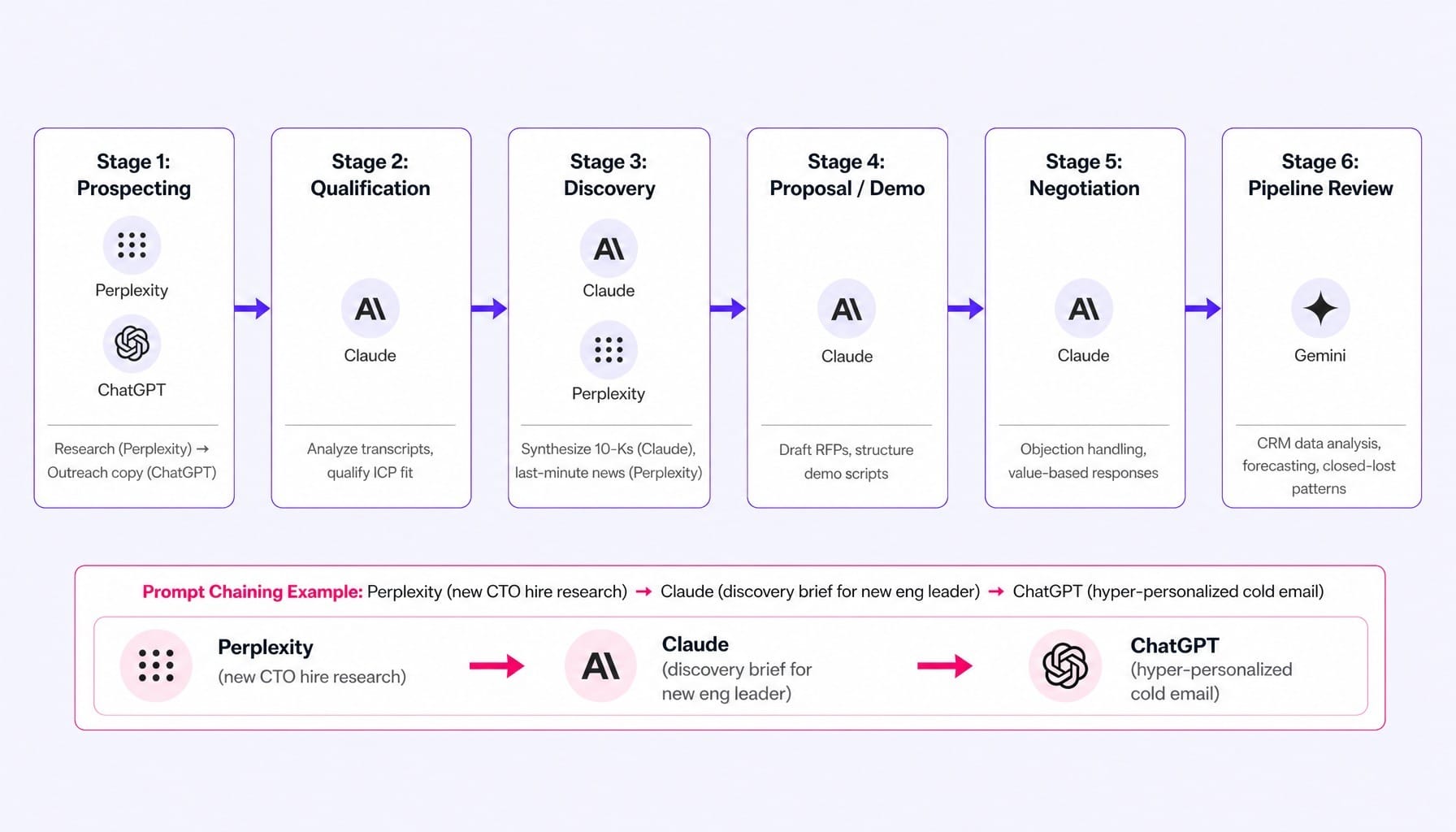
The question is not which LLM is best for sales—it's which LLM is best for each stage of your pipeline. Using the right tool for the right job transforms your AI usage from a random tactic into a systematic advantage.
The most advanced workflow is prompt chaining across models. For example: use Perplexity to research that a target account just hired a new CTO. Feed that output into Claude with a prompt to build a discovery brief focused on the priorities of a new engineering leader. Finally, feed the key talking points from that brief into ChatGPT to draft a hyper-personalized cold email referencing the new hire and their likely challenges.
How to Evaluate Whether Your AI Sales Prompts Actually Work
A prompt that sounds good is not the same as a prompt that performs well. Most sales teams evaluate AI output by gut feel—"Does this email sound like me?"—rather than by measurable outcomes. This is a mistake. This continuous evaluation loop is the same system-level thinking that platforms like Spike AI apply to website conversion, where constant, measured iteration is the only path to compounding growth.
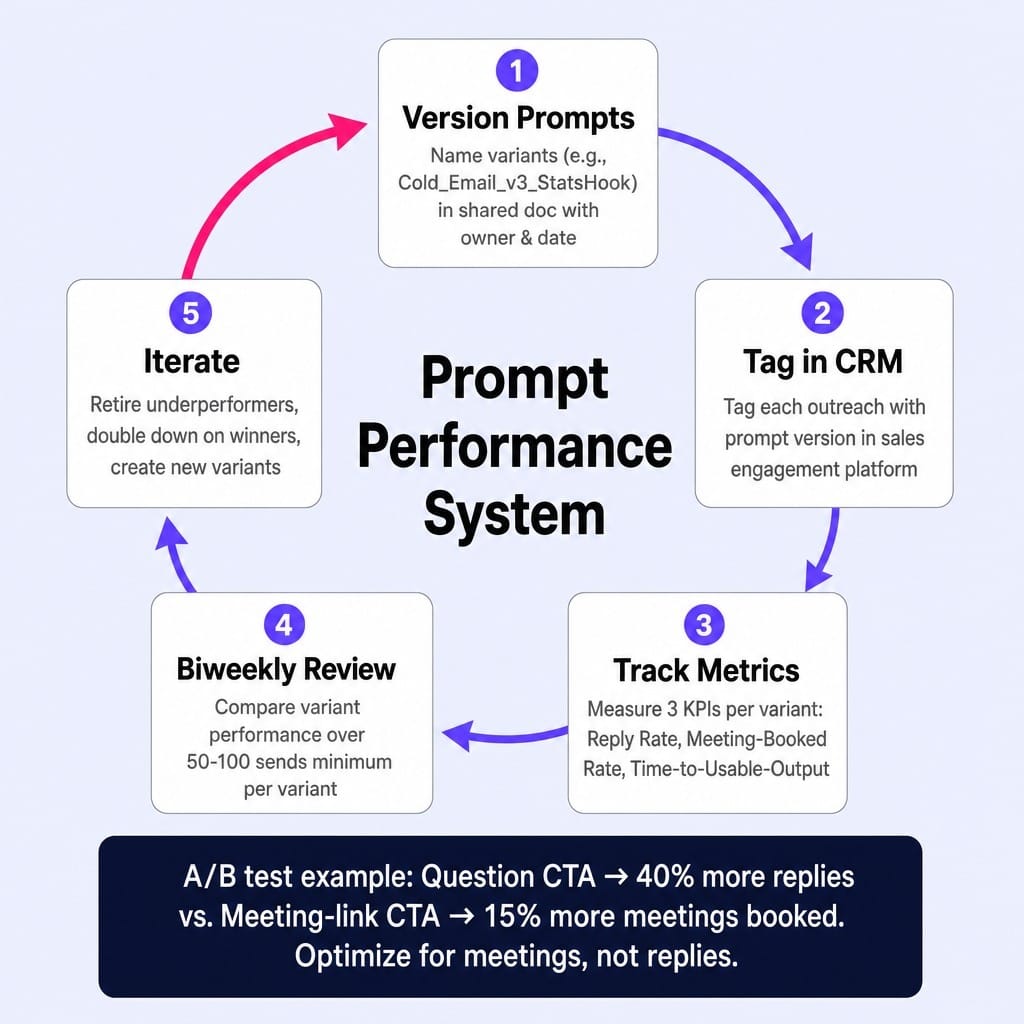
To build a true performance system around your sales AI prompts, track these three metrics:
- Reply Rate by Prompt Variant: This is your primary top-of-funnel metric. If you're testing two different cold email prompts, you need to track which one generates more replies. A/B test prompt templates over a two-week window with at least 50-100 sends per variant to get a meaningful signal. Evaluating by open rate alone is misleading; subject lines and timing have a much larger impact there.
- Meeting-Booked Rate: This is the ultimate downstream metric. A prompt that gets a high reply rate but few meetings is optimizing for conversation, not conversion. Consider a scenario where a team A/B tested two CTAs: a question-based CTA got 40% more replies, but a direct meeting-link CTA booked 15% more meetings. The meeting metric is the one that matters to the business.
- Time-to-Usable-Output: How many follow-up prompts or manual edits does a rep need before the AI's output is ready to send? A prompt that looks great but requires four rounds of refinement isn't saving time; it's just adding a step. Track this qualitatively. The best prompts produce a near-final draft on the first try.
The process is simple: version your prompts in a shared document (e.g., Cold_Email_v3_StatsHook). Tag outreach in your CRM or sales engagement platform with the prompt version used. Review the performance data biweekly. Retire underperforming variants and double down on what works. This is what separates teams that get compounding value from AI from those that plateau. Teams serious about tracking SaaS marketing metrics will recognize this same discipline of measuring what actually informs decisions.
When Prompt Quality Becomes an Optimization Problem, You Need a System
This article has built a specific case: getting real value from AI in sales requires choosing the right model for the task, feeding it rich context, matching prompts to pipeline stages, and continuously evaluating performance. That isn't a one-time setup—it's an ongoing optimization loop that most sales and marketing teams lack the bandwidth to maintain manually.
This is the exact same class of problem Spike AI solves for your marketing funnel.
Spike AI isn't another prompt tool. It's the system that handles the continuous optimization loop for your website and marketing performance. Just as this guide showed that prompt quality degrades without an evaluation system, your website's conversion rates and SEO performance stagnate without continuous, prioritized iteration.
Spike AI operates as that always-on optimization layer. Every week, it identifies the highest-impact move across your website, SEO, and conversion funnel, models the impact, and executes the fix. It's the same rigorous, data-driven process an elite CRO agency would run, but delivered at a fraction of the cost and without the quarterly wait. If you need a system for continuous optimization in your sales process, you definitely need one for your website.
See how Spike AI continuously optimizes your website and marketing for maximum conversions
Conclusion
The most important belief shift is this: ai prompts for sales are not a list you copy once. They are a system you build, match to the right models, map to your pipeline, and continuously measure.
The difference between teams that get diminishing returns from AI and those that achieve compounding results is not the quality of their initial prompts. It's the infrastructure around them: deliberate model selection, rich context injection, pipeline stage mapping, and rigorous performance measurement.
The sales teams that will win in the next 12 months aren't the ones simply using AI—everyone is using AI. They are the ones who have built a systematic practice around which AI to use, for which task, measured by which outcome. That is the only sustainable advantage.
Frequently Asked Questions
What system prompt settings produce the best sales email outputs in ChatGPT?
Set the system message to define the AI's role (e.g., 'You are a senior B2B sales rep writing to technical buyers'), specify tone constraints (consultative, not promotional), and set a hard word limit. Use temperature 0.7 for first drafts to get creative variation, then drop to 0.3 for final polished versions. Always include a format instruction like, 'Output a single email under 100 words with a question-based CTA.'
How do enterprise sales teams manage and version their AI prompts?
Mature teams store prompt templates in a shared Notion or Google Doc with version numbers, owners, and last-tested dates. Each prompt variant is tagged in the CRM (e.g., 'cold-email-v3') so reply and meeting-booked rates can be tracked per version. Underperforming variants are retired monthly. This prevents prompt drift, where reps silently modify prompts and performance degrades without anyone noticing.
What are the risks of sending AI-generated sales messages without human review?
The three biggest risks are factual hallucinations (the AI invents a product feature or misstates a funding round), tone miscalibration (overly casual for a C-suite prospect), and compliance violations (making unsubstantiated ROI claims). Always have a human verify factual claims and run a final tone check before any message is sent to a prospect.
How do I prevent AI-generated sales outreach from sounding like every other AI email?
Generic output comes from generic input. The fix is specificity in three areas: the prospect's context (name their actual pain point), your proof point (reference a specific customer outcome), and the CTA (ask a question about their situation). Also, instruct the model to avoid common AI phrases like 'I hope this email finds you well' by listing banned phrases directly in the prompt.
Can I use prompt chaining to automate an entire sales workflow end to end?
You can chain prompts across models for a single task—Perplexity for research, Claude for analysis, ChatGPT for messaging—but full end-to-end automation without human review is risky. The handoff points between models are where errors compound. Use chaining to accelerate each step, but keep a human checkpoint before any output reaches a prospect.