B2B SaaS SEO Strategy: How to Optimize for Pipeline, Not Just Traffic (2026)

TLDR
- Stop optimizing for traffic. Most B2B SaaS SEO fails by chasing high-volume educational keywords instead of low-volume, high-intent queries that generate pipeline.
- Your highest-leverage SEO assets are not blog posts. They are comparison, alternative, feature, and integration pages that match the queries of buyers ready to make a decision.
- Build your keyword strategy around your buying committee, not a keyword tool. Map the specific questions each persona (e.g., end-user, finance lead, IT security) asks at each stage of their journey.
- The real bottleneck in SaaS SEO isn't strategy; it's shipping speed. The latency between identifying what to build and deploying it prevents the compounding gains that drive real growth.
- Measure success with pipeline influence rate—the percentage of your sales pipeline that has an organic search touchpoint. This metric aligns SEO with revenue and proves its value to your CFO.
Your team published 60 blog posts last year. Organic traffic is up 40%. The dashboard looks great. But in the weekly pipeline meeting, the story is different. When the VP of Sales asks how many closed-won deals came from organic search, the answer is a shrug. Maybe one or two, but it's hard to tell.
This scenario is the default state for most B2B SaaS marketing teams. Their SEO strategies are built around a familiar playbook: do keyword research, publish blog posts, build some links, and watch the traffic graph go up and to the right.
The problem is, this strategy optimizes for the wrong outcome.
The pages that actually influence a complex B2B SaaS buying decision—comparison pages, feature deep-dives, integration directories, and use-case landing pages—either don't exist or are collecting dust in a Jira backlog. The team doesn't have the bandwidth to build them.
This isn't another guide about finding keywords and writing articles. This is a framework for building the specific SEO assets that influence the pipeline in a long sales cycle. It's about understanding why shipping speed matters more than publishing volume and why your highest-leverage move is probably not another blog post.
What B2B SaaS SEO Actually Is (And What It Isn't)
B2B SaaS SEO is the practice of optimizing a software company's web presence to attract, engage, and convert buyers who research solutions through search engines and AI answer tools before ever talking to sales. But it is not content marketing with keywords attached. The distinction is critical because it changes every downstream decision.
Unlike B2C SaaS SEO, which often targets individual users with shorter, freemium-driven conversion paths, B2B SaaS SEO must address a multi-persona buying committee. The end-user, their manager, the procurement lead, and the IT security specialist all have different problems and search for different solutions.
Consider an $18M ARR project management tool. The marketing team could target "project management best practices," a query with 50,000 monthly searches. This will drive traffic. But a VP of Engineering at a 100-person tech company, frustrated with their current system, is searching for "Jira alternatives for small teams." That query might only have 300 monthly searches, but its pipeline value is 50x higher. It signals active, high-intent evaluation.
Winning at B2B SaaS SEO means systematically ignoring the high-volume, low-intent queries that fill dashboards and instead focusing relentlessly on the specific, commercial-intent queries that your buyers use when they are actually trying to make a purchase. It's a revenue system, not a traffic system.
Why Most B2B SaaS SEO Strategies Optimize for the Wrong Metric
Most SaaS SEO programs are measured by organic sessions, keyword rankings, and blog post output. These are activity metrics that correlate weakly with revenue. The problem isn't that top-of-funnel (TOFU) blog content is useless; it's that it often absorbs over 80% of the team's bandwidth while the pages that actually convert are never built.
Research from the Ehrenberg-Bass Institute and LinkedIn's B2B Institute shows that around 95% of B2B buyers are not in-market at any given time. This means the vast majority of your educational blog traffic is reaching people who won't buy for months or even years. Meanwhile, the 5% who are ready to buy are searching for things like [your competitor] vs [your product], and most SaaS sites have no content to capture them.
A typical SaaS company might publish four blog posts a month but hasn't updated its pricing page SEO in 18 months and has zero comparison pages—even as competitors build out entire content hubs targeting their brand name. This happens for two reasons.
The Traffic Vanity Trap
When organic traffic is the primary KPI, it creates a perverse incentive. Teams are rewarded for chasing high-volume keywords because they move the traffic graph, even if that traffic has no commercial intent.
Imagine a SaaS company ranking #3 for an educational keyword with 5,000 monthly searches. This generates 800 visits a month and zero demo requests. Now, consider a bottom-of-funnel (BOFU) query like [competitor] pricing and alternatives with only 200 monthly searches. If your page could capture just 20% of that traffic and convert 15% of visitors to a demo, that's 6 demos per month.
The math is stark: the low-volume page generates infinitely more pipeline. But in a system that rewards traffic volume, building the low-volume, high-conversion page is a rounding error. It doesn't move the needle on the metric the team is judged by. This is how SEO programs become busy but ineffective, generating reports instead of revenue.
The Shipping Bottleneck That Kills Compounding
Even teams who know they should build comparison pages, feature deep-dives, and integration directories often can't. The reason is a systemic bottleneck: shipping speed.
A blog post can often be written and published by a single person. A comparison page, however, requires a cross-functional workflow:
- Product Marketing: For positioning and competitive intelligence.
- Design: For layout, tables, and visuals.
- Engineering: For custom CMS components or deployment.
- Legal: For reviewing claims about competitors.
The coordination overhead is immense. The result is a perpetually growing backlog where the highest-converting page types are always deprioritized in favor of the blog posts the team can actually ship. This isn't a strategy failure; it's an execution system failure. And it kills growth, because SEO only compounds when you ship consistently. Every week a high-intent comparison page doesn't exist, your competitor who has one captures that pipeline.
Read more: How to Prioritize Marketing Channels With a Limited Budget And Resources (Framework for Lean Teams)
Keyword Research That Starts with the Buying Committee, Not the Search Bar
The common way keyword research goes wrong in B2B SaaS is predictable. The marketer opens Ahrefs, types in their product category, sorts the list by search volume, and exports the top 50 results to build a content calendar. This process guarantees a blog-heavy, TOFU-focused keyword map that looks comprehensive but misses the actual queries your buyers use.
The correct starting point isn't a tool; it's your buying committee. A VP of Finance evaluating expense management software searches for different things than the accounts payable clerk who will use it daily, and both search differently than the IT lead who needs to ensure SOC 2 compliance. A winning b2b saas seo strategy maps queries to these roles, not just to generic funnel stages.
For example, for a hypothetical expense management SaaS, the queries might look like this:
- VP of Finance: reduce expense report processing time, brex alternatives with better reporting
- AP Clerk (End-User): best expense tracking app with receipt scanning
- IT Lead: SOC 2 compliant expense management software
These three queries demand three different pages—a use-case page, a feature page, and a compliance page—not three blog posts.
Mapping Personas to Query Patterns
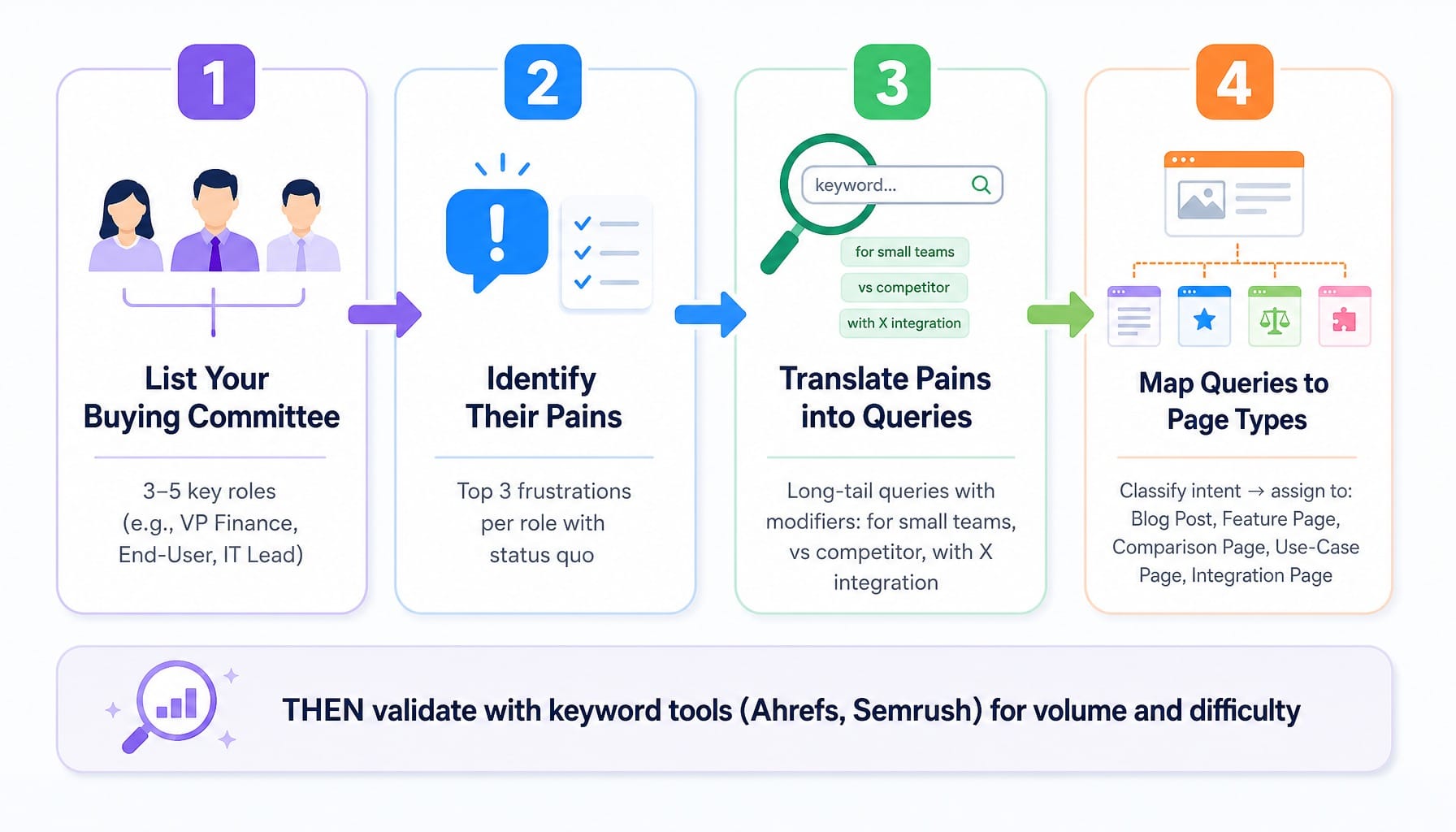
Here is a repeatable methodology for building a pipeline-focused keyword map:
- List Your Buying Committee: Identify the 3-5 key roles involved in a purchase decision.
- Identify Their Pains: For each role, list their top three frustrations with the status quo or their primary goal in seeking a new solution.
- Translate Pains into Queries: Convert each frustration into the specific, long-tail query that person would actually type into Google. Think about the modifiers they'd use: "for small teams," "with X integration," "vs Y competitor."
- Map Queries to Page Types: Classify the intent behind each query and assign it to the page type that can best satisfy it: a blog post, a feature page, a comparison page, a use-case page, or an integration page.
Only after this persona-to-query mapping is complete should you use tools like Semrush or Ahrefs to validate search volume and assess difficulty. This process ensures you're building a content architecture that mirrors the buyer's journey. You can then use nTM keyword clustering to group semantically related queries that can be served by a single, comprehensive page, preventing keyword cannibalization.
Why Volume-First Sorting Produces the Wrong Content Calendar
Sorting a keyword list by search volume is the fastest way to build an SEO strategy that generates traffic but no pipeline. It biases your entire content calendar toward broad, educational TOFU topics because those always have the highest volume.
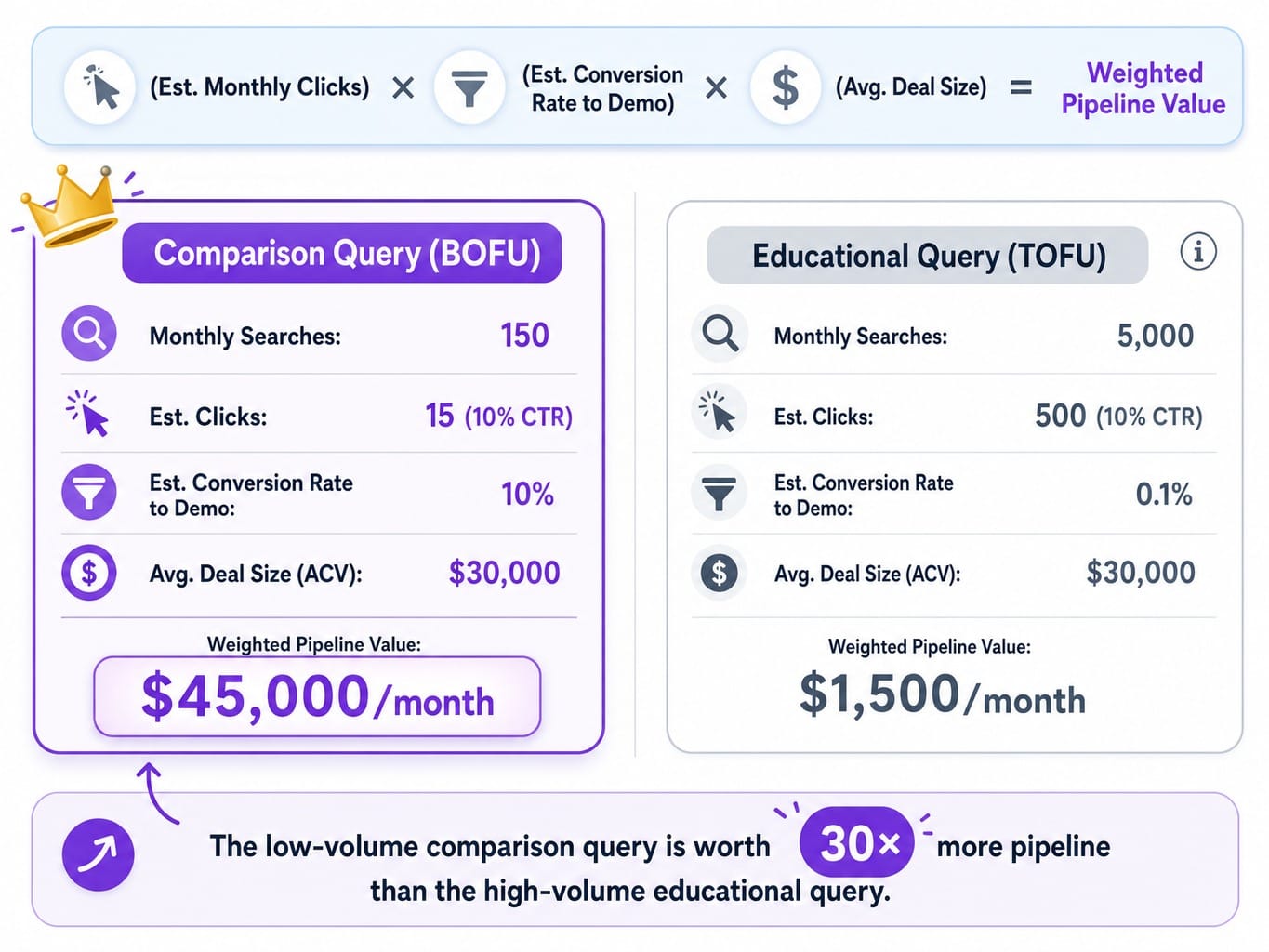
A better approach is to calculate a weighted traffic value. This simple formula helps you prioritize keywords based on their potential revenue impact, not just their search volume.
(Est. Monthly Clicks) x (Est. Conversion Rate to Demo) x (Avg. Deal Size) = Weighted Pipeline Value
A 150-volume comparison query with a 10% conversion probability and a $30,000 ACV is worth $45,000 in potential pipeline per month. A 5,000-volume educational query with a 0.1% conversion probability is worth only $1,500. The math changes everything. It forces you to build the pages that matter to the business, not the ones that look good on a traffic report.
The Pages That Actually Convert: Building Beyond the Blog
If your keyword map is built around buying committee queries, the implication is clear: the content you need to create is mostly not blog posts. It's a collection of product-adjacent, commercial-intent pages that live in your site's main navigation or product section, not buried in /blog/.
These pages—comparison pages, feature pages, and integration directories—consistently have higher conversion rates because they match the intent of users who are actively evaluating solutions. They are also harder to build. They require deep product knowledge, competitive intelligence, and a flexible CMS. Here are the three most critical types B2B SaaS sites underinvest in.
Comparison and Alternative Pages
Pages targeting [your product] vs [competitor] and [competitor] alternatives are the highest-intent SEO assets you can own. They capture prospects at the final stage of their decision-making process.
Many teams avoid them, fearing a penalty from Google for "biased" content. This is a misunderstanding. Google penalizes thin, deceptive content, not opinionated, useful content. A good comparison page doesn't just declare you're the best; it helps the reader make an informed decision.
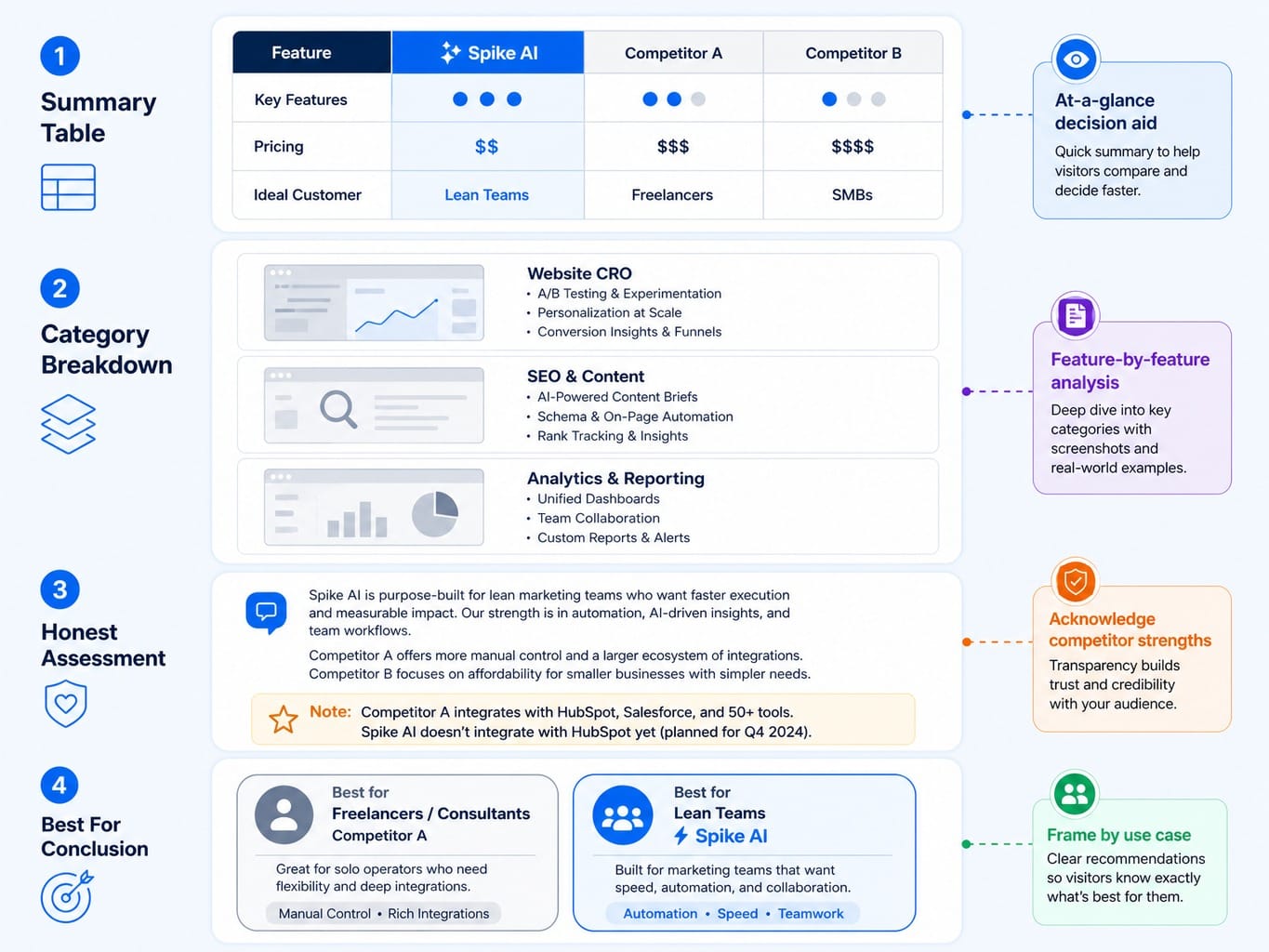
A structure that ranks and converts:
- Summary Table: An at-a-glance table comparing key features, pricing, and the ideal customer for each product.
- Category Breakdown: A detailed, feature-by-feature analysis, using screenshots and specific examples.
- Honest Assessment: Acknowledge where your competitor is stronger. This builds immense trust.
- "Best For" Conclusion: Frame the final recommendation around use cases (e.g., "Competitor X is best for freelancers, while our product is built for collaborative teams").
These pages also perform exceptionally well in Google's AI Overviews, as they directly answer commercial comparison queries.
Read more: Semrush vs Moz (2026): Which SEO Tool Fits Your Team's Actual Workflow
Feature Pages and Use-Case Landing Pages
Most SaaS feature pages are written for product marketing, not for SEO. They use internal jargon and describe features without connecting them to the job the buyer is trying to do.
The fix is to reframe feature pages around the pain point the buyer is searching to solve. The feature "Automated Invoice Matching" should have a page titled "Eliminate Manual Invoice Data Entry" that targets the pain-point query.
Use-case pages take this a step further. They target [solution] for [industry/role] queries, mapping directly to your buying committee personas. You can even use your own product usage data to decide which ones to build first. If 30% of your active users are in the legal industry, a "Contract Management for Law Firms" page is a high-confidence bet. Tools like Surfer SEO or Clearscope can help ensure these pages have the topical depth required to outrank competitors.
Integration Pages as Programmatic SEO Assets
Integration pages are one of the most powerful and underutilized SEO assets in B2B SaaS. For every tool your product integrates with, there's a keyword opportunity: [your product] + [integration partner] integration.
These pages are a high-leverage growth loop. They capture high-intent search traffic from users who are already invested in your integration partner's ecosystem (making them warm prospects), and they can often be built programmatically.
The canonical example is Zapier, whose pSEO-driven integration directory is a massive competitive moat. But even a SaaS with 10-20 core integrations can build a valuable hub. The key is to avoid the common pSEO mistake of creating thin, templated pages. Each integration page needs unique content that explains the specific workflow the connection enables, ideally with a short video or GIF.
Technical SEO for JavaScript-Heavy SaaS Sites
The best content strategy in the world will fail if Google can't properly crawl, render, and index your pages. This is a particularly acute problem for B2B SaaS companies, as most modern SaaS websites are built on JavaScript frameworks like React, Next.js, or Vue.
While Google's official stance is that it can render JavaScript, the reality on the ground is far more nuanced. For SaaS sites, two technical SEO issues are especially common and damaging.
Rendering, Crawl Budget, and the JavaScript Indexing Gap
When your site is built with client-side rendering (CSR), Googlebot must download and execute JavaScript to see your content. This rendering process is deferred to a second queue, meaning a page might be crawled but not fully "seen" for days or even weeks.
For a SaaS site with hundreds or thousands of pages (documentation, blog posts, feature pages), this creates a significant crawl budget allocation problem. Google wastes resources re-crawling pages it couldn't fully render on the first pass. We've seen SaaS companies migrate from WordPress to a custom React app and watch their organic traffic plummet 35% over eight weeks, only to discover via log file analysis that Googlebot was indexing pages with empty body content.
The most robust solution is to use server-side rendering (SSR) or static site generation (SSG), often via frameworks like Next.js. If you're seeing a high number of pages in Google Search Console marked as "Discovered - currently not indexed," a rendering issue is a likely culprit. You can use Screaming Frog's JavaScript rendering mode to audit how your pages appear to Googlebot.
Index Bloat from Documentation, Changelogs, and Faceted Navigation
SaaS products naturally generate a large number of URLs through their product documentation, changelogs, and help centers. If not managed, this can lead to "index bloat," where thousands of low-value pages are indexed, diluting your site's topical authority and consuming crawl budget.
The common mistake is to noindex the entire documentation section. This is throwing the baby out with the bathwater; docs pages can rank for valuable long-tail technical queries and are a strong signal of topical authority.
The correct approach is surgical. Audit your documentation to identify the 20% of pages that answer real search queries and ensure they are indexed. Use noindex directives and canonical tags to manage the rest. Similarly, ensure that faceted navigation on pricing or feature comparison pages doesn't create thousands of indexable duplicate URLs with different parameters. Google Search Console's Index Coverage report is your starting point for diagnosing these issues.
How to Measure Whether SEO Is Actually Influencing Pipeline
Most SaaS companies can tell you how much organic traffic they get. Almost none can tell you how many closed-won deals had an organic search touchpoint in their journey. This measurement gap makes it impossible to justify SEO investment to a CFO and difficult to know if your strategy is actually working.
Last-touch attribution, the default in many analytics setups, is the enemy of B2B SEO. A prospect might first discover you through a blog post, return two weeks later via a branded search, and finally book a demo by navigating directly to your site. In a last-touch model, SEO gets zero credit.
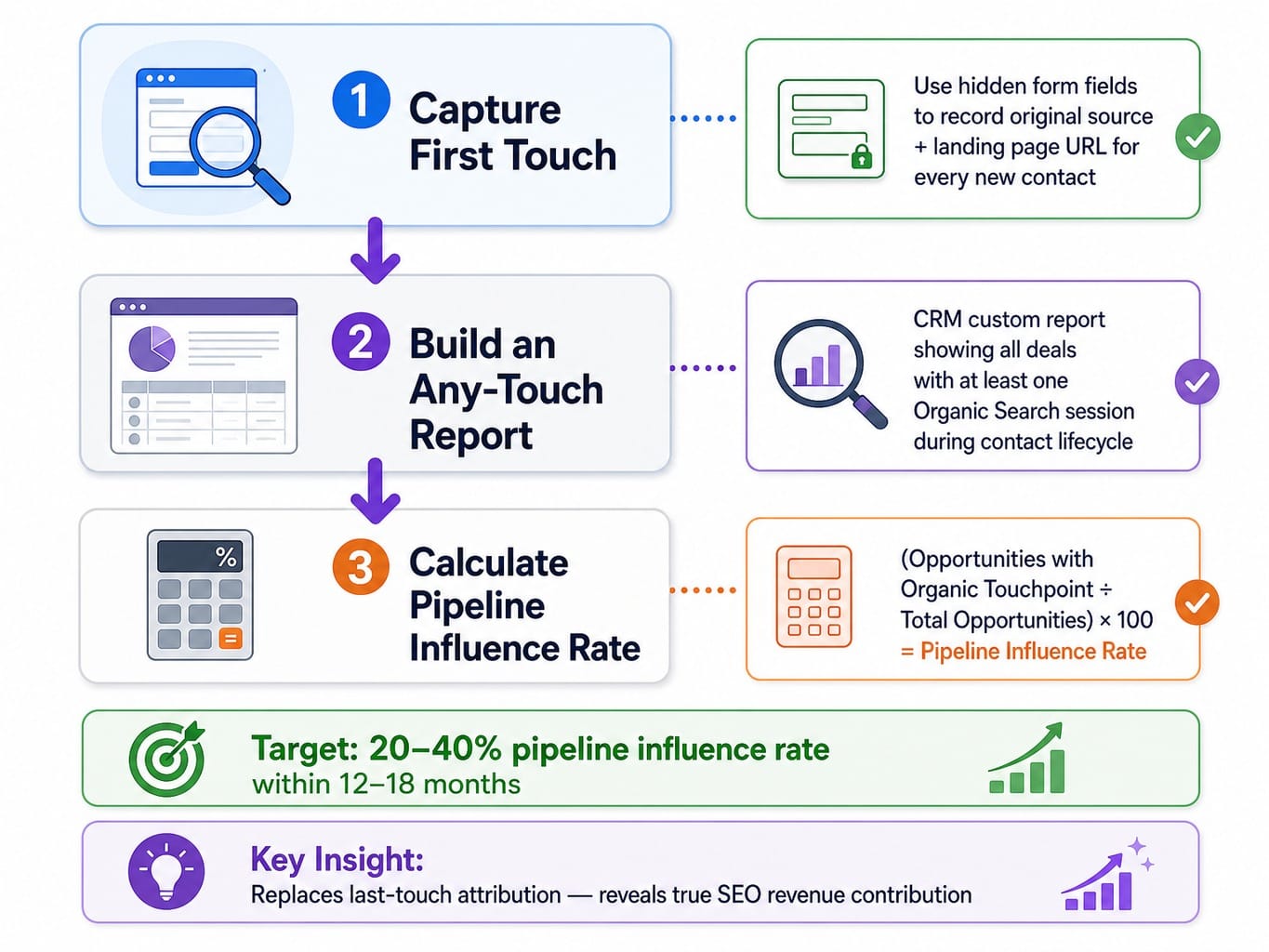
A practical multi-touch attribution model is essential. Here's how to set it up in a CRM like HubSpot:
- Capture First Touch: Use hidden form fields to capture the original source and landing page URL for every new contact. This tells you which organic page initiated the relationship.
- Build an "Any-Touch" Report: Create a custom report in your CRM that shows all deals that had at least one session with "Organic Search" as the source during the contact's lifecycle.
- Calculate Pipeline Influence Rate: This is your north-star metric.
(Opportunities with an Organic Touchpoint / Total Opportunities) x 100 = Pipeline Influence Rate
For a well-executed B2B SaaS SEO program, you should see a 20-40% pipeline influence rate within 12-18 months. This single metric reframes SEO from a cost center to a revenue driver. It also reveals which page types are doing the heavy lifting—it's almost always the comparison, feature, and use-case pages, reinforcing the need to build beyond the blog.
Read more: Data-Driven CRO Strategies: Identifying Marketing Opportunities for True Conversion Optimization
When the Strategy Is Clear but the Backlog Won't Move
This framework gives you a clear strategy: identify the specific, high-intent pages your buying committee is searching for, and build them. But as we've seen, the real constraint isn't knowing what to do—it's the massive execution gap between identifying a high-impact page and actually shipping it. Backlogs grow, coordination stalls, and the highest-leverage work never gets done.
This is the exact problem Spike AI was built to solve. It's a marketing execution engine designed to close the shipping gap for lean teams.
Every week, Spike AI's prioritization engine identifies the single highest-impact move across your entire marketing surface—whether that's a missing comparison page, an underperforming feature page, or a critical technical SEO fix. Then, our execution layer builds and deploys it. The backlog that once felt like a graveyard becomes a simple approval queue. SEO strategy finally compounds because the shipping cadence is consistent and predictable.
See how Spike AI turns your SEO backlog into weekly shipped improvements
From Content Production to Revenue System
The most important shift you can make in your B2B SaaS SEO strategy is to stop thinking of it as a content production function. It is a revenue system, and the highest-leverage moves are often the pages you haven't built yet.
The teams that win organic pipeline are not the ones publishing the most blog posts. They are the ones who obsessively map keywords to buying committee roles, who build the non-blog pages that match commercial intent, who ensure their technical foundation is flawless, and who measure success by pipeline influence, not traffic.
Take a moment and audit your SEO output from the last quarter. Count how many new pages were blog posts versus comparison pages, feature pages, or integration pages. If that ratio is 10:1 or worse, your SEO program is optimized for the wrong outcome.
Frequently Asked Questions
Should B2B SaaS companies invest in programmatic SEO or editorial content first?
Start with editorial content for your highest-intent pages, like comparisons and core use cases, as these require nuanced positioning that templates can't replicate. Move to programmatic SEO (pSEO) once you have a scalable page type with a clear template, such as integration directories. Launching pSEO before your editorial foundation is solid risks creating hundreds of thin pages that dilute your authority.
What is the ideal content refresh cadence for B2B SaaS blog posts?
Audit quarterly, but only refresh pages that have lost rankings or traffic. Check Google Search Console for a declining click trend over the past 90 days. Prioritize pages ranking in positions 4-15 for high-intent queries, as small improvements here have the highest ROI. Pages ranking #1-3 with stable traffic should generally be left alone.
How should B2B SaaS companies optimize for Google AI Overviews in 2026?
Structure each page section so the first 2-3 sentences directly answer that section's implied question. AI Overviews extract passage-level answers, not entire pages. Use comparison tables, concise definitions, and bulleted lists. Google's own guidance confirms that foundational SEO best practices—creating clear, authoritative, and well-structured content—remain the primary lever for AI Overview visibility. There is no special "AEO hack."
How do you prevent keyword cannibalization across feature pages and blog posts?
Assign each target keyword to exactly one page based on its intent. Commercial-intent queries belong on feature or comparison pages; informational queries belong on blog posts. If a blog post and a feature page both target "automated invoice processing," consolidate. The feature page should own the keyword, and the blog post should target a related informational query like "how to reduce invoice processing errors" and link to the feature page.
What SEO metrics should a B2B SaaS CMO actually report on?
Focus on three metrics: (1) Pipeline influence rate—the percentage of your sales pipeline with an organic search touchpoint. (2) Organic-sourced demos/signups—direct conversions from organic landing pages. (3) Non-branded organic traffic growth—to measure new demand capture. Drop vanity metrics like total sessions and keyword rankings from executive reports; they don't correlate with revenue and train the organization to value the wrong things.