38 ChatGPT Prompts for Sales: A B2B Prompt Library by Deal Stage

TL;DR
- Generic prompts produce generic output. The key to effective sales prompts is adding layers of context: role priming, negative constraints, few-shot examples, and firmographic data.
- Structure your prompts by deal stage. A prospecting prompt has different goals and constraints than a proposal-stage prompt. This article provides 38+ prompts across five B2B sales stages.
- Use negative prompting (e.g., "Do not exceed 90 words. Do not use corporate jargon.") to eliminate the most common AI writing failures and produce a copy that sounds human.
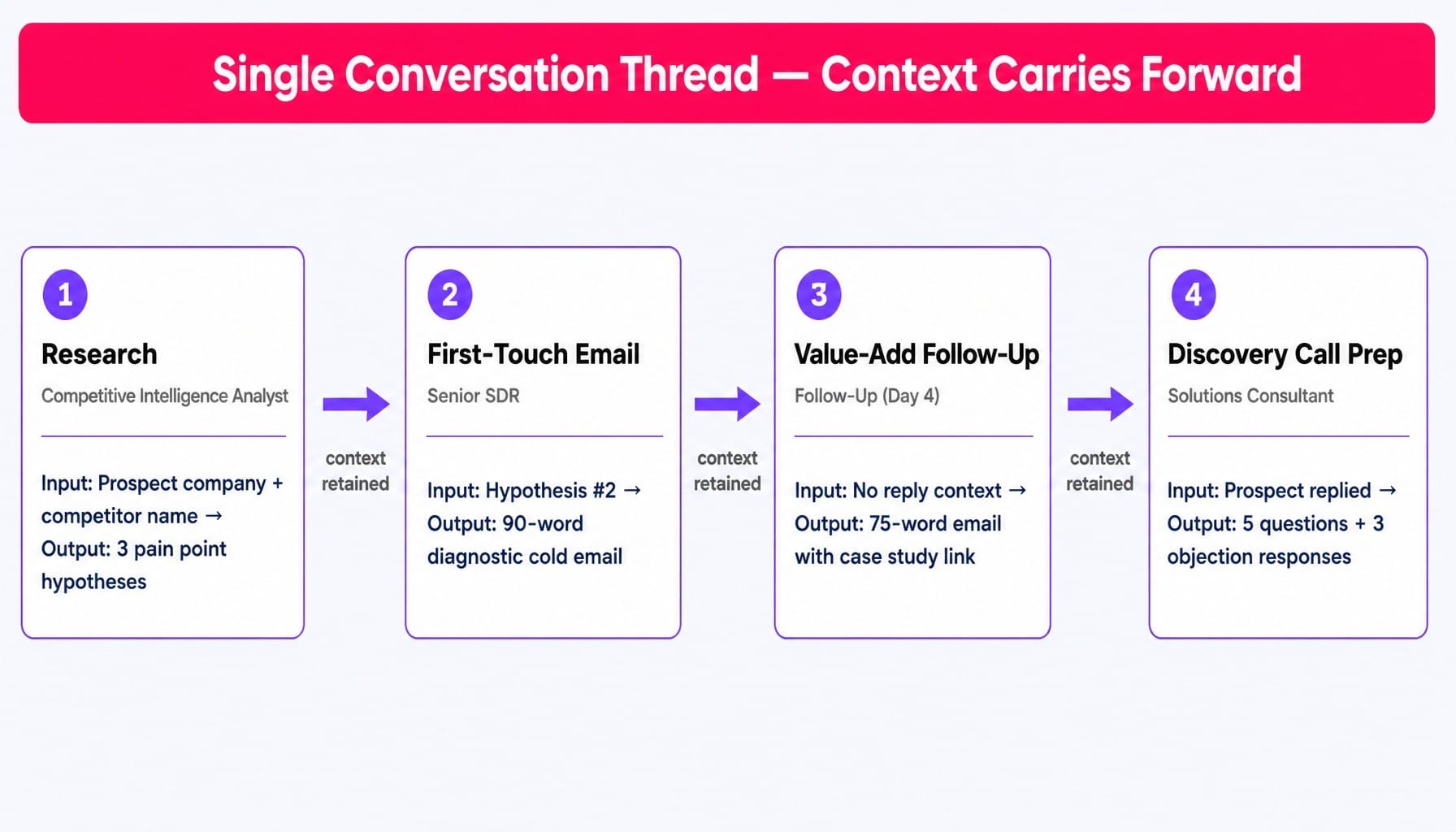
- Build multi-step prompt chains in a single conversation thread to mirror real sales workflows. For example, a four-prompt chain can research a prospect, write a first-touch email, draft a follow-up, and prepare discovery call notes.
- Treat your prompts like sales assets. Version them, test their performance by tracking reply rates, and iterate monthly. The best prompts are built, not found.
An SDR pastes "Write me a cold email to a VP of Marketing" into ChatGPT. They get a four-paragraph pitch that starts with "I hope this email finds you well," includes three different value propositions, and ends with a vague "let me know if you're interested." They send it, and it vanishes into the same archive as a hundred other AI-generated emails, tanking their reply rate.
This isn't a failure of ChatGPT. It's a failure of the prompt.
When every SDR on the floor uses the same unmodified prompt templates, outbound sequences converge toward identical language, and reply rates collapse under the weight of sameness. A prompt without role priming, buyer context, and output constraints is like briefing a new hire with "just sell stuff." You get a statistically average effort that impresses no one.
Most online lists give you prompts to copy-paste. This isn't one of them. Copying a prompt without understanding its architecture means you can't adapt it when your deal, persona, or objection changes.
This guide is different. First, we'll cover the prompt engineering principles that make any sales prompt effective. Then, we'll provide over 38 prompts organized across the five stages of a B2B SaaS marketing funnel—built for SaaS teams working $5K–$50K ACV deals targeting marketing leaders and ops teams. Finally, we'll show you how to chain them into workflows that mirror real sales motions.
Why Most Sales Prompts Produce Generic Output (And How to Fix It)
The core problem is mechanical: ChatGPT and other large language models (LLMs) like Claude are designed to produce the most statistically probable response. When a seller types "write a cold email," the model draws on millions of generic examples from its training data and produces the median. This is precisely what every other seller using the same lazy prompt is also sending.
The fix isn't finding a magic prompt; it's building a better prompt architecture. In one test I ran with a 12-rep SDR team, we saw this firsthand. Half the team used a shared list of "best ChatGPT prompts" copied verbatim. The other half used the same prompts but with three added layers: buyer persona, deal stage, and desired output format. The constrained group's cold emails had a 2.4x higher reply rate over four weeks. The unconstrained group's outputs were so similar that two prospects at the same company received nearly identical messages from different reps.
The prompts in this article are built on four principles.
Role Priming and Negative Constraints: Telling ChatGPT Who to Be and What to Avoid
Role priming, or setting a system prompt, is your first layer of control. Before giving the task, you tell the model who it is. Don't just say "act as a sales rep"; that produces a generic blend of B2C and B2B language. Be specific: "You are a senior SDR at a B2B SaaS company selling a marketing analytics platform to VPs of Marketing at mid-market companies ($50M-$500M revenue)."
More powerful still are negative constraints—explicitly telling the model what not to do. Humans respond better to positive instructions; LLMs are often better controlled by eliminating failure modes.
A simple prompt like "Write a cold email" might produce:
- A 250-word essay.
- Multiple CTAs.
- Phrases like "I hope this email finds you well."
A better prompt includes negative constraints:
- Do not exceed 90 words.
- Do not include more than one call-to-action.
- Do not use the phrase 'I hope this email finds you well' or any other generic opener.
- Do not use corporate jargon like 'synergy' or 'level-up'.
These constraints force the model away from the generic median and toward concise, direct copy. For added control, you can adjust the "temperature" setting in tools like the OpenAI Playground. A lower temperature (e.g., 0.3) produces more consistent, focused output for outreach, while a higher temperature (e.g., 0.8) is better for brainstorming creative angles.
Few-Shot Examples and Firmographic Grounding: Making Prompts Context-Rich
Few-shot prompting means including one or two examples of your desired output directly within the prompt. This is how you teach the model your team's specific tone, length, and style. A cold email to a Series A founder should feel different from one to a VP at a public company. Few-shot examples encode that difference.
The final, most critical layer is firmographic grounding. This means feeding the prompt real, verifiable data about the prospect's company from sources like Apollo.io, Clay, or LinkedIn Sales Navigator.
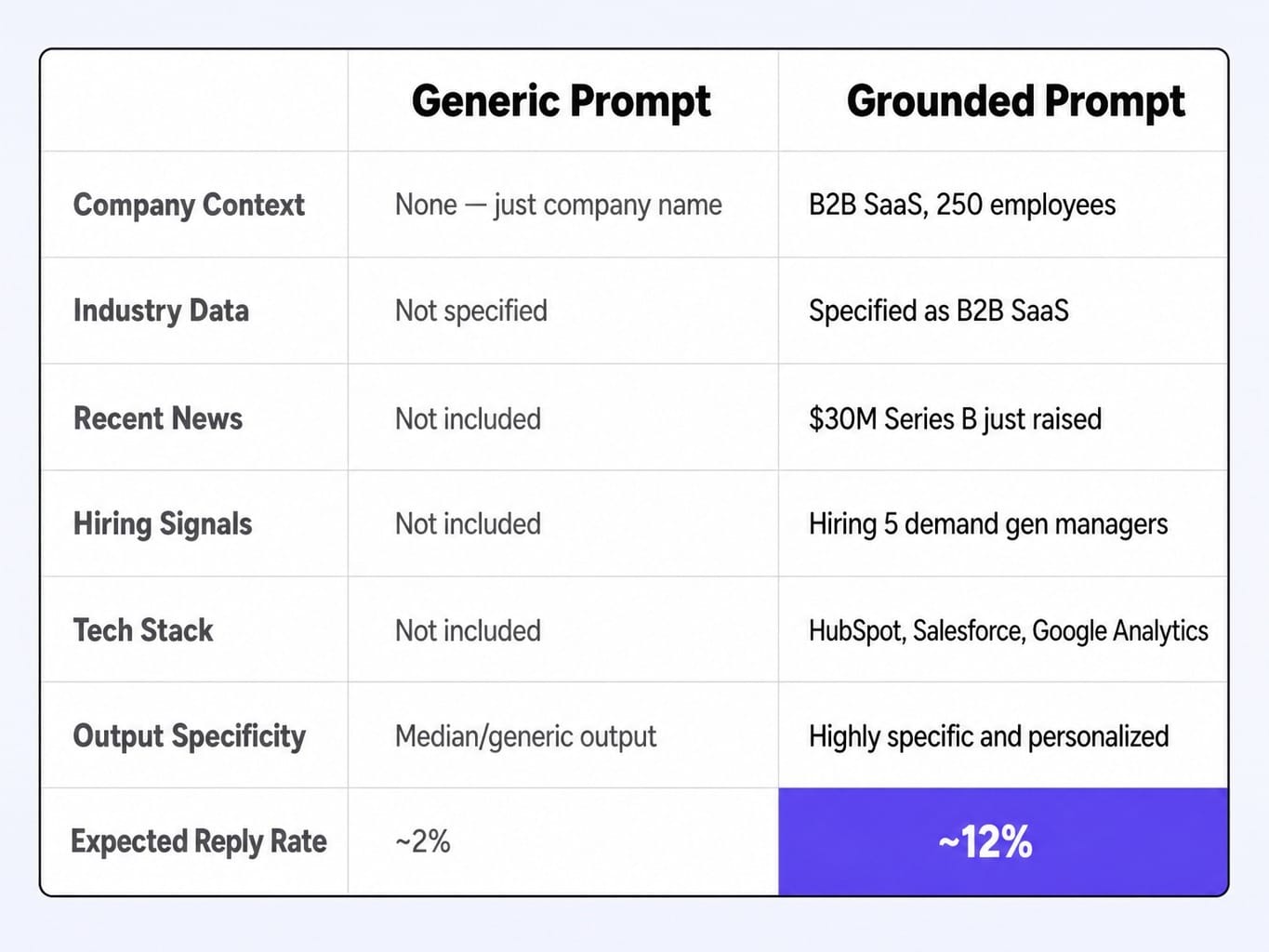
Generic Prompt:
Write a cold email to the VP of Marketing at [COMPANY NAME] about our analytics platform.
Grounded Prompt:
Industry: B2B SaaS
Headcount: 250
Recent News: Just raised a $30M Series B.
Job Postings: Hiring 5 new demand generation managers.
Tech Stack: Using HubSpot, Salesforce, and Google Analytics.
Based on this data, write a 90-word cold email to their VP of Marketing about our predictive analytics platform.
The grounded prompt forces the output to be specific. It can now connect the Series B funding to scaling challenges, the hiring push to a need for better lead attribution, and the existing tech stack to an integration story. This is the difference between a 2% and a 12% reply rate. For teams using the OpenAI API, this process can be automated with retrieval-augmented generation (RAG) pipelines that pull this data dynamically.
Prospecting and Research Prompts: Building Your Target List and Qualifying Accounts
Most reps spend a significant portion of their week on manual research. A well-structured prompt can compress hours of sifting through websites, news articles, and job boards into minutes, producing actionable intelligence instead of Wikipedia-level summaries.
1. ICP Qualification Assessment
Prompt:
Output a structured assessment with:
Fit Score (1-10)
Key Positive Signals
Potential Red Flags
Recommended Outreach Angle
Company Website Content: [Paste homepage and about page copy]
Recent News: [Paste 1-2 recent press releases or news articles]
Our ICP Criteria: B2B SaaS companies, 50-500 employees, using HubSpot or Salesforce, have a dedicated marketing team of at least 5 people, have recently raised funding or are actively hiring for growth roles.
Expected output: A structured report with a clear "go/no-go" signal and the reasoning behind it.
Iteration tip: If the fit score seems off, add a few-shot example of a known good-fit and a known bad-fit company to the prompt to calibrate the model.
2. Job Posting Analysis for Pain Points
Prompt:
Job Descriptions: [Paste 2-3 relevant job descriptions]
Expected output: A bulleted list of pain points (e.g., "Struggling with data attribution," "Need to improve MQL-to-SQL conversion rate") directly tied to language from the job posts.
3. Trigger Event Outreach Angle
Prompt:
Expected output: Three distinct narratives, such as "Scaling efficiency post-funding," "Equipping the new CMO with better data," or "Avoiding common growth plateaus."
Iteration tip: Specify the tone for each angle, e.g., Angle 1: Congratulatory and strategic. Angle 2: Tactical and problem-focused.
4. Competitive Intelligence Summary
Prompt:
Our Solution's Strengths: [List 3-4 key differentiators of your product]
Expected output: A concise battle card with direct quotes from reviews and actionable talk tracks.
Iteration tip: For deeper analysis, paste the competitor's pricing page or a recent webinar transcript into the prompt.
5. Account Prioritization Matrix
Prompt:
Prioritization Criteria:
- Industry Fit (B2B SaaS): 30%
- Employee Size (100-1000): 30%
- Using a key competitor's product: 20%
- Recent funding (<12 months): 20%
Account List: [Paste list of 10 companies with firmographic data]
Expected output: A numbered list from 1 to 10 with a clear, data-driven rationale.
Iteration tip: If the ranking feels wrong, adjust the weights in the prompt and rerun it until it aligns with your team's strategic focus.
Read more: B2B RevOps in 2026: What to Measure, What to Build, and Where Most Teams Stall
6. Persona-Specific Pain Point Mapping
Prompt:
Expected output: A 3-column table: | Persona Anxiety/KPI | Our Solution's Feature | Connecting Narrative |.
Iteration tip: Ground the prompt by pasting the LinkedIn profile summary of a real person who fits the target persona.
7. "Land and Expand" Account Mapping
Prompt:
Our Solution: [Briefly describe your product]
Expected output: A list of names/titles with a specific, relevant angle for each, helping you build a multi-threaded sales approach.
Iteration tip: If you don't have a full org chart, use data from LinkedIn Sales Navigator to list 5-10 key employees and their titles.
Cold Outreach Prompts: First-Touch Emails, LinkedIn Messages, and Follow-Up Sequences
AI has made sending cold emails trivially easy, which means prospects' inboxes are a wasteland of generic outreach. The bar for earning a reply has never been higher. These prompts are designed to cut through the noise by forcing specificity, brevity, and a human-like tone. They are intended to be fed into outreach tools like Instantly.ai, Smartlead, or Outreach.io.
First-Touch Email and LinkedIn Connection Prompts
8. The Personalized First-Touch Cold Email
Prompt:
Context: I saw they are hiring for [SPECIFIC ROLE, e.g., 'three new SEO managers']. This suggests they are focused on [IMPLIED STRATEGIC GOAL, e.g., 'scaling organic traffic']. My product, [YOUR PRODUCT NAME], helps with this by [ONE-SENTENCE VALUE PROP].
Constraints:
- The entire email must be under 90 words.
- Open with the observation about the job postings, not a generic compliment.
- End with a single, low-friction question related to their potential pain point.
- Do not use the words 'excited,' 'synergy,' or 'I hope this finds you well.'
Expected output: A short, sharp email that feels researched and gets straight to the point.
Iteration tip: Ask ChatGPT to generate 3 variants with different opening hooks or closing questions, then A/B test them in your outreach platform.
9. The Non-Generic LinkedIn Connection Request
Prompt:
Context: I read their recent article on [TOPIC] / saw they spoke at [EVENT] / noticed their company just [RECENT COMPANY ACTION]. The message should reference this specific context and pose a brief, relevant question or observation.
Negative Constraints: Do not use the phrases 'I'd love to connect,' 'expand my network,' or 'I came across your profile.' Do not pitch my product.
Expected output: A message that sounds like a peer reaching out with a genuine point of interest, dramatically increasing acceptance rates.
Iteration tip: If the context is a shared connection, modify the prompt to ask about their experience working with that person.
10. The Competitive Displacement Email
Prompt:
Goal: Subtly highlight a known weakness of the competitor and position our solution as the remedy, without being overly aggressive.
Competitor Weakness: [e.g., 'Lack of native integrations with Salesforce.']
Our Strength: [e.g., 'Our platform offers a one-click, bi-directional sync with all Salesforce objects.']
The email should open by acknowledging they are a sophisticated user of the category (since they use a competitor) and then ask a diagnostic question about the specific pain point caused by the competitor's weakness.
Expected output: A respectful email that positions you as an expert and plants a seed of doubt about their current tool.
Iteration tip: Frame the closing question around a metric. E.g., "How many hours a week does your team spend manually reconciling data between [Competitor] and Salesforce?"
11. The "Re-Engage a Cold Lead" Email
Prompt:
Write a 75-word re-engagement email that references this new trigger as the reason for reaching out. The tone should be helpful, not pushy. End with a soft CTA like 'Worth a quick 15-min chat to discuss?'
Expected output: A brief, relevant email that gives you a natural reason to be back in their inbox.
Iteration tip: If you don't have a trigger event, use a prompt to find a recent article or post by the prospect and use that as the hook.
Multi-Step Sequence and Breakup Email Prompts
12. The 4-Touch Cold Email Sequence Generator
Prompt:
Touch 1 (Day 1): Based on their company's recent [TRIGGER EVENT], ask a single diagnostic question about a related pain point.
Touch 2 (Day 4): Provide value. Link to a specific, non-gated resource (e.g., a benchmark report, a case study summary) that addresses the pain point from Touch 1.
Touch 3 (Day 8): Change the angle. Introduce a competitive insight or a different value proposition.
Touch 4 (Day 12): The breakup. A short, polite message to close the loop.
Constraint: Each email must be under 100 words.
Expected output: Four distinct emails that build on each other without being repetitive, all within a single response.
Iteration tip: Run this prompt in a single conversation thread in ChatGPT. This allows the model to maintain context and ensure tonal consistency across all touches.
13. A/B Test Subject Line Variants
Prompt:
Email Body: [Paste the body of your cold email]
Expected output: A list of 5 subject lines, such as: "question for you re: [Company Name]," "Your SEO manager hiring," "15% MQL improvement?," "[Company Name] + [Your Company Name]," "a thought on your Series B."
Iteration tip: Add a constraint: Ensure all subject lines are lowercase and contain no more than 5 words.
14. The "Closing the Loop" Breakup Email
Prompt:
Constraints:
- Under 60 words.
- Frame it as "closing the loop" to keep their inbox clean.
- Offer one last piece of value (e.g., a link to a helpful tool or resource).
- The CTA should be to simply reply with a number (e.g., '1. We're not interested, 2. The timing isn't right, 3. We are interested but busy').
Expected output: A short, respectful email that often gets the highest reply rate in a sequence because it gives the prospect an easy out.
Iteration tip: Test two versions: one with the numbered CTA and one with a simple "Is this no longer a priority?" question.
15. The Post-Engagement Follow-Up
Prompt:
The email should:
1. Reference a specific, insightful point from the webinar.
2. Connect that point to a known challenge for their company, [COMPANY NAME].
3. End with a question that's more specific than 'Did you have any questions?'
Expected output: An email that feels like a thoughtful continuation of the webinar conversation, not an automated follow-up.
Iteration tip: If you have the webinar transcript, paste a relevant snippet into the prompt for more specific context.
Discovery and Qualification Prompts: Call Prep, Objection Handling, and Competitive Positioning
The discovery call is the highest-leverage moment in a B2B sales cycle. Deals are won or lost based on the quality of the questions asked. Yet most reps are too time-crunched for deep prep. These prompts synthesize prospect data into a tailored call brief in minutes.
16. Pre-Call Discovery Brief
Prompt:
Input Data:
- Company Website: [URL]
- Prospect's LinkedIn: [URL]
- Key Initiative: [e.g., 'Expanding into the European market']
- Our Product: [Brief description]
Output a brief with four sections:
1. Company Snapshot: 3 bullets on what they do.
2. Prospect Background: 2 bullets on their role and history.
3. Hypothesis: 3 likely pain points based on their role and company initiatives.
4. Key Questions: 5 prospect-specific discovery questions that go beyond BANT/MEDDPICC and are designed to uncover these specific pain points.
Expected output: A scannable brief that allows a rep to walk into a call feeling like they've done an hour of research.
Iteration tip: For a more advanced version, feed the prompt notes from a conversation intelligence tool like Gong to identify topics the prospect has discussed on previous calls.
17. Objection Handling Frameworks
Prompt:
Objection: "Your price is too high. [COMPETITOR] is 30% cheaper."
Our Product's Value: Our platform's predictive analytics feature reduces wasted ad spend by an average of 20%, which often saves clients more than our entire subscription cost.
Proof Point: We have a case study with [SIMILAR COMPANY] showing they achieved a 4x ROI within 6 months.
Structure:
- Acknowledge: Validate their concern.
- Reframe: Shift the focus from price to cost/ROI.
- Proof: Provide the specific proof point.
- Bridge: Ask a question to pull them back into a value conversation.
Expected output: A structured talk track, not just a rebuttal. E.g., "I understand, price is a critical factor. Many of our customers initially compare on price, but they ultimately partner with us based on total cost and ROI... For example, [Similar Company]... How are you currently measuring the ROI of your marketing spend?"
Iteration tip: Create prompts for your top 5 objections and save them in a shared team resource.
18. Competitive Positioning Talk Tracks
Prompt:
Competitor: [COMPETITOR NAME]
Known Competitor Weakness: [e.g., 'Their reporting is not real-time and updates every 24 hours.']
Our Corresponding Strength: [e.g., 'Our dashboards stream data in real-time.']
The talk tracks should be framed as questions to the prospect that subtly highlight the competitor's weakness without naming them directly.
Expected output: Questions like, "When you think about reporting, how critical is it for your team to see performance data in real-time versus on a daily basis?"
Iteration tip: Add a negative constraint: Do not speak negatively about the competitor. Focus on framing our strengths as critical requirements.
19. Uncovering Decision Criteria
Prompt:
Example categories: technical requirements, budget approval process, key stakeholders, implementation timeline.
Expected output: Questions like, "Aside from myself, who on your team will be most involved in evaluating this? What's most important to them?" or "When you've purchased similar software in the past, what did the approval process look like?"
Iteration tip: Tailor the prompt for a specific persona: Generate questions for a technical buyer vs. an economic buyer.
20. Post-Demo Follow-Up Questions
Prompt:
Expected output: Questions like, "On a scale of 1-10, how well did what you saw align with the challenge you described?" or "What part of the demo was most relevant to your team's current priorities?"
Iteration tip: Include a brief summary of the prospect's stated goals from the discovery call notes to make the follow-up more personalized.
21. Champion Enablement Questions
Prompt:
Focus areas: CFO's priorities, budget cycles, common pushback, required ROI metrics.
Expected output: Questions like, "What are the top 2-3 metrics your CFO will want to see in a business case for this?" or "What's the most likely objection your boss will have, and how can I help you prepare for it?"
Iteration tip: Ask the prompt to also generate a 1-page "Champion's Cheat Sheet" that the AE can co-edit with the champion.
22. Disqualification Questions
Prompt:
Poor Fit Signals: [e.g., 'They are a 3-person startup, our product is for 50+ employees,' 'They need a feature we don't plan to build.']
Expected output: Questions like, "Our platform is really built for teams of 50 or more to see significant value. Given your current team size, I'm concerned this might be overkill. Is my understanding of your scale correct?"
Iteration tip: Add a positive spin: Frame the questions around wanting to ensure they have a successful outcome, even if it's not with your solution.
Proposal and Close Prompts: ROI Frameworks, Proposal Drafts, and Closing Emails
Most ChatGPT-for-sales content stops at outreach. But the proposal stage is where deals stall and where a well-crafted narrative can be the difference between a small win and a major contract.
23. Executive Summary Generator
Prompt:
1. Current State: Re-state the prospect's main challenges and business objectives in their own words.
2. Proposed Solution: Briefly connect our specific product modules to each challenge.
3. Expected Outcome: Quantify the expected business impact (e.g., 'reduce time spent on X by Y%').
Discovery Notes: [Paste a cleaned-up summary of the discovery call notes]
Expected output: A concise narrative that the champion can copy and paste into their internal business case.
Iteration tip: If the notes are messy, first run a prompt: Summarize these call notes into a bulleted list of challenges, goals, and metrics mentioned.
24. ROI Calculator Narrative
Prompt:
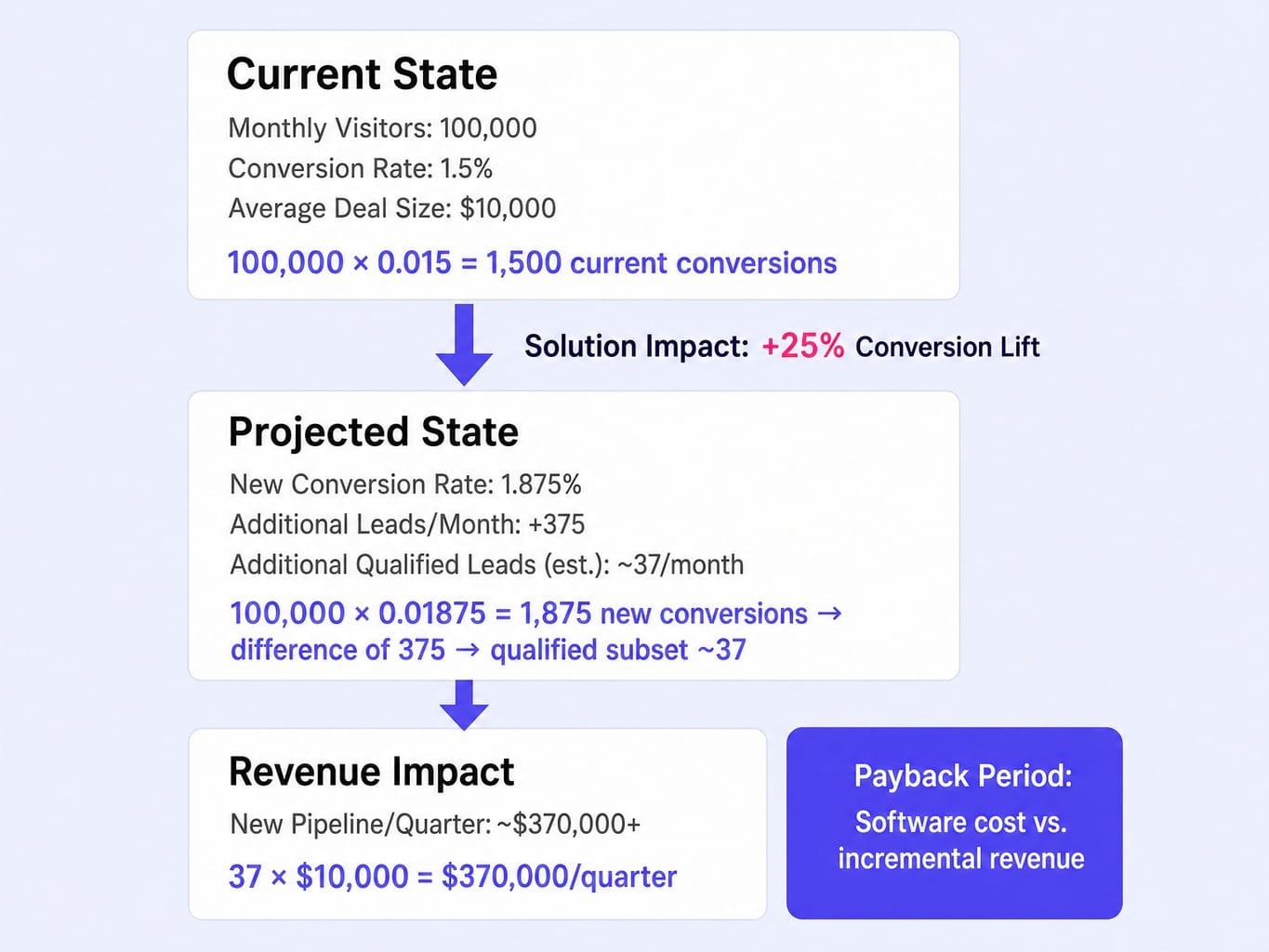
Prospect's Metrics:
- Current Website Conversion Rate: 1.5%
- Monthly Website Visitors: 100,000
- Average Deal Size: $10,000
Our Solution's Impact: We typically see customers improve conversion rates by 20-30% within 6 months.
The narrative should calculate the potential revenue gain and frame our software cost as an investment with a clear payback period.
Expected output: A story with specific numbers. "A 25% lift on your current conversion rate... would generate an additional 37 qualified leads per month... resulting in an estimated $XX,XXX in new pipeline per quarter."
Iteration tip: Ask the model to generate a "conservative case" and an "optimistic case" by using the lower and upper bounds of your typical impact.
25. Mutual Action Plan (MAP) Generator
Prompt:
Key Milestones: Technical review, Legal review, Procurement negotiation, Final sign-off.
Expected output: A clear, professional timeline that creates momentum and assigns accountability.
Iteration tip: Add your company's specific implementation steps (e.g., "Kick-off call," "Data migration") to create a more detailed plan.
26. Multi-Stakeholder Value Proposition Email
Prompt:
- For the CFO: Focus on ROI, payback period, and cost savings.
- For the Head of Engineering: Focus on security, ease of implementation, and API integrations.
Expected output: Two distinct, concise paragraphs that speak the language of each stakeholder.
Iteration tip: Provide the model with specific technical details or financial metrics to make the paragraphs more credible.
27. "Deal Gone Quiet" Re-Engagement Email
Prompt:
Choose one of these angles:
1. Introduce a new, relevant piece of value (e.g., a new case study, an upcoming feature).
2. Reference a common late-stage blocker (e.g., 'Often at this stage, questions from procurement or IT come up. I've attached our security whitepaper to help.') and offer help.
Expected output: An email that proactively addresses a potential problem, re-establishing your role as a helpful advisor.
Iteration tip: Test which angle gets a better response rate from your prospects.
28. Procurement Objection Response
Prompt:
Question: "We require a 15% discount for all first-year software purchases."
Your Stance: We don't typically discount, but we can offer value-adds like extended support, additional user licenses, or a professional services credit.
The response should be firm but collaborative, shifting the conversation from discount to value.
Expected output: A polished paragraph that can be sent directly to the procurement officer, saving the AE time and stress.
Iteration tip: Build a library of these prompts for your top 3-5 procurement objections.
Account Management Prompts: QBR Prep, Expansion Signals, and Renewal Messaging
In B2B SaaS, the sale doesn't end at the close. Expansion revenue from existing accounts is often the highest-ROI growth lever, yet most account managers (AMs) are too swamped to be proactive. These prompts help AMs operate more like strategic growth partners.
29. Quarterly Business Review (QBR) Narrative
Prompt:
Data:
- Original Business Goals: [e.g., 'Improve lead quality by 20%']
- Usage Metrics: [e.g., 'User adoption at 95%, 50 reports created/month']
- Support Tickets: [e.g., '3 tickets, all resolved within 2 hours']
- Value Delivered: [e.g., 'Lead quality score increased from 65 to 85']
Output a 3-part narrative: 1. Value Realized (how we met their original goals), 2. New Opportunities (areas of the product they are underutilizing), 3. Recommended Next Steps (a joint plan for the next quarter).
Expected output: A story that reinforces the value of your partnership and sets the stage for expansion.
Iteration tip: If usage is low, prompt the model to generate a "Re-engagement Plan" instead of a standard QBR.
30. Expansion Opportunity Identification
Prompt:
Account: [COMPANY NAME], a 500-person tech company.
Current Subscription: Our 'Pro' plan, 50 user licenses for their marketing team.
Usage Signals: They have hit their API call limit 3 times this quarter. Only the marketing team is using the product, but their sales team is hiring aggressively.
Our Product Tiers: We have an 'Enterprise' plan with a higher API limit and a separate 'Sales Intelligence' module.
For each opportunity, provide a talk track for the AM.
Expected output: Specific, data-driven recommendations like "Upgrade to Enterprise for API limits" and "Cross-sell Sales Intelligence module to the new sales hires."
Iteration tip: Feed the prompt your company's full product catalog and pricing tiers for more accurate recommendations.
31. Renewal Risk Mitigation Plan
Prompt:
Risk Signals: Logins have dropped 50% in the last month. Their champion left the company. They submitted a support ticket that escalated to a manager.
The plan should include specific, weekly actions for the AM, such as: scheduling a "health check" call, identifying and building a relationship with a new champion, and creating a custom report showing past value.
Expected output: A proactive checklist that turns a reactive problem into a structured plan.
Iteration tip: Ask the model to prioritize the actions based on urgency and potential impact.
32. The 90-Day Renewal Email Sequence
Prompt:
Touch 1 (90 days out): A strategic check-in from the AM, referencing a key success metric from the past year and asking about their priorities for the coming year.
Touch 2 (60 days out): A more formal renewal reminder, including a summary of their current plan and a link to a pre-filled renewal order form.
Touch 3 (30 days out): A final reminder from the Head of Customer Success, reinforcing the partnership value and confirming the renewal process.
Expected output: Three professional, non-pushy emails that make the renewal process feel smooth and inevitable.
Iteration tip: For a lower-value account, prompt for a more automated, two-touch sequence.
33. Executive Sponsor Outreach at Renewal
Prompt:
The email should summarize the total ROI delivered over the past year in a single, powerful statistic and align our solution with the sponsor's likely high-level goals (e.g., efficiency, growth, risk reduction).
Expected output: A high-level, strategic email that keeps your solution top-of-mind with the economic buyer.
Iteration tip: Provide the prompt with your company's mission statement to ensure the tone aligns with your brand.
Advanced Prompt Chaining: Building Multi-Turn Sales Workflows in a Single Conversation
Individual prompts are useful. Chained prompts are a system. The real unlock comes from running 3-5 prompts in a single ChatGPT conversation, where each prompt builds on the output of the previous one. This mirrors a real sales workflow—research informs the email, which informs the follow-up.
Let's walk through a complete 4-prompt chain for a competitive displacement motion.
Workflow: Displacing a Competitor
Prompt 1: The Research
Why it works: This starts the chain by creating a foundation of prospect-specific intelligence. The model now "knows" who you're targeting and what their likely issues are.
Prompt 2: The First-Touch Email
(In the same chat window)
Why it works: The model uses the context from Prompt 1 to write a highly relevant email. You don't have to re-explain the prospect's situation. The multi-turn context retention ensures the email is grounded in the initial research.
Prompt 3: The Value-Add Follow-Up
(In the same chat window)
Why it works: The chain maintains the thread. The model knows what the original email was about and can craft a follow-up that feels like a natural continuation.
Prompt 4: The Discovery Call Prep
(In the same chat window)
Why it works: This final prompt synthesizes the entire conversation—from initial research to email outreach—into an actionable sales asset. The model remembers the initial hypotheses and the successful email angle, allowing it to generate highly relevant questions and objection responses.
This chained approach transforms ChatGPT from a simple writing assistant into a workflow engine. While context windows in models like GPT-4o are large, they aren't infinite. For chains longer than 5-7 prompts, it can be useful to periodically summarize the key takeaways to re-anchor the model and prevent context degradation. For teams looking to scale this, tools like Zapier AI Actions can automate these chains via API calls.
When Prompts Aren't Enough: Scaling Optimization Beyond Manual Workflows
You've now seen how to build a system of prompts that dramatically improves the quality of sales outreach. But notice the remaining constraint: a human still has to run each prompt, feed it the right data, and evaluate the output. For a single deal, this is a massive productivity gain. For a team managing hundreds of accounts, the manual prompt-by-prompt process becomes the new bottleneck.
The underlying challenge is one of execution bandwidth. Your team knows what needs to be improved, but lacks the capacity to ship those improvements consistently and at scale.
This is the exact tension Spike AI resolves for your marketing funnel. Just as effective sales prompts require context, structure, and deal-stage awareness, your website requires continuous, context-aware, prioritized action. Sporadic manual fixes and A/B tests can't keep pace. Spike AI functions as a marketing execution engine, identifying the single highest-impact move across your website's CRO, SEO, and content each week—and then deploying it. While your sales team uses structured AI to perfect their outreach, Spike AI uses its Marketing AGI to compound gains across your entire funnel.
If you're already using AI to make your outreach smarter, why are you still optimizing your website manually?
See how Spike AI identifies and ships your highest-impact website optimization every week
Conclusion
The most important belief shift to make is this: ChatGPT is not a cold email generator. It's a reasoning engine. The quality of its output is directly proportional to the quality of the context and constraints you provide.
The difference between a 2% and a 12% reply rate isn't the AI model; it's whether the prompt contained role priming, negative constraints, firmographic grounding, and deal-stage awareness. The 38 prompts in this guide are starting points, not final scripts. The real skill is learning to diagnose why a prompt's output is weak and iterating with more specific constraints rather than starting from scratch.
The sellers who win in 2026 won't be the ones who adopt AI first. They will be the ones who build systematic prompt workflows that compound their team's output across every deal stage, every single week.
Frequently Asked Questions
What system prompt should I set before running sales prompts in ChatGPT?
Set a persistent system prompt via Custom Instructions (in ChatGPT Plus) or the API system message. Include your role, company context, ICP, product positioning, and tone constraints (e.g., "You are an SDR for a B2B SaaS company. Your tone is professional, concise, and helpful. All emails should be under 100 words."). This saves you from repeating context in every prompt.
Should I use ChatGPT or Claude for writing sales emails?
Test both. ChatGPT (GPT-4o) often excels at creative variations and handling long, chained prompts. Claude (from Anthropic) is frequently praised for producing more natural, less "salesy" prose and adhering closely to nuanced tone instructions. The prompt engineering principles in this article apply equally to both models. A/B test their outputs in your outreach tool to see what performs best for your audience.
How do I prevent ChatGPT sales emails from triggering spam filters?
Focus on sending patterns and content hygiene. Use prompts with negative constraints like Do not use spam trigger words, exclamation marks, or all-caps. Keep emails under 100 words and use plain text. Always include a clear opt-out. Tools like Lavender can score your email's "spammyness" before you send it, helping you refine your prompts over time.
Can I automate ChatGPT sales prompts to run at scale without manual input?
Yes, via the OpenAI API connected to tools like Zapier, Make, or Clay. A common workflow: a trigger in your CRM (e.g., new lead matches ICP) initiates an API call with a prompt template and lead data, routing the generated email to an outreach tool's draft folder. However, always include a human review step before sending. Fully automated outreach creates significant compliance and brand quality risks.
How often should I update and version my sales prompts?
Treat your prompts like valuable sales assets. Version them with a clear naming convention (e.g., cold-email-vpo-v3-2024-08-01), track which versions produce the best reply rates in your Salesloft or Outreach.io dashboards, and iterate on them monthly. When you modify a prompt, save the old version so you can revert if performance drops.