ChatGPT Prompts for Email Marketing: 15 Ready-to-Use Templates for B2B SaaS
TL;DR
- Generic prompts produce generic emails. The quality of AI copy is set by prompt structure, not model capability.
- Effective prompts define three things: the AI's role and context, specific output constraints (word count, format), and seed copy to anchor the brand voice.
- Organize your prompts by B2B SaaS lifecycle stage (Welcome, Newsletter, Campaign, Re-engagement, Cold Outreach), not by generic email parts.
- To prevent AI-generated sameness, use temperature tuning in the API to increase variance and batch generation to test multiple persuasion angles at once.
- The bottleneck isn't prompt generation; it's the manual cycle of testing, deploying, and measuring what the prompts produce.
You paste the prompt into ChatGPT: 'Write a follow-up email for our product.' You get back a wall of text that is grammatically perfect, vaguely positive, and utterly useless. It reads like it was written by someone who has never used your product, never spoken to a customer, and has no idea what the recipient cares about. It's the email equivalent of stock photography.
The problem isn't the model. It's the prompt.
I've seen this breakdown firsthand. We once ran a welcome sequence test across four trial segments for a B2B SaaS product, and the ChatGPT output was functionally identical for all four. The prompts differed only in surface-level product descriptors, not in the specific activation behavior each segment needed to take next. The manual rewrite cycle to make each variant genuinely distinct took longer than writing from scratch would have.
Most lists of ChatGPT prompts for email marketing are built for ecommerce—abandoned carts, flash sales, discount codes. They produce output that B2B SaaS teams cannot use without heavy rewriting. This guide is different. Below are 15 prompts organized by the five email types B2B teams actually send, each designed to produce copy that references demos, trials, and enterprise buying cycles.
Why Most ChatGPT Email Prompts Produce Mediocre Output
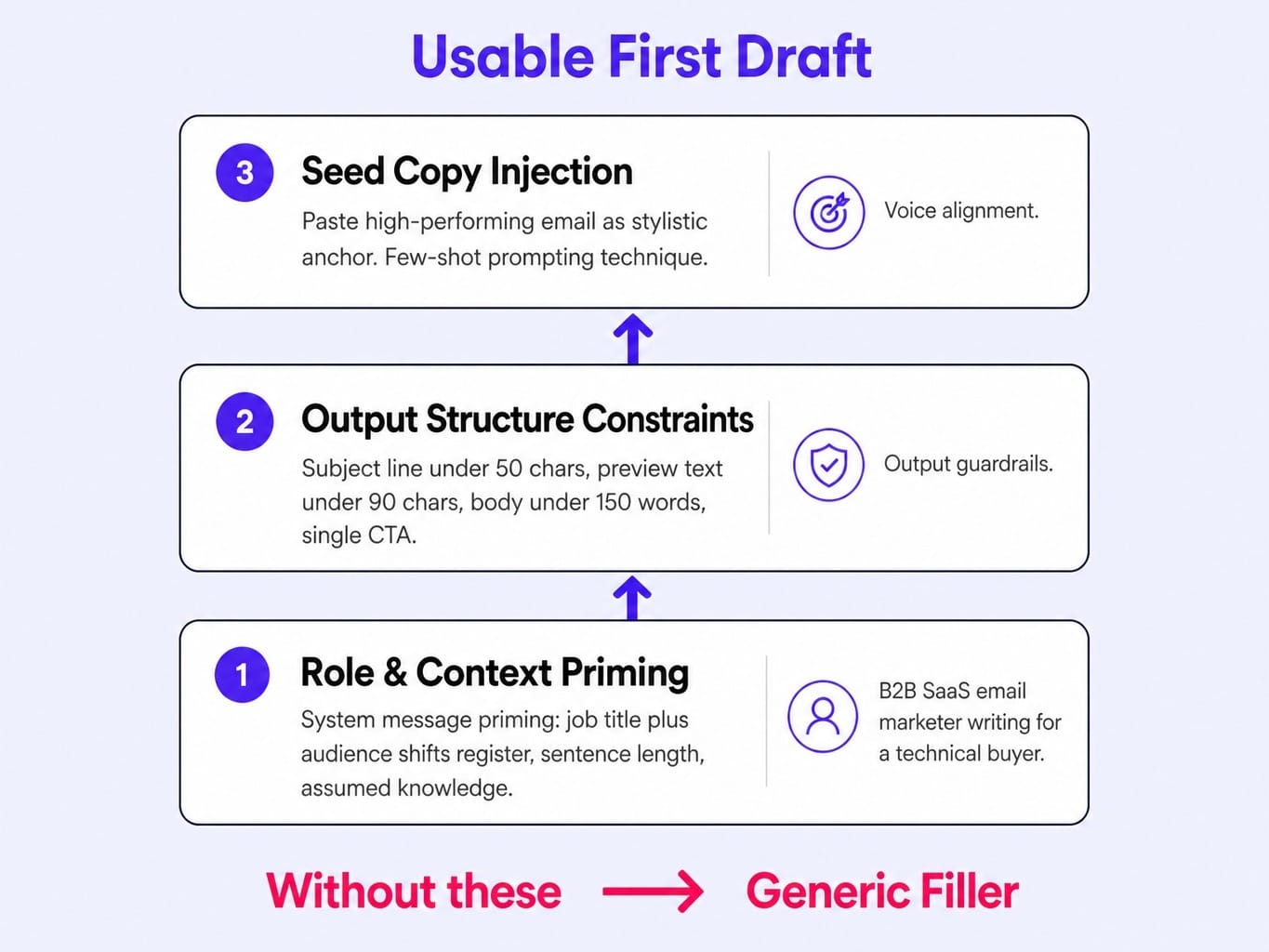
The quality ceiling of AI-generated email copy is set by three variables in the prompt, not by the model itself. Get these right, and you move from generic filler to usable first drafts.
- Role and Context Priming: Telling the model it is a 'B2B SaaS email marketer writing for a technical buyer' produces structurally different copy than the same ask with no role context. This is often called system message priming. You're giving ChatGPT a job title and an audience, which shifts its register, sentence length, and assumed reader knowledge.
- Output Structure Constraints: Vague requests get vague answers. Specify the desired output with precision: a subject line under 50 characters, a preview text line under 90 characters, and a body under 150 words with a single, clear CTA. These output guardrails force the model to be concise.
- Seed Copy Injection: Pasting in a previous high-performing email or a snippet of your best brand copy gives the model a stylistic anchor. This technique, a form of few-shot prompting, is the most reliable way to align AI output with your brand voice.
Consider the difference. A prompt like 'Write a welcome email for our SaaS product' produces filler. But a structured prompt that includes the product category, the user's signup trigger, the desired next action, and a word count cap produces something you can actually send. When a B2B SaaS team sends the same trial-to-paid welcome sequence to every segment because the manual effort of creating distinct variants exceeds their bandwidth, the activation rate ceiling is set by workflow capacity, not copy quality. Better prompting breaks that ceiling.
Read more: SaaS Email Marketing in 2026: The Execution System That Replaces Drip Campaigns
Welcome Sequence Prompts: Onboarding, Activation, and Trial-to-Paid
A welcome sequence is the highest-leverage email type for B2B SaaS. It sets the user's activation trajectory. Most AI-generated welcome emails default to 'Thanks for signing up! Here's what we do,' wasting the moment of highest intent. These prompts force the focus onto the user's next action.
Prompt 1: Day-Zero Onboarding Email
RECIPIENT CONTEXT: A user just signed up for a free 14-day trial. They have not yet completed the initial setup wizard to create their first project.
TASK: Write a day-zero onboarding email.
OUTPUT FORMAT:
Subject Line: Under 50 characters.
Preview Text: Under 90 characters.
Body: Under 120 words, with one clear CTA.
CTA Text: "Create Your First Project"
CTA Link: [LINK_TO_SETUP_WIZARD]
TONE: Helpful and specific. Avoid corporate jargon and generic phrases like "We're excited to have you." Focus entirely on the user's next step.
Why this prompt works: It forces the model to focus on the recipient's immediate next action (completing setup) rather than the company's value proposition, which is exactly what a new user needs.
Prompt 2: Activation Nudge Email (Day 3)
RECIPIENT CONTEXT: A user signed up for a trial 3 days ago, logged in once, but has not completed the key activation milestone: [ACTIVATION_ACTION].
TASK: Write a day-3 activation nudge email.
OUTPUT FORMAT:
Subject Line: Under 40 characters.
Body: Under 100 words.
CTA Text: [CTA_TEXT_RELATED_TO_ACTION]
CTA Link: [LINK_TO_FEATURE]
TONE: Casual, peer-level, and helpful. Frame it as a quick tip to get more value from the product.
Why this prompt works: The [ACTIVATION_ACTION] placeholder allows you to define your own key milestone—like 'inviting a teammate' or 'connecting an integration'—without rewriting the entire prompt.
Prompt 3: Trial-to-Paid Conversion Email (Day 10)
RECIPIENT CONTEXT: An active trial user is approaching day 10 of a 14-day trial. They have used the product regularly and hit their activation milestones.
TASK: Write a trial expiration email.
OUTPUT FORMAT:
Subject Line: Under 50 characters.
Body: Under 150 words.
Primary CTA: Upgrade to a paid plan.
Secondary CTA: Book a call with sales.
TONE: Confident and value-focused. No desperation or discount-driven language.
CONSTRAINT: Lead the email by reminding the user what they will lose access to when the trial ends, rather than what they will gain by upgrading.
Why this prompt works: The loss-framing constraint is critical. For an active user who already sees the value, the fear of losing access to features they've started relying on is a more powerful motivator than a list of benefits they already know. Understanding free trial conversion rate benchmarks helps you gauge whether your trial-to-paid emails are performing at or above industry standard.
Newsletter and Content Email Prompts: Subject Lines, Body Copy, and CTAs
Newsletters are where AI-generated sameness is most visible. Recipients get dozens of AI-written emails weekly, and they all start to sound identical. These ai prompts for email marketing are designed to produce output that sounds like a specific person wrote it.
Prompt 4: Subject Line and Preview Text Generator (10 Variants)
TASK: Generate 10 subject line and preview text pairs for a weekly newsletter.
NEWSLETTER TOPIC: [TOPIC_OF_THE_WEEK]
AUDIENCE: [ICP_DESCRIPTION - e.g., "VPs of Engineering at mid-market tech companies"]
OUTPUT FORMAT: A markdown table with three columns: "Subject Line," "Preview Text," and "Psychological Mechanism" (e.g., Curiosity Gap, Specificity, Social Proof, Urgency).
CONSTRAINTS:
No exclamation marks or ALL CAPS.
Subject lines must be under 50 characters.
Preview text must be under 90 characters.
Vary the psychological mechanism used across the 10 variants.
Why this prompt works: Requesting the 'Psychological Mechanism' column forces the model to diversify its output. Instead of 10 slight variations of the same idea, you get 10 genuinely different angles to A/B test.
Prompt 5: Newsletter Body Copy with Voice Matching
TASK: Write the body copy for this week's newsletter.
STYLE REFERENCE (match the sentence rhythm, vocabulary level, and structural patterns of this example): [PASTE_A_PREVIOUS_HIGH-PERFORMING_NEWSLETTER_HERE]
THIS WEEK'S TOPIC: [TOPIC]
AUDIENCE: [ICP_DESCRIPTION]
OUTPUT FORMAT:
Body copy under 250 words.
Conversational and direct tone.
One primary CTA and one secondary link.
Why this prompt works: This is the single most effective technique for maintaining brand voice. The pasted example acts as a stylistic anchor—a seed copy injection—that the model will mirror, preventing the copy from drifting into generic AI prose.
Prompt 6: CTA Variation Generator for A/B Testing
TASK: Generate 5 CTA button text variations and 5 corresponding supporting paragraph variations.
DESIRED ACTION: [THE_ACTION_THE_CTA_DRIVES - e.g., "Book a demo," "Read the full case study"]
OUTPUT FORMAT: A markdown table with three columns: "CTA Button Text" (under 5 words), "Supporting Paragraph" (under 30 words), and "Persuasion Angle."
CONSTRAINT: Use five different persuasion angles for the variants: Curiosity, Social Proof, Urgency, Benefit-First, and Objection-Preemption.
Why this prompt works: Generating CTA variations in a batch compresses what normally takes 30 minutes of brainstorming into 30 seconds. Forcing angle diversity ensures you're testing fundamentally different psychological triggers, not just different words for the same idea.
Campaign and Launch Prompts: Product Launches, Events, and Webinar Follow-Ups
Campaign emails are where most B2B teams default to a single blast rather than a sequence. ChatGPT is most useful here not for writing one email, but for generating a multi-touch sequence from a single prompt. This is a simple form of prompt chaining, where the logic flows from one email to the next.
Prompt 7: Product Launch Email Sequence (3 Emails)
PRODUCT CONTEXT:
Feature Name: [FEATURE_NAME]
One-Sentence Description: [ONE_SENTENCE_PITCH_FOR_THE_FEATURE]
AUDIENCE: [ICP_DESCRIPTION - e.g., "Existing customers on our Pro plan"]
TASK: Write a 3-email product launch sequence:
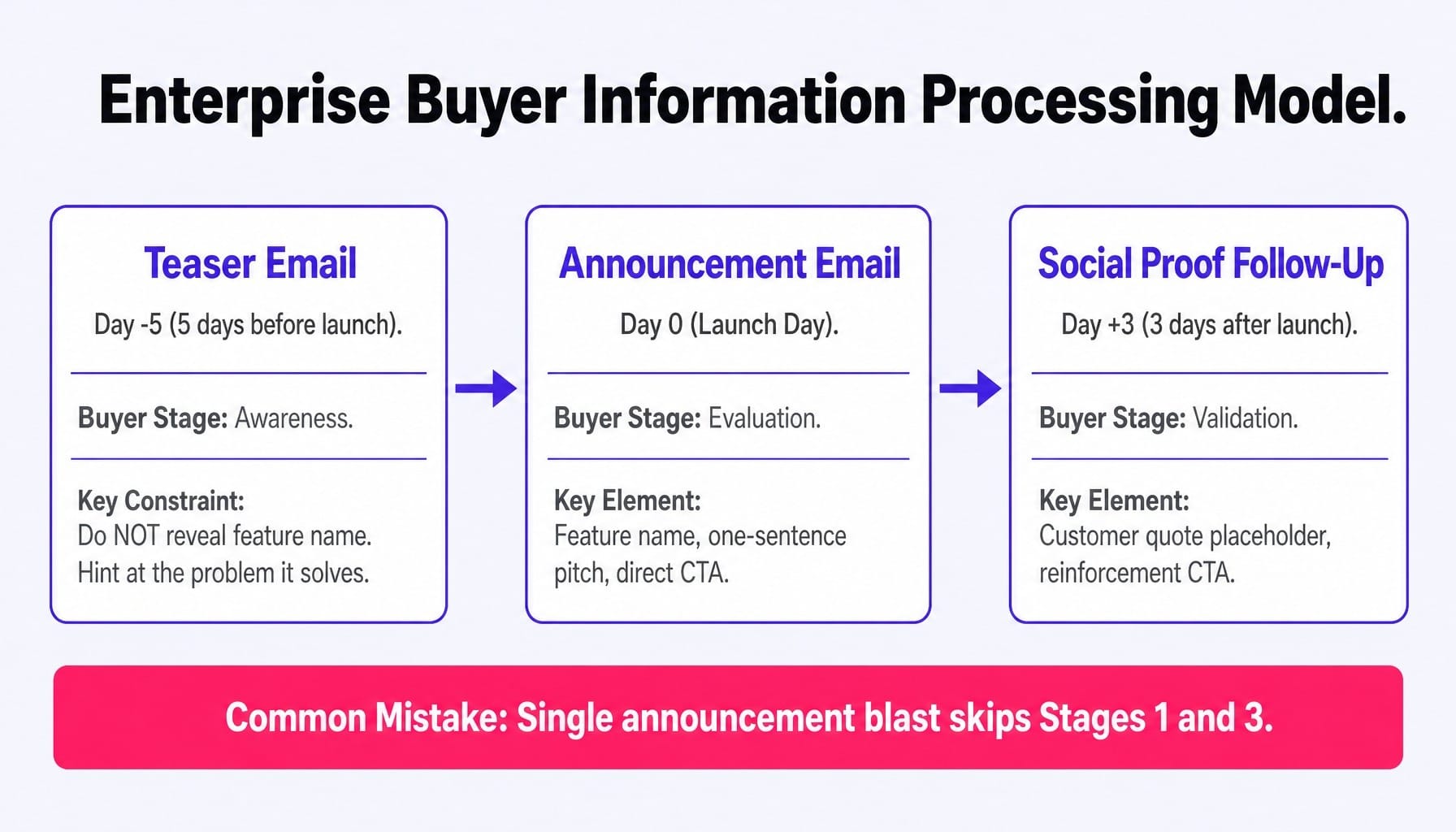
Teaser Email (sent 5 days before launch)
Announcement Email (sent on launch day)
Social Proof Follow-Up (sent 3 days after launch)
OUTPUT FORMAT (for each of the 3 emails):
Subject Line
Preview Text
Body (under 120 words)
CTA
TONE: Confident and specific. Avoid marketing hyperbole like "revolutionary" or "groundbreaking."
CONSTRAINT: The teaser email must NOT reveal the feature name. It should only hint at the problem it solves. The social proof email should include a placeholder for a customer quote, like [CUSTOMER_QUOTE].
Why this prompt works: The three-email structure mirrors how enterprise buyers process information: awareness (teaser), evaluation (announcement), and validation (social proof). A single announcement blast skips the first and third stages.
Prompt 8: Event Promotion Email with Urgency Progression
EVENT DETAILS:
Event Name: [EVENT_NAME]
Date & Time: [DATE_AND_TIME]
Speaker(s): [SPEAKER_NAMES_AND_TITLES]
Topic: [WEBINAR_TOPIC]
AUDIENCE: [ICP_DESCRIPTION]
TASK: Write a 2-email event promotion sequence:
Initial Invitation (sent 2 weeks out)
Last-Chance Reminder (sent 24 hours out)
OUTPUT FORMAT (for each email):
Subject Line
Body (under 100 words)
CTA (to the registration page)
CONSTRAINT: The first email must lead with the learning outcome for the attendee (what they will be able to do differently after the webinar). The second email must lead with scarcity (e.g., "registration closes tonight").
Why this prompt works: The urgency progression—value-first, then scarcity—avoids the common mistake of leading with FOMO in every email, which trains recipients to ignore urgency signals over time.
Prompt 9: Post-Webinar Follow-Up (Attendees vs. No-Shows)
WEBINAR DETAILS:
Webinar Topic: [WEBINAR_TOPIC]
Key Takeaway: [ONE_SPECIFIC_INSIGHT_OR_STAT_FROM_THE_WEBINAR]
TASK: Write two distinct follow-up emails to be sent 1 hour after the webinar ends.
Email for Attendees
Email for Registrants who did not attend (No-Shows)
OUTPUT FORMAT (for each of the 2 emails):
Subject Line
Body (under 100 words)
CTA
CONSTRAINT: The attendee email must reference the [KEY_TAKEAWAY] and have a CTA to the next logical step (e.g., "Book a Demo"). The no-show email must offer the recording and have a CTA to watch it or schedule a live walkthrough.
Why this prompt works: Splitting attendees from no-shows is the minimum viable segmentation for webinar follow-ups. This prompt automates the creation of both versions at once, fixing a common leak in the marketing funnel.
Re-Engagement Prompts: Win-Back, Churn Prevention, and Sunset Flows
Re-engagement emails are where most B2B teams either do nothing or send a generic 'We miss you' email that feels impersonal. These ChatGPT email marketing prompts are designed to address the specific reason for disengagement.
Prompt 10: Win-Back Email for Inactive Product Users
RECIPIENT CONTEXT: A user was active for their first month but has not logged into the product in over 30 days.
PRODUCT: [PRODUCT_NAME]
TASK: Write a win-back email.
OUTPUT FORMAT:
Subject Line: Under 45 characters.
Body: Under 100 words.
CTA: A direct link to log back in.
TONE: Helpful and inquisitive, not guilt-inducing.
CONSTRAINT: The email must reference a new feature or improvement that was shipped since their last login, using the placeholder [RECENT_FEATURE].
Why this prompt works: Anchoring the win-back to a tangible product change gives the recipient a new reason to return. It's a value proposition, not just a plea for attention.
Prompt 11: Churn Prevention Email Before Renewal
RECIPIENT CONTEXT: An enterprise customer has an annual contract renewing in 30 days. Their product usage has dropped significantly in the last quarter.
TASK: Write a pre-renewal email to the account's primary contact.
OUTPUT FORMAT:
Subject Line: Under 50 characters.
Body: Under 120 words.
Primary CTA: Schedule a "Success Review" call.
Secondary CTA: View their usage dashboard.
TONE: Consultative and proactive, not salesy.
CONSTRAINT: Frame the email as a value check-in to ensure they're getting the most out of their investment. Do not mention the word "renewal."
Why this prompt works: Positioning the email as a success review rather than a renewal reminder reduces the defensive reaction that renewal emails often trigger, opening the door for a constructive conversation about value.
Prompt 12: Sunset Flow Email for Unengaged Subscribers
RECIPIENT CONTEXT: A subscriber has been on the list for over 6 months but has not opened an email in the last 90 days.
TASK: Write a sunset/list-cleaning email.
OUTPUT FORMAT:
Subject Line: Under 35 characters (e.g., "A final check-in").
Body: Under 80 words.
Primary CTA: A link to confirm they want to stay subscribed.
Secondary CTA: A link to unsubscribe.
TONE: Respectful and brief. No emotional manipulation.
CONSTRAINT: The email must state clearly that they will be removed from the list if they don't take action.
Why this prompt works: Sunset flows protect your sender reputation. Removing unengaged contacts is a healthy practice that improves deliverability for the contacts who do engage, and this prompt keeps the message clean and direct.
Cold Email Prompts: First Touch, Follow-Up Cadences, and Breakup Emails
Cold email is where ChatGPT is most likely to produce output that sounds like spam. This is usually because cold email prompts lack a specific triggering event or observable behavior to anchor the opening line. These ai prompts for email force the model to reference a specific observation about the prospect.
Prompt 13: First-Touch Cold Email with Trigger-Based Opening
TRIGGER EVENT: [A_SPECIFIC_OBSERVABLE_ACTION - e.g., "the prospect's company just raised a Series B funding round," "they are hiring for a new Head of Data Science," "they recently spoke at a conference on scaling engineering teams"].
RECIPIENT: [PROSPECT_TITLE, COMPANY_NAME]
YOUR PRODUCT: [PRODUCT_NAME] and its [ONE_SENTENCE_VALUE_PROP].
TASK: Write a first-touch cold email.
OUTPUT FORMAT:
Subject Line: Under 40 characters, lowercase.
Body: Under 75 words.
CTA: One question. No links.
TONE: Conversational, peer-to-peer, and direct.
CONSTRAINT: Never open with "I hope this email finds you well," "My name is," or a compliment about their company. Start directly with the trigger event.
Why this prompt works: Trigger-based openings signal that the sender did their research, which is the minimum bar for earning a reply in today's crowded inboxes.
Prompt 14: Follow-Up Email (Day 4) That Adds Value
CONTEXT: The first email was sent 4 days ago. There has been no reply.
TASK: Write a follow-up email that adds new value.
OUTPUT FORMAT:
Subject Line: A reply to the previous email (Re: [Original Subject]).
Body: Under 60 words.
Value-Add Element: Include a placeholder for a relevant stat, a short case study reference, or a link to a helpful resource. e.g., [VALUE_ADD_SNIPPET].
TONE: Brief and helpful. Not apologetic or pushy.
CONSTRAINT: Never use phrases like "Just following up" or "Bumping this to the top of your inbox."
Why this prompt works: The value-add constraint is critical. A follow-up that simply re-asks the same question is just noise. A follow-up that offers a new piece of information respects the recipient's time.
Prompt 15: Breakup Email That Leaves the Door Open
CONTEXT: 3-4 previous emails have been sent over 2 weeks with no reply.
TASK: Write a final "breakup" email.
OUTPUT FORMAT:
Subject Line: Under 35 characters (e.g., "Closing the loop").
Body: Under 50 words.
CTA: A soft close that gives the prospect permission to ignore the email but leaves the door open for future contact.
TONE: Respectful, professional, and concise. No guilt trips.
CONSTRAINT: The email must state that you won't follow up again on this topic.
Why this prompt works: A clean breakup email occasionally triggers a reply from busy prospects, but its primary job is to cleanly close the sequence so you can reallocate your effort. Brevity is key to its effectiveness.
How to Stop Every AI Email from Sounding the Same
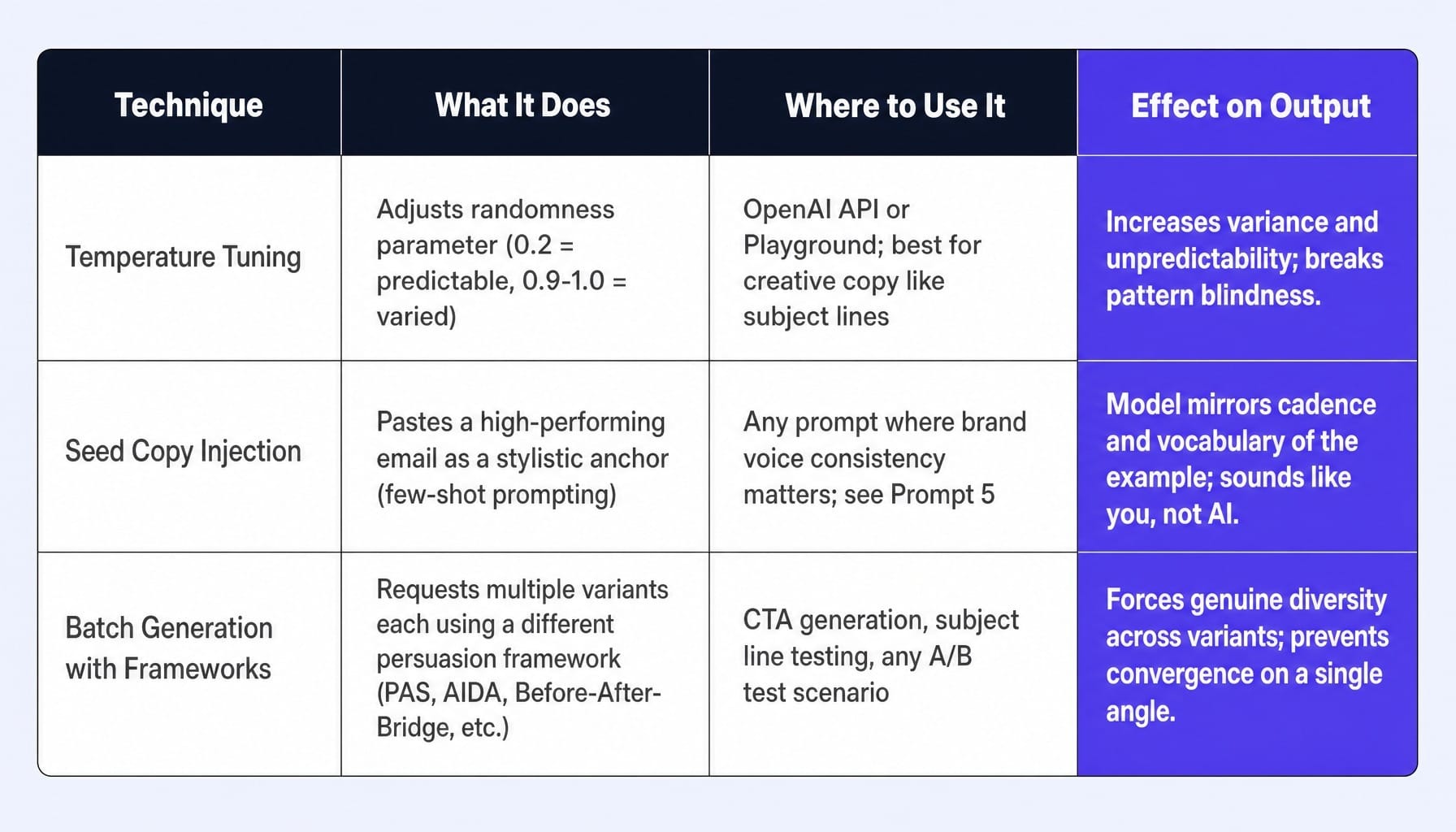
The biggest risk of using ChatGPT prompts for email marketing in 2026 is not bad copy—it's indistinguishable copy. As more teams use the same models, recipients develop pattern blindness to AI-generated emails. You start seeing the same sentence rhythms, the same transition phrases, and the same CTA structures.
Here are three techniques to break the pattern:
- Temperature Tuning: The standard ChatGPT interface is optimized for safe, median-quality responses. In tools like the OpenAI API or Playground, you can adjust a parameter called "temperature." A temperature of 0.2 produces very deterministic, predictable copy. Setting it to 0.9 or 1.0 forces the model to take more risks, producing more varied and less predictable output. For creative copy like subject lines, higher temperatures are your friend.
- Seed Copy Injection: As shown in Prompt 5, pasting a paragraph from an email you wrote manually and instructing the model to match its cadence and vocabulary is more effective than describing a tone in words. The model is excellent at pattern-matching, so give it a better pattern to match. This is the fastest way to make AI copy sound like you.
- Batch Generation with Frameworks: Don't just ask for "5 variants." Ask for 5 variants, each using a different persuasion framework. For example: "Generate 5 CTA paragraphs. Use PAS for #1, AIDA for #2, Before-After-Bridge for #3, a direct benefit for #4, and a story-led approach for #5." This forces genuine diversity, giving you meaningfully different options to test in your ESP like HubSpot or ActiveCampaign.
When the Bottleneck Is Not the Prompt — It Is Everything After
Even with excellent prompts, the manual cycle of generating copy, reviewing it, testing variants, deploying to your ESP, measuring results, and iterating is where most teams stall. A marketer can generate 15 email variants in 10 minutes with ChatGPT, but deploying, testing, and optimizing those variants across segments still takes weeks of manual coordination.
This is the execution gap. Great emails driving traffic to an unoptimized website is a leak most B2B teams never even measure. While prompts improve your email copy, a system like Spike AI is designed to handle the optimization loop after the click—continuously testing, measuring, and improving your website and conversion touchpoints. It ensures the high-intent traffic your brilliant emails generate actually converts when it lands, closing the loop between communication and conversion.
The Real Competitive Edge
The quality of AI-generated email is determined by prompt structure, not just the model you use. The prompts in this article are built on three principles most generic lists ignore: role priming, output constraints, and seed copy injection.
But as email marketing ai prompts become a commodity, the teams that win won't be the ones with the best prompt library. They will be the ones who can iterate fastest on what those prompts produce. The new competitive advantage isn't generation; it's the speed of your optimization cycle.
Frequently Asked Questions
What system prompt setup produces the best email marketing output in ChatGPT?
Setting a system message that defines ChatGPT's role (e.g., 'You are a senior B2B email marketer who writes concise, conversion-focused emails'), audience, and output constraints dramatically improves consistency. This is native to the OpenAI API and Playground; in the chat interface, include these instructions at the top of every user prompt.
How do I combine ChatGPT prompts with my ESP's personalization tokens?
The most effective method is to include placeholder syntax matching your ESP's merge tag format—like {{first_name}} for HubSpot or |FNAME| for Mailchimp—directly in the prompt. Instruct ChatGPT to embed these tokens naturally in the output, which eliminates the manual step of inserting them after generation.
Can ChatGPT help improve email deliverability, or only copywriting?
ChatGPT can audit draft emails for spam trigger words, excessive capitalization, and link density that may hurt deliverability. However, it cannot test actual inbox placement. Use it as a pre-send QA layer alongside a dedicated tool like Litmus or a manual seed list test for true deliverability analysis.
How many email variants should I generate per prompt for meaningful A/B testing?
Generate at least 5 variants for any element you are testing (subject line, CTA, body copy). Asking for only 2-3 variants often produces outputs that are too similar to detect a meaningful performance difference, as the model converges on a single angle unless explicitly instructed to diversify.
Does GPT-4o produce better email copy than GPT-3.5, and is the cost difference worth it?
GPT-4o produces noticeably better copy for complex prompts, such as multi-email sequences or nuanced voice matching. For simple, single-email prompts, the difference narrows. For generating first drafts at high volume, GPT-3.5 can be more cost-effective, with GPT-4o reserved for refinement and critical campaign copy.