The Best ChatGPT Prompts for LinkedIn: Post Templates, Chaining Workflows, and Anti-Slop Techniques

TL;DR
- Stop using generic prompts. The best ChatGPT prompts for linkedin use a "persona block" to define your voice and "few-shot examples" of your best posts to calibrate tone.
- Organize prompts by the engagement they drive. Use storytelling prompts for dwell time, framework prompts for saves, and contrarian prompts for comments.
- Build prompt chains to turn one insight into a week of content. For example, use a sequence of prompts to transform a customer quote into a story, a framework, and a contrarian take.
- Create a custom GPT in the OpenAI GPT Store. Upload your persona block and best posts as knowledge files to build a persistent co-pilot that already knows your voice and strategy.
- Tune your prompts for the LinkedIn algorithm by adding constraints that optimize for dwell time (open loops, line breaks) and high-value comments (specific, answerable questions).
You know the drill. You paste a topic into ChatGPT, ask for a LinkedIn post, and get back something that starts with a rhetorical question, uses the word 'landscape,' and ends with 'What do you think? Drop a comment below.' It reads like an AI wrote it because an AI did write it—without any structural guidance.
The problem is, this low-effort output does more than just fail to engage; it actively damages your reach. When a B2B marketing team publishes content that reads as obvious AI, prospects pattern-match the brand as low-effort, and the organic reach decay makes every subsequent post harder to distribute. This is precisely the kind of execution drag that platforms like Spike AI exist to prevent by ensuring content quality and deployment velocity don't trade off against each other. Your audience scrolls past, the algorithm learns your content isn't worth showing, and you're left with worse results than if you'd just written from scratch.
The difference between ChatGPT output that sounds like you and output that sounds like a template isn't the model. It's the prompt architecture.
This guide provides that architecture. You'll get an anti-slop framework for structuring any prompt, 15+ ready-to-use ChatGPT prompts for linkedin, and workflows for turning one idea into a week of high-performing content.
Why Most ChatGPT LinkedIn Prompts Produce Content Nobody Engages With
Generic prompts fail because they give the model no constraints on voice, audience, or format. Without guardrails, ChatGPT defaults to its most statistically average output, which is the same bland, corporate-speak every other user is getting.
A typical prompt like, Write a LinkedIn post about B2B lead generation, produces a predictable pattern: a vague opening question, three generic bullet points, and a motivational closing. It's technically correct but has zero specificity, no recognizable voice, and a format that encourages skim-reading, not engagement.
High-performing LinkedIn content does the opposite. It uses specificity, a distinct voice, and a concrete story to create dwell time—the signal LinkedIn's algorithm uses to measure interest and grant distribution. The problem isn't ChatGPT's capability; it's the absence of three critical layers in your prompts: persona context, structural constraints, and audience-aware framing.
Persona Injection: Teaching ChatGPT Who You Are Before What to Write
The single highest-leverage change you can make to any LinkedIn prompt is to front-load it with a persona definition. This is a system-level instruction that tells the model who it is, who it's talking to, and how it should sound. This isn't just about tone; it's about point of view.
Persona injection works best when it specifies what the persona would never say, not just what they would say, because ChatGPT's default voice is defined more by its tendencies toward hedging and generality than by any positive stylistic trait.
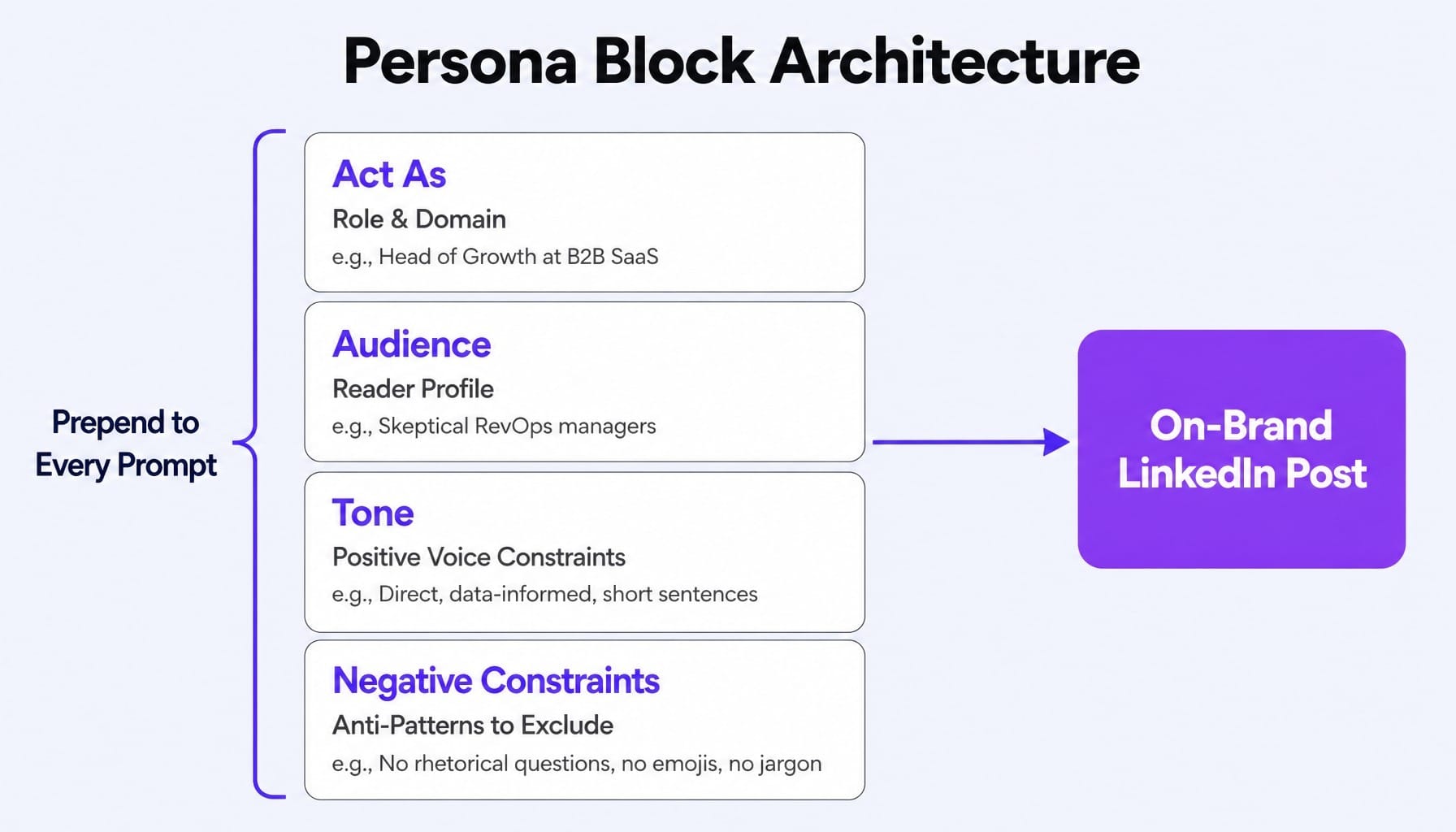
You can build a reusable persona block—a piece of prompt scaffolding you prepend to every request.
Example Persona Block:
Act as: A Head of Growth at a B2B SaaS company selling to RevOps leaders.
Audience: Technically-savvy RevOps and marketing ops managers who are skeptical of marketing fluff.
Tone: Direct, concise, and data-informed. Use short, declarative sentences. Avoid jargon like 'synergy' or 'leverage.' Ground all claims in specific revenue or pipeline metrics.
Negative Constraints: Never start a post with a rhetorical question. Never use the word 'landscape.' Never use emojis.
Adding this block transforms the output from a generic template into something that reflects a specific, credible point of view.
Few-Shot Examples: Feeding ChatGPT Your Best-Performing Posts
While persona injection defines your voice, few-shot prompting calibrates it. This technique involves giving ChatGPT 2-3 examples of your own high-performing LinkedIn posts as a reference. The model pattern-matches against these concrete examples far more accurately than it interprets abstract descriptions like 'professional but approachable.'
Practitioners who A/B test prompts often report dramatic differences: in one 12-post sequence, for instance, posts using zero-context prompts averaged under 800 impressions while those with structured prompts and few-shot examples averaged over 4,200.
The mechanics are simple:
- Find your top 3 posts by engagement from the last 90 days.
- Paste the full text into your prompt.
- Add the instruction: Match the tone, sentence length, and structural rhythm of these examples.
- Provide your new topic.
Your existing content is the best training data you have. Few-shot examples implicitly teach the model your preferred sentence length, paragraph cadence, and even punctuation habits, which is why poorly chosen examples can silently override explicit style instructions. For advanced users with access to the API, slightly lowering the output temperature can also help the model stick more closely to the provided examples.
15 ChatGPT Prompts for LinkedIn Posts That Drive Real Engagement
The following are copy-paste ready ChatGPT linkedin prompts, organized by the engagement mechanic they target. Each includes the [YOUR PERSONA BLOCK] placeholder so you can connect it to the framework above.
Storytelling and Narrative Post Prompts
These prompts are engineered to maximize dwell time. By opening with an unresolved story, they compel readers to scroll to the end, signaling high interest to the LinkedIn algorithm.
- The Lesson-from-Failure Post:
- The Behind-the-Scenes Decision Post:
- The Career Turning Point Post:
- The Counterintuitive Result Post:
- The Customer Story Post:
Insight and Framework Post Prompts
These formats are optimized for saves and shares. They deliver referenceable value that readers bookmark to revisit, building your authority on a topic. This is a core part of any linkedin content strategy.
- The Numbered List of Non-Obvious Lessons:
- The Mental Model Post:
- The Process Breakdown Post:
- The Comparison/Contrast Post:
- The Data-Backed Observation Post:
Contrarian and Opinion Post Prompts
These prompts are designed to generate high comment rates. They create productive disagreement, which the algorithm interprets as a strong engagement signal.
- The 'Unpopular Opinion' Post:
- The 'Stop Doing X' Post:
- The Industry Myth-Busting Post:
- The Prediction Post:
- The 'What Nobody Talks About' Post:
ChatGPT Prompts for B2B LinkedIn Marketing Tasks Beyond Posts
Effective LinkedIn marketing is a system, not just a series of posts. Most prompt lists stop at content creation, but ChatGPT can also automate the operational layer around it, like building a content calendar or executing content repurposing with AI.
Prompt for Building a Monthly LinkedIn Content Calendar
This prompt solves the "what do I post this month?" problem. By specifying your content pillars, you ensure the output is strategically aligned, not a random collection of topics that fragments your audience's perception of your expertise.
The Prompt:
You are a LinkedIn content strategist. Create a 4-week content calendar for me in a markdown table.
My Details:
- Content Pillars: [Pillar 1], [Pillar 2], [Pillar 3]
- Posting Frequency: [e.g., 3 times per week]
- Audience: [Your audience persona]
- Key Events: [e.g., 'Product launch on Week 3', 'Webinar on Week 4']
The table should have these columns: Date, Content Pillar, Post Format (Story, Insight, Contrarian, or Repurpose), and Hook Angle (A 1-sentence idea for the post's opening line).
Distribute the content pillars and post formats evenly across the month.
Prompts for Repurposing Blog Posts and Long-Form Content into LinkedIn Posts
This workflow enables content atomization, turning one asset into a week's worth of promotion. The key is the instruction to avoid summarizing, which prevents ChatGPT's default behavior of creating thin, low-value summaries.
The Main Repurposing Prompt:
I've written a blog post. Your task is to turn it into 4 distinct, standalone LinkedIn posts. Do not summarize the blog post. Instead, identify 4 different insights, arguments, or stories from the text and write each one as an independent post.
Post 1: A storytelling post based on an anecdote from the text.
Post 2: An insight post formatted as a numbered list of 3 key takeaways.
Post 3: A contrarian post that challenges a conventional idea mentioned in the text.
Post 4: A process breakdown post based on a how-to section.
Here is the blog post text:
[Paste the full text of your blog post here]
Bonus Prompt for LinkedIn Newsletters:
Prompt Chaining: How to Turn One Idea into a Week of LinkedIn Content
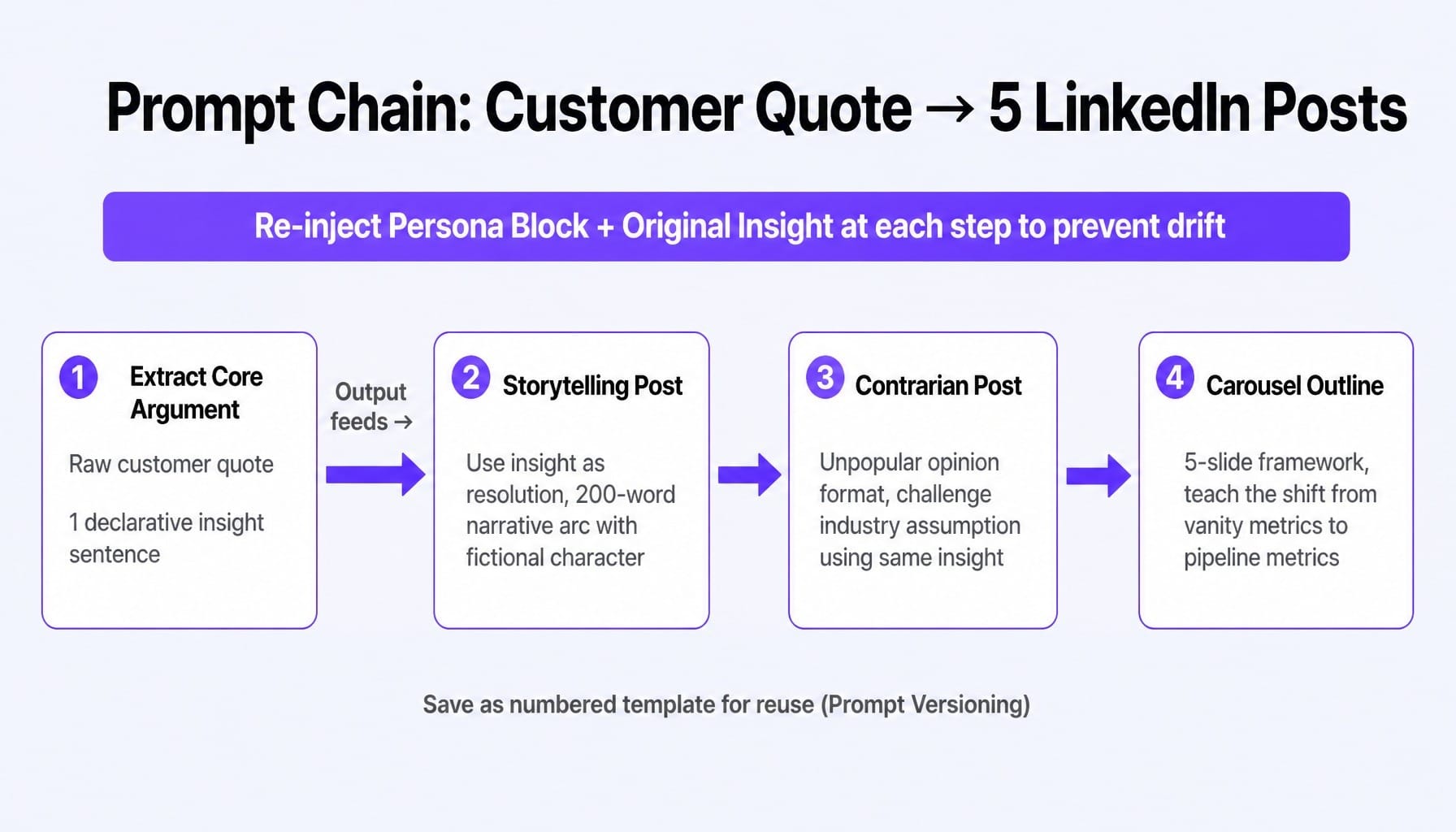
Prompt chaining is the technique that separates one-off prompt users from marketers building scalable content systems. Instead of starting from scratch for every post, you use a sequence of prompts where the output of one becomes the input for the next. This allows you to extract maximum value from a single core insight.
A 4-Step Prompt Chain from One Customer Insight to Five LinkedIn Posts
Imagine you just got off a call where a customer said, "We switched from Competitor X because their reporting was all vanity metrics. We had no idea what was actually driving the pipeline." That's a powerful insight. Here's how to chain it.
Step 1: Extract the Core Argument
Prompt:
Output: Many marketing teams are drowning in data but blind to the activities that actually generate revenue.
Step 2: Create a Storytelling Post
Prompt:
Step 3: Create a Contrarian Post
Prompt:
Step 4: Create a Carousel Outline
Prompt:
This chain demonstrates how a single customer quote can fuel an entire week of LinkedIn content—and the same approach works when you need to turn SaaS marketing metrics into audience-facing narratives.
Preventing Prompt Drift Across a Chain
A common frustration with prompt chaining is "drift"—as the conversation gets longer, the model's output can stray from the original intent and voice.
The solution is prompt drift correction: re-injecting your persona block and the original core insight at each step of the chain. Don't rely on the model's conversational memory alone. Custom GPTs can lose coherence over long conversations because user-turn context begins to outweigh system-prompt context in the model's attention, which means the most important constraints should be reinforced in the user prompt, not just the system prompt.
Treat effective chains as reusable assets. Save them as numbered templates—a practice known as prompt versioning—so you can refine and deploy them consistently without rebuilding them from scratch.
Building a Custom GPT as Your Persistent LinkedIn Content Co-Pilot
The logical endpoint of persona injection, few-shot examples, and prompt chaining is to build a custom GPT that permanently stores this context. This eliminates the need to re-enter your persona block or paste example posts in every session.
You can build this in the OpenAI GPT Store or use a similar feature like Projects in Claude (Anthropic). It becomes a co-pilot that already knows your voice, audience, and strategy.
How to Set It Up:
- Create a New GPT: Go to the GPT Store and click "Create a GPT."
- Configure the Instructions (System Prompt): Paste your full persona block, content pillars, and audience definition here. Add rules like Always write for LinkedIn and Keep posts under 250 words unless specified.
- Upload Knowledge Files: This is the critical step. Upload a document containing the full text of your 10 best-performing LinkedIn posts. This acts as a permanent few-shot reference. You can also upload your brand voice guide or product messaging docs.
- Save and Use: Now, instead of a long setup prompt, you can simply say, Write an insight post about the flaws in the traditional sales funnel. Your custom GPT already has all the context it needs to generate on-brand, structurally sound content.
This is the real efficiency gain. You move from having better individual prompts to having a persistent system, which you can complement with tools like Taplio or AuthoredUp for scheduling and formatting. For teams that also run paid campaigns alongside organic LinkedIn content, pairing this system with a LinkedIn Ads strategy ensures both channels reinforce the same messaging.
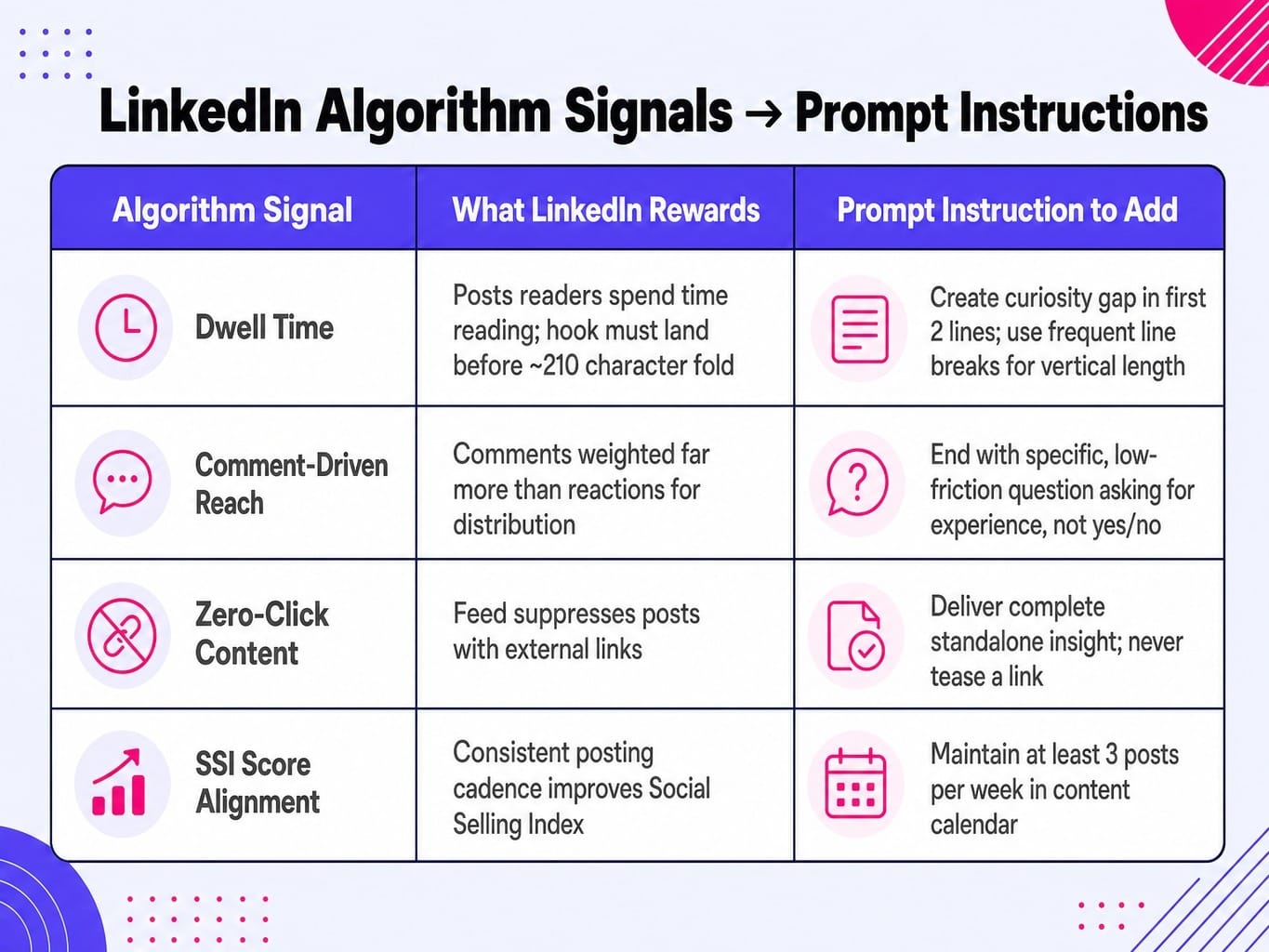
Tuning Your Prompts for LinkedIn's 2026 Algorithm Signals
Most prompt lists ignore the platform's distribution mechanics. To get ahead, you must translate LinkedIn's feed algorithm ranking factors into specific prompt instructions.
- Dwell Time: LinkedIn's algorithm rewards posts that people spend time reading. The "see more" fold on mobile truncates a post at roughly 210 characters, so your hook must land before that cutoff.
Prompt Instruction: Write the first two lines of the post to create a curiosity gap or open loop that is only resolved at the end of the post. Use frequent line breaks to increase the post's vertical length and encourage scrolling.
- Comment-Driven Reach: Comments carry significantly more distribution weight than reactions. Generic questions get generic answers (or none at all).
Prompt Instruction: End the post with a specific, low-friction question that asks the reader to share an experience or opinion, not a yes/no answer. For example, instead of 'Do you agree?', ask 'What's one vanity metric you've been forced to report on?'
- Zero-Click Content: LinkedIn's feed suppresses posts with external links. The most successful strategies deliver complete value within the post itself.
Prompt Instruction: The post must deliver a complete, standalone insight. Do not tease a link or direct the reader to an external blog post.
- SSI Score Alignment: Your Social Selling Index (SSI) is influenced by your activity and engagement. Consistent posting, which a content calendar prompt enables, is a key component.
Prompt Instruction: (Used in the calendar prompt) Ensure a consistent posting cadence of at least 3 times per week to support SSI score growth.
Read more: SaaS Social Media Marketing: A 5-Step Process to Drive Pipeline, Not Just Impressions | Spike AI
When Prompt Engineering Hits the Bandwidth Wall
You now have a complete system: a framework for persona injection, format-specific templates, prompt chaining workflows, a custom GPT setup, and algorithm-aware tuning. This is a sophisticated content engine.
But it's still an engine that requires your time to run. And it's competing for that time with everything else: optimizing your website, running ad campaigns, improving SEO, and fixing landing pages. The bottleneck isn't knowing what to do; it's the human bandwidth required to do it all consistently.
This is where you must decide where your personal expertise is irreplaceable. Your voice and insights on LinkedIn are unique. The continuous, technical optimization of your website is not.
Spike AI acts as the execution layer for that work. Every week, our platform identifies the highest-impact move across your website and search presence—fixing CRO issues, deploying technical SEO changes, optimizing page copy—and ships it. This frees you to redirect your limited bandwidth toward the high-leverage activities only you can do, like building the LinkedIn content system you just learned. You shouldn't be spending your prompting energy on website copy when a system can handle that continuously.
See how Spike AI handles the optimization work so you can focus on the content only you can create
Conclusion
The most important shift you can make is to see ChatGPT prompts for linkedin not as copy-paste shortcuts, but as architectural decisions. They determine whether your content sounds like you or like everyone else.
Generic prompts produce generic output because they give the model no constraints on voice, format, or audience. The framework this article provides—persona injection, few-shot grounding, format-specific templates, and prompt chaining—transforms ChatGPT from a content slot machine into a reliable extension of your thinking.
The marketers who will dominate LinkedIn in 2026 are not the ones who post most frequently, but the ones who build and refine reusable content systems that compound over time. Start with one persona block, one prompt chain, and one custom GPT. Then iterate weekly. The system itself becomes the growth engine.
Frequently Asked Questions
Should I use GPT-4o or GPT-5 for LinkedIn content?
GPT-5 generally handles nuanced tone calibration and longer chain-of-thought prompts more reliably, making it better for persona-injected LinkedIn content. GPT-4o is sufficient for straightforward single-prompt posts but can drift more in multi-step chains. If you are using custom GPTs with uploaded knowledge files, GPT-5's improved retrieval makes it the stronger choice.
How do I write ChatGPT prompts for LinkedIn carousel content?
Instruct ChatGPT to output a numbered slide-by-slide outline with a hook slide, 5-7 content slides each making one point in under 20 words, and a closing CTA slide. Specify that each slide must be self-contained, as carousels are scanned, not read sequentially. Use a tool like Canva AI to convert the text outline into visual slides.
Can ChatGPT write LinkedIn comments that actually build my network?
Yes, but the prompt must specify: add a specific observation that extends the original post's argument, keep it under 50 words, and never start with "Great post." Feed ChatGPT the original post text and your persona block, then ask for a comment that demonstrates expertise, not just agreement. This drives more profile visits than posting for most users.
How do I prevent my ChatGPT LinkedIn posts from sounding like AI wrote them?
Three techniques: (1) use few-shot examples from your own past posts so the model mirrors your actual voice, (2) add a negative constraint like 'Do not use the words leverage, landscape, journey, or delve,' and (3) always edit the output to replace one sentence with a specific experience only you would have. The goal is AI-assisted, not AI-generated.
What is the 4-1-1 rule on LinkedIn and how do I prompt for it?
The 4-1-1 rule suggests a ratio of 4 educational/entertaining posts, 1 soft promotion, and 1 hard promotion for every 6 posts. Build this into your content calendar prompt by specifying: 'Of the 12 posts this month, make 8 educational, 2 soft mentions of our product in the context of a lesson learned, and 2 direct value propositions with a CTA.'
How do I use LinkedIn analytics data to improve my ChatGPT prompts over time?
Pull your top 5 posts by impression-to-engagement ratio from Shield Analytics or LinkedIn's native analytics. Paste them into ChatGPT and ask: 'Identify the structural patterns these posts share—hook type, sentence length, format, topic category.' Use the output to refine your persona block and few-shot examples monthly, creating a feedback loop.