Hotjar Review 2026: Is It Worth It for B2B SaaS?

TL;DR
- Hotjar excels at collecting qualitative feedback through on-site surveys and polls, which are its most powerful and underrated features.
- For B2B SaaS sites with under 20K monthly visits, Hotjar's session caps and sampling limits on lower-tier plans can create misleading data, making free alternatives like Microsoft Clarity a better starting point for behavior tracking.
- The platform's biggest limitation for B2B is its inability to provide account-level insights. It shows you what anonymous users are doing, but not which companies they belong to.
- Hotjar's pricing is fragmented across three products (Observe, Ask, Engage). A meaningful plan for a mid-market team combining recordings and surveys will likely cost $150-$250/month, not the low entry price advertised.
- The core problem Hotjar surfaces but doesn't solve is execution. If your team lacks the bandwidth to act on the insights it generates, the tool becomes an expensive dashboard of problems you can't fix.
Imagine this: your three-person B2B SaaS marketing team installs Hotjar. Over the next week, you watch 50 session recordings. You see visitors scrolling right past your pricing section and rage-clicking a button that isn't clickable. The insights are interesting, for sure. But then… nothing happens. You don't know which accounts those visitors belong to, you can't prioritize what to fix first, and you don't have the bandwidth to implement changes anyway. The insight dies in a Slack thread.
This scenario gets to the heart of the question. Hotjar is one of the most popular behavior analytics tools on the market, but popularity and usefulness are not the same thing—especially for B2B teams.
This isn't just another Hotjar review listing features. We'll evaluate its capabilities, pricing, and limitations specifically through a B2B lens. We'll look at what's changed since the July 2025 Contentsquare acquisition and deliver a clear verdict on who should use it and who should skip it entirely.
What Hotjar Is Now (Post-Contentsquare Merger)
Hotjar is a behavior analytics platform that combines heatmaps, session recordings, surveys, and feedback widgets to show how users interact with a website. It's designed to answer the "why" behind user behavior, complementing quantitative tools like Google Analytics 4 that answer the "what."
A critical piece of context for 2026 is the July 2025 acquisition by Contentsquare. As a result, Hotjar's product and pricing are migrating toward Contentsquare's structure. The platform is now split into three distinct modules you pay for independently:
- Observe: Heatmaps and Recordings
- Ask: Surveys and Feedback
- Engage: Moderated User Interviews
The free "Basic" plan offers a taste of each, including up to 35 daily sessions for recordings and unlimited heatmaps. But for most B2B teams, the real value—and cost—lies in the paid tiers. The platform's goal is to provide a visual and qualitative layer on top of your existing analytics, helping you see your website through your users' eyes.
Hotjar's Core Features: What Actually Works and What Doesn't
Hotjar has more than eight distinct features, but only three categories truly determine whether it's a worthwhile investment: visual behavior tracking, user feedback collection, and conversion diagnostics. The other features, like the Engage module for user interviews, are secondary for most teams and won't be the primary reason you buy or skip the tool. Here's a breakdown of where Hotjar is genuinely strong, where it's merely adequate, and where it falls short for a serious B2B marketing team.
Heatmaps and Session Recordings: Strong for Pattern Recognition, Weak on Sample Size
Hotjar's heatmaps and session recordings are its most mature features and the main reason teams adopt it. Click maps, scroll maps, and dead click detection are genuinely useful for identifying friction patterns on high-traffic pages. The ability to generate retroactive heatmaps is a real advantage—you don't have to set them up in advance to see how users interacted with a page last week.
However, there's a critical limitation for B2B. On lower-traffic sites, heatmap data is often based on too few sessions to be statistically significant. A heatmap rendered from 200 visits over a month looks authoritative but represents noise, not a reliable signal. Session recordings are filterable by events like rage clicks and u-turns, which is helpful. But the reality is that most lean teams stop manually scrubbing through recordings after the first week. The initial novelty wears off, and the time-intensive process doesn't scale. These features provide a great qualitative pulse on user behavior, but produce misleading confidence on low-traffic B2B pages where every session counts.
Surveys and Feedback Widgets: Where Hotjar Genuinely Shines
This is Hotjar's most underrated capability and the strongest reason to consider the platform. The ability to trigger a survey based on exit intent, scroll depth, or a specific event—using CSS selector targeting—lets you ask users why they're leaving at the exact moment it matters most. For lean teams, the 42+ survey templates and AI-powered question suggestions are genuinely time-saving.
But there's a B2B-specific risk here: survey fatigue. A B2B site with 5,000 to 15,000 monthly visits often has a small, high-value, repeat-visitor audience. Showing the same feedback widget to a target account prospect on their third visit erodes the buying experience and can feel intrusive. While Hotjar's surveys are powerful, they require careful implementation of suppression selectors and trigger logic to avoid damaging the very B2B buyer journeys you're trying to improve. It's a sharp tool, but you have to wield it carefully.
Funnels and Form Analytics: Useful Starting Point, Not a Serious CRO Tool
Let's be direct: Hotjar's funnel and form analytics features are adequate for teams that have never tracked conversion paths before, but they are not competitive with dedicated product or conversion analytics tools.
The funnel tool is limited to 10 steps and uses session-based counting, not user-based. This means if a user leaves and comes back to complete a funnel, they're counted as two separate entries, which can skew your data. Furthermore, sampling kicks in when your traffic exceeds plan thresholds, meaning your funnel data may only represent a fraction of actual behavior.
For form analytics, Hotjar tracks around nine field-level metrics. It can show you which field has the highest drop-off rate, but it can't easily segment that data by traffic source or UTM parameter without a lot of manual attribution stitching. If a B2B team is trying to optimize a multi-step demo request form with conditional logic, Hotjar can't provide the granular, user-level insight needed to diagnose the problem effectively. If serious funnel and form optimization is your primary goal, Hotjar isn't the right tool for the job.
Read more: SaaS Marketing Metrics That Actually Inform Decisions (Not Just Dashboards) | Spike AI
The B2B Blind Spot: Why Hotjar Struggles With Account-Level Insights
Hotjar was designed for a B2C world where the unit of analysis is the individual, anonymous session. B2B buying is fundamentally different. The unit of analysis is the account.
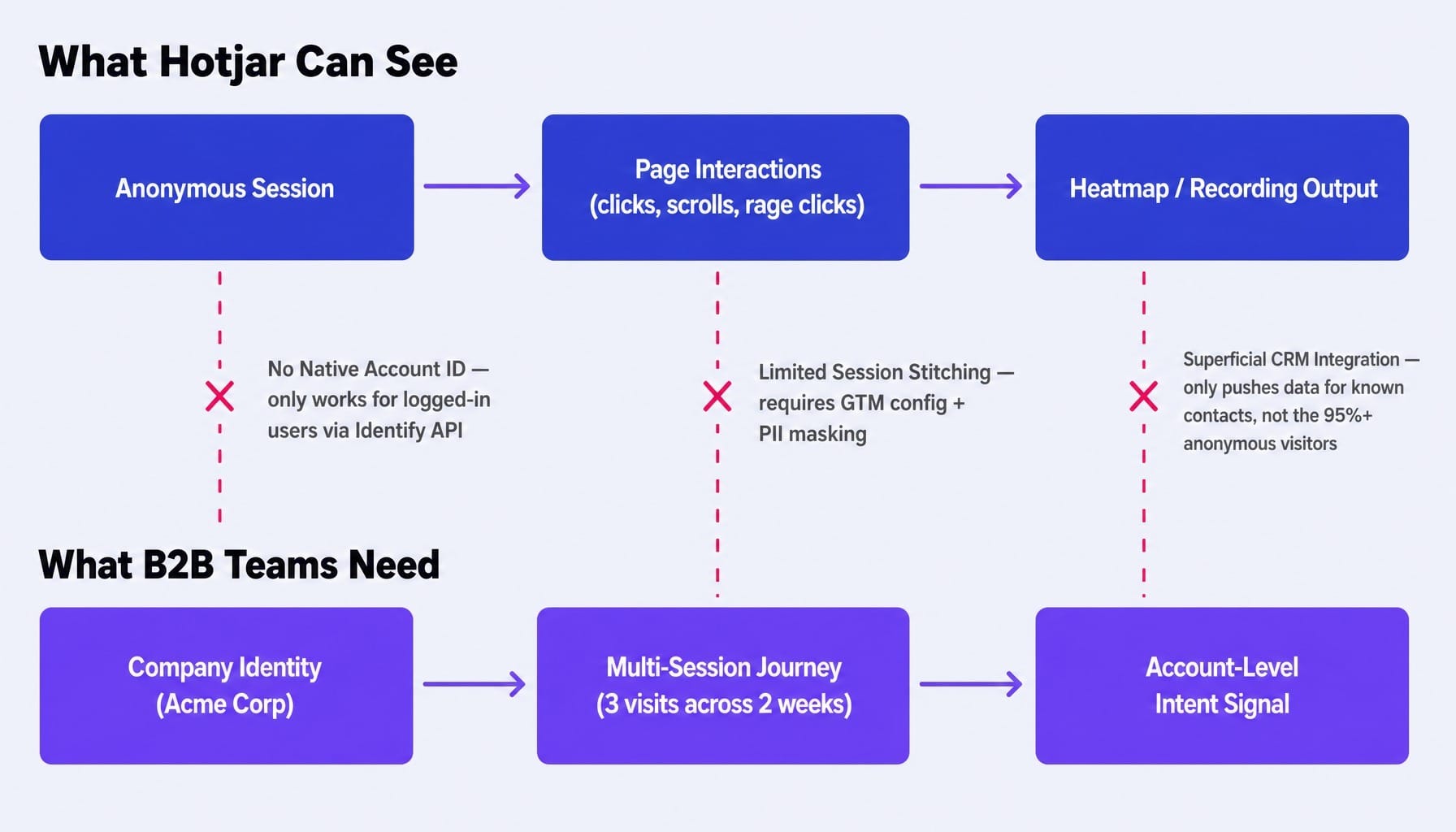
A B2B marketing team doesn't need to know that 'someone' rage-clicked on the pricing page. They need to know that three people from Acme Corp visited the pricing page this week, one of them watched the demo video, and none of them clicked 'Book a Call.' Hotjar cannot do this.
This isn't a minor gap; it's an architectural blind spot. Here are the specific technical limitations:
- No Native Account Identification: Hotjar does not natively identify visitors by company. While it offers an Identify API, this requires engineering resources to implement and only works for logged-in users. This excludes the vast majority of B2B website visitors who are anonymous prospects.
- Limited Session Stitching: Connecting a user's journey across multiple sessions and subdomains is technically possible, but it requires careful configuration in a GTM container and strict PII masking rules that most lean teams don't have the technical bandwidth to manage correctly.
- Superficial CRM Integration: Hotjar can push survey responses or recording links into a HubSpot contact record. This is useful for sales follow-up on known contacts. But for the 95%+ of your B2B traffic that is anonymous, it provides zero account-level intelligence.
Hotjar shows you what happened on your site, but it can't tell you who it happened to. And for a B2B marketer, that's often the only question that actually matters.
Hotjar Pricing: What You're Actually Paying For
Hotjar's pricing is split across three separate products—Observe (heatmaps and recordings), Ask (surveys and feedback), and Engage (user interviews)—and you pay for each independently. This fragmentation is a common complaint, and it's a legitimate one.
Here's a concise breakdown of the paid tiers:
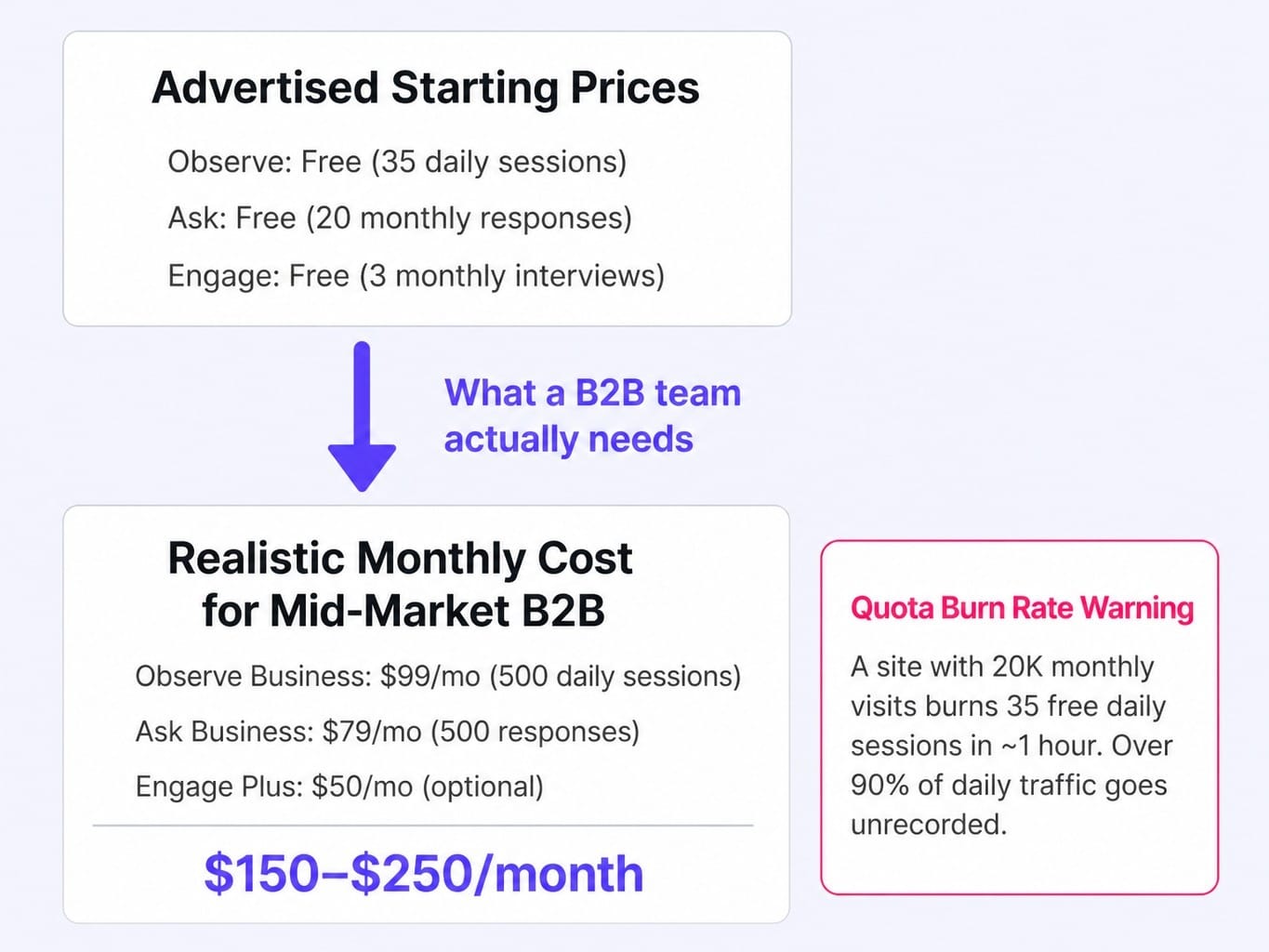
- Observe: Ranges from a free plan (35 daily sessions) to Business ($99/month for 500 daily sessions) and Scale ($213/month for more).
- Ask: Ranges from a free plan (20 monthly responses) to Business ($79/month for 500 responses) and Scale ($159/month).
- Engage: Has a free tier (3 monthly interviews) and a Plus plan at $50/month.
A mid-market B2B team wanting a meaningful number of recordings and surveys is realistically looking at a combined cost of $150-$250 per month, not the $0 or $39 figures emphasized on the marketing page.
Beyond the sticker price, you need to understand the quota burn rate. On the free and lower-paid plans, a B2B site with 20,000 monthly visits can burn through its 35 daily session recordings in the first hour of a busy day. This means over 90% of your daily traffic goes unrecorded, leaving you blind for most of the day and potentially missing key interactions from target accounts.
Hotjar vs. Microsoft Clarity vs. FullStory: Which One Fits Your Stack
The question every team evaluating Hotjar asks is: "Should I just use Microsoft Clarity for free, or do I need something more advanced like FullStory?" The answer depends on your traffic volume, analytics maturity, and whether you need qualitative surveys or just behavior tracking.
Here are the conditional verdicts:
- Choose Microsoft Clarity if... you just need free, unlimited heatmaps and session recordings. For core behavior tracking, Clarity has reached near-parity with Hotjar's Observe module and has no session caps, making it a better choice for low-traffic sites where capturing every session matters.
- Choose Hotjar if... you specifically need on-site surveys and feedback collection alongside recordings. The "Ask" module is Hotjar's key differentiator. This is the right tool if your site gets enough traffic (50k+ visits/mo) to make the data meaningful and surveys are a core part of your research workflow.
- Choose FullStory if... you need deeper, user-level identity resolution and have the budget for a true product analytics platform. If your primary goal is to understand the complete user journey and tie behavior to revenue, FullStory is the more powerful, albeit more expensive, option.
Read more: SaaS Marketing Tools in 2026: How to Build a Stack That Ships, Not Just Reports | Spike AI
When Hotjar Is the Right Tool—and When You Should Skip It
Hotjar is a good tool for the specific job it was designed to do: showing you how anonymous users interact with high-traffic web pages and collecting qualitative feedback through surveys. It is not a good tool for B2B teams that need account-level insights, statistically significant data on low-traffic sites, or a platform that moves from diagnosis to action.
Use Hotjar if:
- Your site gets 50,000+ monthly visits, providing a large enough sample size.
- You primarily need qualitative behavior data to complement GA4.
- On-site surveys are a core part of your research and CRO workflow.
- You have a dedicated CRO specialist who will watch recordings and act on findings weekly.
Skip Hotjar if:
- Your site gets under 20,000 monthly visits (session caps and sampling make the data unreliable).
- You need account-level or user-level identity resolution for B2B sales.
- You lack the bandwidth to translate insights into shipped changes.
- You're already using Microsoft Clarity and don't need surveys.
The ultimate disqualifying condition is execution capacity. If your team identifies problems with Hotjar but can't fix them, the tool becomes an expensive window into issues you can't solve. It generates guilt, not growth. For teams struggling with this B2B SaaS growth strategy gap, the bottleneck is rarely data—it's the ability to act on it.
What If Your Analytics Tool Actually Fixed What It Found?
This entire review highlights a fundamental tension: diagnostic tools like Hotjar show you what's broken, but they stop at the dashboard. The gap between "we can see the problem" and "we shipped the fix" is where most B2B SaaS marketing teams stall.
This is the exact gap Spike AI is designed to close. We don't just show you that visitors are dropping off; we identify the highest-impact fix, generate the optimized variant, and deploy it.
Where Hotjar tells you that visitors aren't scrolling past your hero section, Spike AI identifies that as the priority, proposes the change, and ships it—without an engineering ticket, without a two-week sprint cycle, and without the insight dying in a Slack thread. It's the difference between a tool that generates reports and a system that generates results.
See how Spike AI turns website insights into shipped fixes — every week.
Conclusion: Solving the Right Half of the Problem
Hotjar remains a capable qualitative analytics tool for teams with high traffic, dedicated CRO resources, and a specific need for on-site surveys. It does its job well.
But for many B2B SaaS teams—where traffic is modest, buyer journeys are complex, and the real bottleneck is acting on insights—Hotjar solves the wrong half of the problem. The value of any analytics tool isn't measured by the quality of its dashboards, but by the rate at which its insights become shipped changes on your website.
Before you invest in any behavior analytics tool, ask your team: how many insights from our current tools were actually implemented in the last 90 days? If the answer is less than five, your problem isn't a lack of data. It's a lack of execution.
Frequently Asked Questions
Does Hotjar slow down website performance and affect Core Web Vitals?
Hotjar's tracking script adds 150-250 KB of compressed JavaScript to your page load. On well-optimized sites, this has a measurable but modest impact on Largest Contentful Paint and Total Blocking Time. On single-page applications (SPAs), the impact can be more significant as the script re-initializes on virtual page transitions. Always test your site's performance with and without the script before committing.
How does Hotjar handle GDPR and privacy compliance in 2026?
Hotjar provides built-in consent management, automatic PII suppression (masking keystrokes and form inputs by default), and data processing agreements compliant with GDPR. You can also configure suppression selectors to mask specific page elements. However, you are still responsible for obtaining user consent via your own cookie banner, as Hotjar does not replace your consent management platform.
Can Hotjar identify individual users or accounts for B2B sales follow-up?
Only partially. Hotjar's Identify API lets you attach a user ID to sessions, but this requires engineering work and only applies to logged-in users. For the vast majority of anonymous B2B visitors, Hotjar provides no company-level identification. You would need a separate tool like 6sense or Clearbit for true account-level visitor intelligence.
Does Hotjar work reliably on single-page applications and React-based sites?
Hotjar supports SPAs, but with caveats. Heatmaps on dynamic pages require the SPA tracking snippet to fire on virtual page changes, and retroactive heatmaps can fail on very complex pages. Session recordings generally work but may miss state changes that don't trigger a URL update. Test thoroughly in your specific framework before relying on the data.
Is Hotjar Engage worth it for running moderated user interviews?
Hotjar Engage is a lightweight recruitment and scheduling tool. It's useful if you have no existing research workflow but is limited compared to dedicated platforms like UserTesting. For most B2B sites, the bigger issue is that site traffic is too low to recruit a meaningful number of interview participants through an on-site widget.