Instapage Review 2026: An Honest Breakdown for B2B Marketing Teams
TL;DR
- Instapage excels at creating message-matched landing pages at scale for paid ad campaigns, with a best-in-class builder and features like AdMap that directly improve ad-to-page relevance.
- The true entry point for any serious B2B team is the $199/month Optimize plan. The cheaper $99/month Create plan lacks A/B testing, the core reason to invest in a premium landing page platform.
- The platform's value is highest for teams running personalized ABM campaigns or high-volume Google Ads, where features like dynamic text replacement can justify the cost. It is overkill for simple, low-volume needs.
- The biggest limitation isn't a feature; it's the operational reality. Instapage provides the tools for optimization but not the system, leaving a continuous optimization gap that most lean teams struggle to fill.
- For teams spending over $10,000/month on ads, the potential conversion lift can make Instapage a profitable investment. For teams spending under $3,000/month, the math rarely works.
If you're searching for an instapage review, you've likely noticed a pattern. The top results are often written by competing landing page builders—Swipe Pages, SeedProd, and others—who have a direct financial incentive to highlight Instapage's flaws and steer you toward their own product. This isn't a secret; it's just how content marketing works.
But you deserve an evaluation that isn't funded by a competitor.
This review is different. We're assessing Instapage through the lens of a B2B marketing team running paid campaigns. We'll analyze it based on four criteria that actually matter in that context:
- Builder Quality & Workflow Speed: How fast can you get from idea to a live, message-matched page?
- B2B-Specific Fit: How well does it handle personalization, ABM, and CRM integrations?
- True Cost of Ownership: What's the real 12-month cost, including team time and feature-gated plans?
- The Optimization Gap: What happens after you hit publish?
This isn't about whether Instapage is generically 'good' or 'bad'. It's about whether it's the right system for your team's specific scale, ad spend, and operational capacity. Let's dig in.
What Instapage Genuinely Does Better Than Alternatives
Instapage has three distinct advantages that are not just marketing fluff. For teams running paid campaigns at any significant scale, these are genuine workflow accelerators that cheaper alternatives don't replicate.
First is the combination of its pixel-perfect builder and the Instablocks system. Imagine you're launching a Google Ads campaign with 15 distinct ad groups, each targeting a different user pain point. Building 15 unique landing pages in a typical CMS is a week-long project. With Instapage, you design a master template, save key sections as Global Blocks (like your header, footer, and testimonial section), and then you can rapidly assemble 15 variants. If you need to update a testimonial across all 15 pages, you edit the Global Block once, and it propagates everywhere. This is how you achieve true ad group level page segmentation without a developer on standby.
Second is its native focus on ad-to-page relevance through AdMap and dynamic text replacement (DTR). Strong message match between your ad copy and landing page headline directly impacts Google Ads Quality Score; a one-point QS lift can reduce CPC by over 10%. Instapage's AdMap feature provides a visual interface to connect each ad campaign or ad group to a specific page variant, ensuring the post-click experience is perfectly aligned. For a B2B SaaS team targeting eight different industries with the same product, this means each visitor sees a headline that mirrors the ad they clicked. This conversion delta between a generic page and a message-matched one is where Instapage's value is most tangible.
Finally, there's the collaboration layer. In many B2B teams, a landing page is touched by a designer in Figma, a copywriter in Google Docs, and a campaign manager in the ad platform. The handoff between these stages is pure friction. Instapage's real-time visual collaboration allows team members to leave comments and feedback directly on the page canvas, much like Figma. It eliminates the broken workflow of taking screenshots, marking them up, and sending them back and forth over Slack.
Where Instapage Falls Short—And What Reviews Funded by Competitors Won't Tell You Honestly
Instapage has real weaknesses, but competitor-written reviews often focus on the wrong ones. The goal here is to separate legitimate limitations from competitive fear, uncertainty, and doubt. The two biggest issues are the pricing structure and a few specific feature gaps that disproportionately affect B2B teams.
The Pricing Problem Is Not the Sticker Price—It's the Feature Gating
The most common complaint is that Instapage is expensive. That's not quite right. The real issue is that the features that justify its premium price are gated behind its more expensive plans.
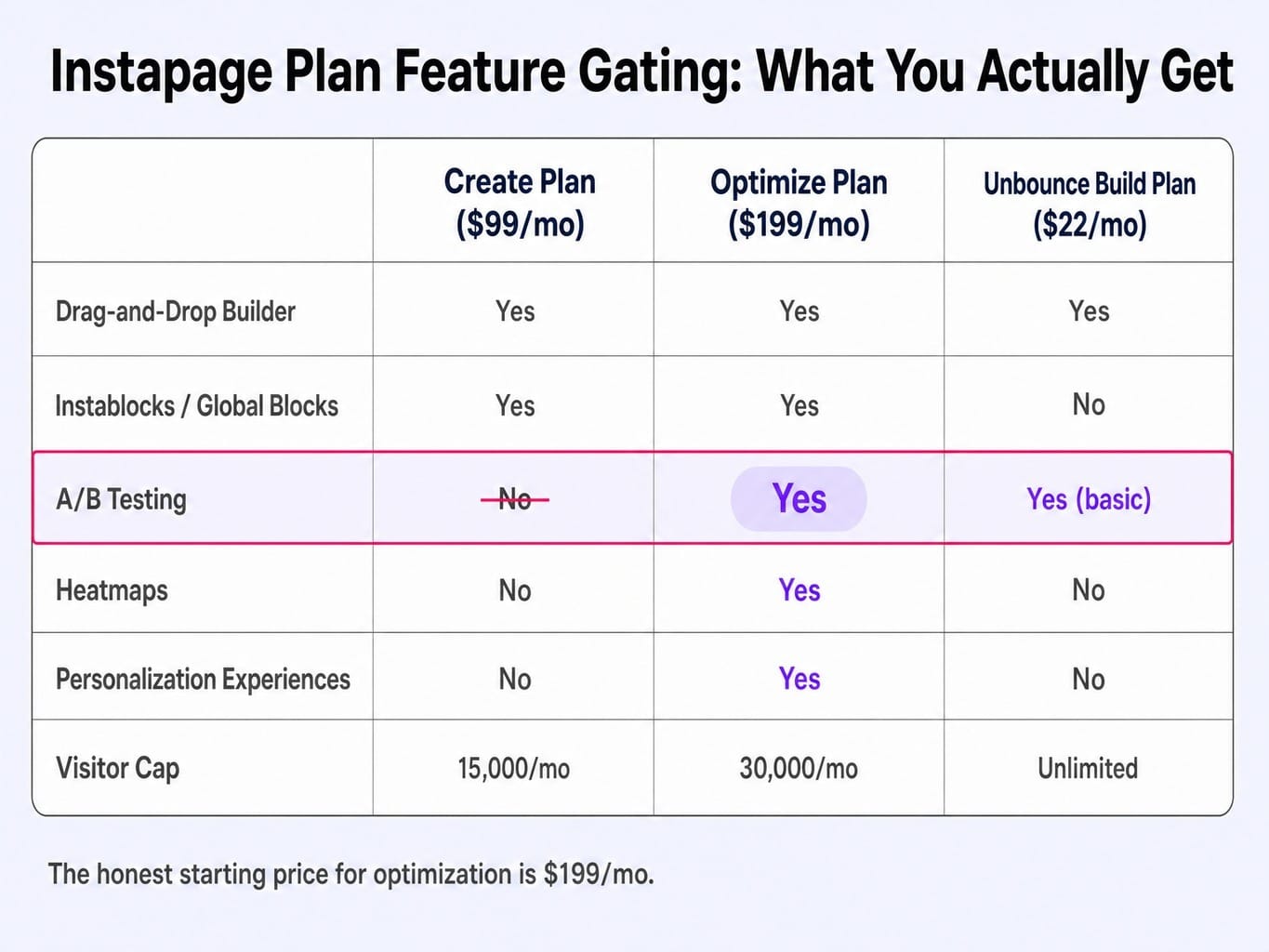
Let's be direct. The Create plan at $99/month ($79/mo annually) is a page builder. The Optimize plan at $199/month ($159/mo annually) is a landing page optimization platform. These are different products at different price points, and Instapage markets them as tiers of the same thing.
The Create plan does not include A/B testing or heatmaps. For any B2B team serious about performance, A/B testing isn't a "nice-to-have"; it's the entire point of using a dedicated landing page tool. If you're a three-person marketing team with a $5k/month ad spend, you'll sign up for the $99 plan only to discover you can't run a single split test without upgrading.
For a B2B team evaluating is instapage worth it, the honest starting price is $199/month. At that price, you get the core optimization suite. By comparison, Unbounce's entry-level "Build" plan is just $22/month and includes basic A/B testing. The pricing problem isn't the number; it's the mismatch between what the entry-level plan promises and what it actually delivers for performance marketing.
Read more: Unbounce vs Instapage (2026): A B2B Marketer's Honest Comparison After Using Both
Feature Gaps That Actually Matter for B2B Teams
Beyond pricing, there are three practical limitations that B2B teams will hit.
- Mobile Responsiveness Is a Manual Process. Unlike modern builders like Webflow that use responsive breakpoints, Instapage treats desktop and mobile as two separate layouts. This gives you pixel-perfect control, but it also means you have to build and adjust every page twice. If you're publishing ten or more pages a month, this effectively doubles your build time. It's a manageable frustration for a few pages, but a significant operational drag at scale.
- Low Visitor Caps on Entry Plans. The Create plan is capped at 15,000 unique visitors per month. For a B2B company with even a moderate paid social or display budget, it's surprisingly easy to hit this limit. The overage fees are steep, forcing another upgrade. This cap makes the entry-level plan unsuitable for anything beyond very small-scale or low-traffic campaigns.
- Page-Level Analytics Only. Instapage's built-in analytics are fine for tracking a single page's conversion rate. You can see that a page converted at 4.2%. But you can't easily see which ad group, keyword, or audience segment drove those conversions without integrating external tools. Achieving a true ROAS-to-landing-page correlation requires connecting data from Google Analytics 4, your CRM, and your ad platforms. The platform provides page-level conversion attribution, not full-funnel visibility.
Instapage for B2B: Where It Fits and Where It Doesn't
So, is instapage good for B2B? The answer depends entirely on your marketing motion. For some B2B use cases, it's a powerful asset; for others, it's expensive overkill. The platform's value proposition hinges on two factors: your use of personalization and the complexity of your martech stack.
Personalization and ABM: Instapage's Strongest B2B Case
Instapage's most powerful and underrated B2B feature is its personalization engine. It allows you to create different "Experiences" for a single landing page URL, dynamically swapping out headlines, images, testimonials, or even the form itself based on UTM parameters, geographic location, or referral source.
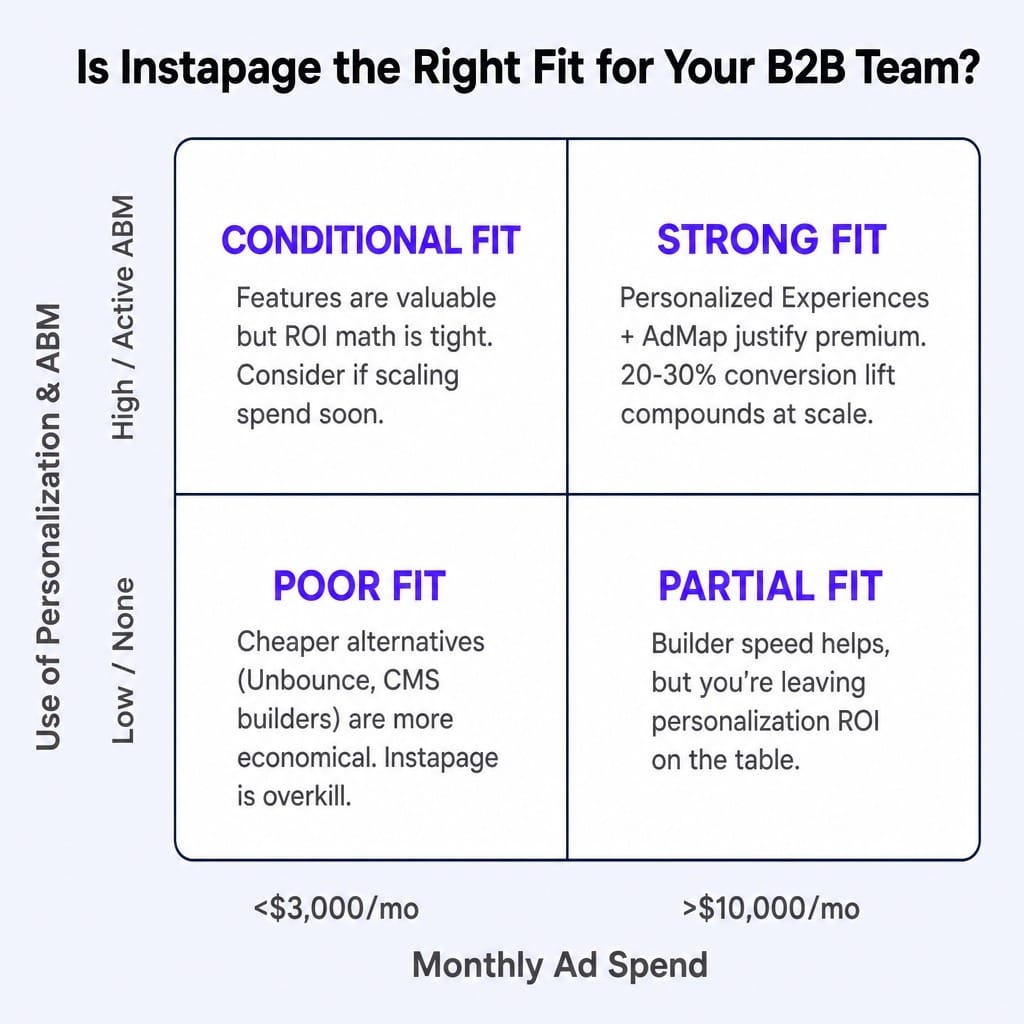
This is where the premium pricing starts to make economic sense. Consider an Account-Based Marketing (ABM) team targeting 50 enterprise accounts with LinkedIn Ads, where a single click can cost $50+. Using Instapage, you can create a unique Experience for each target account, greeting them by name and showing them a case study from their specific industry. The conversion lift from this level of personalization—often 20-30% over a generic page—can deliver a massive return on ad spend.
If your team is running sophisticated, personalized campaigns, Instapage provides a system for scaling post-click experiences that few competitors can match. If you're not using this feature, you're paying for a capability you're leaving on the table, and a cheaper alternative would likely suffice.
CRM and Marketing Automation Integration: What Actually Works
For B2B marketers, a landing page is just the start of a journey. The real work happens when lead data flows into a CRM like Salesforce or a marketing automation platform like HubSpot. So, how well does Instapage connect?
The answer is: it depends on your plan.
Instapage offers native integrations with both HubSpot and Salesforce, but there are caveats. The HubSpot integration on lower tiers reliably pushes new form submissions as contacts, but mapping to custom properties or triggering complex workflows can be finicky. The native Salesforce integration is primarily available on the high-end Convert plan; for most teams on the Optimize plan, the connection happens via a third-party tool like Zapier or a direct webhook.
The practical reality is that getting lead data from an Instapage form into your CRM with the correct source attribution, campaign tags, and lifecycle stage is entirely possible. But it's not always the seamless, one-click process you might expect on the sub-Enterprise tiers. You should assume some setup and testing will be required to get your experience mapping from ad-to-lead-to-CRM working perfectly.
The True 12-Month Cost of Instapage vs. Alternatives
Sticker price comparisons are misleading. The real question is the total cost of ownership (TCO) over 12 months, factoring in both the subscription fee and the value of your team's time.
Let's model four common scenarios for a team needing to build and test landing pages regularly:
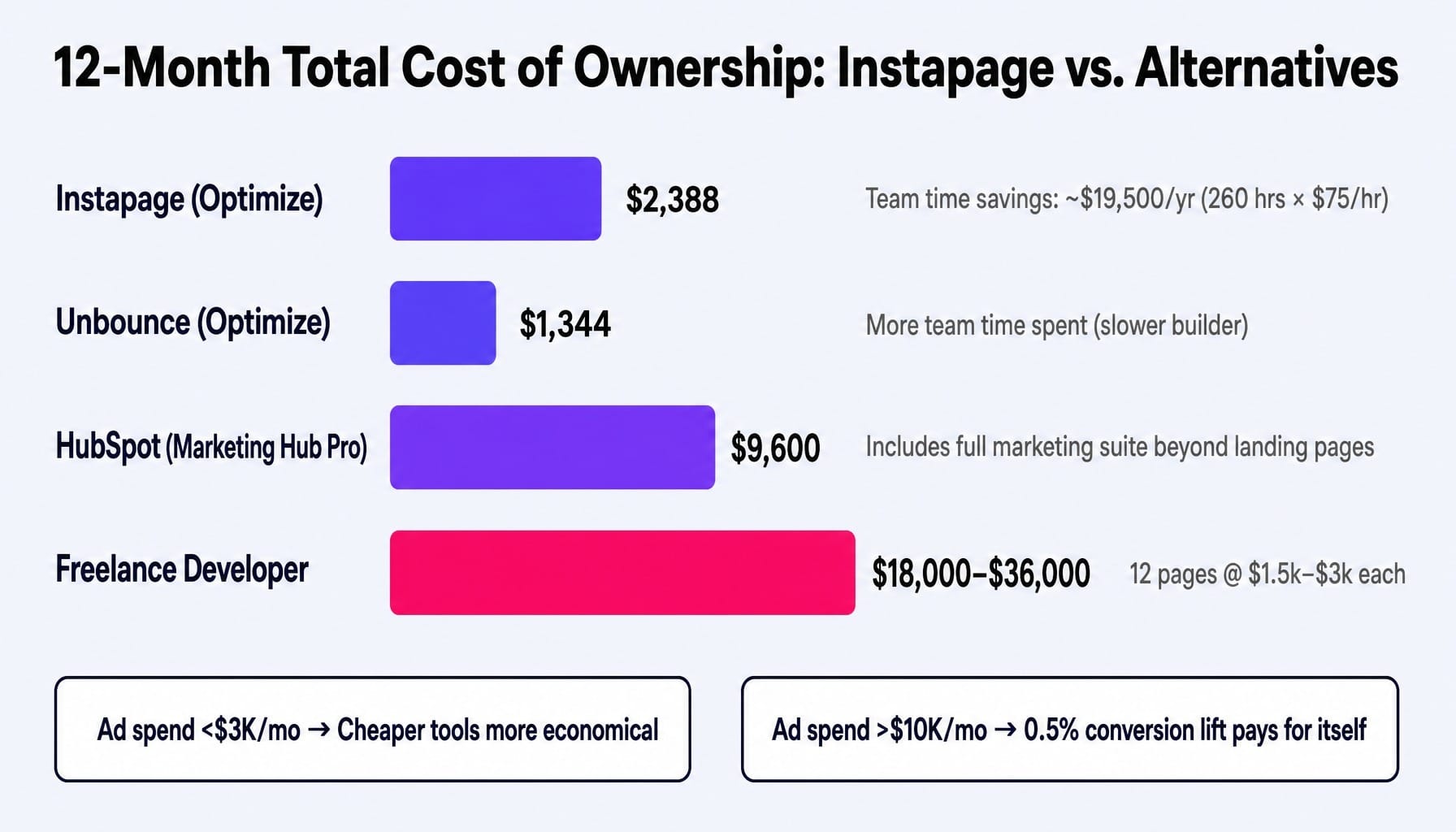
Now for the hidden variable: team time. If Instapage's faster builder and reusable Instablocks save your growth marketer 5 hours per week compared to a clunkier system or coordinating with a developer, that's 260 hours per year. At a loaded cost of $75/hour, that's $19,500 in recovered capacity.
This is where the ROI math becomes clear.
- If you spend <$3,000/month on ads: The potential conversion lift from Instapage's advanced features likely won't offset the $2,388 platform cost. A cheaper tool like Unbounce or your native CMS builder is more economical.
- If you spend >$10,000/month on ads: The math flips. A mere 0.5% improvement in conversion rate on $120,000 in annual ad spend generates $600 in savings if your CPL is $100. The platform quickly pays for itself.
Instapage isn't just "expensive"; it's a premium tool for teams operating at a scale where small conversion gains produce significant financial returns.
If you're weighing Instapage against other platforms for paid campaigns, our comparison of Instapage vs ClickFunnels breaks down the real differences in that context.
The Optimization Gap Instapage Doesn't Close
Here's the limitation that no instapage review talks about, because it's not a missing feature. It's a structural problem with how marketing teams operate. Instapage solves the page-building problem, but it leaves the continuous optimization problem entirely on your plate.
Consider this scenario: your team builds 12 excellent, message-matched landing pages in Instapage over a quarter. You even run A/B tests on three of them. A winner is declared for each.
Then what?
The pages sit. The next product launch takes priority. The next campaign demands new assets. Nobody goes back to re-test the winning variant from Q1 to see if it's still winning in Q3. The insights from one test aren't systematically applied to the other nine pages.
This is the post-launch optimization gap. It's where most of the compounding gains from conversion optimization are lost. Industry benchmarks show that average website conversion rates have stagnated around 2-3% for years, despite the widespread adoption of powerful tools like Instapage. Access to a tool doesn't guarantee an optimization outcome.
Instapage gives you a world-class workshop and all the tools you need to test. But it doesn't provide the system—the prioritization logic, the testing schedule, the analytical bandwidth—to run a continuous optimization program. That execution burden remains entirely with your team.
What Continuous Landing Page Optimization Actually Requires
The gap between having optimization tools and running an ongoing optimization program is where most lean teams get stuck. You have the builder, but you lack the execution bandwidth to continuously identify what to test next, deploy the change, and measure the impact across all your pages. The backlog of "should-test" ideas grows, but the number of shipped experiments doesn't.
This is a system problem, not a tool problem. Closing this gap requires an execution engine that runs independently of your team's day-to-day campaign workload.
Spike AI is designed to be that engine. It continuously analyzes your entire site—including landing pages built on any platform—to identify the highest-impact optimization opportunities available right now. It doesn't just give you a dashboard of suggestions; it prioritizes them by projected impact on qualified leads and revenue, and then executes the changes in weekly releases.
Where Instapage gives you the ability to build and test, Spike AI provides the persistent optimization system. It's the equivalent of having a dedicated CRO team that never stops testing, compounding small weekly gains into significant, measurable lifts over time. You get the benefit of a continuous optimization program without the manual overhead.
See how Spike AI continuously optimizes your pages — book a discovery call
Conclusion: Who Should (and Shouldn't) Buy Instapage in 2026?
Instapage is a powerful, specialized platform. Its value is not absolute; it's entirely conditional on your team's ad spend, testing maturity, and operational workflow.
You should seriously consider Instapage if:
- You spend over $10,000/month on paid ads and can benefit financially from incremental conversion lifts.
- You run complex paid search or ABM campaigns that require deep ad-to-page message matching and personalization.
- Your team's time is more valuable than the $199/month platform fee, and builder speed is a critical factor.
You should probably look at alternatives if:
- Your ad spend is low, and you just need a few simple landing pages.
- You don't have the bandwidth or intention to use A/B testing and personalization features.
- You're considering the $99/month Create plan. At that price, you're paying a premium for a builder without the optimization suite that makes Instapage unique.
For teams exploring what else is available, our guide to Instapage alternatives offers a practitioner's comparison of the leading platforms.
Ultimately, the teams that win with any landing page builder are those that treat optimization as a continuous system, not a one-time, launch-day activity. Instapage gives you an excellent set of tools for the job, but you still need to bring the system.
Frequently Asked Questions
What happens to my landing pages if I cancel my Instapage subscription?
Your pages go offline immediately. Instapage hosts all assets on its infrastructure, and there is no option to export functional HTML to self-host your pages. You can download page designs for reference, but this represents a significant vendor lock-in risk for teams with dozens of active pages.
Does Instapage still offer AMP landing pages, and are they worth using in 2026?
Instapage supports AMP pages via its Thor Render Engine, but their relevance has declined since Google removed AMP-specific search advantages. While AMP pages can load quickly on mobile, they restrict JavaScript, limiting form complexity and personalization. For most B2B use cases, a well-optimized standard page now offers a better balance of speed and conversion flexibility.
Does Instapage support server-side personalization for ABM campaigns?
Instapage's personalization is client-side, operating at the "Experience" level. It swaps page elements based on data passed in the URL (like UTMs) or browser-level information. This is highly effective for many ABM tactics but is not true server-side personalization, which modifies content based on firmographic data from a reverse-IP lookup before the page loads.
How fast do Instapage pages load compared to custom-coded landing pages?
Instapage pages are fast, typically passing Core Web Vitals and loading in under three seconds. However, a cleanly coded custom page built by a skilled developer will almost always have a faster Time to First Byte (TTFB) and Largest Contentful Paint (LCP) because it carries no platform overhead. The difference matters most on mobile-first campaigns where every millisecond counts.
Is the Instapage Enterprise (Convert) plan worth the upgrade over Optimize?
The Convert plan adds features for operational scale and governance: a dedicated success manager, custom integrations, audit logs, and guaranteed uptime SLAs. These are critical for large organizations managing 50+ pages across multiple business units with compliance needs. For a single marketing team, the Optimize plan contains all the core optimization features you'll actually use.
Can I use Instapage pages on my own domain and maintain SEO best practices?
Yes, Instapage supports publishing to a custom domain via a CNAME record, either on a subdomain (lp.yoursite.com) or in a subdirectory (yoursite.com/offers). For SEO, subdirectory publishing is generally preferred. However, since most Instapage pages are built for ephemeral paid campaigns and are often noindexed, SEO is typically a secondary concern to conversion performance.