SaaS Technical SEO: Why One-Time Audits Kill Growth & What to Ship Instead

TLDR
- Treat SaaS technical SEO as a continuous shipping discipline, not a one-time audit. The companies that win organic are the ones whose fixes ship at the same velocity as their product features.
- Client-side rendering (CSR) is the most common cause of missing pages. Use Server-Side Rendering (SSR) for dynamic content and Static Site Generation (SSG) for pages that change infrequently.
- Audit your crawl budget with log file analysis, not just Google Search Console. If more than 30% of Googlebot's requests hit non-indexable URLs (like /app/ or parameter-heavy URLs), you have a crawl budget problem.
- Use Edge SEO via Cloudflare Workers or Vercel Edge Middleware to ship technical fixes like redirects and hreflang tags at the CDN layer, bypassing engineering backlogs.
- Google replaced First Input Delay (FID) with Interaction to Next Paint (INP) in March 2024. Optimize INP by deferring chatbot scripts and moving complex pricing calculator logic off the main thread.
Your SaaS marketing team runs a technical SEO audit. You get a 47-item report from Screaming Frog, fix the critical items over two sprints, and then don't touch technical SEO again for eight months. During that time, your Next.js marketing site ships 30 new integration pages, three pricing experiments, and a docs restructure. Each release quietly introduces new crawl traps, orphan pages, and canonicalization signal conflicts. By the time you audit again, organic traffic has flatlined, and you blame 'the algorithm.'
This scenario is the default for most SaaS companies, and it's why their growth stalls.
SaaS technical SEO refers to optimizing the site architecture, rendering pipeline, and page performance of a software-as-a-service website so that search engines can efficiently crawl, index, and interpret its product pages, feature content, and conversion flows. What sets it apart from conventional technical SEO is its focus on JavaScript-rendered applications, subdomain architecture decisions, multi-region internationalization, and the goal of driving trial sign-ups and demo requests rather than e-commerce transactions.
But the real problem isn't the knowledge of what to fix. It's that teams treat technical SEO as a periodic audit rather than a continuous shipping discipline. Every product release and framework upgrade introduces technical debt. The companies that win are the ones who ship fixes at the same cadence they ship features.
This guide walks through the highest-impact SaaS-specific technical SEO issues, organized by symptom, likely cause, and fix. More importantly, it provides the operational model that prevents them from recurring.
Why SaaS Sites Accumulate Technical Debt Faster Than Any Other Category
SaaS websites generate technical SEO debt faster than e-commerce, media, or service businesses because every product release changes the crawlable surface of the marketing site. While an e-commerce site might add new products, a SaaS platform fundamentally alters its own structure with every sprint. This happens through three mechanisms unique to the SaaS model.
First, shared JavaScript frameworks between the product and marketing site mean rendering changes propagate silently. A migration to the Next.js App Router for the product dashboard can inadvertently break Server-Side Rendering (SSR) on the marketing site's feature pages. No one on the marketing team notices until organic traffic to those pages drops a month later.
Second, rapid page proliferation multiplies the crawlable surface area at an astonishing rate. Integration directories, comparison pages, use-case verticals, changelog entries, and help docs can take a site from 40 to 800+ indexable pages in 18 months. Each new page type introduces potential for index bloat, duplicate content, and poor internal linking.
Third, multi-team ownership means product, engineering, marketing, and docs teams all publish to the same domain, often without a shared technical SEO standard. The docs team implements a new search filter that creates a crawl trap, while marketing launches a campaign with unhandled UTM parameters.
The result is that technical SEO for a SaaS company is not a project. It's a maintenance discipline, just like code quality or security patching.
Read more: Marketing Task Prioritization for Lean Teams: A Framework That Actually Works
JavaScript Rendering: The Symptom Is Missing Pages, the Cause Is Your Build Pipeline
Client-side rendering (CSR) is the most common cause of SaaS pages failing to appear in Google's index. The common misdiagnosis is that Google "can't render JavaScript." The reality is that Google can, but its render budget is finite. It deprioritizes pages that require a second, resource-intensive crawl pass to render content, often leaving them un-indexed for weeks or months. Other crawlers, like Bingbot, ChatGPT-User, and Perplexitybot, are even less reliable at rendering JavaScript, making this a critical Answer Engine Optimization (AEO) issue as well.
The actual cause is rarely Google's capability but your build configuration. A minor change in a deployment can cause a Next.js or Nuxt.js application to silently fall back to CSR, serving an empty shell to search engine bots on their first visit.
Here's the 60-second diagnostic:
- Navigate to one of your marketing pages.
- Open Chrome DevTools (Cmd+Opt+I or Ctrl+Shift+I).
- Open the Command Menu (Cmd+Shift+P or Ctrl+Shift+P).
- Type disable javascript and press Enter.
- Reload the page.
If your core content disappears, search engines see that same empty page on their first pass.
SSR and SSG: Choose Based on Content Volatility, Not Framework Default
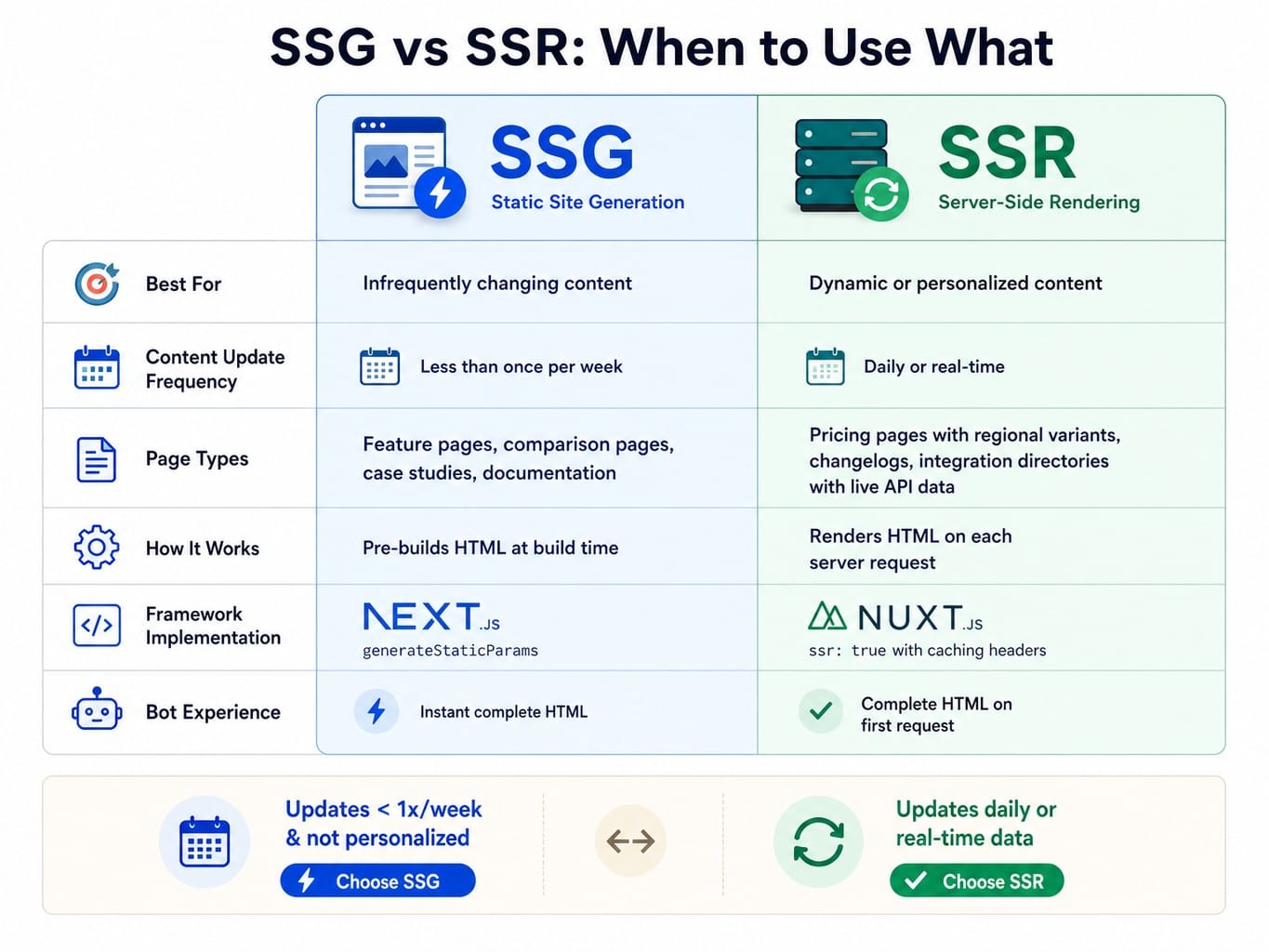
The choice between Server-Side Rendering (SSR) and Static Site Generation (SSG) should be driven by how frequently a page's content changes, not by your framework's default settings.
Static Site Generation (SSG) is the correct choice for feature pages, comparison pages, case studies, and documentation that change infrequently (e.g., monthly). SSG pre-builds the page into static HTML at build time, completely eliminating server-side render cost and ensuring bots get instant, complete content. In Next.js, this is achieved using generateStaticParams.
Server-Side Rendering (SSR) is necessary for pages with content that updates often or is personalized. This includes pricing pages with dynamic regional variants, changelogs that update with every release, or integration directories pulling from a real-time API. For Nuxt.js, this means ensuring ssr: true is configured with appropriate caching headers to balance freshness and performance.
The rule of thumb: If the page content updates less than once a week, use SSG. If it updates daily or pulls real-time data, use SSR.
Dynamic Rendering as a Temporary Fix—and When to Stop Using It
What if a full migration to SSR requires engineering resources you don't have? Dynamic rendering—serving pre-rendered HTML to bots while serving CSR to users via a service like Prerender.io—is a legitimate interim fix. It gets your content indexed while you plan a proper architectural change.
But here lies the trap: many teams deploy a dynamic rendering service and then never complete the migration to SSR because the "fix" removed the urgency. This is a mistake. Dynamic rendering introduces its own complexity, primarily around cache invalidation. If your pre-rendered cache isn't properly refreshed when content changes, search bots will see stale, outdated versions of your pages.
The heuristic: Use dynamic rendering for no more than one quarter while you scope and prioritize the SSR migration. If it's been six months and you're still relying on Prerender.io, you haven't fixed the problem; you've just created a new, more opaque layer of technical debt.
Index Bloat and Crawl Traps: How SaaS Freemium Flows and Parameter URLs Waste Your Crawl Budget
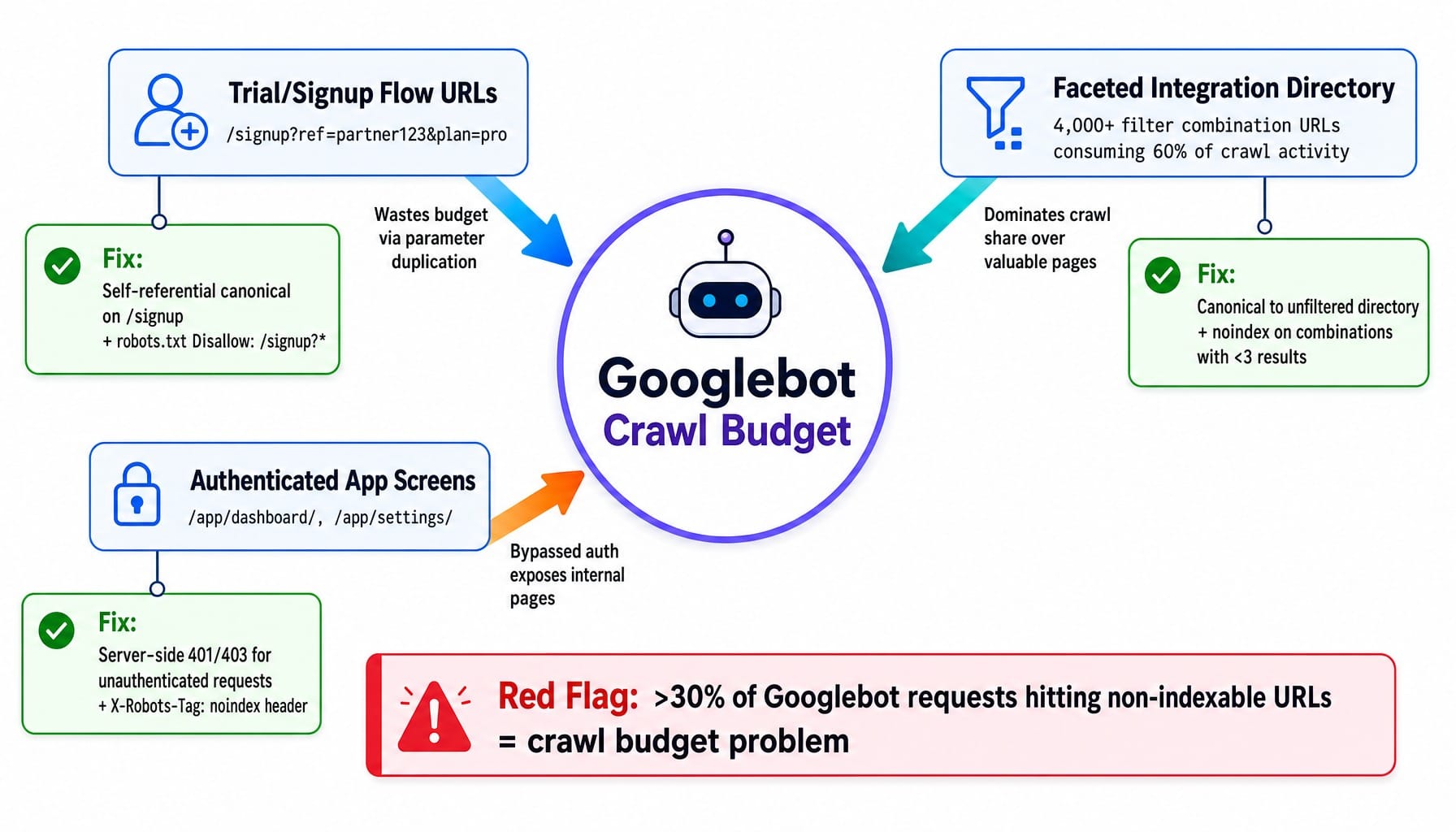
SaaS companies with freemium signup flows face a distinct index bloat problem: every trial signup URL, onboarding step, and authenticated dashboard screen that leaks into Google's index wastes crawl budget and dilutes the site's quality signal. These are crawl traps that consume bot resources without providing any value to search users.
Here are three SaaS-specific patterns to audit:
- Trial/Signup Flow URLs with Parameters: URLs like /signup?ref=partner123&plan=pro create a unique indexable URL for every parameter combination. This is a classic source of duplicate content and crawl waste.
Fix: Implement a self-referential canonical tag on the clean /signup URL. Then, use robots.txt with regex-based disallow rules (e.g., Disallow: /signup?) to prevent bots from crawling the parameterized versions in the first place.
- Integration Directory Faceted Navigation: A SaaS platform with 200 integrations and 5 filter categories (e.g., industry, pricing, rating) can generate thousands of unique filter combination URLs. If your integration directory for a tool like Salesforce generates 4,000+ URLs that consume 60% of Googlebot's activity, your valuable feature pages are being neglected.
Fix: Set canonical tags on all filtered views to point back to the main, unfiltered directory page. Alternatively, apply a noindex tag to filter combinations that yield fewer than three results to avoid indexing thin content pages. This is called facet crawl path pruning.
- Authenticated App Screens: It's common for SaaS products to use client-side authentication checks that Googlebot can bypass, leading to dashboard or settings pages getting indexed.
Fix: Implement server-side authentication checks that return a 401/403 status code for unauthenticated requests, or apply an X-Robots-Tag: noindex HTTP header to all authenticated routes.
Note that Google deprecated the URL Parameters tool in Search Console, so relying on canonical tags and robots.txt is now the only way to manage this.
Auditing Crawl Budget Waste with Log File Analysis
Google Search Console's coverage report is insufficient for diagnosing crawl waste. It shows you what's indexed or excluded, but it doesn't show you what's being crawled unnecessarily. For that, you need log file analysis.
Using a tool like Screaming Frog SEO Spider's Log Analyzer, Botify, or Lumar, you can see the exact distribution of Googlebot's requests across your entire URL space.
The diagnostic: Segment your server log files by URL pattern. Compare the percentage of Googlebot hits to /app/, /dashboard/, and parameter-heavy URLs versus valuable paths like /blog/, /features/, and /integrations/.
The threshold: If more than 30% of Googlebot's requests are hitting non-indexable or low-value URLs, you have a significant crawl budget problem. The fix involves aggressive robots.txt disallow rules and pruning internal links that point to these wasteful paths.
Site Architecture: Subdomains vs. Subdirectories and the Four-Cluster Model
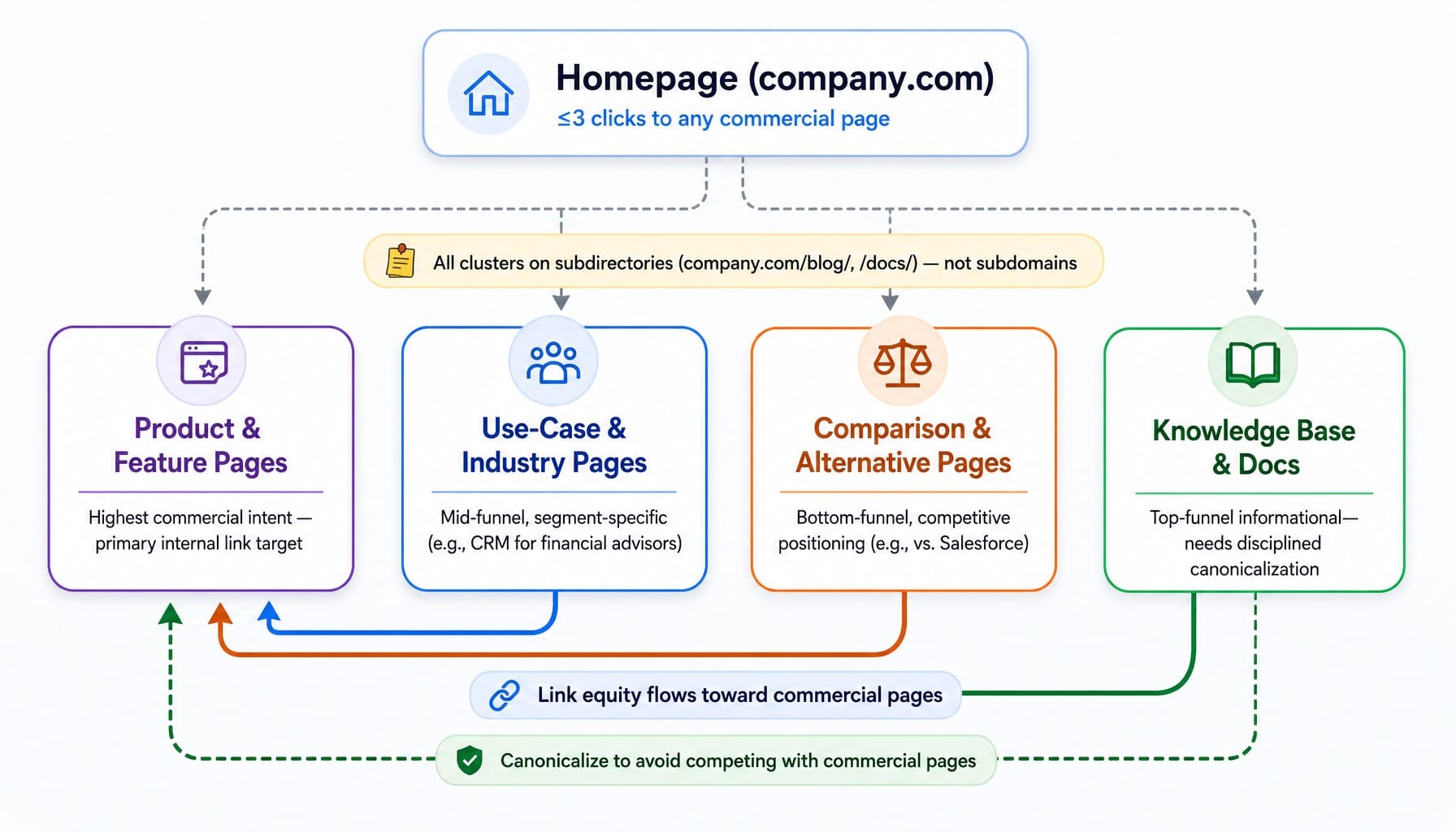
SaaS companies should host their blog, docs, and resource library on subdirectories (company.com/blog/) rather than subdomains (blog.company.com). Subdirectories consolidate link equity and topical authority under a single, stronger domain.
While Google officially states that its systems handle both equally, years of practitioner experience show that migrating content from a subdomain to a subdirectory consistently produces a measurable lift in organic traffic. When a SaaS site has 50 high-quality referring domains pointing to its blog content, that authority should support the entire domain, not just a separate subdomain.
Beyond the subdomain debate, a strong SaaS site architecture follows a four-cluster model:
- Product & Feature Pages: Highest commercial intent. These should have clean URLs and be the primary target of internal linking from other clusters.
- Use-Case & Industry Pages: Mid-funnel content targeting segment-specific problems (e.g., "CRM for financial advisors").
- Comparison & Alternative Pages: Bottom-funnel content for competitive positioning (e.g., "vs. Salesforce").
- Knowledge Base & Docs: Top-of-funnel informational content. This cluster can generate significant traffic but requires disciplined canonicalization to avoid competing with commercial pages.
The structural rule: Every important commercial page should be reachable within three clicks from the homepage. Internal linking should strategically flow from informational content (docs, blog) toward commercial pages (features, pricing), not the other way around.
Read more: Data-Driven CRO Strategies: Identifying Marketing Opportunities for True Conversion Optimization
Edge SEO: Ship Technical Fixes at the CDN Layer Without Engineering Sprints
Edge SEO is the practice of implementing technical SEO changes—redirects, hreflang tags, canonical tags, and security headers—at the Content Delivery Network (CDN) layer using serverless functions, without modifying the application codebase.
This is where the thesis of this article becomes actionable. Most marketing teams identify fixes but can't ship them because every change requires an engineering ticket, a sprint slot, and a 2-6 week deployment cycle. Edge SEO bypasses this bottleneck entirely.
Here are three specific use cases:
- Redirect Management: A marketing team can use Cloudflare Workers to implement 200+ redirects for a rebrand in a single afternoon, without touching the application server or waiting for a three-week engineering sprint.
- Hreflang Injection: For a multi-region SaaS site, Vercel Edge Middleware can dynamically inject the correct hreflang tags based on URL patterns, eliminating the need to hardcode them into every page template.
- Structured Data Injection: If your CMS doesn't support custom schema, you can use an edge function to inject SoftwareApplication or FAQPage schema into the <head> of pages as they are served from the CDN.
Edge SEO is a powerful deployment mechanism for additive changes, but it is not a rendering solution. It should not be used to modify core page content or as a substitute for proper SSR.
When Edge SEO Creates New Problems
The power of Edge SEO also introduces a risk: it can create a "shadow configuration" layer. Redirects and canonical rules exist at the CDN but are not reflected in the application's codebase or CMS. This can lead to conflicts. For example, a Cloudflare Worker might inject a canonical tag pointing to /features/analytics while the application template simultaneously sets a self-referential canonical on a parameterized version of that same page.
The operational rule: Maintain a single source of truth document mapping every edge SEO rule. Review this document before every major deployment, and use a real-time monitoring tool like ContentKing or Lumar to send alerts on any canonicalization signal conflicts.
Structured Data for SaaS: What Schema Types Actually Earn Rich Results and AI Citations
SaaS companies should implement SoftwareApplication, Organization, Article, FAQPage, BreadcrumbList, and HowTo schema. However, it's crucial to understand that structured data alone will not magically improve rankings or guarantee AI Overview inclusion.
Many teams fall into an over-optimization trap, spending weeks implementing elaborate schema graphs when the same effort spent on rendering fixes or internal linking would produce far more impact.
Focus on this priority order:
- Organization Schema: This is the foundation for entity recognition. Include sameAs links to your company's LinkedIn, Crunchbase, and any Wikipedia/Wikidata entries. This helps both Google and LLM-based search systems like Perplexity understand who you are.
- SoftwareApplication Schema: Apply this to your main product and pricing pages. Include properties like applicationCategory, operatingSystem, and offers to define your product.
- FAQPage Schema: Use this only on pages with genuine, visible FAQ content.
- Article and BreadcrumbList Schema: These can typically be implemented at the template level for site-wide coverage.
As Fabrice Canel of Microsoft stated, schema helps LLMs understand content structure, which is critical for citation in AI-generated answers. Validate your implementation using Google's Rich Results Test and reference the official Schema.org documentation.
Migration Planning: How to Replatform a SaaS Marketing Site Without Losing Organic Traffic
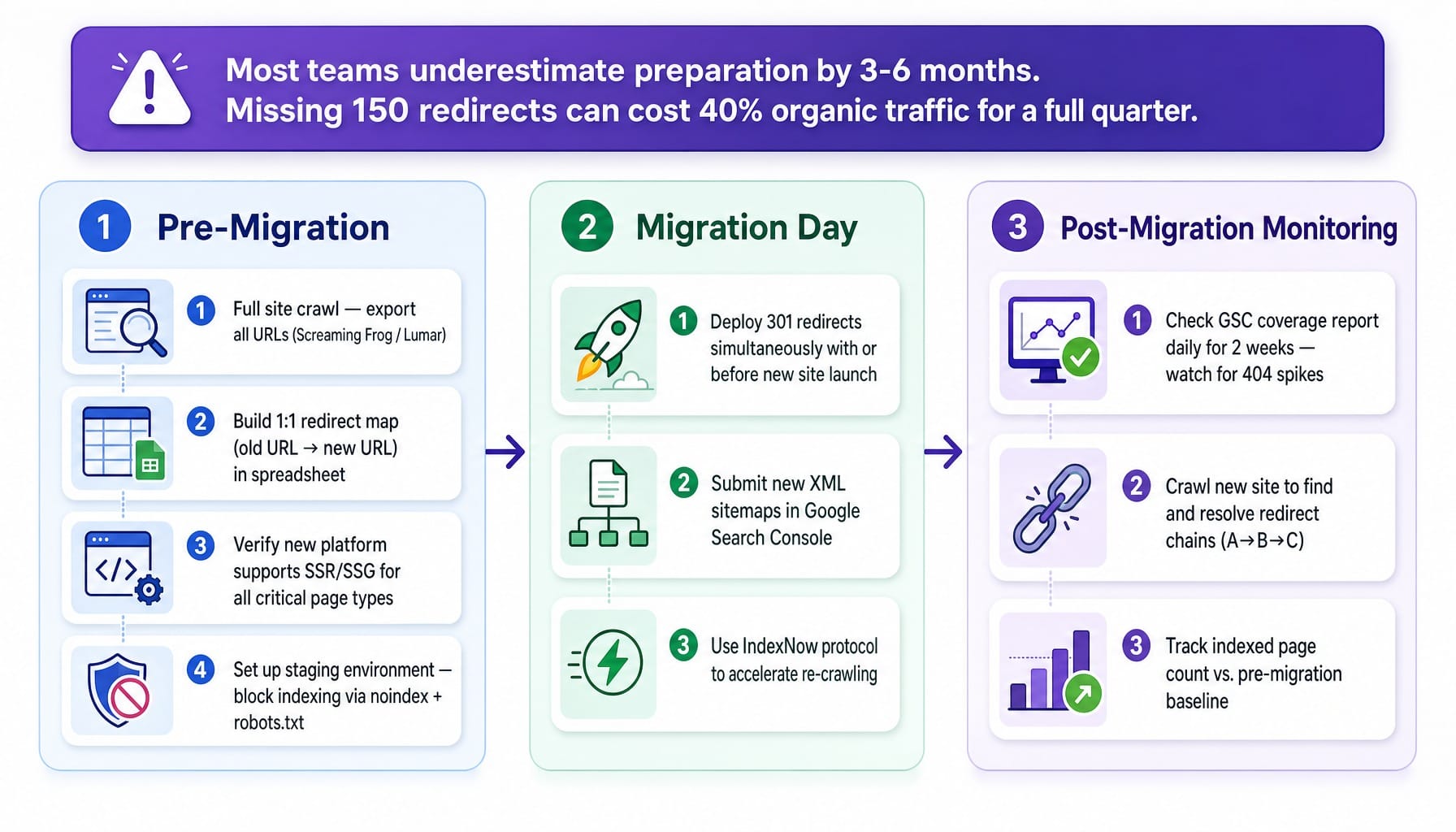
SaaS site migrations—from WordPress to a headless CMS, from a monolithic app to a separated marketing site, or a domain change during a rebrand—are the single highest-risk technical SEO event a company faces. Most teams underestimate the required preparation by 3-6 months. A SaaS company migrating from WordPress to Next.js that forgets to redirect 150 blog URLs can lose 40% of its organic traffic for a full quarter.
Follow this three-phase framework to de-risk your next migration:
- Pre-Migration:
Crawl the existing site with Screaming Frog or Lumar and export all URLs.
Build a 1:1 redirect map from every old URL to its new equivalent in a spreadsheet.
Verify the new platform supports SSR or SSG for all critical page types.
Set up a staging environment and ensure it is blocked from indexing via noindex tags and robots.txt to prevent staging environment leakage.
- Migration Day:
Deploy the 301 redirects either simultaneously with or immediately before the new site goes live.
Submit your new XML sitemaps in Google Search Console.
Use the IndexNow protocol to signal the changes to search engines and accelerate re-crawling.
- Post-Migration Monitoring:
Check the GSC coverage report daily for the first two weeks, looking for a spike in 404s or soft 404s.
Crawl the new site to identify and resolve any redirect chains (e.g., URL A -> URL B -> URL C).
Track your indexed page count and compare it to the pre-migration baseline.
Core Web Vitals for SaaS: INP Is the Metric You're Probably Ignoring
Any guide still referencing First Input Delay (FID) is outdated. Google replaced FID with Interaction to Next Paint (INP) as a Core Web Vital in March 2024.
INP measures the total latency between a user interaction (a click, tap, or keypress) and the next visual update on the screen. A good INP is under 200 milliseconds. SaaS marketing sites often struggle with this metric due to interactive elements:
- Pricing calculators with complex JavaScript logic.
- Demo request forms with real-time field validation.
- Embedded chatbot widgets that block the main browser thread.
- Interactive product tours.
The diagnostic workflow: Run a performance audit in Chrome DevTools Lighthouse and look at the INP score. If it's over 200ms, use the Performance panel to identify which interactions are slow. A common culprit is a pricing calculator that scores 450ms INP because all its calculation logic runs on the main thread.
Common fixes:
- Defer non-critical JavaScript like chatbot widgets and analytics scripts.
- Move heavy computations for pricing calculators to a Web Worker.
- Lazy-load interactive elements that appear below the fold.
Don't forget that Time to First Byte (TTFB) at the origin vs. the edge also contributes to overall latency.
What If Technical SEO Fixes Shipped Every Week Without an Engineering Ticket?
This guide has built a specific tension: SaaS technical SEO is not a one-time audit but a continuous shipping discipline. Yet, most marketing teams are 1-5 people who cannot maintain this cadence on top of content, ads, and product launches. You now know that rendering regressions, crawl traps, and migration errors are constantly accumulating. But who has the bandwidth to fix them?
The Edge SEO section showed that fixes can be deployed without engineering, but someone still needs to identify, prioritize, and implement them every single week.
This is the execution gap Spike AI was built to close.
Spike AI is the system that continuously identifies the highest-impact technical SEO fix across your site—whether it's a new canonical conflict, a crawl trap from an integration page, or a rendering regression after a deployment. Then, it ships that fix as part of a weekly release cadence.
The article argued that technical SEO compounds when shipped continuously. Spike AI is the mechanism that makes that continuous shipping cadence possible for lean teams without a dedicated technical SEO specialist. It turns your backlog of technical fixes into a weekly rhythm of shipped improvements that compound over time.
See how Spike AI identifies and ships your highest-impact technical SEO fixes weekly
Conclusion
SaaS technical SEO is not a checklist you complete; it's a shipping discipline you maintain. Every section of this article—from JavaScript rendering to crawl budget to migration planning—shares a common pattern. The fix itself is often straightforward, but the real challenge is shipping it before the next product release introduces a new problem.
The companies that win organic are not the ones with the cleanest audit reports. They are the ones whose technical SEO fixes ship at the same velocity as their product features. The compounding interest on weekly fixes will always outperform the heroic effort of a quarterly audit.
So, audit your site today using the diagnostics in this article. But more importantly, ask yourself: do you have a system for shipping the fixes you find, or will they sit in a backlog until the next audit?
Frequently Asked Questions
How do you handle canonical tags when SaaS pricing pages have regional variations?
Each regional pricing page (e.g., /pricing/us/, /pricing/eu/) should have a self-referential canonical tag. The content (currency, features) is genuinely different, so they are not duplicates. Pair this with correct hreflang return tags linking each regional variant to the others. Canonicalizing all regional pages to a single /pricing/ URL is a mistake that suppresses local versions from SERPs.
Should SaaS companies allow AI crawlers like Perplexitybot and ChatGPT-User in robots.txt?
Yes, unless you have a specific reason to block them. These crawlers drive discovery and citation in AI-generated answers where buyers research solutions. Blocking them removes you from the conversation. The exception is blocking specific paths, like proprietary documentation, if you don't want that content summarized by third-party AI systems.
How often should a SaaS company run a full technical SEO crawl?
Run a full site crawl with a tool like Screaming Frog or Lumar at least monthly to catch structural issues. More importantly, use a real-time monitoring tool like ContentKing to detect regressions between crawls. If your engineering team deploys multiple times a week, real-time monitoring is the only way to catch a stray noindex tag before it impacts your indexation.
How should SaaS companies structure programmatic landing pages without triggering thin content penalties?
Each programmatic page (e.g., /integrations/salesforce/) must contain unique, substantive content. Add integration-specific use cases, configuration steps, or customer testimonials. If you cannot add at least 200 words of genuinely unique value per page, consolidate them into a single directory with filters instead of creating thousands of thin, individual URLs.
What is the difference between a soft 404 and a real 404, and why does it matter for SaaS sites?
A soft 404 is a page that returns a 200 OK status code but shows a "not found" message or has no content. SaaS sites generate these when features are deprecated or dynamic content fails to load. Unlike real 404s, soft 404s waste crawl budget because Google keeps re-crawling them expecting to find content. Fix them by ensuring your server returns a proper 404 or 410 status code for genuinely removed pages.