Is Screaming Frog Worth It in 2026? A Practitioner's Honest Review

TL;DR
- For Power Users, It's Unbeatable: Screaming Frog's granular crawl configuration, custom extraction, and API integrations provide a level of control that no cloud crawler matches at its price point.
- The Desktop Ceiling Is Real: The tool is limited by your local hardware. For sites over 500K URLs or agencies running parallel crawls, its desktop architecture becomes a significant operational bottleneck.
- The License Is Worth It (If You're a Practitioner): The free 500-URL limit is useful for spot-checks, but the paid version's JavaScript rendering and integrations are non-negotiable for any serious technical SEO work.
- It Diagnoses, It Doesn't Prioritize: Screaming Frog provides a data dump of 300+ potential issues. It's on you to interpret, prioritize, and create an action plan—a significant, often undiscussed, part of the workflow.
- The Real Bottleneck Is After the Crawl: The tool is excellent for finding problems. The true constraint for most teams is the time and resources required to get those findings fixed and shipped.
Screaming Frog SEO Spider is the most recommended tool in technical SEO. It's the first thing taught in every course, the default on every "best tools" list, and has become virtually synonymous with website crawling.
But despite this universal acclaim, most reviews are either feature lists from their own marketing or surface-level descriptions that don't evaluate the tool honestly. You've likely already seen the feature list. What you actually need is a practitioner to tell you where it excels, where it genuinely struggles, and if that $279/year license is justified for your specific situation.
How does it stack up against alternatives like Sitebulb or cloud crawlers that have matured significantly since Screaming Frog became the default?
This is that assessment. We're not walking through a feature list. We're evaluating the tool as it's used in practice, based on years of running it on everything from 500-page blogs to multi-million-URL ecommerce platforms. This is the conversation that happens between SEOs off the record, not the sanitized version.
What Screaming Frog Actually Does Better Than Anything Else
Before we critique it, let's be clear: Screaming Frog earned its reputation for a reason. Its core strength isn't a single feature but the combination of raw crawl power, deep configuration flexibility, and a data extraction ecosystem that no cloud-based competitor fully replicates at its price point. For certain use cases, it's still untouchable.
Crawl Power and Configuration Depth
Screaming Frog's real advantage isn't just that it crawls, but how you can control it. The granular configuration is its superpower. Imagine auditing a large ecommerce site where faceted nav bloat has created thousands of near-duplicate URLs. A cloud crawler might burn through your credits trying to crawl it all. With Screaming Frog, you can use regex exclusions to ignore those parameter-based URLs, apply a custom robots.txt override to test changes before deploying them, and run a segmented crawl config in list mode to analyze just the problematic URL set.
This surgical control is what separates it from simpler tools. For modern JavaScript-heavy sites, its AJAX crawling mode is essential. You can crawl a site built on React or Angular and then use the rendered DOM vs raw HTML diff to see exactly what content is only visible after rendering—something search engines can struggle with. The power isn't in the crawl itself; it's in how precisely you can target it to isolate issues like crawl traps and indexing bloat.
The Integration and Extraction Ecosystem
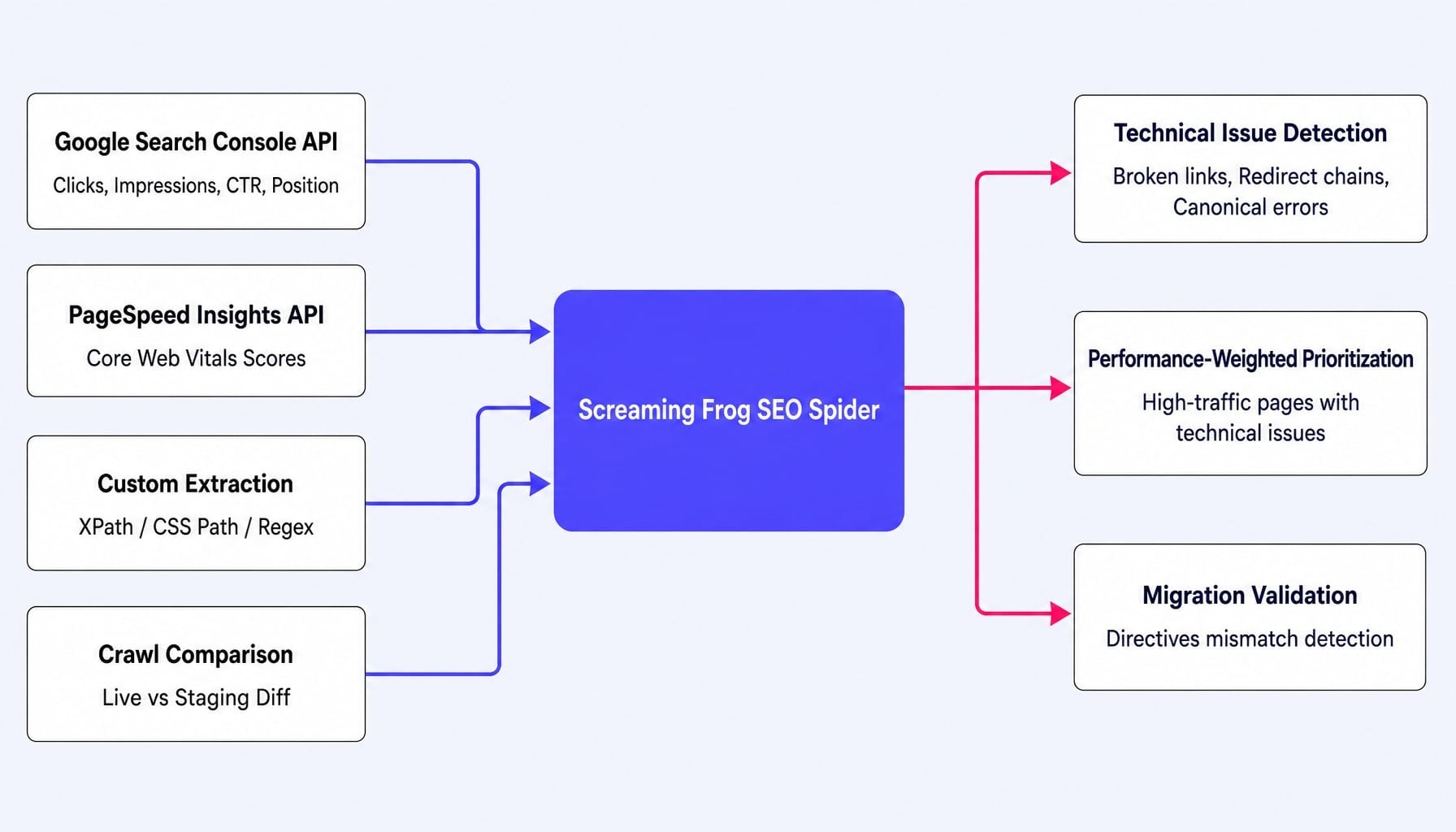
Screaming Frog's second major strength is its ability to function as a multi-source audit platform. It doesn't just crawl; it pulls in external data and lets you extract custom data during the crawl.
You can connect directly to the Google Search Console API to pull clicks, impressions, and CTR for every URL, layering real search performance onto your technical data. The PSI batch integration does the same for Core Web Vitals. This allows you to immediately identify pages with technical issues that are also your highest-traffic URLs.
But the real game-changer is custom extraction. Using XPath, CSS Path, or regex, you can pull virtually anything from a page's source code. For a content team planning a migration, this is invaluable. You can extract every page title, H1, word count, and canonical tag from the old site and the staging site, then run a crawl comparison to catch directives mismatch issues before they go live and tank your rankings. This turns the crawler from a diagnostic tool into a data collection and validation engine.
Where Screaming Frog Genuinely Struggles
Every tool has tradeoffs. Understanding Screaming Frog's specific limitations is what separates a good tool choice from a frustrating one, and most reviews gloss over them. These aren't minor inconveniences; they are structural constraints that determine whether the tool is right for your workflow.
The Desktop Architecture Ceiling
The fact that Screaming Frog runs on your local machine is both its greatest strength and its most significant weakness. The strength is clear: no per-crawl costs, you own your data, and there's no vendor lock-in. The weakness? Your crawl speed, size, and capacity are all constrained by your hardware.
The tool's memory consumption scales with crawl size, with a recommended 2GB of RAM for every 100,000 URLs. If you're trying to crawl a 2 million-page ecommerce site on a standard 16GB laptop, the crawl will either crash, take over eight hours, or require you to split it into multiple segmented crawls that then need to be manually stitched back together. We've all been there, watching the memory bar creep into the red.
For an agency managing 15 client sites, this becomes a genuine operational constraint. You can't run parallel crawls without dedicated machines. The scheduling feature in the paid version is useful, but it still requires the application to be running on a machine that stays on. For sites under 100k pages, this is rarely a problem. But for enterprise-scale sites or agencies, the desktop architecture creates a hard ceiling that cloud crawlers like Lumar or JetOctopus simply don't have.
Read more: Screaming Frog Alternatives (2026): What to Actually Switch To — and When to Stay | Spike
The Learning Curve Is Real—and Rarely Discussed
Running your first crawl in Screaming Frog takes five minutes. Producing an actionable technical audit deliverable can take weeks of practice. The gap between those two points is far wider than most reviews admit.
A new user, perhaps a growth marketer who bought a license to fix their SEO, is confronted with a spreadsheet-like interface, dozens of tabs, and thousands of rows of data. The tool surfaces everything—broken links, redirect chains, duplicate titles, orphan page discovery, canonical tag validation—but provides no prioritization framework. It tells you there are 5,00_0 low-content pages, but not which 10 are hurting your revenue.
The output is a diagnostic dump, not a prioritized action plan. Screaming Frog assumes you have the expertise to know which of the 300+ issue types actually matter for a given site, how to configure the crawl correctly for different architectures, and how to turn that raw data into a compelling business case for engineering resources. It's a power tool built for practitioners who already know what they're looking for, not a guided solution for generalists.
Free vs Paid: Is the $279/Year License Worth It?
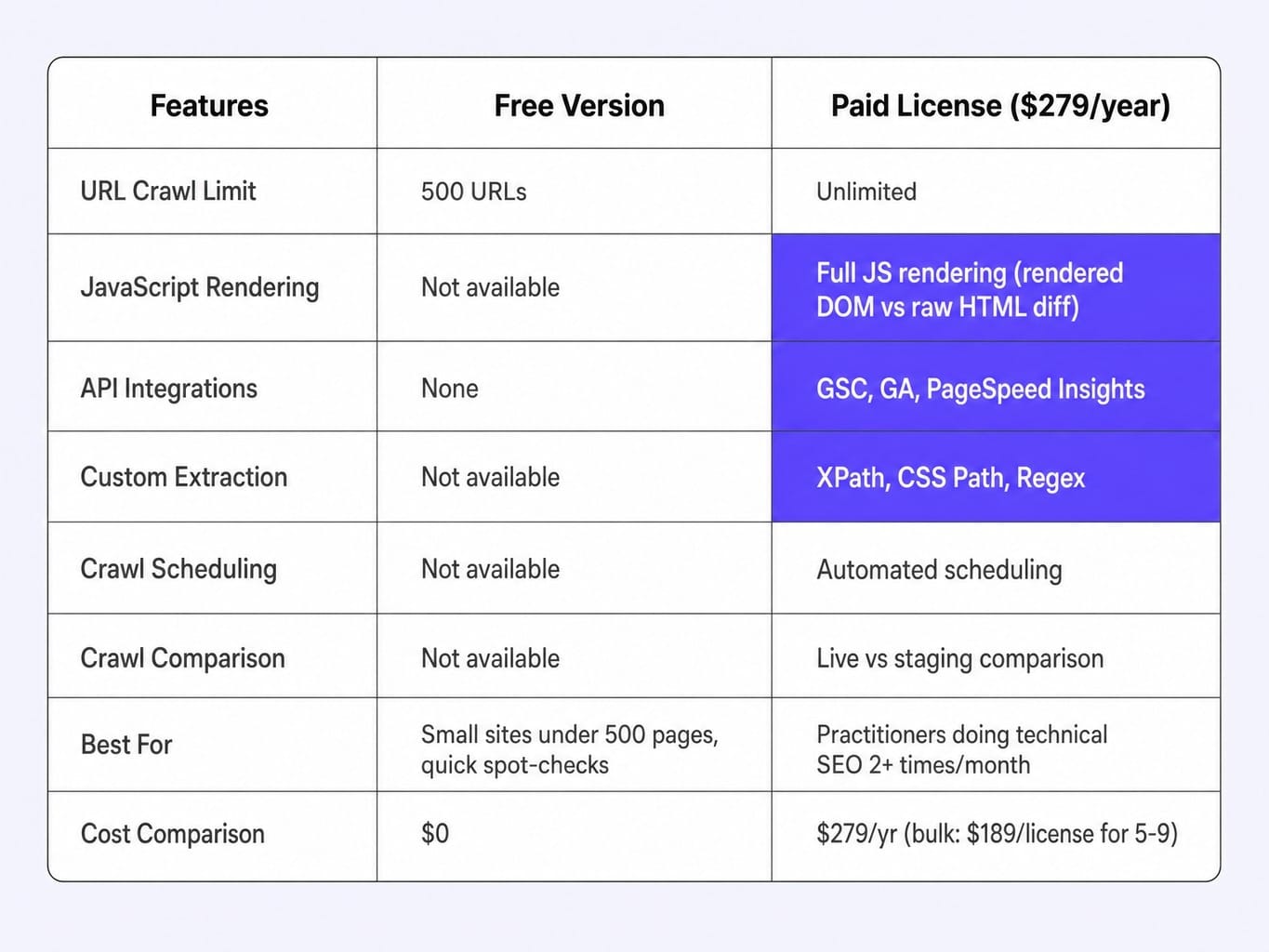
Let's be direct: for any site over 500 pages, or any practitioner who needs integrations, JavaScript rendering, or crawl scheduling, the paid license is unambiguously worth it.
The free version is genuinely useful. It crawls up to 500 URLs and gives you basic data like response codes, page titles, meta descriptions, and H1s. For a small business site or a quick spot-check on a section of a larger site, it's a fantastic free resource.
But the 500 URL limit is a hard wall. The moment your needs exceed that, the paid tier's unlocks become critical. Consider a SaaS company with a 2,000-page site including a blog, docs, and marketing pages built on React. The free tier can't even complete the crawl. And without JavaScript rendering, their dynamically loaded pricing page is effectively invisible to the crawler.
The paid license removes the crawl limit and unlocks the features that turn Screaming Frog from a simple crawler into an audit platform: JS rendering, GSC/GA/PSI integrations, custom extraction, scheduling, and crawl comparison. At $279/year, it's a bargain. A single project on a cloud crawler like Lumar can easily cost more than an entire year's license for Screaming Frog. For agencies, the bulk discounts (e.g., 5-9 licenses at $189/each) make it even more cost-effective.
The verdict is simple. If you do technical SEO more than twice a month, the license pays for itself in the first week. If you run a small site under 500 pages and only need occasional checks, the free version is sufficient.
How Screaming Frog Compares to the Alternatives
The "best" crawler depends entirely on your workflow, site scale, and team structure. The goal isn't to declare a winner but to help you choose the right tool for your specific job.
Screaming Frog vs Sitebulb: Raw Power vs Guided Auditing
The choice between Screaming Frog and Sitebulb comes down to a simple question: do you want a power tool or a guided audit platform?
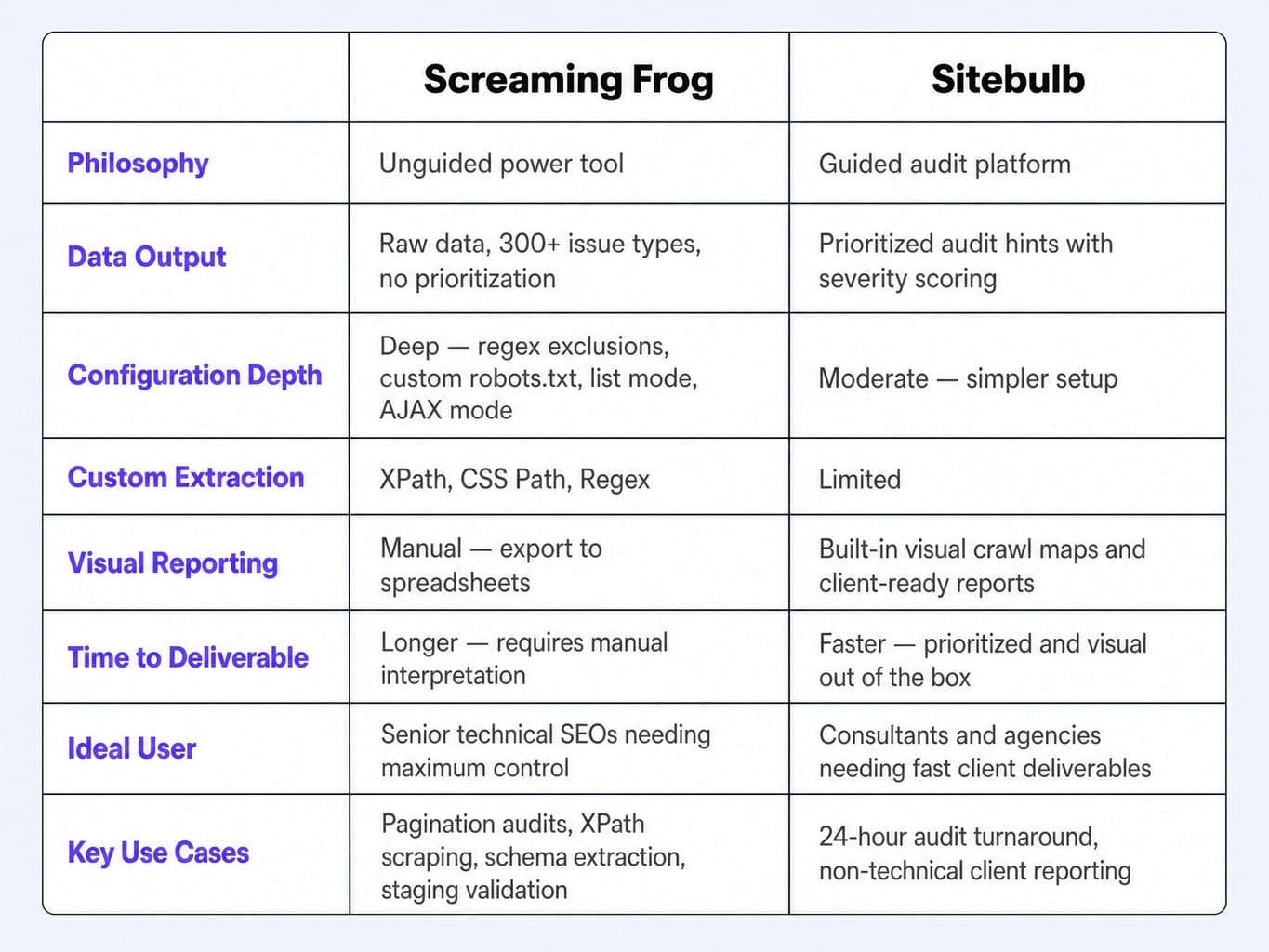
Screaming Frog gives you more raw data, more configuration options, and more extraction flexibility. It assumes you know what to do with the output. Sitebulb, by contrast, provides prioritized audit hints, visual crawl maps, and issue severity scoring out of the box. It's designed to get you from crawl to client-ready deliverable faster.
If you're a solo SEO consultant who needs to deliver a technical audit report to a non-technical client in 24 hours, Sitebulb's built-in prioritization and visual reports will save you hours of manual interpretation. If you're a senior technical SEO who needs to perform a complex pagination audit via rel-next or scrape schema from a staging environment using XPath scraping, Screaming Frog's power is indispensable.
Verdict: Screaming Frog for practitioners who demand maximum control and data depth. Sitebulb for consultants and agencies who need faster time-to-deliverable.
Screaming Frog vs Cloud Crawlers: When to Switch to Lumar or JetOctopus
The desktop vs. cloud decision is about scale and collaboration. For sites under 500K pages crawled by one person, Screaming Frog's flat annual license is far more cost-effective than any cloud crawler's per-crawl pricing.
The switch becomes necessary when your site scale or team size forces it. When you need to crawl multi-million-page sites regularly, share crawl data across a team without emailing files, or run automated monitoring crawls without a dedicated machine, cloud crawlers like Lumar or JetOctopus become operationally essential. Lumar (formerly DeepCrawl) is positioned for enterprise SEO teams with deep compliance needs, while JetOctopus offers blistering crawl speeds and a more accessible price point for mid-market teams.
From a cost-per-insight perspective, Screaming Frog's $279/year is unbeatable for individual practitioners. But don't switch to a cloud crawler until you have to. The trigger isn't a feature you're missing; it's an operational bottleneck you can no longer work around.
Screaming Frog in 2026: Still the Default, but for How Long?
Screaming Frog has adapted. Versions 21.0 and 22.0 added integrations with OpenAI, Gemini, and other models for AI-powered content analysis, plus vector embeddings for semantic similarity detection. These are meaningful additions that show the team is evolving the tool beyond pure crawling.
But this raises a deeper question. In a world where marketing requires continuous monitoring, not periodic crawls, and automated action, not just diagnostic spreadsheets, is a desktop crawler—no matter how powerful—the right foundation?
Screaming Frog will remain an indispensable diagnostic instrument, like a stethoscope for a doctor. But the industry is moving toward systems that don't just diagnose; they prioritize, recommend, and increasingly act. The practitioner who runs a crawl, exports the data to a spreadsheet, creates a prioritized list, builds tickets, and waits for engineering is spending 80% of their time on everything that happens after the crawl.
That post-crawl execution gap is where the real bottleneck lives. The problem for most teams isn't that they need a better crawler. It's that they need a system that closes the loop between diagnosis and action.
Read more: SaaS Technical SEO: Why One-Time Audits Kill Growth & What to Ship Instead | Spike AI
When the Bottleneck Isn't the Crawl—It's Everything After
The core tension of this review is clear: Screaming Frog is an exceptional diagnostic tool, but diagnosis without prioritized execution is where most marketing teams stall. It surfaces hundreds of issues but offers no guidance on which ones will actually move the needle for your business. The output is a backlog, not a solution.
The real constraint for most lean teams isn't finding problems. It's the latency between identifying what needs to change and actually shipping the fix.
This is the exact gap Spike AI is designed to close. We don't replace diagnostic tools; we provide the execution layer that picks up where they leave off. Where Screaming Frog gives you a spreadsheet of 300+ issues, Spike AI identifies the single highest-impact fix that will move qualified leads most, then ships it—across your website, SEO, and CRO—every week. No engineering tickets, no agency briefs, no backlog anxiety. It turns your diagnostic findings into shipped improvements with a consistent weekly cadence.
See how Spike AI turns SEO diagnostics into weekly shipped improvements
The Verdict
Screaming Frog is still the best desktop crawler available in 2026. But whether it's the right tool for you depends entirely on your site scale, technical fluency, and—most importantly—whether your real bottleneck is diagnosis or execution.
It earns its reputation through unmatched crawl depth and configuration flexibility at a price no cloud competitor can touch. Its limitations—hardware dependency, a steep learning curve, and the absence of any prioritization—are not flaws so much as boundaries that define who the tool is for: practitioners who need a powerful, unguided instrument.
Before buying a license, ask yourself a simple question: Is your team's primary constraint finding SEO issues, or is it getting them fixed? The answer determines whether you need a better crawler or a better system.
Frequently Asked Questions
Can Screaming Frog effectively crawl JavaScript-rendered websites?
Yes, the paid version includes a JavaScript rendering engine that executes client-side JS. This allows you to compare the rendered DOM against the raw HTML to identify content that search engines might miss. However, JS rendering significantly increases crawl time and memory usage—expect crawls to take 3-5x longer. It's best to segment your crawl to JS-dependent sections rather than rendering the entire site.
What are the minimum system requirements for crawling large sites with Screaming Frog?
Screaming Frog recommends allocating approximately 2GB of RAM per 100,000 URLs crawled. For a 1-million-page site, you'd need 16-20GB of RAM allocated just to the application, plus a multi-core processor and an SSD. On standard business laptops, crawls above 200,000-300,000 URLs become unreliable and may crash. For enterprise-scale sites, most practitioners run Screaming Frog on dedicated VMs or cloud instances.
Is Screaming Frog suitable for agencies managing 10+ client sites?
It works, but with operational friction. Each crawl runs locally and ties up your machine, so you can't run parallel crawls across clients without multiple machines. Scheduled crawls require the application to remain open and the machine to be powered on. While bulk license discounts help with cost, there's no centralized dashboard for managing results across clients; you're exporting and organizing data manually. Many agencies pair it with a cloud crawler for ongoing monitoring.
How do I connect Google Search Console and PageSpeed Insights to Screaming Frog?
In the paid version, go to Configuration > API Access and authenticate with your Google account for both GSC and PSI. Once connected, Screaming Frog pulls impressions, clicks, CTR, and position data from GSC, and Core Web Vitals scores from PSI for each URL during the crawl. This lets you overlay real search performance and page speed data onto your technical audit in a single interface.
What custom extractions can I set up in Screaming Frog for content audits?
You can extract almost any element from a page's source code using XPath, CSS Path, or regex. Common content audit extractions include author names, publish dates, word counts from specific containers, schema markup values, and pricing data. For migrations, practitioners often extract the full content body and canonical URLs from both the live and staging sites, then run a crawl comparison to catch discrepancies before launch.