Serpstat Pricing 2026: Plans, Real Costs, and Where It Stops Being Cheap

TL;DR
- Serpstat's value depends entirely on your usage volume fitting within a plan's credit limits, not its sticker price. The Individual plan's 100 queries-per-day (QPD) cap is a major constraint for active freelancers.
- The crossover point where Serpstat stops being the budget option is when you outgrow the Team plan. Semrush Pro ($139/mo) offers a broader feature set and deeper English-language data for less than Serpstat's Team x2 plan ($169/mo).
- API access is Serpstat's key cost advantage. It's included in the $100/mo Team plan, whereas competitors like Ahrefs and Semrush charge hundreds more for comparable API access.
- Before committing to an annual plan, use the 7-day trial to run three specific tests: compare a site audit to a known crawler, check keyword data accuracy against your GSC, and test the API integration.
- The real cost isn't the tool; it's the time between finding an insight and shipping a fix. Tools like Serpstat find problems, but execution platforms like Spike AI are what actually solve them.
Every article on Serpstat pricing repeats the same narrative: it's the budget-friendly alternative to Ahrefs and Semrush, with plans starting around $50 a month. That's true, but it's a dangerously incomplete picture. That $50 plan buys you 100 searches per day and a 5-project limit—caps a single freelancer managing three client sites can exhaust before lunch on a Monday.
The real question isn't what Serpstat costs per month; it's what it costs per usable data point at your actual usage level. A plan that forces you to ration queries or split research across multiple days has a hidden productivity cost that never appears on the invoice.
This analysis moves beyond sticker price. We'll walk through each plan's real-world limits, model what actual usage costs for a solo SEO and a small agency, identify the exact point where Serpstat stops being cheaper than its main competitors, and explain what you can realistically evaluate during the free trial.
Serpstat Plans and Pricing: What Each Tier Actually Includes
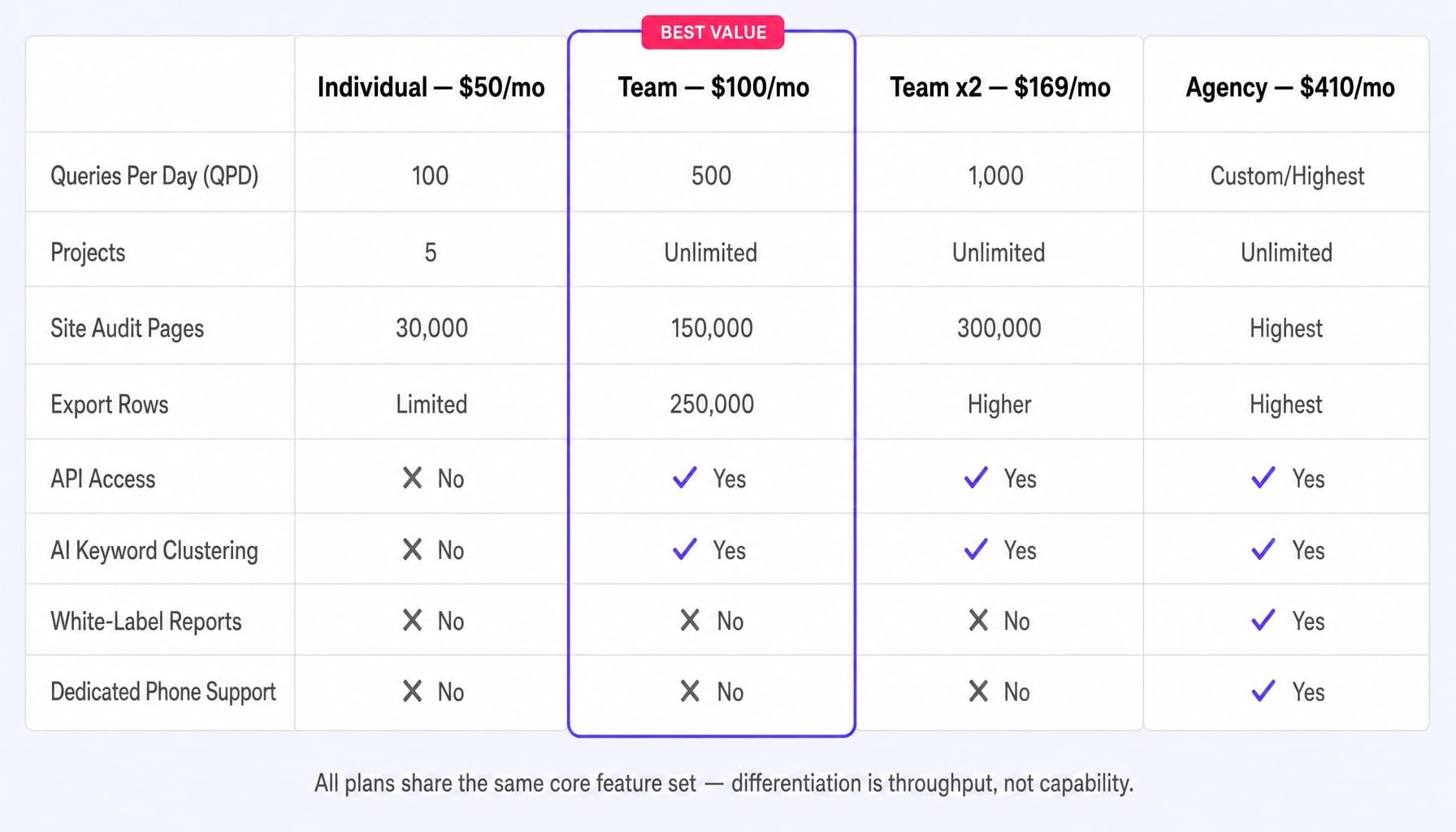
Serpstat's four tiers are differentiated primarily by query-per-day (QPD) limits and site audit crawl budgets, not by feature access. This means your plan decision is about throughput, not capability. Unlike Semrush or Ahrefs, where core features unlock at higher price points, Serpstat gives you the full toolset on nearly every plan. The choice comes down to how much data you need to pull daily.
Individual Plan ($50/month): The Ceiling You'll Hit First
The Individual plan's 100 searches-per-day and 5-project cap make it a single-site owner's tool, not a professional freelancer's. While marketed to freelancers, the daily query limit is a significant bottleneck. A single deep-dive keyword research session for one client can easily burn through the 100 QPD limit by midday, forcing you to halt work.
The plan includes 10,000 keyword position checks and a 30,000-page site audit crawl budget, which is adequate for one or two small-to-medium sites. Critically, this plan lacks API access, preventing any programmatic data pulls or integration with custom reporting dashboards. It's viable only for managing one website with moderate, predictable research needs.
Team Plan ($100/month): Where API Access Unlocks
The jump from the Individual to the Team plan is really about unlocking the API and the ChatGPT/Claude integration, not just the 5x increase in query limits. For any practitioner building automated reports, feeding SEO data into a BI tool, or using AI for content workflows, this is the actual entry-level plan. You get unlimited projects, 500 QPD, 150,000 audit pages, and 250,000 export rows.
This is a genuine cost advantage. Serpstat includes API access at $100/month, while Ahrefs and Semrush treat it as a premium add-on that can cost hundreds more per month. If your workflow depends on API calls, the Team plan is the real starting point.
Team x2 ($169/month) and Agency ($410/month): Scaling Limits
These upper tiers exist to scale your data throughput, not to unlock new features. The Team x2 plan, a recent addition, simply doubles the Team plan's limits to 1,000 QPD and a 300,000-page crawl budget. It's positioned as the logical next step for small agencies that find the Team plan's 500 QPD too restrictive but don't need the client-facing features of the Agency tier.
The Agency plan's higher cost is justified only by its white-label reporting and dedicated phone support. If you need to deliver branded reports to clients, this is your only option. Otherwise, for in-house teams just needing higher limits, the Team x2 plan at $169/month covers most scaling needs for less than half the price.
All plans share the same core feature set—keyword research, site audit, rank tracking, backlink analysis, and competitor analysis—so the decision is purely about volume.
Annual vs Monthly Billing: The Real Savings Math
Serpstat offers a significant discount for annual billing, typically ranging from 20-27% depending on the plan. But stating the percentage doesn't make the savings tangible.
Let's look at the dollar math. On the Team plan at $100/month, committing to a year drops the effective monthly cost to around $73 ($876/year vs. $1,200/year), saving you $324 annually. For the Agency plan at $410/month, the annual billing discount saves you approximately $1,068 per year.
However, this only makes sense if you've already validated that the tool fits your workflow. Too many teams get lured by the annual discount on day one, only to discover by month three that the QPD limits are too tight or the data freshness isn't what they need. Once you're locked in, you're locked in. Serpstat's policy requires you to notify their support team at least 15 days before your billing cycle renews to cancel. Committing to an annual plan prematurely is a common and costly mistake.
What Serpstat Actually Costs: Modeling Credit Burn for Real Workflows
Sticker price is the wrong way to evaluate any SEO tool. What matters is your cost per usable action, which is a function of your team's actual usage volume. A $50/month plan becomes expensive quickly if it forces you to ration queries, creating a hidden productivity cost that doesn't show up on the invoice. To find the right plan, you have to model your credit burn rate.
Solo Freelancer on the Individual Plan: Where the Limits Bite
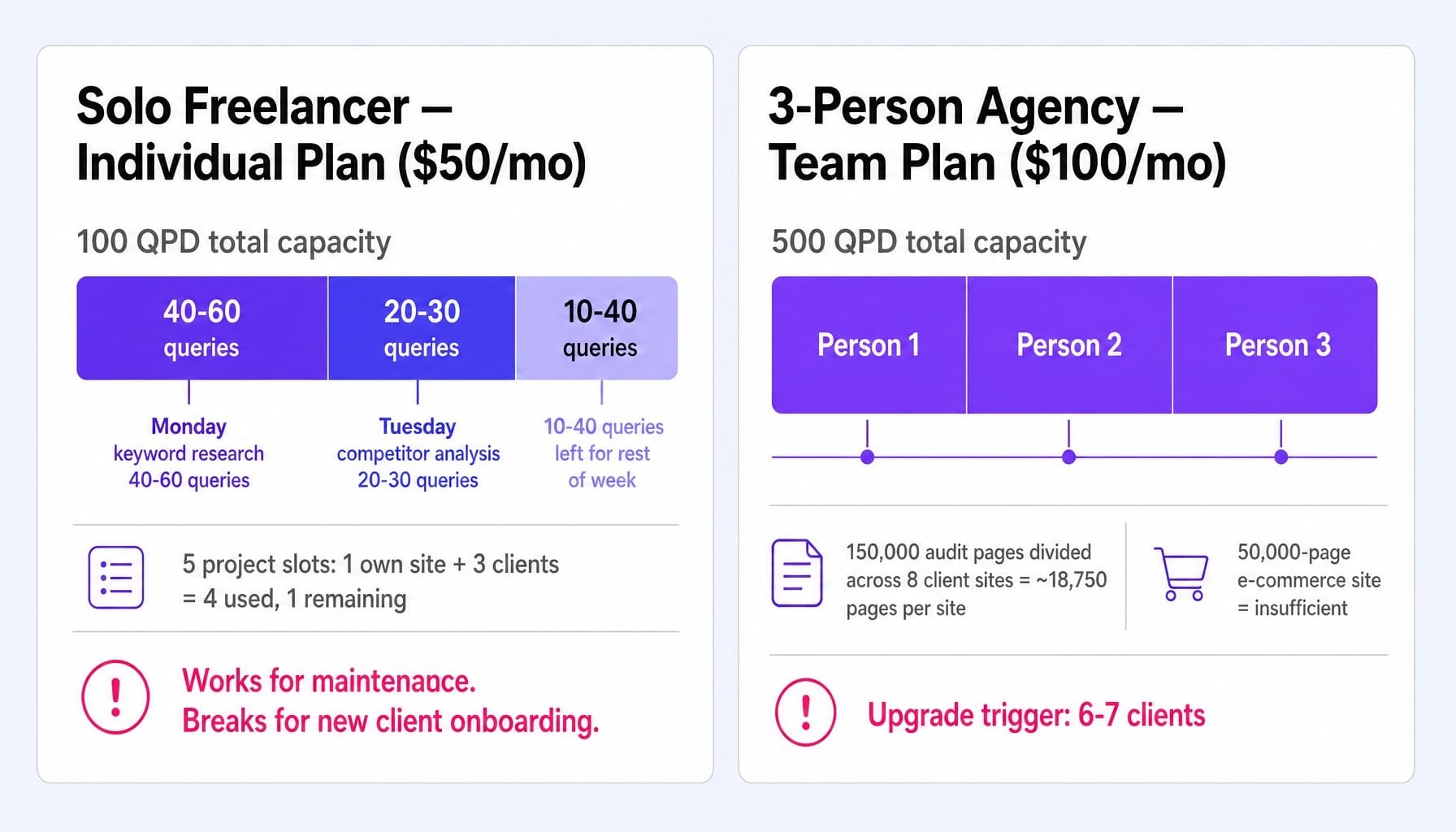
A solo SEO freelancer managing three client websites operates on a tight margin. Let's model a typical week on the $50 Individual plan. Monday is for keyword research (40-60 queries). Tuesday is for competitor gap analysis (20-30 queries). That's 60-90% of your 100 QPD limit gone in two days, leaving little buffer for ad-hoc client requests or a deeper dive. The 5-project limit is also tight; your own site plus three clients consumes four of the five available slots.
This plan works for steady-state maintenance. But it breaks down the moment you onboard a new client (requiring heavy initial research) or prepare a quarterly business review (requiring bulk data pulls). The Individual plan is viable for maintenance mode, but not for growth mode.
Small Agency on the Team Plan: Dividing Credits Across Seats
Now consider a three-person agency team sharing the $100 Team plan. The 500 QPD limit sounds generous until you divide it across three users. With simultaneous research, you're looking at an effective capacity of just 167 queries per person per day. Seat stacking quickly exposes the shared limit. The 150,000-page crawl budget, when split across eight client sites, allows for roughly 18,750 pages per audit—fine for small brochure sites, but insufficient for a client with a 50,000-page e-commerce inventory. This team will almost certainly hit the upgrade trigger for the Team x2 plan within months of landing their sixth or seventh client. The Team plan's pricing is deceptive for multi-seat agencies because the limits are shared, not per-user.
When Serpstat Stops Being Cheaper Than Semrush: The Crossover Point
The claim that Serpstat is "the budget alternative to Semrush and Ahrefs" is only true up to a point. Let's identify that crossover point.
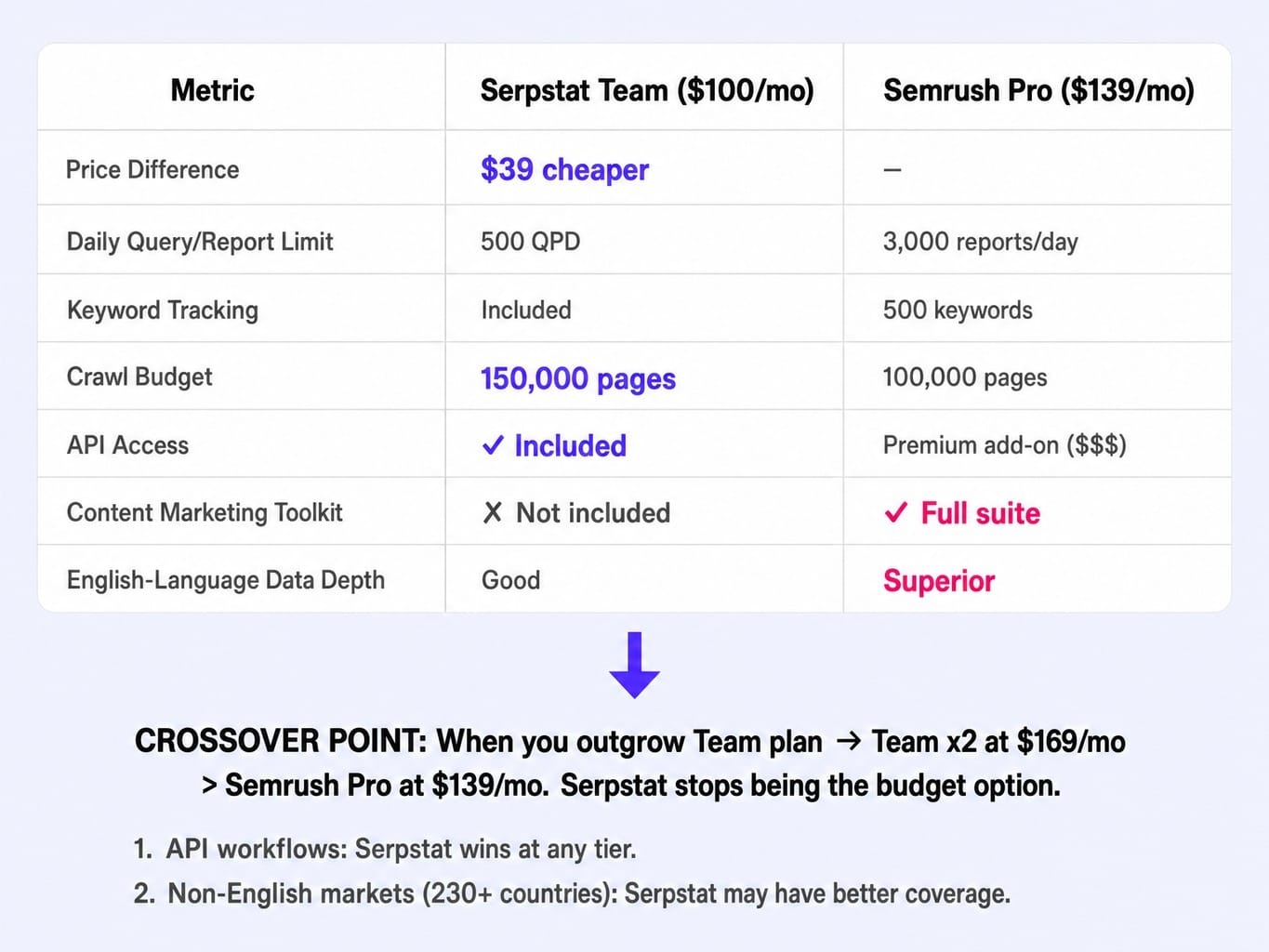
Semrush Pro costs $139/month and provides 3,000 report exports per day, 500 keywords to track, and a 100,000-page crawl budget. Serpstat's Team plan at $100/month offers 500 QPD, unlimited projects, and a 150,000-page audit budget. At this level, Serpstat appears to win on price by $39.
But this is where simple math gets complicated. Semrush Pro includes a full content marketing toolkit, social media tracking, and a significantly larger and more frequently updated keyword database for English-language markets. For a US-focused B2B team, Semrush's data depth is often materially better.
The true crossover happens the moment your agency outgrows Serpstat's Team plan. You're forced to upgrade to Team x2 at $169/month. Suddenly, you're paying $30/month more than Semrush Pro for a narrower feature set and arguably less robust US keyword data. At that point, Semrush Pro offers more capability for less money.
The two major exceptions are API access and international SEO. If you need API calls, Serpstat's inclusion at $100/mo is a massive cost-saver. And if you operate in non-English markets, Serpstat's 230+ country databases can provide competitive coverage where Semrush or Ahrefs may be weaker.
Read more: Serpstat Alternatives Compared: Which Tool Fits Your SEO Workflow (Not Just Your Budget) | Spike
What the 7-Day Free Trial Actually Lets You Evaluate
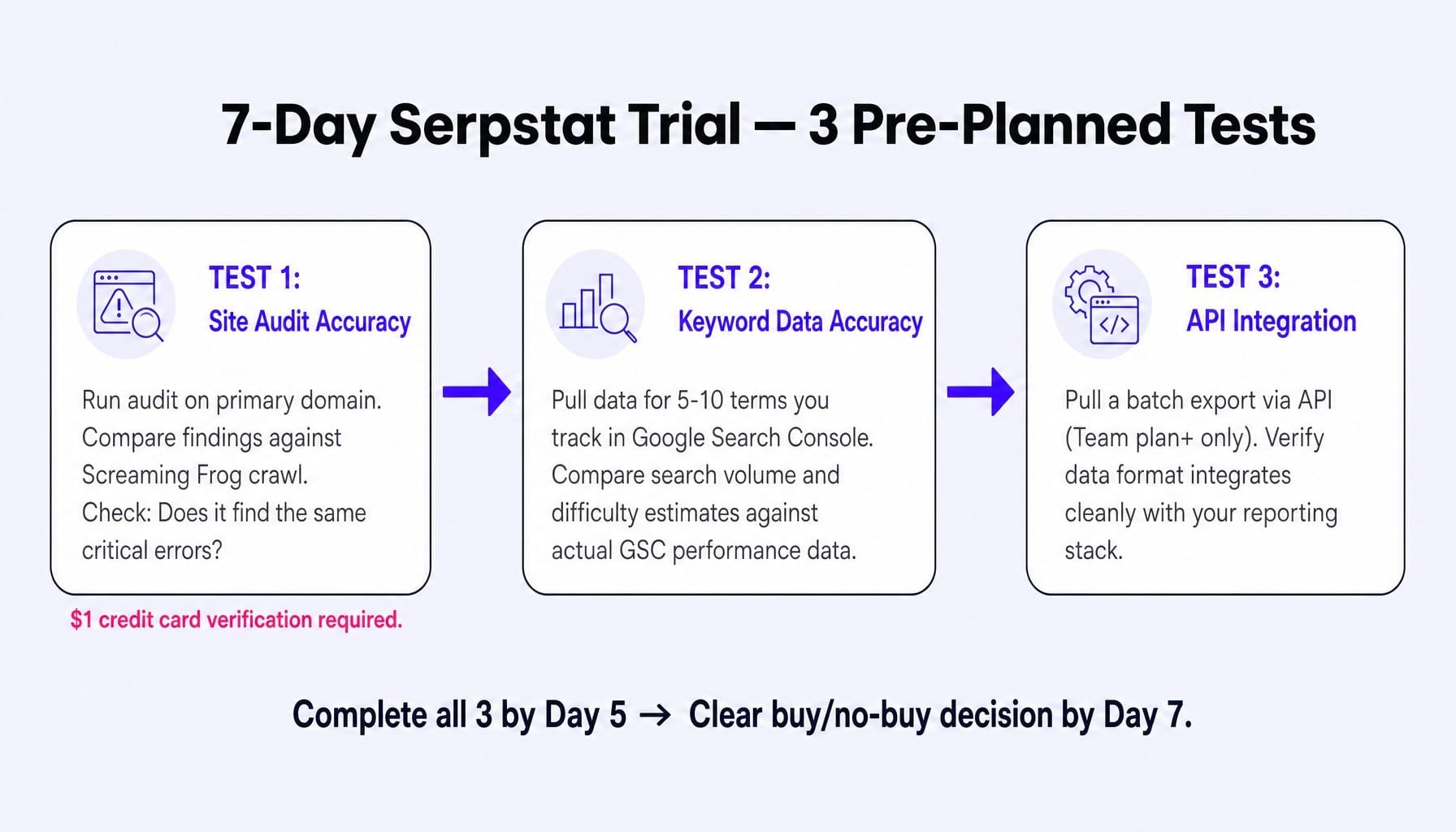
Serpstat offers a 7-day free trial, but it requires a $1 credit card verification charge—a detail many reviews omit. Seven days isn't enough time to evaluate long-term data accuracy, but it is enough to run three specific, high-value tests.
First, run a site audit on your primary domain. Compare the findings against a crawl from a tool you trust, like Screaming Frog. This tells you whether Serpstat's audit depth and issue categorization align with your needs. Does it find the same critical errors?
Second, test data accuracy for your niche. Pull keyword data for 5-10 terms you already track closely in Google Search Console. Compare Serpstat's search volume and difficulty estimates against your actual performance data. This reveals how fresh and accurate its data is for your specific market.
Third, test the API. If you're trialing the Team plan or higher, pull a batch export and check if the data format integrates cleanly with your reporting stack.
Don't evaluate the tool by exploring features randomly. Go into the trial with these three tests pre-planned, and you'll have a clear buy/no-buy decision by day five.
When the Real Cost Isn't the Tool — It's the Time Between Insight and Action
This entire analysis—modeling credit burn, comparing QPD limits, identifying the competitive crossover point—highlights a deeper problem. Even after you pick the perfect tool and pull the right data, the gap between "here's what the audit found" and "here's the fix we shipped" is where most marketing teams stall.
Serpstat, Semrush, and Ahrefs are diagnostic engines. They surface problems. They don't solve them. The most expensive part of your marketing system isn't the monthly subscription cost; it's the human latency required to act on the insights you pay for.
Spike AI is built to close that gap. Instead of just identifying the highest-impact move across your website, SEO, and ads, it executes it. The focus shifts from analyzing backlogs to approving weekly releases. If you spend this much energy optimizing your tool spend, imagine redirecting that focus to compounding actual improvements.
See how Spike AI turns SEO insights into shipped improvements — every week
The Right Plan Is a Math Problem, Not a Feature List
Serpstat's value depends entirely on whether your actual usage fits within a specific plan's credit limits—not on the sticker price. We've moved from plan specs to real-world credit modeling to the competitive crossover point, and the finding is consistent: the "cheapest SEO tool" claim really only holds at the lower tiers and for specific use cases, like API-dependent workflows or international SEO.
Before you commit to any annual plan, run the three trial tests outlined above. Model your team's weekly credit burn against the plan you're considering. The math will make the decision for you.
Frequently Asked Questions
What happens when you exceed your Serpstat API credit limit mid-month?
Serpstat does not offer automatic overage billing. When you hit your API credit ceiling, calls will return errors until your allocation resets at the next billing cycle. There is no credit rollover for unused limits from previous months. If you consistently hit the cap, your only option is to upgrade to the next plan tier or manually throttle your API calls.
Can you add extra user seats to Serpstat without upgrading your plan?
No, Serpstat does not offer à la carte user seat additions on its standard plans. Multi-user access is tied to the plan tier itself. If your team grows and you need more seats with simultaneous access, you must upgrade to a higher plan like Team x2 or Agency. There is no separate per-seat pricing.
Does Serpstat charge extra for white-label reports?
White-label reporting is included exclusively in the top-tier Agency plan ($410/month). It is not available as a standalone add-on for the Individual, Team, or Team x2 plans. If delivering branded reports to clients is a core requirement for your agency, the Agency plan is the only tier that supports this functionality.
How does Serpstat's cancellation and refund policy work?
To cancel your subscription, you must send a request to support@serpstat.com at least 15 days before your current billing period ends. Serpstat does not offer prorated refunds for any unused time within a billing cycle. Be aware that annual plans auto-renew, so missing the 15-day cancellation window will lock you into another full year.
Does Serpstat offer custom enterprise pricing for large teams?
Yes, Serpstat provides custom solutions for enterprise clients with needs beyond the public Agency plan. These deals are negotiated directly with their sales team and typically involve tailored API rate limits, dedicated data engineer support, and expanded crawl budgets. The pricing for these custom plans is not published publicly.
Which Serpstat plan includes the AI keyword clustering feature?
The AI-powered keyword clustering and other AI tools become available starting with the Team plan ($100/month). The entry-level Individual plan does not include these AI features. If keyword clustering is a core part of your SEO workflow, the Team plan is the minimum viable option.