The Technical SEO Checklist for B2B SaaS: AI-Monitored vs. Manual-Only Audits
Technical SEO checks differ in urgency and cadence. This prioritized technical SEO checklist for B2B SaaS shows which items need continuous AI monitoring vs quarterly manual review.

Key Takeaways
- Stop auditing your site alphabetically. Prioritize technical SEO fixes by revenue impact, starting with pages that drive conversions (pricing, demo, product pages).
- Split your checklist into two cadences. Checks for crawl errors, index coverage, and Core Web Vitals regressions are ideal for continuous, AI-driven monitoring.
- Reserve manual audits for tasks requiring human judgment: log file analysis, rendered content verification, thin content evaluation, and internal link relevance.
- For SaaS product pages, rendering performance is monitorable, but rendering correctness is not. Manually spot-check the rendered DOM in Google Search Console to ensure critical content isn't missing.
- Treat technical SEO as an ongoing process rather than a quarterly project. The goal is a continuous monitoring and fixing cycle, not a static PDF report that becomes a backlog.
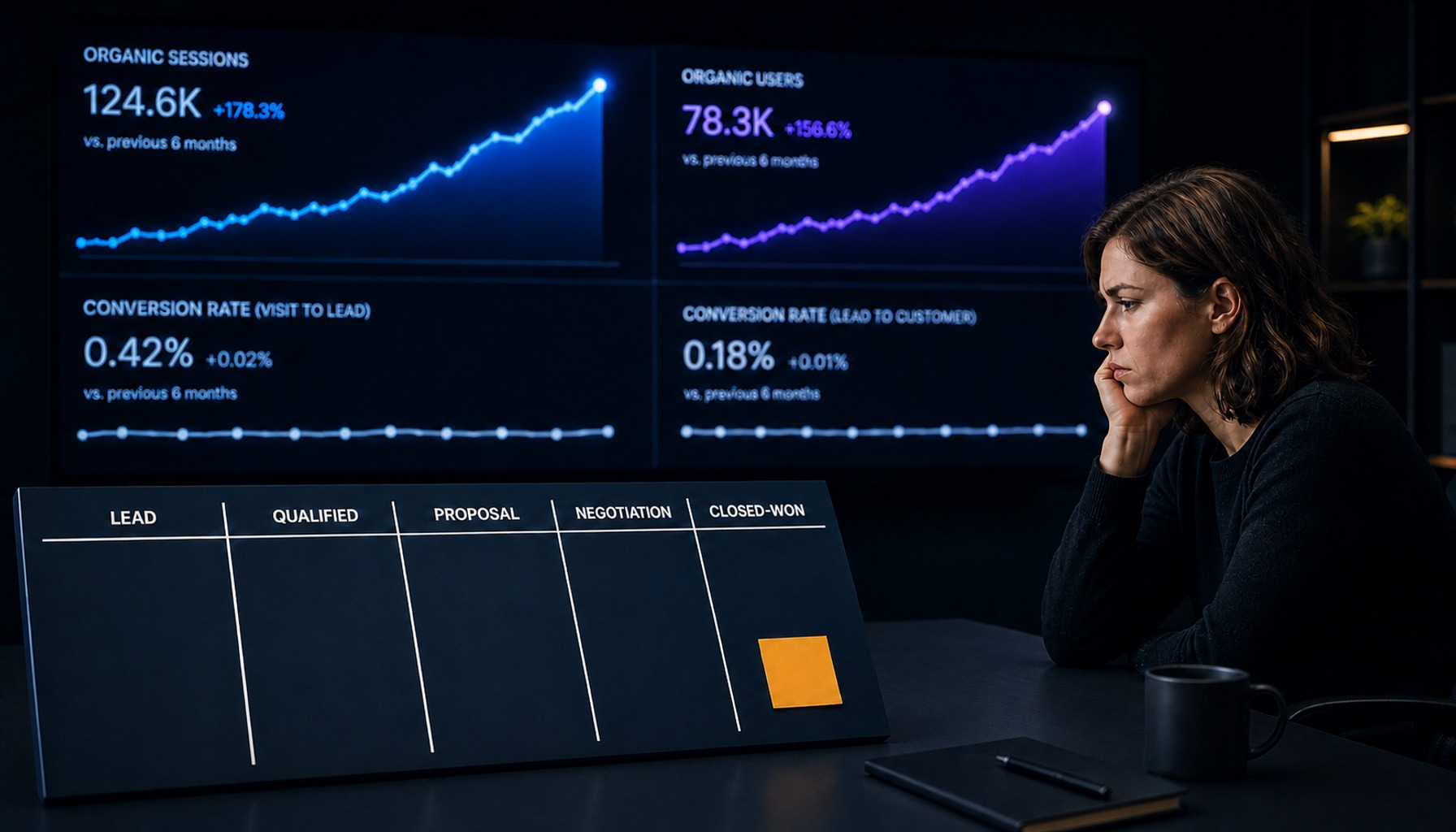
A three-person B2B SaaS marketing team ran a full technical SEO audit in Q1. They fixed over forty issues, from redirect chains to missing alt tags. In Q3, they discovered that a routine CMS update had silently re-introduced noindex tags on their three highest-converting landing pages. The pages had been losing organic traffic for eleven weeks before anyone connected the pipeline dip to a technical root cause.
The fix itself was simple. The gap was that nothing was checking for the regression between audits.
Technical SEO checklists are everywhere, but most are built on two flawed assumptions: that the audit is a one-time event, and that every checklist item is equally urgent. The real failure mode for a lean team isn't missing an item; it's lacking a system that distinguishes between checks needing continuous automated monitoring and those requiring human evaluation.
The checklist below ranks each item by business impact and marks whether it belongs to continuous AI monitoring or a manual quarterly review.
Prioritize by Revenue Impact, Not by Crawl Order
Most technical SEO checklists start with robots.txt and sitemaps. This is logical, but for lean teams with limited engineering access, it's the wrong approach. A broken canonical on your pricing page costs more revenue than an orphaned blog post from 2022. You must audit in order of commercial importance.
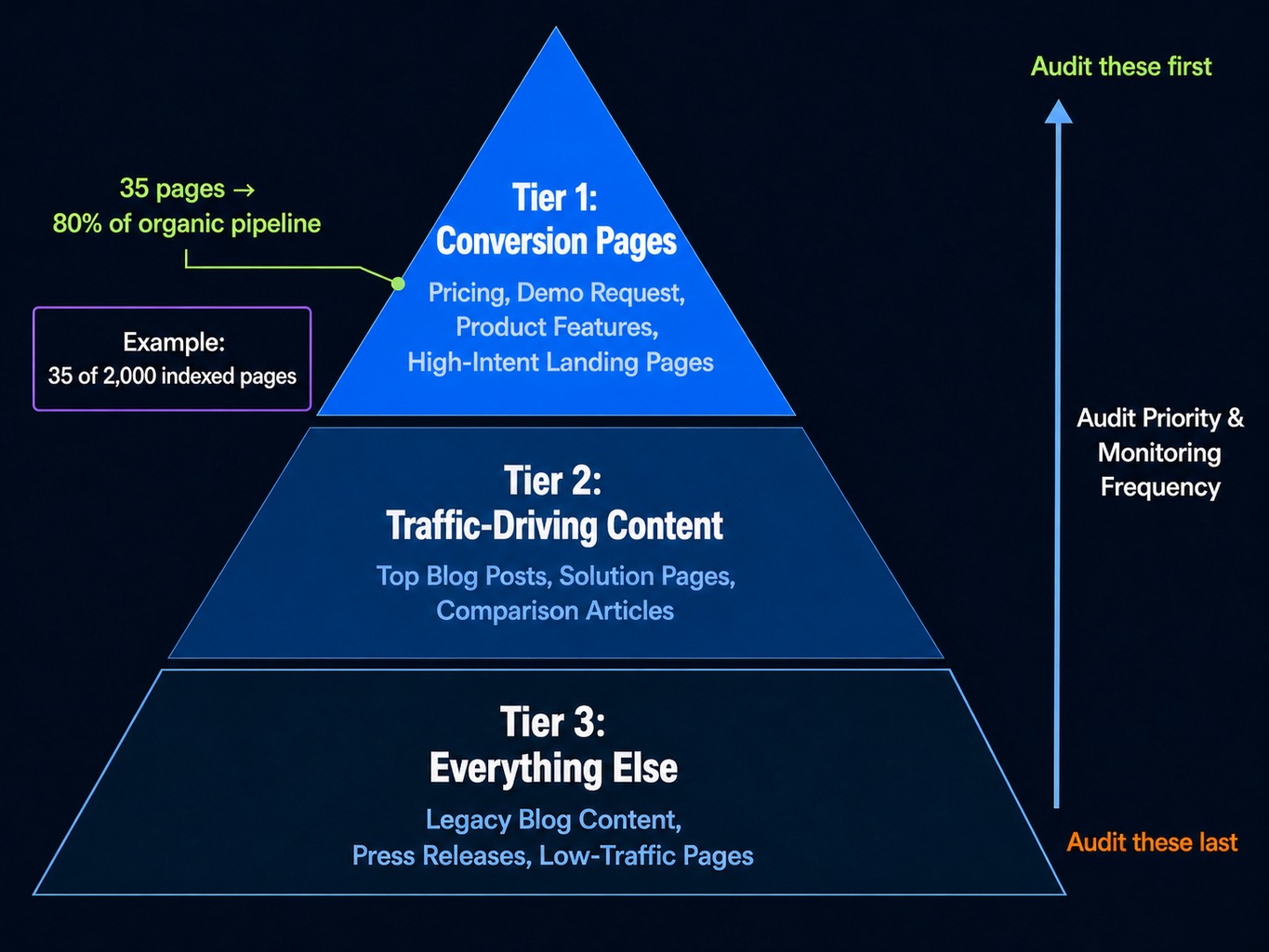
Start by tiering your site's pages:
- Tier 1: Conversion Pages. Your pricing, demo request, product feature pages, and high-intent paid landing pages. These directly generate pipeline.
- Tier 2: Traffic-Driving Content. Your top-performing blog posts, solution pages, and comparison articles that drive qualified organic traffic.
- Tier 3: Everything Else. Legacy blog content, press releases, and low-traffic pages.
Consider a SaaS company with 2,000 indexed pages where only 35 pages drive 80% of organic-sourced pipeline. The technical SEO audit for those 35 pages should happen first and with a higher monitoring frequency. Use Google Search Console's performance reports, filtered by landing page, to identify your Tier 1 assets.
Read more: B2B SEO Audit: A Revenue-First Framework for SaaS Teams (2026) | Spike AI
Crawlability and Index Hygiene
Crawlability and indexation are the two areas where silent failures cause the most damage on scaling SaaS sites. They are also where the split between AI-monitored and manual-audit items is sharpest.
Detecting and Fixing Crawl Budget Waste
Crawl budget waste on SaaS sites rarely comes from having too many pages. It comes from Googlebot getting lost in parameter-heavy URLs from faceted navigation, UTM-tagged internal links, or session IDs. Imagine a multi-tenant SaaS platform where every customer workspace generates unique URLs that Googlebot discovers and attempts to crawl, burning the site's crawl budget on pages that should never be indexed.
What to Check:
- Googlebot Hit Distribution: Use log file analysis to see where Googlebot actually spends its time.
- Parameter Handling: Review
robots.txtrules to ensure parameters are handled correctly. - Redirect Chains: Identify and flatten chains longer than two hops.
- Crawl Traps: Look for infinite URL paths generated by calendars or filters.
Log-based crawl analysis is the one check that cannot be fully automated by standard monitoring tools; it requires periodic manual review of server logs. In contrast, monitoring for a spike in new 404 errors in Google Search Console or with tools like ContentKing can and should be automated.
Preventing Index Bloat on Scaling Sites
Index bloat is the silent tax of programmatic content. Imagine a SaaS company that programmatically scales its integration pages and finds 400+ near-identical pages indexed, each with only the integration name swapped out, triggering a thin content issue.
What to Check:
- Index Coverage Ratio: Monitor the ratio of indexed vs. excluded pages in GSC.
- Soft 404s: Find pages that return a 200 OK status code but display error messages or have no main content.
- Noindex Leaks: Detect pages that should be indexed but have inherited a
noindextag from a template. - Orphan Pages: Use a crawler like Screaming Frog or Ahrefs Site Audit to find pages with few or no internal links.
The monitoring split is clear: the index coverage ratio is well suited to continuous AI-driven alerts. Any sudden spike in "Crawled - currently not indexed" pages signals a deployment problem. However, evaluating whether a specific page meets a subjective "thin content" threshold requires human editorial judgment and a manual review.
JavaScript Rendering and SaaS Product Page Indexing
For SaaS sites, the most common source of invisible indexing failures comes from product pages built with modern JavaScript frameworks. The page looks perfect in your browser, but Googlebot's rendered DOM is missing the most important content.
Consider a B2B SaaS team whose React-rendered pricing page serves only the app shell to Googlebot for eleven weeks because a third-party analytics script blocks the critical rendering path. The page passes every Lighthouse audit, yet it drops from position 4 to 38 for its main commercial keyword, and no one notices until pipeline reports flag a decline in organic demo requests.
What to Check:
- Rendered vs. Raw HTML: Use GSC's URL Inspection tool to compare what Googlebot renders versus the raw page source.
- Client-Side Dependencies: Check for critical content loaded via client-side API calls that Googlebot's renderer may not execute.
- Interaction-Gated Content: Verify that content hidden behind tabs, accordions, or "load more" buttons is present in the initial HTML.
- Rendering Strategy: Confirm that critical pages use pre-rendering or server-side rendering (SSR).
Here, the monitoring split is nuanced. Rendering performance metrics like Time to Interactive (TTI) and Time to First Byte (TTFB) can be monitored automatically. But verifying that the correct content elements are present in the final rendered DOM requires periodic, manual spot-checks. No monitoring tool can confirm your pricing table rendered; it can only confirm the page rendered at all.
Core Web Vitals Checks That Affect SaaS Conversions
For B2B SaaS, Core Web Vitals (CWV) matter most on the pages where a user is about to convert. A poor Interaction to Next Paint (INP) score on a pricing page means the CTA button feels unresponsive, which directly suppresses form submissions.
Your checklist should focus on the vitals that have a direct line to revenue:
- Largest Contentful Paint (LCP): On landing pages, this should be under 2.5 seconds. A slow LCP means your value proposition is delayed.
- Interaction to Next Paint (INP): On pages with interactive elements like pricing toggles or demo forms, this must be low. A high INP feels like a broken interface.
- Cumulative Layout Shift (CLS): On pages with dynamically loaded testimonials or chat widgets, a high CLS can cause users to click the wrong thing.
Imagine a SaaS company whose demo booking page has a 3.8s LCP because a large hero video is render-blocking. After lazy-loading the video, the LCP drops to 1.9s, and form submissions measurably increase.
The monitoring split is straightforward: CWV scores from real-user data (CrUX) can be monitored continuously via automated dashboards. But diagnosing the root cause of a regression a new script, a larger image, a third-party widget requires manual investigation in Chrome DevTools.
Read more: Data-Driven CRO: Evolve Your Marketing Strategy for Revenue | Spike AI
Canonical Tag and Redirect Signal Conflicts
Canonical tag issues on SaaS sites rarely come from missing tags. They come from conflicting signals. The canonical tag says one thing, the sitemap includes another URL, and an internal link points to a third variation. Google is forced to choose its own preferred URL, which may not be the one you want indexed.
When the canonical, sitemap, and internal links each point to a different www or non-www variant, Google consolidates ranking signals to an unexpected URL, and the intended landing page loses authority.
What to Check:
- Canonical Consistency: Ensure all URL variations (HTTP/HTTPS, www/non-www, trailing slash) have a consistent canonical tag.
- Sitemap & Canonical Alignment: Verify that URLs in your sitemap match the specified canonical URLs.
- Redirect Integrity: Use a crawler to ensure no redirect chains are longer than two hops.
- Hreflang Return Tags: For multi-language sites, check that hreflang annotations have correct return links.
Automated change-monitoring tools can detect new redirect chains or changes to canonical tags in real time. But evaluating whether Google is actually respecting your canonical requires manual checks in Google Search Console's URL Inspection tool.
Structured Data Types That Matter for B2B SaaS in 2026
Structured data guides often cover far more schema types than a SaaS site needs. For B2B SaaS, only a handful of schema types meaningfully affect visibility. Focus your efforts here and ignore the rest.
The Shortlist:
FAQPage: Use on support, comparison, and solution pages to capture rich results and provide direct answers for AI overviews.SoftwareApplication: Essential for product pages to signal ratings, pricing, and operating system compatibility in SERPs.Article/BlogPosting: Necessary for content to be eligible for carousels and other rich treatments.Organization: Critical for your homepage to help establish your brand as a recognized entity for knowledge panels and AI citations.
Skip Recipe, Event, and LocalBusiness schema on most B2B SaaS sites.
For monitoring, GSC's enhancements reports and other validation tools can automatically detect schema errors like missing fields or deprecated markup. But deciding which new page templates deserve FAQPage or SoftwareApplication schema is a strategic, manual decision.
Internal Linking Architecture for a Growing SaaS Blog
As a SaaS blog scales past 200 posts, its internal linking architecture silently degrades. New posts link up to old pillar pages, but those old, authoritative pages are rarely updated to link out to new, relevant content. This creates a one-directional flow of authority that starves newer pages.
Consider a SaaS blog with 400+ posts where the top 10 pillar pages have over 50 inbound internal links each, but the 200 posts published in the last year average fewer than three. They are effectively orphaned from the site's authority structure.
What to Check:
- Orphan Pages: Identify pages with one or zero inbound internal links.
- Link Distribution: Analyze whether link equity is concentrated on a few old pages.
- Anchor Text Relevance: Ensure anchor text is descriptive and not generic ("click here").
A good rule of thumb: every new blog post should link to 2-3 older, contextually relevant posts. And every quarter, your team should review the top 20 highest-traffic posts and manually add links out to the best newer content. Automated crawlers can track orphan page counts and link distribution metrics. But evaluating whether the right pages are linking to the right pages requires human editorial judgment.
Monitoring Cadence: Which Checks Need Real-Time Alerts vs. Quarterly Review
CMS updates, plugin changes, and deployment errors can re-introduce fixed issues at any time. The solution is not more audits; it's a monitoring cadence that matches each check to its appropriate frequency.
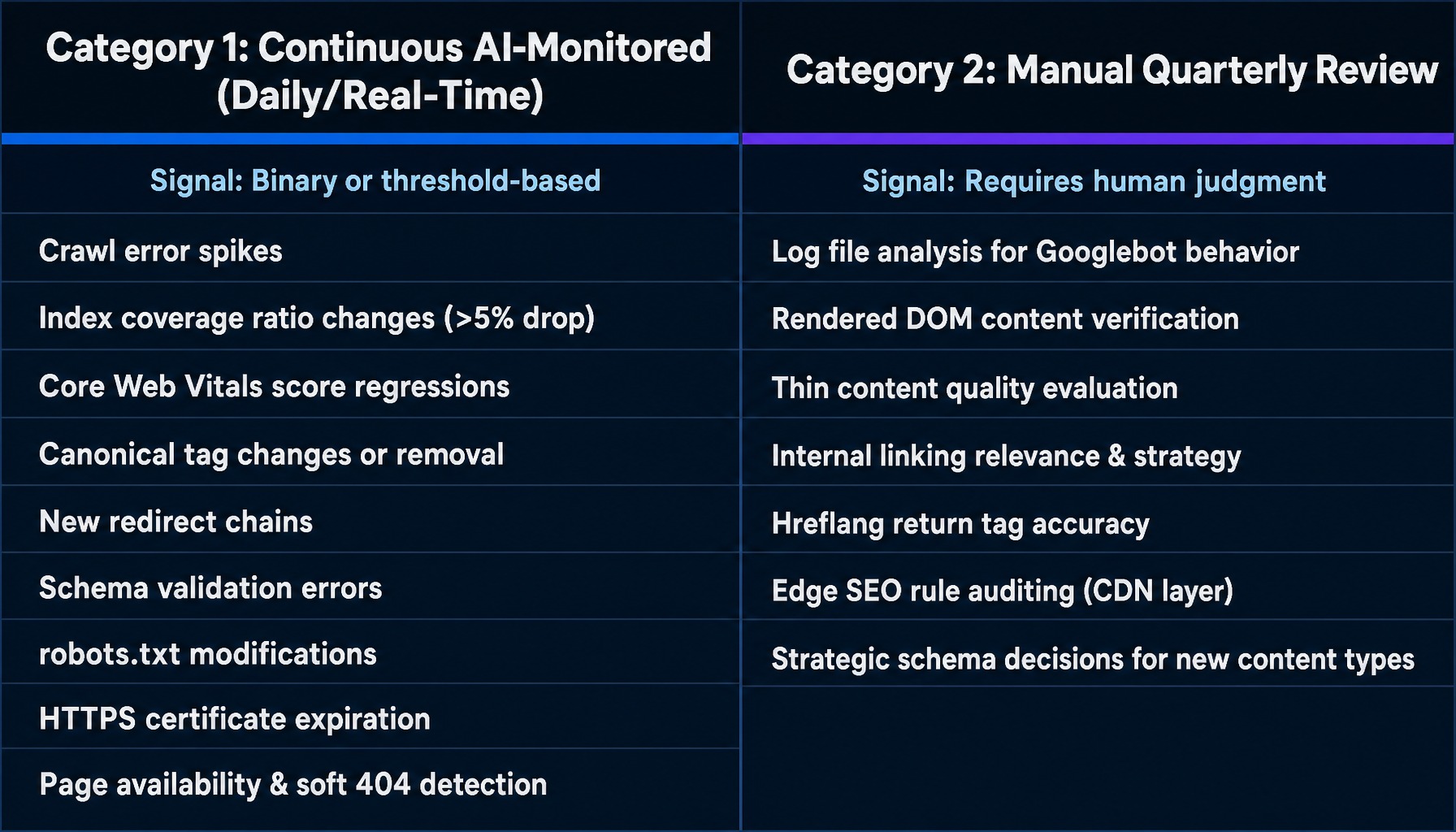
Category 1: Continuous AI-Monitored (Daily/Real-Time Alerts) These are checks where the signal is binary or threshold-based, and a tool can detect a change without human interpretation.
- Crawl error spikes
- Index coverage ratio changes (e.g., indexed pages drop >5%)
- Core Web Vitals score regressions
- Canonical tag changes or removal
- New redirect chains
- Schema validation errors
robots.txtmodifications- HTTPS certificate expiration
- Page availability and soft 404 detection
Category 2: Manual Quarterly Review These checks require human judgment to evaluate context, quality, or strategic intent.
- Log file analysis for Googlebot behavior patterns
- Rendered DOM content verification for critical pages
- Thin content quality evaluation
- Internal linking relevance and strategy
- Hreflang return tag accuracy
- Edge SEO rule auditing at the CDN layer
- Strategic schema decisions for new content types
Set up automated monitoring for Category 1 items with intelligent alert thresholds. Schedule your Category 2 manual reviews quarterly, and run an additional review after any major platform update. This split is what makes a technical SEO checklist sustainable for a lean team.
Spike AI identifies technical SEO regressions across crawlability, indexation, CWV, and structured data as they happen, then prioritizes fixes by their impact on your Tier 1 revenue pages rather than by alphabetical crawl order.
Each week, it surfaces the highest-impact technical issue and begins work on the fix, so the checklist stays current between quarterly reviews.
Spike AI's stated key success metric is an 80% conversion rate.
Learn how Spike AI handles weekly technical SEO monitoring
For a broader view of how these checks fit together, see our guide to SaaS technical SEO.
Frequently Asked Questions
What are the most critical technical SEO checks before launching a new SaaS website?
Before launch, verify that robots.txt does not carry over a staging disallow: / directive, that canonical tags point to production URLs (not staging), that your XML sitemap is submitted and references the correct domain, and that HTTPS is enforced with proper redirects from HTTP. These four items are the most common launch-day failures that can delay indexing for weeks.
How should SaaS teams monitor for soft 404s?
Because a soft 404 returns a 200 OK status code, monitoring that only checks status codes will miss it. Detection requires evaluating page content, such as error messages or near-empty main content. Include soft 404 detection in your continuous monitoring, since Google still spends crawl budget discovering these pages.
What technical SEO issues are unique to multi-tenant SaaS platforms?
Multi-tenant platforms often generate unique URLs per customer workspace (e.g., app.example.com/tenant-name/) that Googlebot discovers. These pages consume crawl budget and can cause index bloat if not handled. The fix is a noindex meta tag on tenant-specific URL paths to remove them from search results, followed by strict robots.txt disallow rules once they drop out of the index, since a disallow stops Googlebot from seeing the noindex tag.
How does edge SEO at the CDN layer help fix technical SEO issues faster?
Edge SEO uses CDN-level rules (e.g., Cloudflare Workers) to modify HTML responses on the fly injecting meta tags, changing redirects, or adding structured data without a code deployment. This gives marketing teams, especially those on rigid CMS platforms, a way to fix urgent technical SEO issues like a noindex leak or a broken canonical tag without waiting for an engineering sprint.
What log file analysis signals indicate a Googlebot crawl problem?
Key signals include Googlebot spending disproportionate crawl budget on low-value URLs (like parameter pages), declining crawl frequency on your most important pages, a high rate of 5xx server errors during crawl peaks, and Googlebot repeatedly hitting redirect chains instead of the final URL. Compare Googlebot's hit distribution against your page priority tiers to spot misalignment.