Unbounce Review for B2B Teams: Honest Pros, Cons, and ROI Analysis (2026)
TL;DR
- Unbounce is worth it for B2B teams running 10+ paid campaigns per year with over 15,000 monthly landing page visitors. Its Smart Traffic and Dynamic Text Replacement features directly improve ROI on high-CPC ad spend.
- The biggest hidden costs are operational. Traffic-based pricing creates budget unpredictability, and the ease of creation leads to page sprawl, creating a significant maintenance and QA burden that isn't reflected in the subscription fee.
- ROI depends entirely on testing cadence. If you don't have the bandwidth to test landing pages monthly, you're paying a premium for a drag-and-drop builder your existing marketing automation platform (like HubSpot) likely already provides for free.
- Smart Traffic is powerful but not magic. It requires sufficient data (at least 5,000+ visitors per month) to outperform manual A/B testing and provides less interpretable data on why a variant won.
- For most teams, the real competitor isn't Instapage; it's your existing stack. Before buying, evaluate if your CRM's native landing page tools are "good enough," as they offer tighter integration without the extra cost and overhead.
If you search for 'unbounce reviews,' you'll find a predictable set of results. Unbounce's own homepage is at the top, followed by reviews from direct competitors like CrazyEgg and Swipe Pages, and a handful of affiliate sites earning a commission on your click. Let's be honest: the information you're getting has financial incentives baked in.
This is not one of those reviews.
This is an independent assessment for B2B marketing teams evaluating if Unbounce is worth the spend for lead generation landing pages. We're not talking e-commerce checkouts or solopreneur sales funnels. We're focused on the specific needs of B2B marketers who need to justify every dollar of their MarTech stack.
The core question we'll answer is the one most reviews skip: Is Unbounce the right tool for the job, or are you about to pay a premium for capabilities your existing marketing stack already provides? We'll break down what it does well, where it falls short operationally, the real pricing math for B2B, and how to decide if you even need a dedicated landing page builder in the first place.
What Unbounce Actually Does Well for B2B Teams
Unbounce has a long feature list, but only a few capabilities genuinely justify its price tag for a B2B team. These aren't just nice-to-haves; they are solutions to specific, expensive execution problems.
First and foremost is Smart Traffic AI routing. Mechanically, it's a machine learning model, trained on what Unbounce claims is over two billion conversions, that distributes visitors across your page variants. Unlike a traditional 50/50 A/B test, it sends each visitor to the page version it predicts is most likely to convert them based on attributes like device, location, and referral source. For a B2B SaaS team running LinkedIn Ads at $8-12 per click, this is critical. You can't afford to waste half your expensive, low-volume traffic on a losing variant while you wait for statistical significance. Smart Traffic's confidence threshold allows the algorithm to start shifting traffic allocation much faster, de-risking ad spend in real time.
Second is Dynamic Text Replacement (DTR) for paid search message match. DTR automatically swaps headline text on your landing page to match the keyword a user searched for, using data passed through UTM parameters. For a B2B team running Google Ads across multiple keyword themes (e.g., "sales forecasting software" vs. "pipeline analytics tools"), this is a powerful lever. It allows you to maintain high LP-to-ad relevance scores and deliver a hyper-relevant post-click experience without building and managing dozens of discrete landing pages. It solves the message match problem at scale.
Finally, the simple drag-and-drop editor's true value isn't its ease of use—it's the independence it provides. It removes the engineering ticket dependency. A marketing team that needs a landing page for next week's webinar or a new gated asset can't afford to wait in a developer's sprint queue. Unbounce solves this specific execution bottleneck, allowing marketers to ship pages without writing code or filing tickets.
Where Unbounce Falls Short — The Problems Reviews Don't Mention
The limitations that actually impact B2B teams aren't the minor feature gaps competitors love to point out. The real problems are operational, creating hidden costs in both budget and bandwidth that you won't see on the pricing page.
The Hidden Cost of Traffic-Based Pricing
Unbounce's pricing model creates unpredictable costs for B2B teams running paid media. A team on the Experiment plan ($149/mo, billed monthly) gets a 30,000-visitor limit. If you launch a successful Google Ads campaign that drives 35,000 visitors in a month, you don't just get a high-five—you get an automatic plan upgrade and a bigger bill. Your subscription price is a floor, not a ceiling.
Let's make this concrete. A successful campaign can paradoxically increase your software costs, making budget forecasting difficult. This is a stark contrast to competitors like Leadpages, whose standard plan ($49/mo) offers unlimited traffic. For B2B teams running fewer than 10 campaigns per year, the per-campaign cost of Unbounce can easily exceed $50-100 per landing page per month when you factor in the traffic ceiling and the base subscription. This is a business model design choice, not an oversight, but it's one you must model honestly. Your cost isn't just the subscription; it's the subscription plus the risk of paying more for success.
Read more: Leadpages Pricing 2026: Plans, True Costs, and Cost-Per-Conversion Math
Page Sprawl and the QA Overhead Nobody Budgets For
The frictionless creation of landing pages in Unbounce creates a significant second-order problem: page sprawl. Imagine your team over 18 months. You've built 25 landing pages for past webinars, old campaigns, and previous product positioning. Some have outdated messaging. Some have form integrations that broke when you migrated your CRM. Some are just floating in the digital ether.
The operational cost isn't the subscription fee; it's the hours your team spends auditing, updating, and decommissioning this inventory. Who is responsible for checking that the form on the landing page for an 8-month-old ebook still works? Unbounce's workspace management tools, like multi-domain publishing and variant management, help organize the chaos but don't eliminate it. Someone still has to review every page, every quarter.
For B2B teams without a dedicated web designer or landing page specialist, this maintenance overhead compounds silently. The tool solves the creation problem but leaves you with the long-term management problem, a classic execution constraint that shifts from engineering dependency to marketing bandwidth dependency.
Unbounce Pricing: The ROI Math Most Reviews Skip
Every Unbounce review shows you the pricing tiers: Build ($99/mo), Experiment ($149/mo), and Optimize ($249/mo), with annual discounts available. But this information is useless without answering the question that actually matters: what is the cost per conversion improvement?
Let's do the ROI math. Assume your current landing pages convert at the industry average of 2%. If Unbounce's testing tools help you lift that to 3%, what is that 1% lift worth?
- Scenario: A B2B SaaS team with 5,000 monthly landing page visitors.
- Baseline: 5,000 visitors × 2% conversion rate = 100 leads/month.
- With Unbounce: 5,000 visitors × 3% conversion rate = 150 leads/month.
- Impact: 50 additional leads per month.
If each qualified lead is worth $500 in initial pipeline value, those 50 extra leads represent $25,000 in additional pipeline per month. Suddenly, even the $249/mo Optimize plan looks like a rounding error.
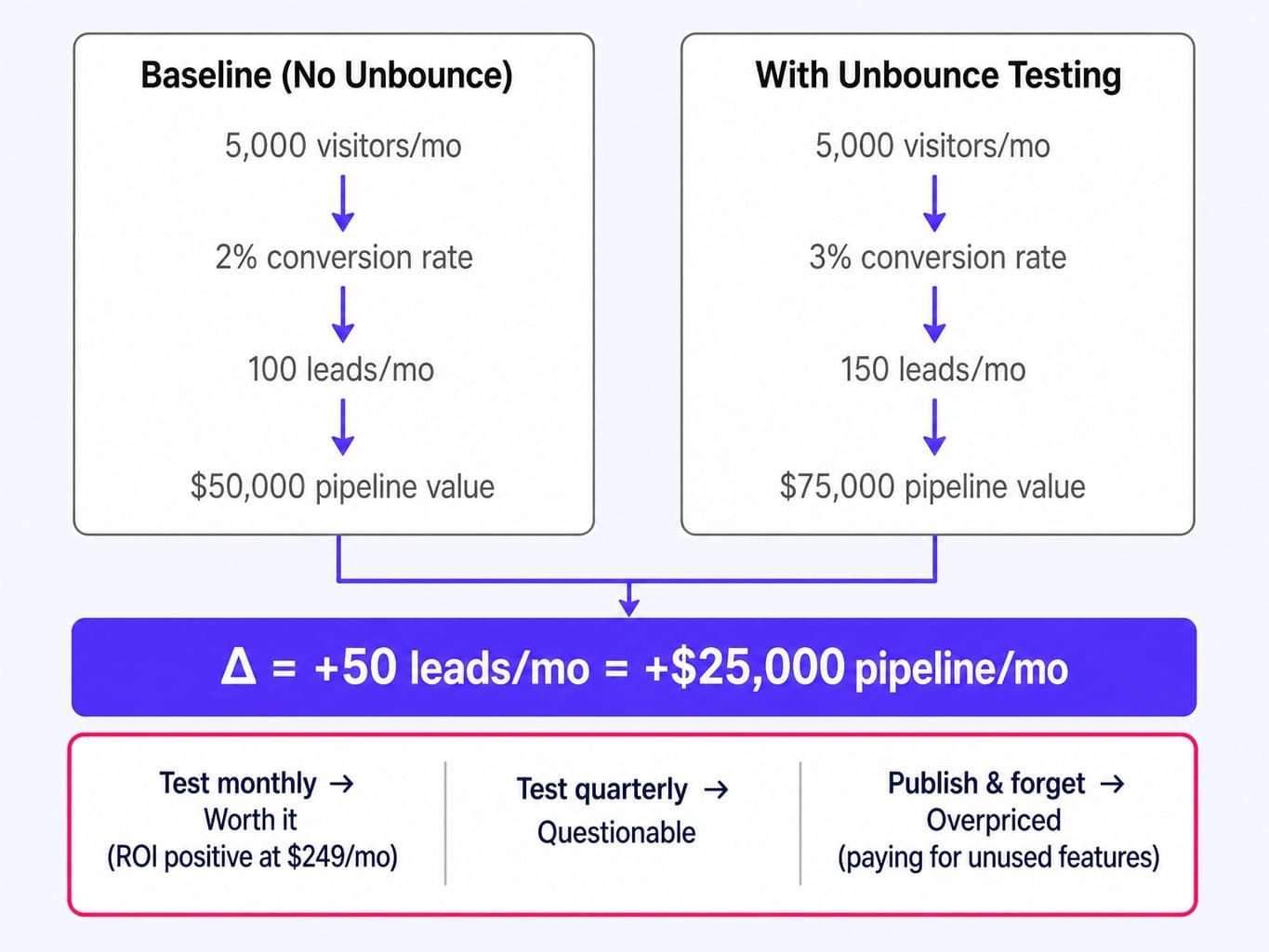
But here's the catch, and it's a big one. This math only works if you have the execution capacity to run tests consistently. The reality for most lean B2B teams is they build a page, launch it, and never touch it again. Without a consistent testing cadence, Unbounce's most valuable features (Smart Traffic, A/B testing) go completely unused. You end up paying $99-$249 per month for a drag-and-drop page builder—a function that tools like HubSpot or Webflow may already provide.
The framework is simple: Unbounce is worth it if you test monthly. It's questionable if you test quarterly. It's overpriced if you just need to publish and forget.
Unbounce vs. Building Landing Pages in Your Existing Stack
Most reviews compare Unbounce to other dedicated landing page builders like Instapage or Leadpages. This misses the point entirely. For most B2B teams, the real question is: should we use a dedicated landing page tool at all, or just build pages within our existing marketing automation platform?
The decision hinges on three variables:
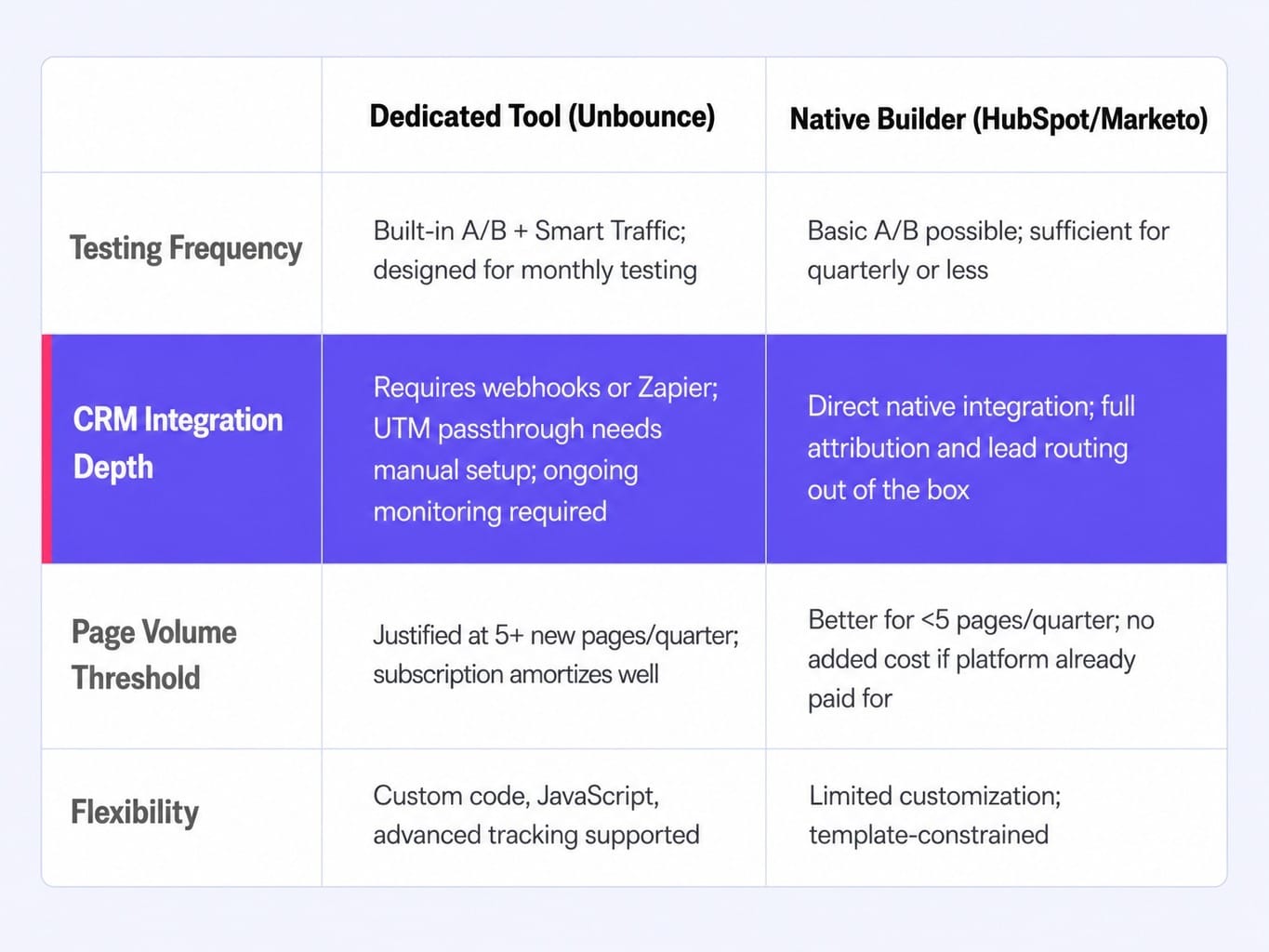
- Testing Frequency: If your team runs A/B tests on landing pages at least monthly, a dedicated tool with built-in traffic splitting and variant management is worth the overhead. The workflows are designed specifically for optimization. If you test quarterly or less, the native landing page builder in your HubSpot or Marketo Engage instance is likely sufficient.
- CRM Integration Depth: This is a crucial, often-overlooked factor. Building a page in HubSpot means form submissions flow directly into the CRM with full attribution and lead routing. With Unbounce, you're configuring webhooks or Zapier to pass data into Salesforce or HubSpot. This introduces friction. UTM passthrough and custom field mapping require careful setup and ongoing monitoring. For B2B teams where lead attribution is paramount (which is all of them), this integration tax is a real operational cost.
- Page Volume: If your team needs fewer than five new landing pages per quarter, the subscription cost and setup overhead of a dedicated tool are difficult to justify. For a team already paying for HubSpot Marketing Hub Professional, adding Unbounce at $149/mo for two pages a quarter is a poor allocation of resources.
The one exception is for teams needing advanced functionality. Unbounce does support custom code and JavaScript, offering more flexibility than some native builders for complex conversion tracking or interactive elements.
Who Should Buy Unbounce — and Who Shouldn't
Unbounce is a powerful tool for a specific type of team and an expensive distraction for others. Here's the verdict.
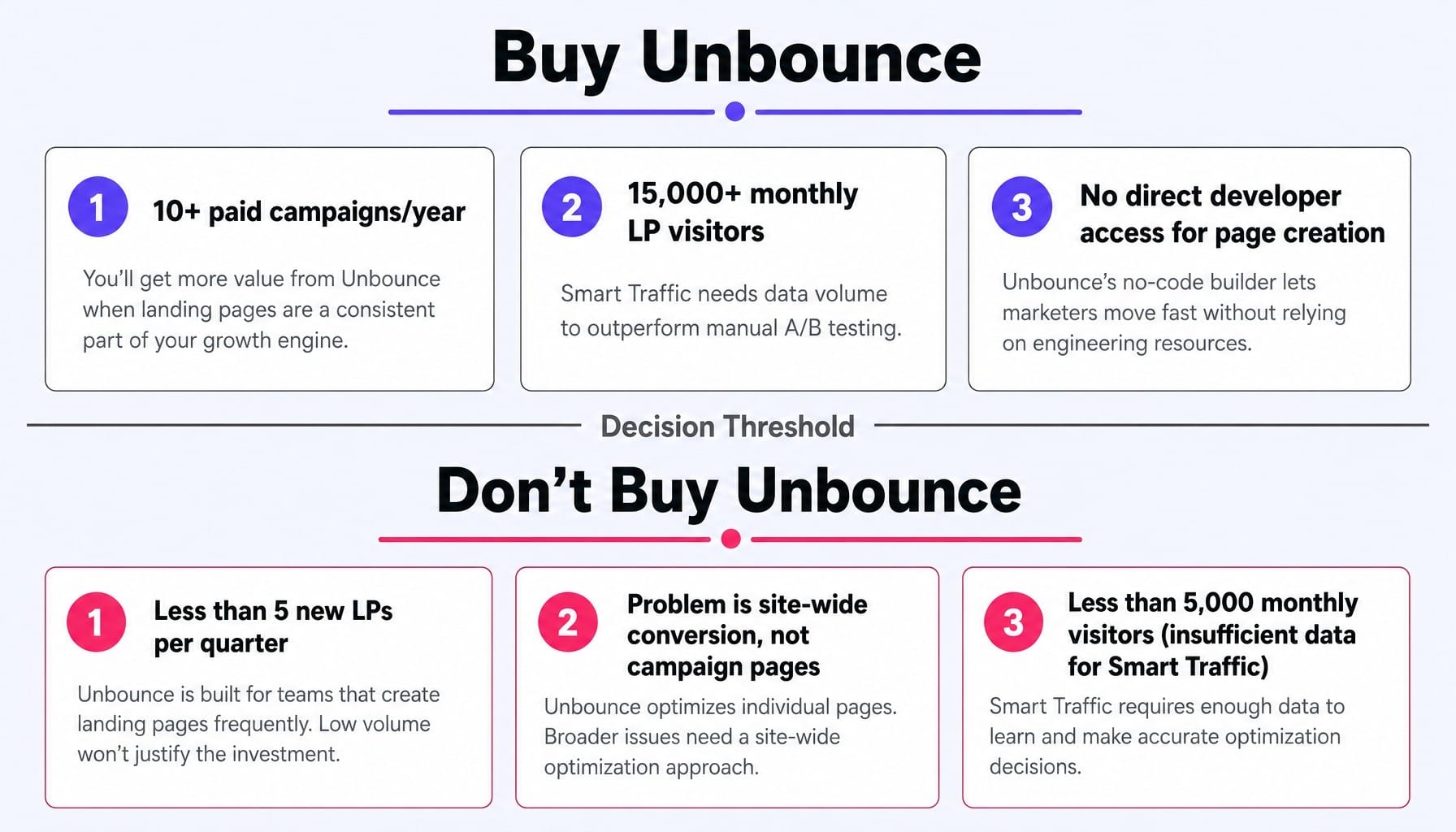
You should buy Unbounce if:
- You run 10+ paid advertising campaigns per year and need unique, message-matched landing pages for each one.
- You have enough traffic (at least 15,000+ monthly landing page visitors) to give the Smart Traffic AI enough data to be effective.
- Your marketing team lacks direct developer access and is constantly bottlenecked by engineering queues to ship new pages.
You should not buy Unbounce if:
- You need fewer than 5 new landing pages per quarter. Use the builder in your existing marketing automation platform.
- Your primary challenge is website-wide conversion, not campaign-specific pages. Unbounce only optimizes the pages you build within it.
- You're a small B2B team with under 5,000 monthly visitors. Smart Traffic won't have enough data to reliably outperform manual A/B testing, and the cost per lead will be too high.
When the Problem Isn't Your Landing Pages — It's Everything Around Them
This review has established a core tension: Unbounce is an effective tool for optimizing the post-click experience on campaign-specific pages. But for most B2B companies, the conversion problem is much bigger than that. It spans the entire website—homepage messaging, pricing page friction, blog-to-demo pathways, and CTAs across dozens of pages that Unbounce never touches.
A team can have perfectly optimized Unbounce landing pages and still suffer from a 2% site-wide conversion rate. This is the execution gap most tools don't address. You can buy a great landing page builder, but if you lack the bandwidth for the consistent testing required to get ROI, you've only solved a fraction of the problem.
This is where a different approach becomes necessary. Instead of manually testing one landing page at a time, Spike AI continuously identifies the highest-impact conversion improvement across your entire digital presence. Whether the bottleneck is on a landing page, your pricing page, or a blog post CTA, Spike's system finds it and ships the fix. It addresses the 90% of your conversion surface that a dedicated landing page tool can't see, turning your backlog of "should-do" optimizations into weekly releases that compound over time.
See how Spike AI identifies and ships your highest-impact conversion improvements every week
Conclusion
Unbounce is a well-built landing page platform. But whether it's worth the price depends entirely on your team's ability to use its optimization features consistently, not just its page builder. The tool earns its subscription fee when teams test monthly, run over ten campaigns a year, and have enough traffic to make the AI features meaningful.
For everyone else, the platform becomes an expensive way to build pages that their existing SaaS marketing tools likely already provides.
Before you start a 14-day trial, do the math. Calculate your potential cost per landing page per month and be honest about your team's realistic testing cadence. If the numbers work and you have the execution capacity, Unbounce is a solid investment in your paid campaign performance. If they don't, that money is better spent optimizing the website you already have.
Frequently Asked Questions
Does Unbounce integrate natively with Salesforce and HubSpot, or do you need Zapier?
Unbounce has a native HubSpot integration that passes form submissions directly. For Salesforce, you'll need to use either Zapier or configure a webhook payload mapping to push lead data into your CRM. This means UTM passthrough and custom fields require extra setup, so budget time for configuration and attribution troubleshooting.
What happens to your landing pages if you cancel your Unbounce subscription?
All published landing pages go offline immediately when your subscription ends. Unbounce does not host pages after cancellation, and there is no simple export-to-HTML feature that preserves full functionality. If you're concerned, publish on a custom domain and maintain a static backup of critical pages before canceling.
How does Smart Traffic differ from running a standard A/B test manually?
A standard A/B test splits traffic evenly and waits for statistical significance to declare a winner. Smart Traffic uses machine learning to dynamically route each visitor to the variant most likely to convert them based on their attributes. The tradeoff: Smart Traffic optimizes faster but gives you less interpretable data about why one variant won.
Is Unbounce's AI copywriting tool reliable enough for B2B messaging?
Smart Copy can generate serviceable first drafts for headlines and body copy, but it tends toward generic, B2C-style language. For nuanced B2B messaging, especially for technical or enterprise products, treat it as a tool for overcoming blank-page paralysis, not for producing final, customer-facing copy.
Can you run multivariate tests on Unbounce, or only A/B tests?
Unbounce supports A/B testing (comparing different full-page variants) but not true multivariate testing where individual elements are tested in combination. To test a headline × CTA × image combination, you'd have to create each combination as a separate variant manually, which quickly becomes impractical.