AI SEO Prompts That Actually Work: A Practitioner's Guide to ChatGPT, Claude, Gemini, and Perplexity
TL;DR
- Stop using generic prompts. The effectiveness of an AI prompt for SEO depends entirely on matching it to the right LLM: ChatGPT for ideation, Claude for deep analysis, Gemini for Google ecosystem data, and Perplexity for live web research.
- The biggest lever for improving prompt output is grounding. Feed your prompts real data—Search Console exports, competitor page content, and site crawl data—to get site-specific recommendations instead of generic advice.
- Most LLMs will confidently fabricate SEO metrics like search volume and keyword difficulty. Never trust these numbers; always validate them with a dedicated SEO tool like Ahrefs or Semrush.
- Build prompt chains, not single-shot prompts. A keyword research prompt should feed into a clustering prompt, which then feeds into a content brief prompt. Isolated prompts produce isolated, lower-quality results.
- Claude's 200K token context window is a significant advantage for SEO, allowing you to analyze entire crawl exports or multiple competitor articles in a single prompt to find gaps and cannibalization issues.
You've seen the blog posts. A marketing manager, under pressure to scale content, copies a generic prompt from a top-ranked article: 'Act as an SEO expert and generate 20 keyword ideas for [topic].' They paste it into ChatGPT and get back a list of obvious head terms they already knew. They try the same prompt in Claude and get a slightly different but equally generic list.
The problem isn't the prompt. It's the underlying system—or lack thereof.
These prompts fail because they are written without understanding which Large Language Model (LLM) excels at which specific SEO task, and without grounding them in any real data about your site, your competitors, or your current SERP landscape. The output is doomed to be generic because the input has no context.
This guide provides a different system. Instead of a generic prompt dump, we match specific, tested ai prompts for seo to the LLM best suited to execute them. We cover ChatGPT, Claude, Gemini, and Perplexity with distinct use cases for each. And to prove it matters, we run the same task across all four and show you the difference in output. This isn't a list; it's a workflow.
Why Most AI Prompts for SEO Produce Generic, Unusable Output
The majority of published AI SEO prompt lists fail because they treat the LLM as a search engine replacement rather than what it is: a reasoning engine that requires context. When a scaling SaaS team burns 15 hours per week on prompt iteration and still ships generic meta descriptions, the bottleneck is not prompt quality but the absence of a system that connects model outputs to live site data.
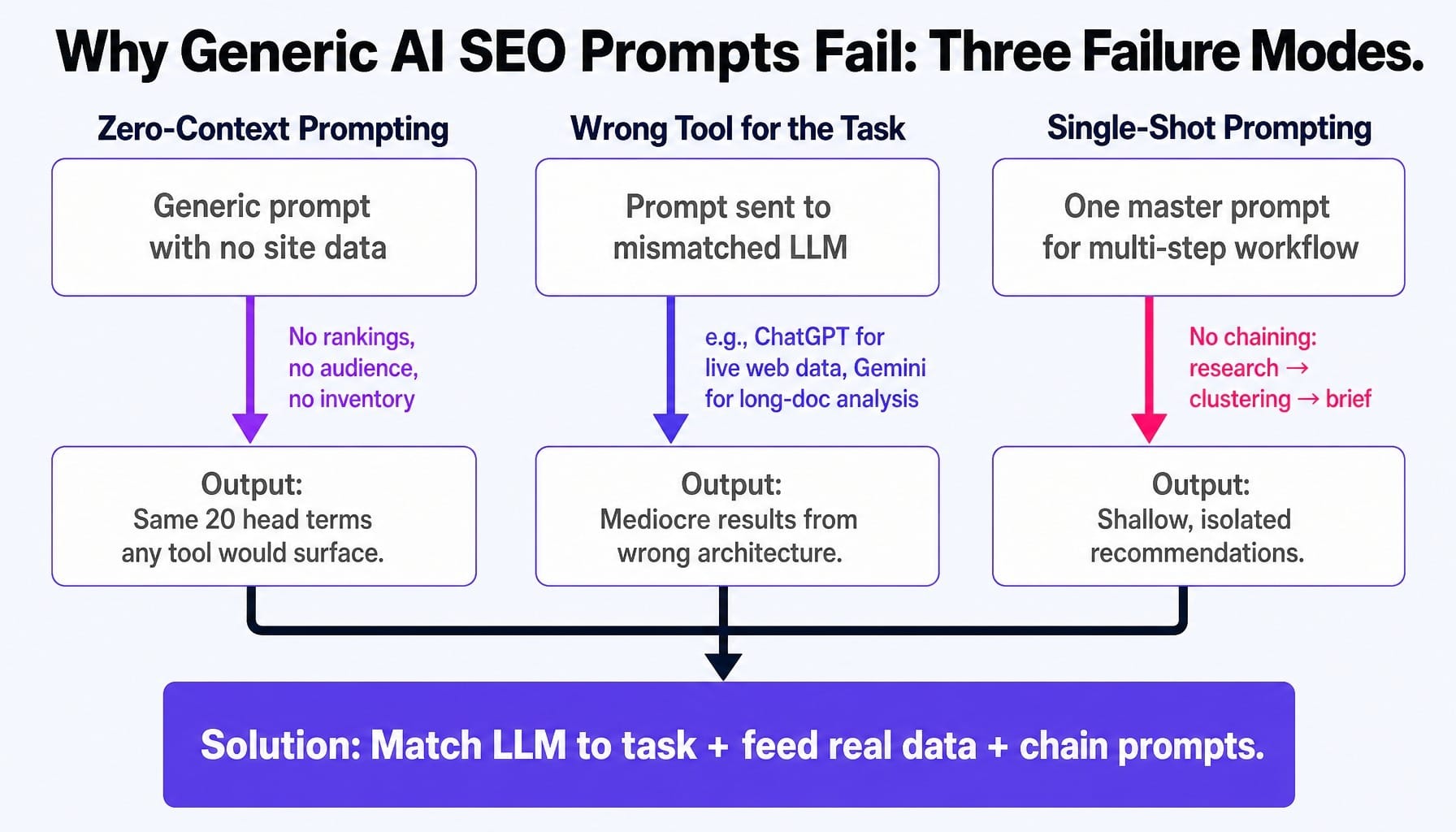
This failure typically manifests in three ways:
- Zero-Context Prompting: This is the most common error. Asking for 'keyword ideas for project management software' without providing your site's existing rankings, content inventory, or audience definition forces the model to pull from its generic training data. The result is the same 20 head terms that Semrush would surface in 10 seconds—useless for anyone with an existing strategy.
- Wrong Tool for the Task: Using ChatGPT for tasks that require live web data (where Perplexity excels) or using Gemini for long-document analysis (where Claude's context window is superior) is a systemic failure. Each model has a distinct architecture. Using the wrong one is like trying to use a screwdriver as a hammer; it might work poorly, but it's not the right system for the job.
- Single-Shot Prompting: Expecting one master prompt to perform a five-step workflow is a fundamental misunderstanding of how these models reason. Effective SEO work involves prompt chaining: the output of a keyword research prompt should become the input for a keyword clustering prompt, which then feeds a content brief generation prompt.
The principle that governs effective AI-driven SEO is simple: match the right LLM to the right task and feed it real data, not just clever instructions.
ChatGPT Prompts for SEO: Keyword Brainstorming, Content Outlines, and Meta Tag Generation
ChatGPT's primary strengths for SEO are speed, structured instruction-following, and reliable formatting. It's the go-to for generating well-organized lists, outlines, and tags quickly. Its weakness is its training data cutoff; it has no access to the live web, so your prompts must provide all the necessary context from your own research.
1. Generate Semantically Related Keywords with Intent Constraints
This prompt moves beyond simple brainstorming by forcing ChatGPT to consider audience sophistication and search intent from the start, producing a more strategically relevant list.
The Prompt:
Generate a table with 30 semantically related keywords, including long-tail variations. The table should have three columns:
Keyword
Estimated Search Intent (Informational, Commercial Investigation, Transactional, Navigational)
A brief explanation of the user's goal for that intent.
Prioritize keywords that a [Target Audience] would use when they are in the [e.g., problem-aware or solution-aware] stage of the buyer's journey. Do not include keywords for beginners.
2. Classify Search Intent for an Existing Keyword List
Use this when you have a list of keywords from a tool like Ahrefs and need to quickly sort them by intent to inform your content strategy. Providing examples (few-shot prompting) dramatically improves accuracy.
The Prompt:
Provide your output as a markdown table with two columns: "Keyword" and "Intent".
Here are examples of how to classify:
"how to calculate customer lifetime value" is Informational.
"hubspot vs salesforce" is Commercial Investigation.
"getspike.ai pricing" is Transactional.
Classify this list:
[Paste your list of up to 50 keywords here]
3. Generate a Content Outline Based on Competitor Analysis
Instead of asking ChatGPT to invent an outline from scratch, this prompt forces it to synthesize the structure of pages that are already ranking, helping you cover essential topics while identifying gaps.
The Prompt:
Your task is to act as a content strategist and create a comprehensive content outline for a new article that can outperform these competitors.
The outline should:
Identify the common themes, sections, and questions all three competitors cover (table stakes).
Highlight any important topics or user questions that these competitors have missed.
Structure the new outline logically with H2 and H3 headings.
For each section, include a brief note on the key point to make or question to answer.
[Paste the full text content of Competitor URL 1]
[Paste the full text content of Competitor URL 2]
[Paste the full text content of Competitor URL 3]
4. Generate Meta Titles & Descriptions with CTR Constraints
This prompt is designed to produce SEO tags that are not just keyword-optimized but also engineered for click-through rate by including specific constraints like character limits and value propositions.
The Prompt:
Follow these strict rules:
Meta Title: Maximum 60 characters. Must include the primary keyword.
Meta Description: Maximum 155 characters. Must include the primary keyword and a clear call to action.
Both must be compelling and create a sense of urgency or curiosity.
Incorporate the unique value proposition: [e.g., "Turns backlogs into weekly releases"].
Present the output in a table with columns for "Variation", "Meta Title", and "Meta Description".
5. Generate an FAQ Section from a Draft Article
This prompt helps you optimize for "People Also Ask" boxes and capture long-tail traffic by identifying questions your content implicitly raises but doesn't fully answer.
The Prompt:
Your task is to read the article and generate a list of 8 relevant questions for an FAQ section. These questions should be things a user might still ask after reading the article, or related long-tail queries that are not fully addressed in the text.
For each question, provide a concise, direct answer of no more than 3 sentences, based on the information in the article or logical extensions of it.
[Paste your full draft article here]
6. Suggest Internal Linking Opportunities
By providing a list of your existing content, you can use ChatGPT to build a contextual internal linking plan that reinforces your topical authority map.
The Prompt:
Below is a list of potential articles to link to, with their target keywords. Identify the 3-5 most relevant articles and suggest the specific anchor text to use for each link from the new post. Explain why each suggested link is contextually relevant for the reader.
Existing Articles:
URL: [URL 1], Target Keyword: [Keyword 1]
URL: [URL 2], Target Keyword: [Keyword 2]
URL: [URL 3], Target Keyword: [Keyword 3]
[Continue with up to 20 existing articles]
Read more: 13 ChatGPT Prompts for Marketing That Actually Work (With Outputs and Iteration Steps) | Spike AI
Claude Prompts for SEO: Content Briefs, Site Audits, and Topical Authority Mapping
Claude's primary advantage for serious SEO work is its massive 200K token context window. This allows it to perform tasks impossible for other models without complex chunking or API work, like analyzing an entire site crawl export or synthesizing insights from dozens of competitor pages at once. Its reasoning is also often more nuanced, making it ideal for analytical and judgment-based tasks.
1. Generate a Comprehensive Content Brief with Information Gain Analysis
This prompt leverages Claude's large context window to "read" the top-ranking pages and create a brief focused on creating content that is demonstrably better by identifying what competitors miss.
The Prompt:
Your task is to analyze these competitor articles and produce a comprehensive content brief that will guide a writer to create a piece with significant information gain.
The brief must include:
1. Core Topics Covered: A list of topics and sub-topics that are "table stakes" because all competitors cover them.
2. Content Gaps & Opportunities: A detailed analysis of what important user questions, angles, or data points these competitors have failed to address. This is the most critical section.
3. Target Audience & Angle: Define the target reader and the unique angle our article should take.
4. Proposed Outline: A detailed H2/H3 outline that incorporates the gap analysis.
5. E-E-A-T Guidance: Specific recommendations for demonstrating experience and expertise (e.g., "Include a first-hand case study," "Cite these specific data points").
Competitor Content:
[Paste full text of Competitor 1]
[Paste full text of Competitor 2]
[Paste full text of Competitor 3]
[Paste full text of Competitor 4]
[Paste full text of Competitor 5]
2. Construct a Topical Authority Map
This prompt uses Claude's reasoning ability to move beyond a simple keyword list and design a strategic content architecture that builds topical authority over time.
The Prompt:
I want to build topical authority around the core topic of "[Core Topic, e.g., Employee Performance Management]".
Your task is to generate a complete topical map. The output should be a structured plan that includes:
1. Pillar Page: The title and a brief description of a comprehensive pillar page on the core topic.
2. Content Clusters: At least 4-6 content clusters that support the pillar page.
3. Cluster Articles: For each cluster, list 3-5 specific article titles (blog posts, guides) that would belong to it. These should be a mix of informational and commercial-intent topics.
4. Internal Linking Structure: Describe how the pillar and cluster pages should link to each other to reinforce semantic relationships (e.g., "All cluster articles should link up to the pillar page; cluster articles should link to each other where contextually relevant").
3. Detect Content Cannibalization from a URL List
Here, Claude acts as an SEO analyst, processing a large list of your site's URLs to find keyword overlap and intent cannibalization—a task that is tedious to do manually. A real-world scenario might involve a SaaS blog with 12 articles targeting minor variations of "project management best practices," all competing with each other. This prompt surfaces that.
The Prompt:
Your task is to identify groups of 2 or more articles that are likely competing with each other for the same search intent.
For each identified group of cannibalizing URLs, provide:
The list of competing URLs.
The core search intent they are all targeting.
A recommendation: either "Consolidate" (merge the articles and 301 redirect) or "Differentiate" (refine the angle of each to target a more specific niche). Provide a brief justification for your recommendation.
Here is the data:
[Paste your list of URLs, H1s, and target keywords, e.g., from a Screaming Frog export]
/blog/post-1, "H1 of Post 1", "Keyword for Post 1"
/blog/post-2, "H1 of Post 2", "Keyword for Post 2"
4. Perform a Page-Level E-E-A-T and Quality Audit
This prompt turns Claude into a content quality rater, evaluating a single piece of content against Google's E-E-A-T (Experience, Expertise, Authoritativeness, Trustworthiness) framework.
The Prompt:
Please perform a detailed E-E-A-T audit of this article. Structure your feedback into four sections:
1. Experience: Does the article demonstrate first-hand experience? Where could it be stronger?
2. Expertise: Does the author demonstrate deep knowledge? Are there any surface-level explanations that need more depth?
3. Authoritativeness: Does the article feel credible? What signals of authority are present or missing?
4. Trustworthiness: Are claims supported by evidence? Are there any unsupported or exaggerated statements?
For each section, provide specific, actionable feedback with examples from the text. Conclude with a summary of the top 3 most impactful revisions to improve the article's overall quality score.
[Paste the full text of the article to be audited]
5. Generate JSON-LD Schema Markup from Page Content
Claude can reliably generate structured data based on the actual content of a page, saving you from using manual schema generators. Precision is key here.
The Prompt:
Based on the content, determine the most appropriate schema type (e.g., Article, FAQPage, HowTo).
Your task is to:
Read the provided content.
Generate the complete and valid JSON-LD script.
Ensure all information within the schema (e.g., questions and answers in an FAQPage schema) is taken directly from the provided text. Output only the JSON-LD code block. Do not include any explanations or surrounding text.
[Paste the full text of your page here]
6. Perform Competitor Content Gap Analysis
Similar to the content brief prompt, but more focused. This prompt specifically asks Claude to find what isn't being said, which is often the source of a winning content angle.
The Prompt:
Your job is to perform a "gap analysis." Read all three articles and identify:
Unanswered Questions: What questions would a reader still have after reading all three of these articles?
Missing Angles: Is there a unique perspective, audience, or framework that none of these competitors are using?
Data Gaps: Are there opportunities to add more recent data, original research, or specific case studies that would provide more value?
Present your findings as a bulleted list of actionable opportunities for my new article.
[Paste text of Competitor 1]
[Paste text of Competitor 2]
[Paste text of Competitor 3]
Gemini Prompts for SEO: Search Console Integration and Google Ecosystem Analysis
Gemini's unique advantage is its native integration with the Google ecosystem. It can analyze Google Search Console exports and interpret Google-specific concepts like Core Web Vitals with more fluency than its competitors. This makes it the right choice when your starting point is data from a Google product. However, be aware that its strength with Google ecosystem data can become a liability; when Search Console exports include branded queries, Gemini often interprets high-impression branded terms as strategic opportunities rather than filtering them as baseline noise.
1. Identify Striking-Distance Keyword Opportunities from Search Console Data
This is Gemini's killer app for SEOs. It turns a raw data dump from GSC into a prioritized list of actionable opportunities. This is how you find the pages a small tweak can push onto page one.
The Prompt:
Your task is to analyze this data and identify "striking-distance" keyword opportunities. These are keywords that meet the following criteria:
Average position between 8 and 20.
High number of impressions (relative to the rest of the data).
Low CTR.
Present your findings in a table with columns for:
Query
Current Position
Monthly Impressions
Recommendation (e.g., "Improve meta title for CTR," "Add a section answering this query," "Internally link to this page more").
[Paste the raw CSV data from your GSC export here]
2. Predict SERP Feature Targeting
Gemini's "upbringing" inside Google gives it a better-than-average intuition for which types of queries trigger specific SERP features. Use this to guide your content formatting.
The Prompt:
For each keyword, predict the most likely SERP features it would trigger (e.g., Featured Snippet, People Also Ask, AI Overview, Video Carousel, Local Pack).
Present your analysis in a table with columns for "Keyword" and "Likely SERP Features". Add a brief "Reasoning" column explaining your prediction (e.g., "Question-based query, high likelihood of Featured Snippet").
Keyword List:
[Keyword 1]
[Keyword 2]
[Keyword 3]
3. Prioritize Core Web Vitals Fixes from a PageSpeed Insights Export
Technical SEO reports can be overwhelming. This prompt uses Gemini to translate a PageSpeed Insights JSON export into a prioritized action plan based on likely ranking impact.
The Prompt:
Your task is to analyze this JSON data and provide a prioritized list of the top 3-5 actions I should take to improve my Core Web Vitals and overall Page Experience score.
For each recommendation, explain:
What the issue is (e.g., "Large Next-Gen Image Format").
Why it matters for user experience and SEO.
What the specific fix is (e.g., "Compress and convert image X to WebP format").
Prioritize the fixes that will have the most significant impact on the LCP, INP, and CLS scores.
[Paste the full JSON output from PageSpeed Insights here]
4. Predict Query Fan-Out for AI Overview Optimization
When Google generates an AI Overview, its systems often "fan out" the original query into a set of related sub-queries to gather more comprehensive information. This prompt asks Gemini to predict those queries, allowing you to proactively create content that will get sourced.
The Prompt:
To build a comprehensive AI Overview, Google's systems will likely generate a set of concurrent, related fan-out queries.
Your task is to predict 5-7 likely fan-out queries for my primary query. These should be questions that explore different facets of the original topic. For each predicted fan-out query, suggest a specific heading or section I should include in my content to answer it directly.
5. Perform a Multimodal SEO Audit
Gemini's multimodal capabilities allow it to "see" and reason about images and page layouts. Use this to get feedback on how your page's visual structure impacts user engagement and search visibility. (Note: This requires an interface that supports image uploads).
The Prompt:
Act as a CRO and SEO specialist. Analyze the provided screenshot of my webpage.
Evaluate the page's visual hierarchy and layout. Provide feedback on:
Above-the-Fold Clarity: Is the value proposition immediately clear without scrolling?
Call-to-Action (CTA) Prominence: Is the primary CTA visually distinct and easy to find?
Content Scannability: Does the use of headings, whitespace, and imagery make the content easy to scan and digest?
Image SEO: Are the images supportive of the content? Suggest opportunities for adding relevant images or optimizing existing ones.
Perplexity Prompts for SEO: Competitor Research and Live SERP Analysis
Perplexity's superpower is its direct, real-time access to the web, complete with citations. This makes it the definitive tool for any SEO task requiring up-to-the-minute information about what is currently ranking, who is linking to whom, and what Google's AI Overviews are saying right now.
1. Conduct a Live Competitor Content Audit
This prompt does in 60 seconds what would take an analyst an hour: it finds the top-ranking pages for a keyword and breaks down their strategy.
The Prompt:
Identify the top 5 organic search results (excluding ads and SERP features). For these 5 pages, create a summary table that analyzes:
1. URL
2. Headline (H1)
3. Estimated Word Count
4. Content Angle/Format (e.g., "Ultimate Guide," "Product Comparison," "Case Study")
5. Unique Strengths (What does this page do particularly well?)
2. Discover Trending Topics for a Content Calendar
Use Perplexity to function as your content strategist, finding the emerging conversations in your niche before they become saturated.
The Prompt:
Identify 5 new content ideas that are not yet widely covered by major publications. For each idea, explain why it's timely and suggest a compelling headline.
3. Research Fresh Backlink Opportunities
This prompt helps you reverse-engineer what kind of content earns links in your space by looking at who has recently linked to your competitors.
The Prompt:
Search the web to find 5-10 recent articles, blog posts, or resource pages that have linked to this competitor's article in the past 6 months.
For each linking page you find, provide the URL and a brief description of why they linked to the competitor's content (e.g., "Cited a statistic," "Included in a resource roundup," "Used as an example"). This will help me understand what earns links in this niche.
4. Analyze Google's AI Overview for a Target Keyword
This is the most direct way to optimize for Answer Engine Optimization (AEO). You ask Perplexity to look at the AI Overview and tell you exactly what Google is rewarding.
The Prompt:
Carefully analyze the AI Overview that appears at the top of the search results.
Describe in detail:
What is the main answer or summary provided in the AI Overview?
Which specific websites are cited as sources for this information?
What is the format of the overview (e.g., paragraph summary, bulleted list, step-by-step guide)?
Based on this analysis, what are 3 specific recommendations for how I should structure my content to increase its chances of being cited in this AI Overview?
5. Conduct a Content Freshness Audit
Use Perplexity's live web access to check if your existing content has become outdated.
The Prompt:
Please search the web for the latest information, statistics, and best practices related to this topic. Compare what you find with the content on my page.
Identify at least 3 specific pieces of information in my article that are now outdated and need to be refreshed. For each, explain what the new, correct information is and cite your source.
Head-to-Head: The Same Keyword Clustering Task Across All Four LLMs
This is where the theoretical meets the practical. To prove that LLM choice matters, I ran the exact same keyword clustering prompt across ChatGPT-4, Claude 3 Opus, Gemini Advanced, and Perplexity. The goal was to see how each model would structure a content plan from a raw list of keywords.
The Prompt Used:
Your task is to group these keywords into logical, semantically-related clusters.
For your output:
Create a distinct group for each cluster.
Give each cluster a descriptive name.
Assign a primary search intent to each cluster (Informational, Commercial Investigation, Transactional).
Recommend a specific content type for each cluster (e.g., Blog Post, Comparison Page, Product Feature Page).
Keyword List: [employee onboarding software, best employee onboarding tools, employee onboarding checklist template, what is employee onboarding, onboarding process for new hires, remote employee onboarding, onboarding software pricing, employee onboarding best practices, free employee onboarding software, [company name] alternative, how to improve employee onboarding, onboarding workflow automation, employee offboarding process, new hire orientation ideas, pre-boarding employee experience, user onboarding vs employee onboarding, employee onboarding journey map, benefits of onboarding software, onboarding software for small business, 30-60-90 day plan template, HR onboarding solutions, onboarding metrics to track, employee training and development plan, integrating onboarding with HRIS, get a demo of onboarding software, employee onboarding platform, best onboarding experience examples, onboarding software reviews, what to include in a welcome kit, compliance training for new hires]
Here's how they performed:
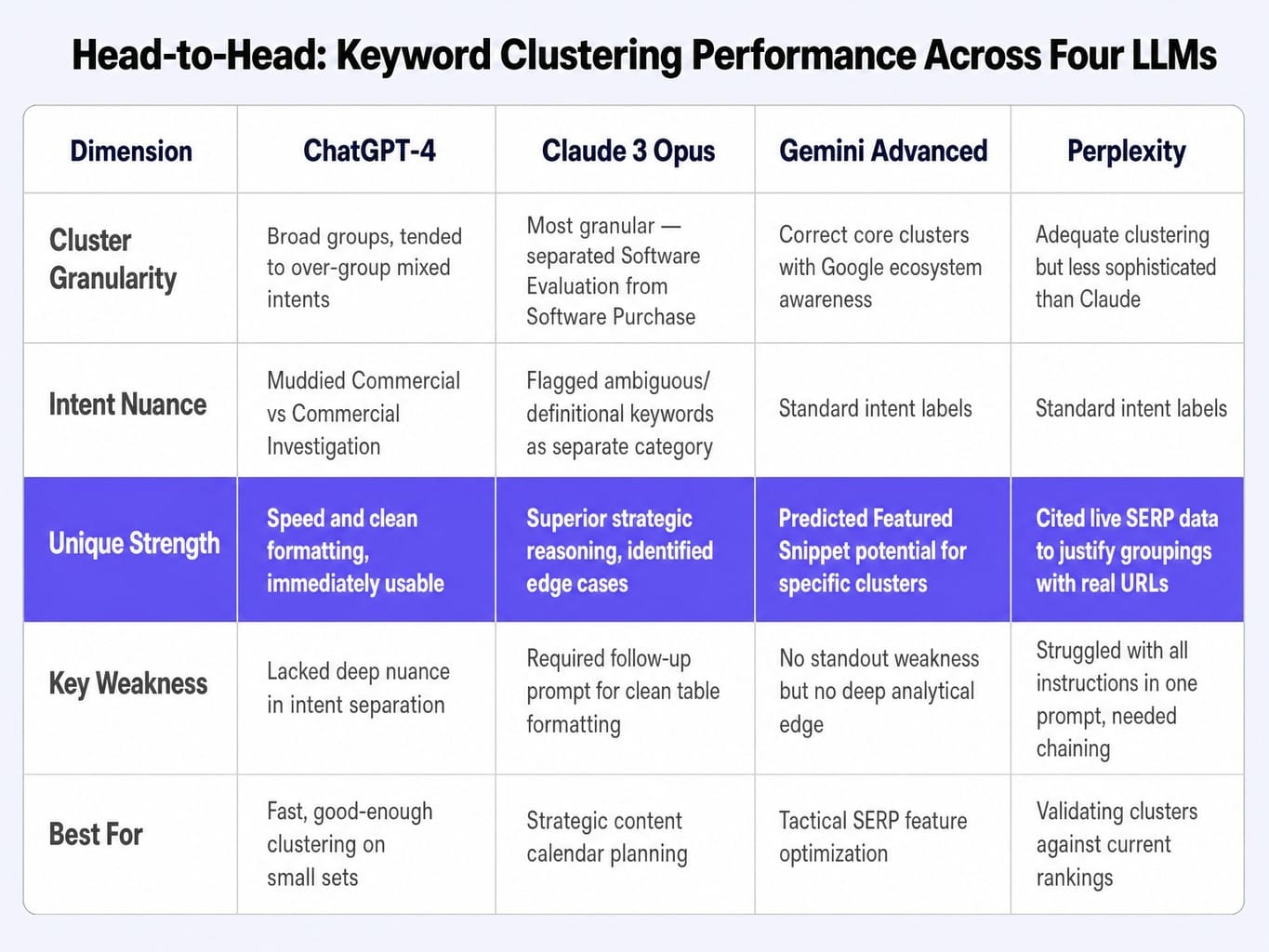
- ChatGPT-4 Output: ChatGPT produced clean, well-formatted clusters and followed the output instructions perfectly. It created logical groups like "Core Software Keywords," "Process & Best Practices," and "Templates & Checklists." However, it tended to over-group, putting "onboarding software pricing" (Commercial) in the same bucket as "best employee onboarding tools" (Commercial Investigation), slightly muddying the intent. The output was fast and immediately usable but lacked deep nuance.
- Claude 3 Opus Output: Claude's output was more analytical. It created more granular clusters, such as separating "Software Evaluation" (comparisons, reviews) from "Software Purchase" (pricing, demos). Critically, it flagged three keywords like "user onboarding vs employee onboarding" as "Ambiguous/Definitional" and suggested they required a dedicated explainer article, a level of nuance ChatGPT missed. The formatting required a follow-up prompt to get into a clean table, but the strategic reasoning was superior.
- Gemini Advanced Output: Gemini correctly identified the core clusters but showed a distinct awareness of the Google ecosystem. It labeled the "employee onboarding checklist template" cluster as having high potential for triggering a Featured Snippet and suggested formatting the content with a clear, step-by-step structure to capture it. Its reasoning felt slightly more aligned with how Google itself might parse these queries.
- Perplexity Output: Perplexity's approach was unique. Alongside clustering, it included citations from live SERPs as justification for its groupings. For the "best employee onboarding tools" cluster, it cited three current "best of" listicles, noting that the dominant content format is a comparison review. This real-world grounding is invaluable, though its core clustering logic was less sophisticated than Claude's. It struggled to handle all instructions in one go and required more prompt chaining.
Analysis: For pure, fast clustering, ChatGPT is sufficient. For the most strategically sound and nuanced clustering that informs a content calendar, Claude provided the superior reasoning. For tactical insights on how to format content to win SERP features, Gemini added a valuable layer. For validating your clusters against what's actually ranking today, Perplexity is the only choice.
Which LLM to Use at Each Stage of the SEO Workflow
Based on the prompts and head-to-head test, here is a practical framework for mapping the right LLM to each stage of your SEO process. This is a living system; these recommendations reflect model capabilities as of late 2025 and will evolve.
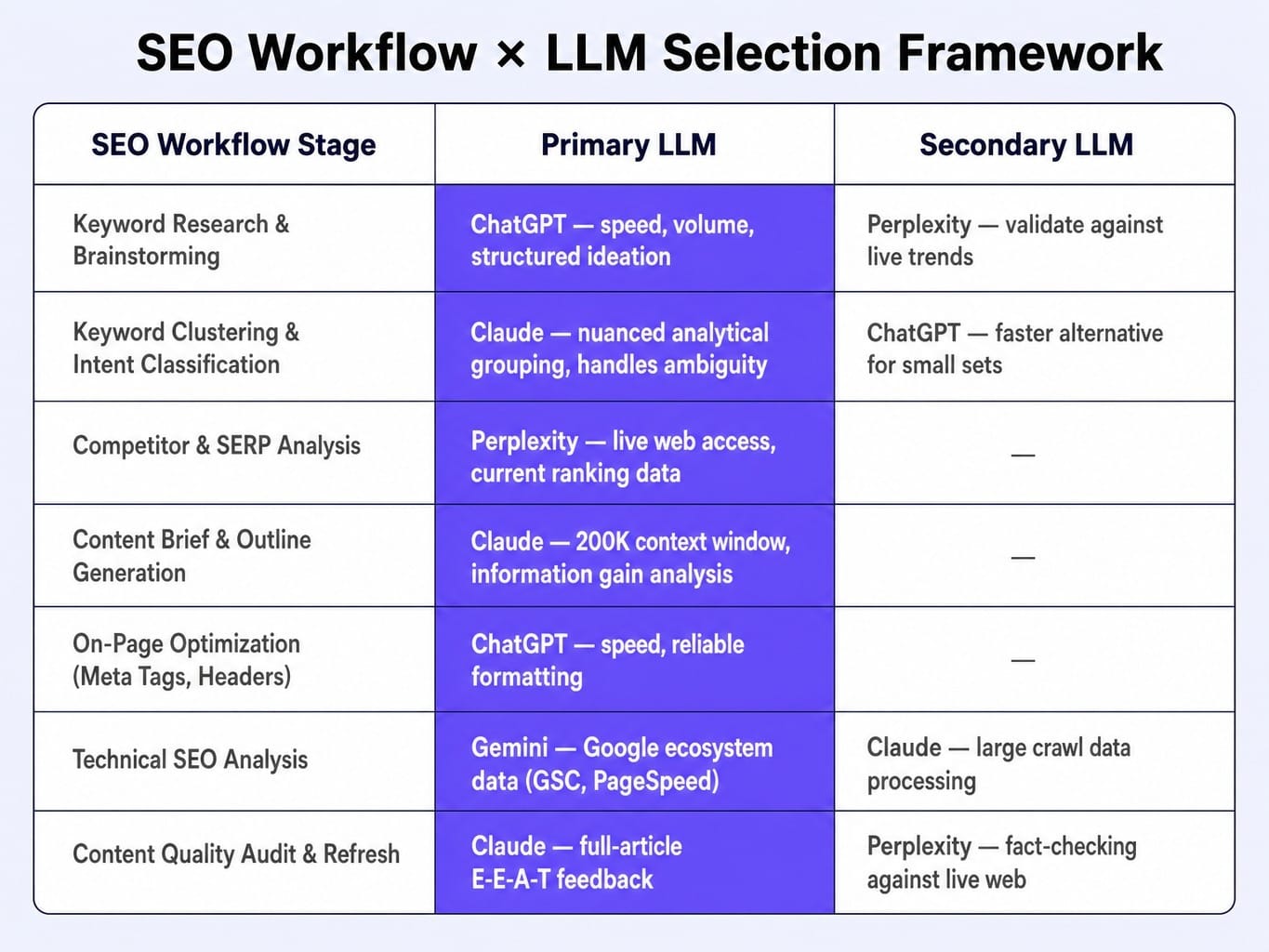
Keyword Research & Brainstorming:
Primary: ChatGPT for speed, volume, and structured ideation.
Secondary: Perplexity to validate ideas against live search trends and discover emerging topics.
Keyword Clustering & Intent Classification:
Primary: Claude for its nuanced, analytical grouping and ability to handle ambiguity.
Secondary: ChatGPT for a faster, good-enough alternative on smaller keyword sets.
Competitor & SERP Analysis:
Primary: Perplexity. Its live web access makes it the undisputed winner for any task requiring current ranking data.
Content Brief & Outline Generation:
Primary: Claude, leveraging its large context window to synthesize multiple competitor articles and focus on information gain.
On-Page Optimization (Meta Tags, Headers):
Primary: ChatGPT for its speed and reliable instruction-following for generating well-formatted tags and lists.
Technical SEO Analysis:
Primary: Gemini for interpreting data from the Google ecosystem (Search Console, PageSpeed Insights).
Secondary: Claude for processing and analyzing large, raw crawl data exports from tools like Screaming Frog.
Content Quality Audit & Refresh Planning:
Primary: Claude for its ability to process full articles and provide deep, E-E-A-T-aligned feedback.
Secondary: Perplexity to check for outdated facts and statistics against the live web.
How to Ground AI Prompts with Real SEO Data Instead of Relying on Training Data
The single biggest improvement you can make to any AI SEO prompt is to feed it your actual data. This practice, often called Retrieval-Augmented Generation (RAG), transforms a generic prompt into a site-specific consultation. If your prompt doesn't include data unique to your site or your competitors, the output will be generic enough to apply to any site—which means it's not truly useful for yours.
Here are three practical data-grounding techniques:
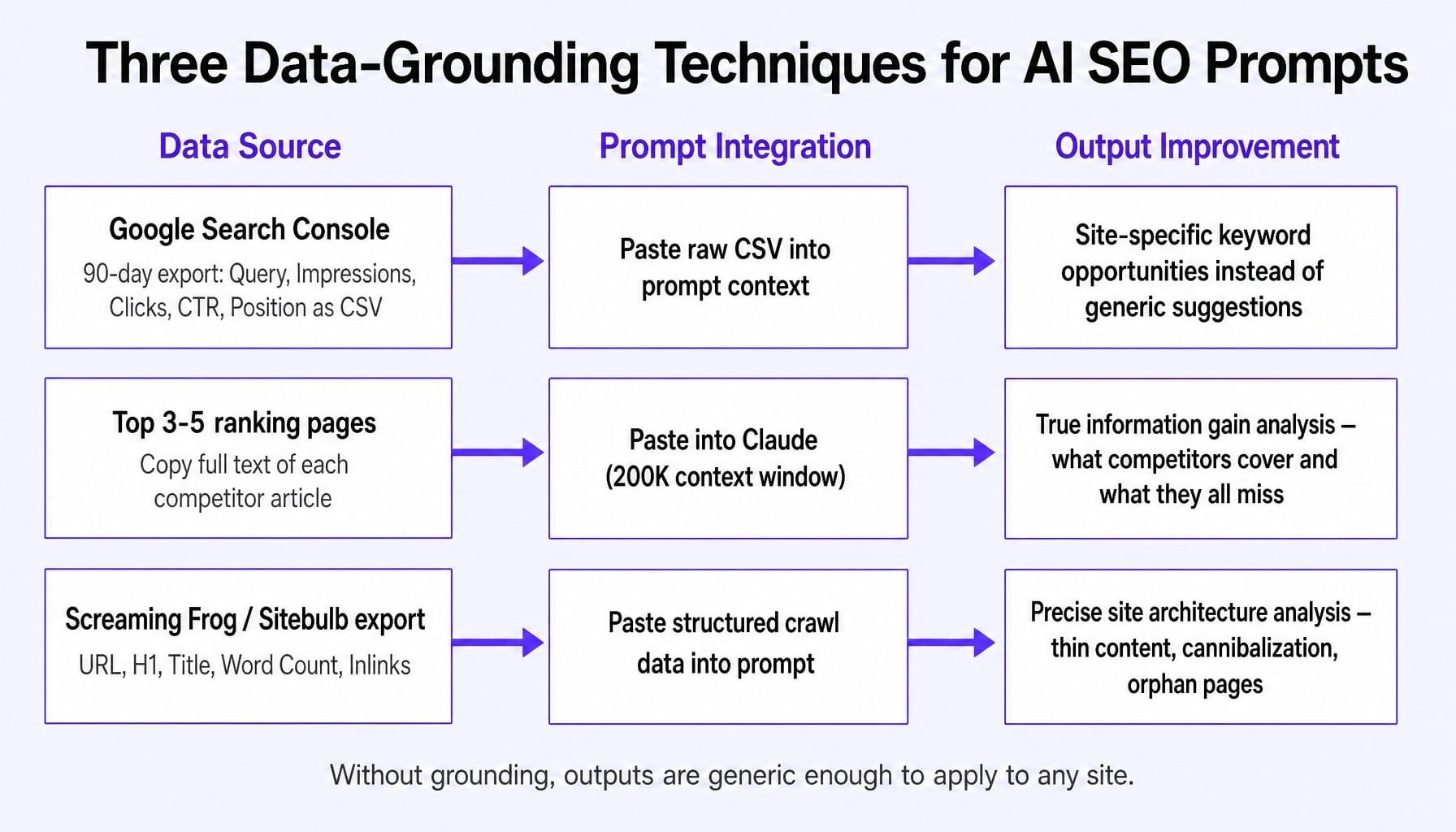
- Ground with Search Console Exports: Before asking an LLM to "find keyword opportunities," go to Google Search Console. Export your query performance data for the last 90 days (Query, Impressions, Clicks, CTR, Average Position) as a CSV. Copy the raw CSV text and paste it directly into your prompt context. This changes the prompt from "Find keyword opportunities for HR software" to "Find my keyword opportunities for HR software based on my actual ranking data." The difference in output quality is night and day.
- Ground with Competitor Content: When creating a content brief, don't ask the model to guess what a good article looks like. Copy the full text of the top 3-5 ranking pages for your target keyword and paste them into the prompt. Claude's 200K context window makes this feasible. This enables true information gain analysis, as the model can identify what your competitors cover and, more importantly, what they all miss.
- Ground with Crawl Data: To analyze your site's architecture, run a crawl with a tool like Screaming Frog or Sitebulb. Export the relevant data (e.g., URL, H1, Title, Word Count, Inlinks) and paste it into Claude. This transforms a vague prompt like "find thin content" into a precise instruction: "From the provided crawl data, identify all pages with a word count below 400 that are not /contact or /about pages."
5 Mistakes That Make Your AI SEO Prompts Useless
Even with the right tool and data, a few common mistakes can render your outputs worthless. Here are five to avoid.
- Asking for Keywords Without Intent Constraints. Simply asking for "keywords related to X" is a recipe for a useless, mixed-intent list. Always specify the intent you're targeting (e.g., "informational keywords for users new to the topic," "commercial investigation keywords for users comparing solutions").
- Trusting LLM-Generated Search Volume. No LLM has access to real-time search volume data. Any numbers they provide are hallucinations based on patterns in their training data. I've seen ChatGPT confidently state a keyword gets "2,400 monthly searches" when the actual Ahrefs volume was 140. Always validate metrics with a dedicated SEO tool.
- Using the Same Prompt Across Different LLMs. The head-to-head test proves this fails. Claude responds best to analytical framing ("analyze," "identify gaps"). ChatGPT excels with structural commands ("create a table," "format as a list"). Perplexity needs prompts framed as search tasks ("search the web for," "find recent articles").
- Not Specifying the Output Format. Asking for "ideas" gets you a paragraph. Asking for "a markdown table with columns for 'Keyword,' 'Intent,' and 'Content Type'" gets you an actionable work plan. Be ruthlessly specific about the format you need.
- Running Prompts in Isolation. SEO is a workflow, not a series of one-off tasks. The best results come from prompt chaining: the output from your SaaS keyword research prompt should be cleaned up and used as the input for your clustering prompt. Stop running single-shot prompts and start building simple, multi-step systems.
When the Bottleneck Is Not the Prompts but the Shipping
You now have a system for thinking about SEO with AI. You know which prompts to use, which LLM to run them on, and how to ground them with real data. But the output of every one of these prompts is still just a recommendation sitting in a chat window.
The keyword clusters need to become a content calendar. The content briefs need to become published articles. The meta tag suggestions need to be deployed across 200 pages. The technical audit findings need to become shipped fixes.
For a lean marketing team—the kind of 1-to-5-person team carrying specialist expectations across SEO, CRO, and paid search—the gap between "AI told me what to do" and "it is actually live on the site" is where all progress stalls.
This is the execution gap that Spike AI is built to close. It is not another prompt tool. It is the system that acts on the insights. Spike AI continuously identifies the highest-impact SEO, AEO, and CRO improvements for your business, prioritizes them by projected lead and revenue impact, and then ships them. Every week.
The prompts in this article help you think better about SEO. Spike AI helps you ship the results of that thinking without the backlog, without the engineering tickets, and without the quarterly agency cycles. It's the logical next step for any team that has the knowledge but lacks the bandwidth to execute.
See how Spike AI turns SEO insights into shipped improvements every week
From Prompts to a System
AI prompts for SEO are not a commodity. Their value is a function of the LLM you choose, the data you feed it, and the workflow you chain them into.
The difference between a generic prompt list and a functional SEO system is understanding how to match ChatGPT's ideation speed, Claude's analytical depth, Gemini's Google-native context, and Perplexity's live web access to the specific stage of the workflow where each excels. It's about grounding every instruction with your site's actual performance data.
As these models improve quarterly, the practitioners who build data-grounded, multi-step workflows now will compound their advantage. Those still copying one-shot prompts from blog posts will be left wondering why their outputs still feel so generic. The future of SEO isn't about finding better prompts; it's about building better systems.
Frequently Asked Questions
Can AI prompts replace manual technical SEO audits entirely?
Not yet. AI prompts can process crawl data from tools like Screaming Frog to analyze and prioritize issues like duplicate titles or thin content. However, they cannot crawl a site themselves to collect that raw data. The AI's role is analysis, not data collection.
Do I need paid API access to use these prompts effectively?
For many prompts here, the free web interfaces of ChatGPT and Perplexity are sufficient. However, Claude's extended context window, which is critical for analyzing large data exports or multiple competitor pages, requires a Pro subscription. Gemini's best features are accessed via Google AI Studio.
How often should I re-run the same AI SEO prompts on my site?
Run keyword opportunity and competitor gap prompts monthly, as SERPs shift. Perform content audits and topical authority mapping quarterly, unless you publish at high volume. After every major Google core update, re-run your Search Console data analysis prompts to catch ranking shifts early.
What prompt structure works best for generating schema markup with AI?
Paste the full page content into Claude or ChatGPT and specify the exact schema type you want (e.g., FAQPage, HowTo). Instruct it to output valid JSON-LD only—no explanations—and to base every property on content that is actually visible on the page. Always validate the output with Google's Rich Results Test before deploying.
Can AI prompts accurately classify search intent at scale?
Yes, with caveats. When you provide clear definitions and examples in the prompt, LLMs can classify keyword lists with high accuracy, typically around 85-90%. The remaining 10-15% are usually ambiguous, mixed-intent queries that still require human judgment. Always spot-check against live SERPs.
What role does prompt engineering play in answer engine optimization?
Prompt engineering helps you create content that AI systems can easily extract and cite. Use prompts to generate concise, self-contained, 40-60 word answer blocks for target queries. These passages become the extractable units that Google AI Overviews and Perplexity cite. The prompt must specify this "atomic" answer format explicitly.