B2B Google Ads Strategy for 2026: The CRM-Integrated Playbook That Actually Builds Pipeline
TL;DR
- Stop optimizing for MQLs. A campaign with a $250 CPL can be twice as profitable as one with a $150 CPL if it generates higher-quality leads. The only metric that matters is cost per qualified pipeline.
- Your campaigns fail because of measurement, not targeting. Before touching a keyword, set up offline conversion tracking to import CRM pipeline stages (MQL, SQL, Opportunity) back into Google Ads.
- If you have fewer than 30 high-value conversions a month, build a "micro-conversion ladder" (e.g., pricing page visits, case study downloads) to give Smart Bidding enough signal to learn without optimizing for junk.
- Structure campaigns in five tiers based on buyer intent, not keyword themes: Brand, High-Intent Product, Competitor, Problem-Aware, and Remarketing. Fund them in that order.
- AI Overviews and broad match defaults make CRM-integrated measurement non-negotiable. Without it, Google's automation will optimize for volume, not value, and burn your budget on unqualified traffic.
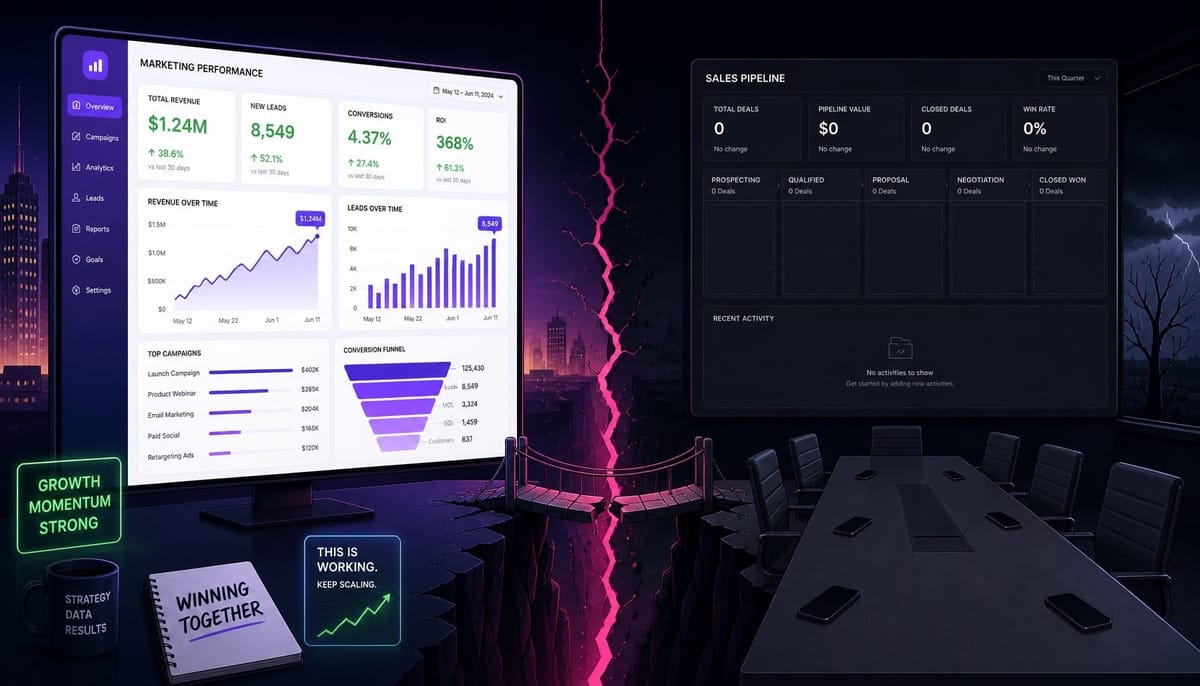
Your team is celebrating. You hit the quarterly goal: a $120 cost per lead from Google Ads, well under the $150 target. The dashboards look great. Three months later, the sales team reports that paid search leads are duds. Fewer than 4% ever progress past the first call. You spent $45,000 to generate a pipeline worth less than $15,000.
The problem wasn't your keywords, ad copy, or bidding strategy. The problem was that you told Google's algorithm to optimize for the wrong outcome.
This is the central failure of most B2B Google Ads strategies. They don't fail because of poor campaign management; they fail because the measurement infrastructure feeds Google incomplete, misleading, or outright incorrect signals about what a valuable conversion actually is.
This guide is not about campaign tweaks. It's about rebuilding your B2B Google Ads strategy from the foundation up. We will diagnose the systemic failures that kill performance before you even launch a campaign, rebuild the measurement infrastructure that connects ad spend to revenue, and then construct a campaign architecture on top of it that actually builds qualified pipeline.
Why Most B2B Google Ads Campaigns Fail Before They Start
B2B Google Ads failure is almost never a creative or targeting problem. It's a structural problem baked into how the account is configured from day one. I once audited a B2B SaaS account spending $40,000 a month where the primary conversion action was a gated PDF download. For over a year, Google's algorithm had become incredibly efficient at finding people who download free content, while the sales team insisted paid search "doesn't work." The campaigns weren't broken; the instructions given to the algorithm were. This happens in three predictable ways.
First is the form-fill trap. You set "demo request submitted" as your primary conversion action. Google's Smart Bidding, by default, treats every conversion action marked "primary" as equally valuable. It then does exactly what you told it to do: find the cheapest, fastest way to get more of that action. It doesn't distinguish between a demo request from a Fortune 500 VP and one from a student using a burner email. It just optimizes for the form fill, which systematically selects for lower-quality prospects because they are cheaper to acquire.
Second is the attribution gap. The average B2B sales cycle is 84 days, yet Google's default conversion window is 30 days. This means any deal that closes on day 31, 60, or 90 is completely invisible to the algorithm. Google literally cannot learn which keywords, ads, or audiences produce your most valuable customers because it never sees the final outcome. It's optimizing with a fraction of the data, blind to the revenue it generates. This is why a proper gclid passback and extended conversion window are not optional.
Third is the channel isolation problem. Marketing optimizes for CPL in Google Ads, while sales tracks pipeline velocity in HubSpot or Salesforce. The two systems never talk. This creates a slow-moving credibility crisis for the marketing function that only surfaces when the board asks why revenue didn't follow the lead volume curve. These aren't optimization problems; they are infrastructure problems. And they must be solved before any campaign-level tactic matters.
Read more: B2B RevOps in 2026: What to Measure, What to Build, and Where Most Teams Stall
Rebuild Your Measurement Infrastructure Before Touching Campaigns
No campaign structure, keyword strategy, or bidding approach will produce a pipeline if Google's algorithm doesn't know what pipeline looks like. Fixing your measurement infrastructure is the single highest-ROI investment you can make in your Google Ads account. It is the prerequisite for everything that follows. This infrastructure has two core components: getting real revenue data into Google and giving Smart Bidding enough signal volume to learn from it.
How to Set Up Offline Conversion Tracking That Actually Feeds Smart Bidding
This process connects the clicks happening in Google Ads to the revenue events happening in your CRM. It begins with the Google Click ID (gclid), a unique identifier generated for every ad click. You must configure your forms to capture this gclid and store it as a property on the contact record in your CRM, like HubSpot or Salesforce.
As that lead progresses through your sales pipeline—from MQL to SQL to Opportunity and Closed-Won—those stage changes are imported back into Google Ads as distinct conversion actions. You can automate this using a direct CRM integration, a tool like Zapier, or the Google Ads Data Manager.
Crucially, you must assign differentiated conversion values to each stage to enable value-based bidding. A simple import isn't enough. For example, you might assign values like this:
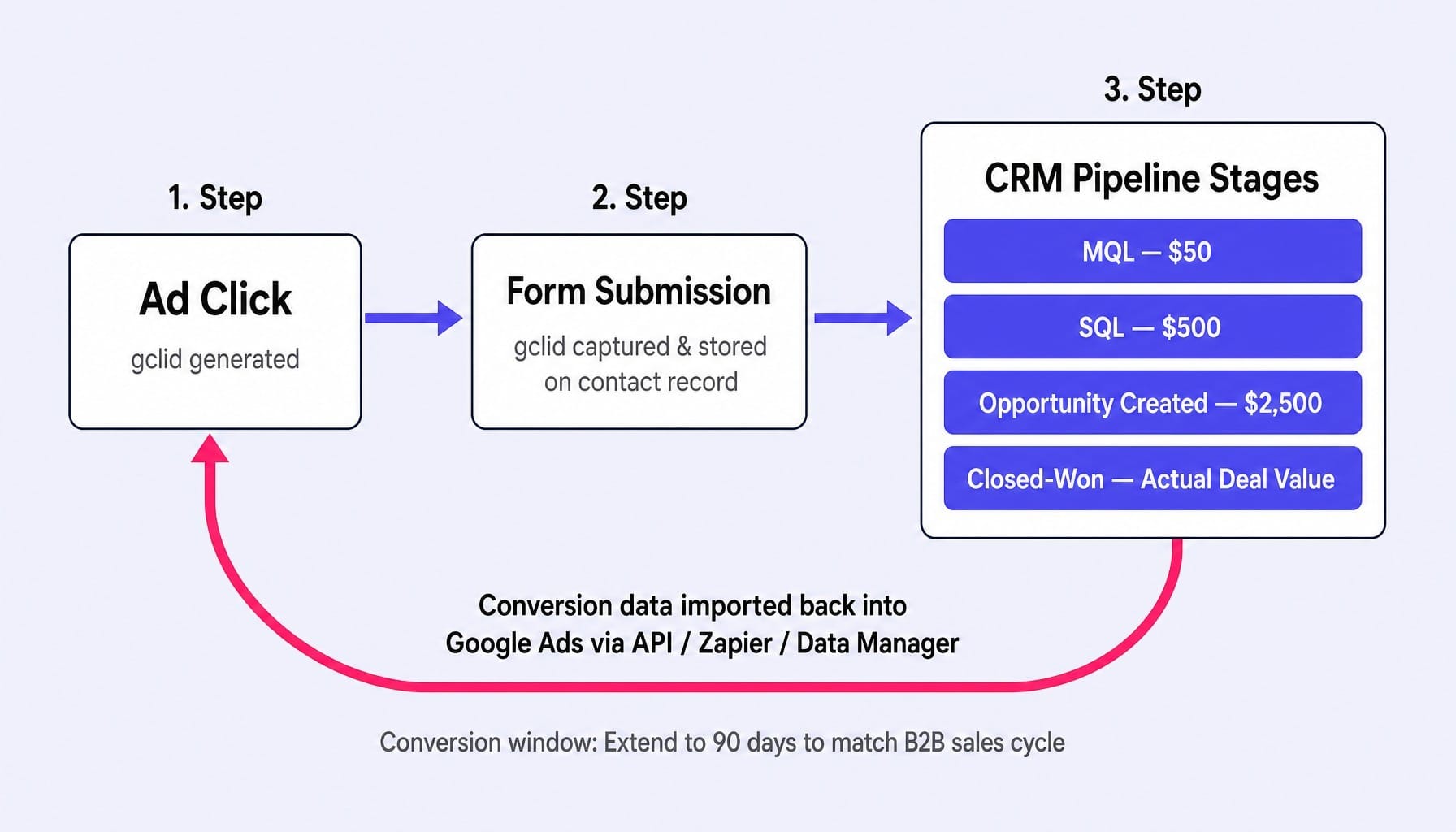
- MQL: $50
- SQL: $500
- Opportunity Created: $2,500
- Closed-Won: Actual deal value (or a high proxy)
This tells Google's algorithm not just to get conversions, but to get the highest-value conversions. Finally, address the offline conversion import latency by extending your conversion window in Google Ads to 90 days to match your sales cycle.
The Micro-Conversion Ladder: Training Smart Bidding When You Have Fewer Than 30 Conversions Per Month
Most B2B accounts face a cold start problem: they don't generate enough high-value conversions (like SQLs or opportunities) for Smart Bidding to exit its learning phase. Google's algorithm needs a minimum of 15 conversions in 30 days, and ideally 30-50, to function effectively.
The solution is a micro-conversion ladder: a sequence of progressively valuable, higher-volume actions that give the algorithm enough signal to learn while still pointing it toward pipeline quality. A typical ladder for a B2B SaaS company might look like this:
- Pricing Page Visit > 30s (Value: $1)
- Case Study Download (Value: $5)
- Demo Page Visit > 60s (Value: $10)
- Demo Request Submitted (Value: $50)
- MQL (Imported from CRM) (Value: $100)
- SQL (Imported from CRM) (Value: $500)
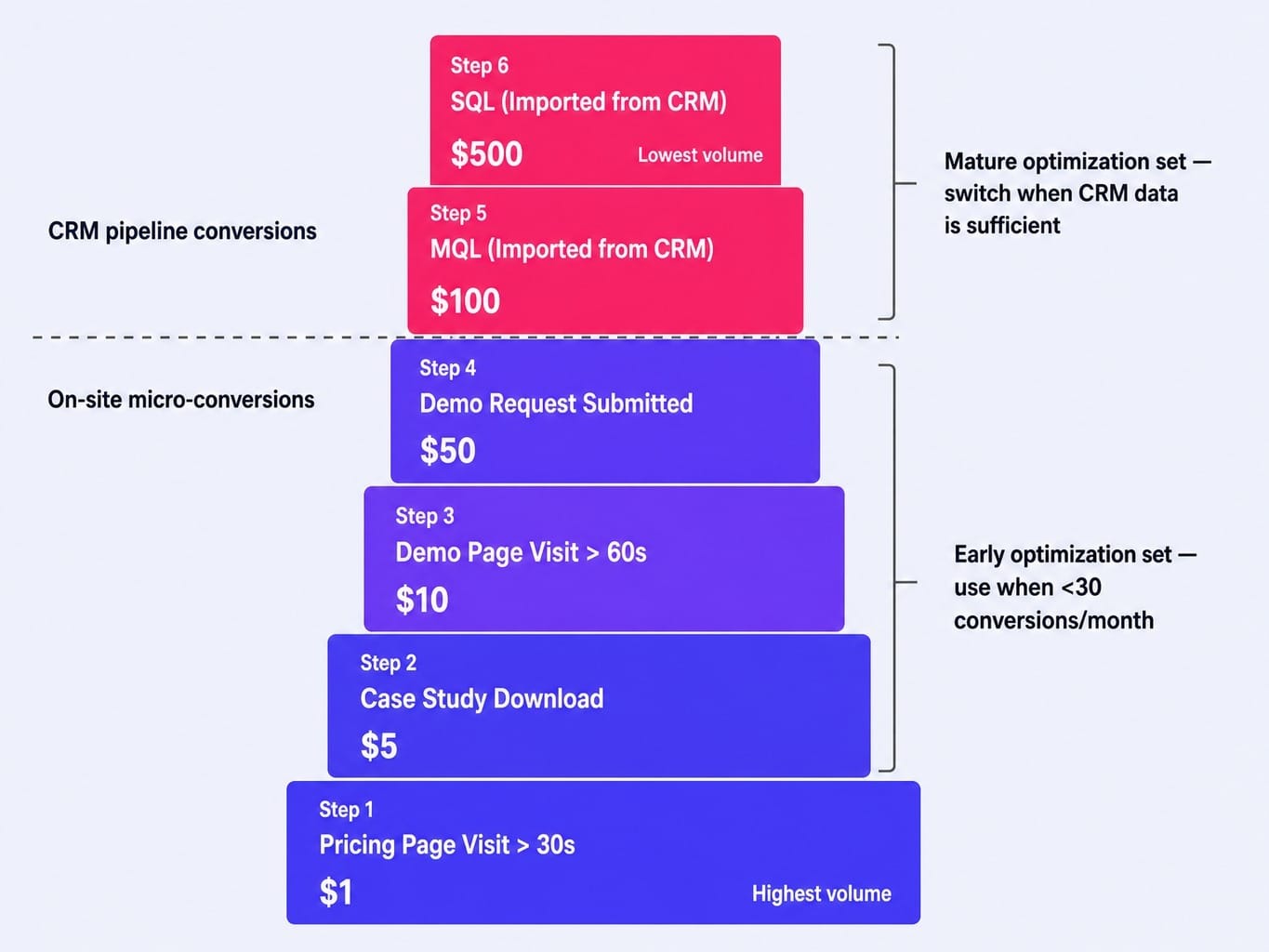
You use conversion action sets to tell Google which of these conversions to optimize for at the campaign level. Early on, you might use a set that includes actions 1-4 to gather volume. As your CRM data matures, you switch to a set focused on actions 5 and 6. This solves the low-volume problem without reverting to optimizing for junk leads, allowing you to transition from a tCPA to a tROAS bidding strategy much sooner.
Campaign Architecture That Mirrors the B2B Buying Committee Journey
The common approach of structuring campaigns by keyword theme or match type is inefficient for B2B. A better model is to structure your account to mirror the buying committee's research journey, which moves from problem awareness to vendor evaluation to brand validation. Different members of the committee—the end-user, the IT manager, the VP of Finance—search for different things at different stages. A problem-aware search isn't ready for a demo CTA; a brand search is.
The most effective B2B accounts are built on a tiered structure, each with distinct keyword intent, ad copy, landing pages, and conversion goals. This allows you to allocate a budget surgically and meet each searcher with the right message.
The Five Campaign Tiers: From Brand Defense to Problem-Aware Capture
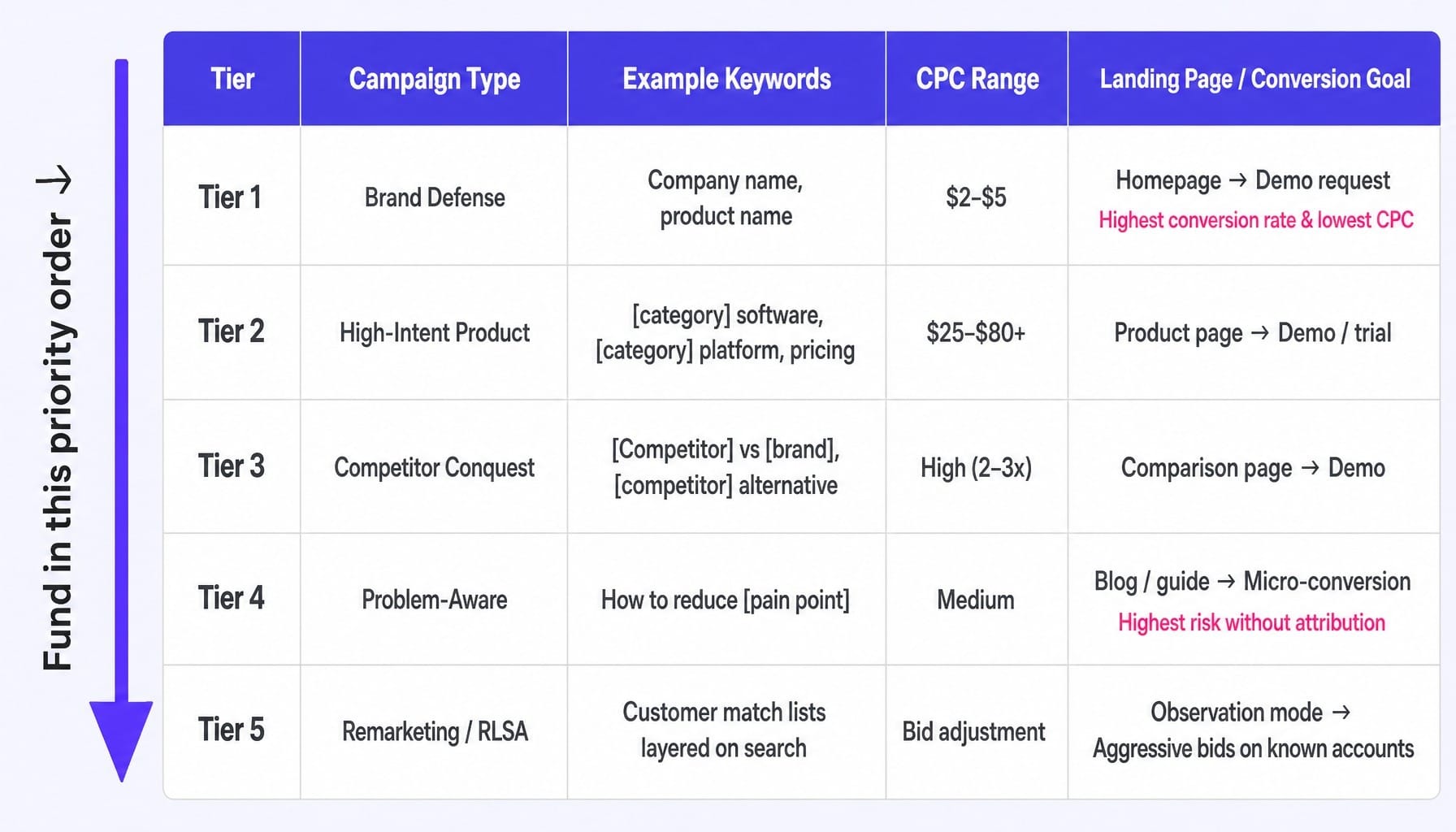
Structure and fund your campaigns in this priority order. Most teams make the mistake of starting with Tier 4, the most expensive and lowest-converting tier, instead of capturing existing demand first.
- Tier 1: Brand Campaigns. These target your own company and product names. They have the cheapest CPCs ($2-$5) and the highest conversion rates. This is non-negotiable brand defense. Your landing page is your homepage, and the conversion goal is a high-intent action like a demo request.
- Tier 2: High-Intent Product Campaigns. These capture users actively shopping for a solution like yours. Keywords include modifiers like "software," "platform," "pricing," "for enterprise." CPCs are high ($25-$80+), but the intent is commercial. Send this traffic to dedicated product pages.
- Tier 3: Competitor Conquest Campaigns. These target searches for your direct competitors (e.g., "[competitor] vs [your brand]"). Expect low CTRs (1-3%) and high CPCs. This only works if you send traffic to a dedicated comparison landing page that makes a compelling case for switching.
- Tier 4: Problem-Aware Campaigns. These target broader keywords where the searcher has a pain point but hasn't identified a solution category (e.g., "how to reduce sales team admin"). This is top-of-funnel demand generation. Send this traffic to helpful blog content or guides, and measure success with micro-conversions.
- Tier 5: Remarketing/RLSA. This involves layering your customer match audience lists onto your search campaigns. Using RLSA for B2B audiences in "observation" mode allows you to bid more aggressively when a contact from a known target account is searching for your keywords, without restricting your reach.
Negative Keyword Architecture: Filtering Out the Wasted B2B Spend
As most B2B practitioners will tell you, it's common for 30-40% of ad spend to be wasted on irrelevant clicks. This happens because negative keyword lists are often reactive—added only after the money is spent. A proactive negative keyword architecture is essential. Build shared negative lists based on three categories specific to B2B SaaS:
- Wrong Buyer Type: free, cheap, open source, personal, template, student, for fun.
- Wrong Stage/Intent: login, support, documentation, tutorial, jobs, careers, how to cancel.
- Wrong Industry/Use Case: Terms that attract adjacent but non-ICP verticals. For a project management tool, this might be wedding planning or home renovation.
Review your search term report weekly. Don't just look for individual bad terms; use search term n-gram analysis to spot patterns. If the word "free" appears across dozens of different queries, you have a systemic case of close variant bleed that needs to be plugged with a broad-match negative.
Why Optimizing for MQLs Is Destroying Your Google Ads ROI
If your Google Ads reporting deck leads with cost per lead (CPL) or cost per MQL, you are optimizing for a metric that actively misleads your team and sabotages your results. MQL-based optimization instructs Google to find the cheapest leads, which systematically selects for low-quality prospects who are easy to convert but will never buy.
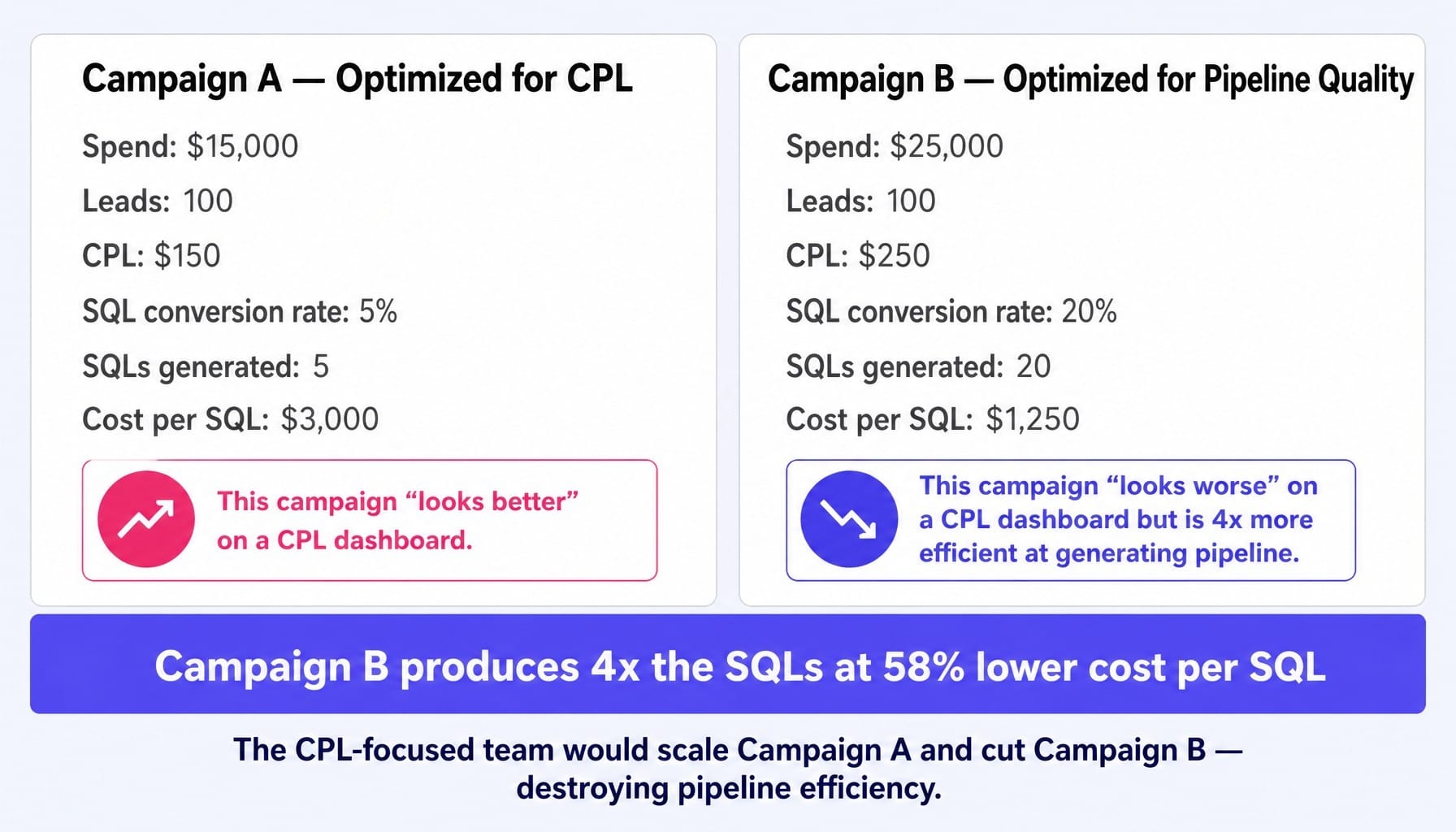
Consider two campaigns running side-by-side:
- Campaign A: Spends $15,000 to generate 100 leads at a $150 CPL. Of those leads, 5% become Sales-Qualified Leads (SQLs).
Result: 5 SQLs at a cost of $3,000 per SQL.
- Campaign B: Spends $25,000 to generate 100 leads at a $250 CPL. Of those leads, 20% become SQLs.
Result: 20 SQLs at a cost of $1,250 per SQL.
A team reporting on CPL would scale Campaign A and cut Campaign B, celebrating the "cheaper" leads while unknowingly destroying their pipeline efficiency. A team reporting on cost per qualified pipeline would do the exact opposite, generating four times the sales opportunities for a similar budget.
This reframe from demand capture to quality demand capture requires two things. First, the CRM pipeline data must flow back into Google Ads, as covered in Section 2. Second, your reporting—likely built in a tool like Looker Studio connected to your HubSpot CRM—must surface cost per SQL and cost per opportunity at the campaign level. This shift is the single highest-leverage change most B2B teams can make. It changes what Google optimizes for, which campaigns get budget, and what "performance" truly means.
Read more: SaaS Marketing Metrics That Actually Inform Decisions (Not Just Dashboards)
What 2026 Changed: AI Overviews, Broad Match Defaults, and the Shrinking SERP
The measurement-first strategy outlined above is evergreen, but three platform shifts in 2026 make it more urgent and non-negotiable.
First, AI Overviews are compressing organic search results. An analysis of over 25 million impressions found that for queries where AI Overviews appear, paid search CTR can drop significantly. This makes your branded and high-intent keywords (Tier 1 & 2) even more valuable, as they are less likely to trigger generic AI answers. Problem-aware keywords (Tier 4), where AI Overviews dominate, become a much riskier investment without rock-solid attribution.
Second, broad match is the new default. With Google retiring legacy campaign types, broad match is being pushed harder than ever. In 2026, broad match incorporates signals from your landing page, past conversions, and user search history. This makes it incredibly powerful with the right data, but a catastrophic budget leak without it. If your measurement infrastructure is still optimizing for form fills, broad match will simply find more low-intent searchers to fill out your forms, burning your budget faster than ever.
Third, Performance Max (PMax) is expanding into lead gen, but remains a black box for most B2B. PMax optimizes across Google's entire inventory (Search, Display, YouTube, etc.) to hit your conversion goal. The problem is, you lose control. For most B2B SaaS companies with long sales cycles and niche audiences, it's inefficient. The exception is for businesses with strong, high-volume offline conversion data (50+ imported conversions per month) and a clear, single offering. For everyone else, it's a tool that requires more control than it gives.
When the Bottleneck Isn't Strategy — It's Shipping the Fixes
This playbook lays out a clear strategy: connect your CRM to Google Ads, build a micro-conversion ladder, structure campaigns by intent, and optimize landing pages for each tier. Most B2B marketing teams know, at some level, this is what needs to happen. The real bottleneck isn't strategy; it's execution.
These fixes—updating conversion actions, building new comparison pages, running CRO tests on your demo request flow, maintaining negative keyword lists—sit in a backlog for weeks or months. The lean marketing team is already stretched thin, juggling SEO, content, and events. The capacity to continuously ship the optimizations that make your Google Ads spend convert simply isn't there.
This is the execution gap Spike AI is designed to close. Our system functions as a unified marketing intelligence layer, identifying the highest-impact optimization across your website, landing pages, and conversion infrastructure. Then, we ship it. Every week. We don't just give you a report on what to fix; we deploy the solutions that turn ad clicks into pipeline.
Conclusion
The most important shift in B2B Google Ads strategy is realizing it's no longer a campaign management problem. It's a measurement and systems problem. The teams that win in paid search aren't the ones with the cleverest ad copy; they're the ones who built the infrastructure that teaches Google's algorithm what revenue actually looks like.
As Google pushes harder toward automation with AI-driven campaigns and broad match defaults, the gap between teams with strong, CRM-integrated measurement and those without will widen from a crack to a chasm. The question is no longer whether you should invest in this infrastructure. It's whether you can afford to wait another quarter to start.
Frequently Asked Questions
How much budget does a B2B SaaS company need to test Google Ads effectively?
A realistic minimum is $3,000-$5,000 per month, focused on a single campaign tier like Brand or High-Intent Product. The budget floor is set by the need to generate 30+ conversions per month for Smart Bidding to learn. Spreading a small budget too thin across multiple tiers is a common cause of failure.
Should you bid on competitor brand names in B2B Google Ads?
Yes, but only with dedicated campaigns that send traffic to comparison-focused landing pages, never your homepage. Expect CPCs to be 2-3x higher and CTR to be low (1-3%). This tactic is only ROI-positive if your landing page makes a powerful, evidence-based case for why a prospect should switch.
What bidding strategy works best for B2B Google Ads with low conversion volume?
Start with Maximize Clicks or Enhanced CPC to gather initial data. Once you have at least 30 conversions in a 30-day period, transition to a Target CPA (tCPA) strategy. If you can't hit that threshold with primary conversions, implement a micro-conversion ladder to increase signal volume for the algorithm.
How do you optimize Google Ads when your SaaS deal cycle is 90+ days?
First, extend your conversion window to 90 days in Google Ads settings. Second, import intermediate pipeline stages (MQL, SQL) as conversion actions to give the algorithm feedback before a deal closes. Finally, analyze performance using 90-day cohort reports, not blended monthly metrics, to see the true impact of your spend.
How do you use customer match lists to improve B2B Google Ads performance?
Upload your closed-won customer list from your CRM to use in two ways: create a similar audience for prospecting, and exclude the list from lead gen campaigns to avoid paying to re-acquire customers. For ABM, upload target account contact lists and layer them onto search campaigns in "observation" mode to bid up when known prospects are searching.
How do you report Google Ads ROI to a B2B SaaS executive team?
Never lead with vanity metrics like CPL or CTR. Build a dashboard in a tool like Looker Studio that reports on cost per SQL, cost per opportunity, and total pipeline value generated, broken out by campaign tier. Include business metrics like CAC payback period and LTV:CAC ratio to connect ad spend directly to revenue impact.