ChatGPT Prompts for Google Ads & Facebook Ads: 20+ Templates for B2B SaaS
TL;DR
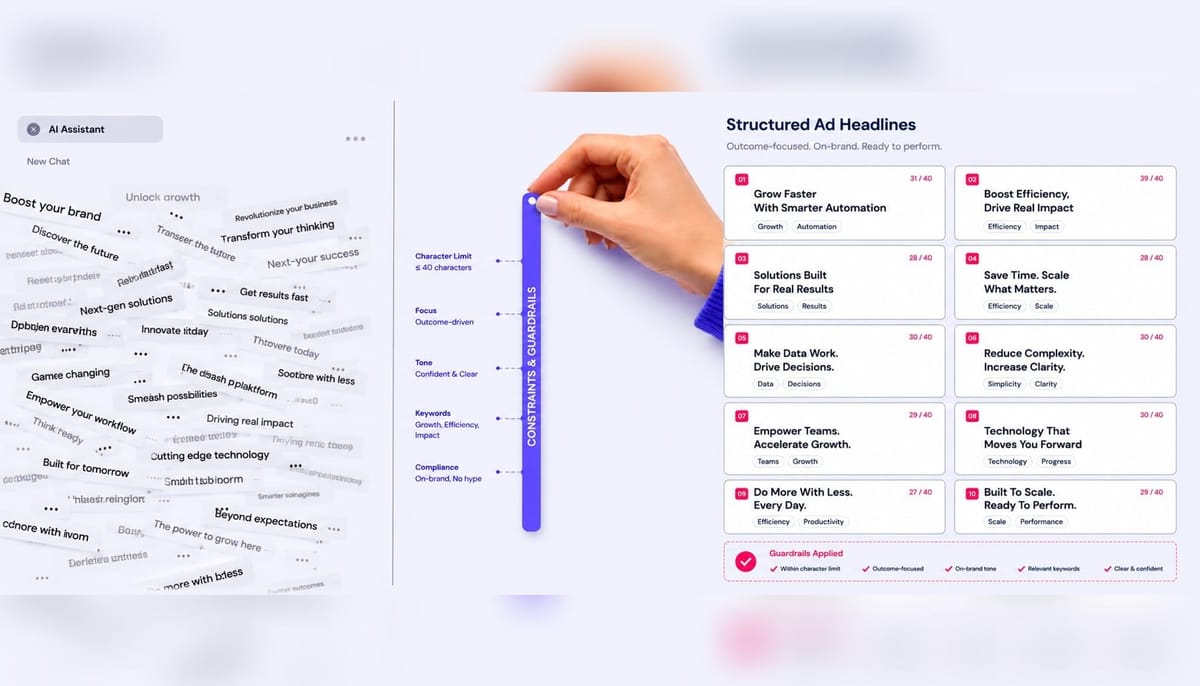
- Generic ChatGPT prompts fail because they lack constraints. The most effective prompts include character limits, negative instructions, and audience specifics.
- For Google Ads, embed character limits directly into your prompts (e.g., "each headline must be under 30 characters") and ask the model to count them for you.
- Use ChatGPT for upstream planning tasks like audience definition and negative keyword discovery to save time and improve campaign alignment before you write a single ad.
- For performance analysis, feed ChatGPT exported search term reports (under 200 rows) to quickly identify wasted spend and diagnose Quality Score issues at the keyword level.
- When prompting for B2B Meta Ads, focus on exclusion criteria (who not to target) and pain-point-driven hooks to attract qualified demo bookings, not just cheap clicks.
We've all been there. You have a new campaign to launch for your B2B SaaS product. You open ChatGPT and type what feels like a reasonable request: "Write me 15 Google Ads headlines for my project management software."
What you get back is a list where 11 headlines exceed the 30-character limit for Responsive Search Ads, and the remaining four are near-identical rephrasings of "Manage Projects Smarter." You spend the next 45 minutes manually editing output that was supposed to save you time.
This is the central frustration with using AI for paid media. The problem isn't the model's capability; it's the absence of constraints in our ChatGPT prompts for Google Ads. Character limits, audience specificity, tone restrictions, negative instructions, and intent alignment are what separate a time-wasting prompt from a usable one.
This is not another list of prompts to copy blindly. It's a system for building prompts that produce usable output on the first try, organized by campaign stage—from planning and ad copy to landing page alignment and performance analysis. Every Google Ads prompt includes the actual character limits, and every example is built for the specific world of B2B SaaS, where the goal is a qualified demo, not an impulse buy.
Campaign Planning Prompts: Audience, Keywords, and Budget
Most articles on AI prompts for Google Ads jump straight to ad copy. That's a mistake. The prompts that save the most time and prevent the most rework are upstream, in the planning phase. A poorly defined audience or a flat keyword list means every downstream prompt will produce misaligned output. These three prompts cover the planning decisions that shape everything else.
Audience Definition Prompt for B2B SaaS Campaigns
A successful campaign starts with knowing who you're talking to and, just as importantly, who you're not talking to. This prompt forces ChatGPT to think like a B2B strategist, focusing on pain points and objections relevant to a demo booking, not a consumer purchase.
Prompt:
Based on this, define three distinct audience segments we should target on Google Ads. For each segment, provide:
Job Titles: A list of 3-5 common job titles.
Company Size: The typical employee count range (e.g., 50-250 employees).
Primary Pain Point: The specific operational problem SyncFlow solves for this segment (e.g., 'cross-departmental visibility issues').
Key Objection: The main reason this segment would hesitate to book a demo (e.g., 'migration from our current tool is too complex').
Constraints:
Do not include freelance, student, or consumer audiences.
Focus on segments with enough scale to be targetable in Google Ads (e.g., avoid niche roles with fewer than 1,000 monthly searches).
Frame all pain points and objections in the context of a mid-market company (50-500 employees).
Why this prompt works: The negative instructions (Do not include...) are critical. Without them, ChatGPT often defaults to broad, unusable segments. By specifying the conversion event (demo booking) and forcing the model to consider pre-demo objections, you get audience personas that directly inform ad copy and landing page messaging for pMax signal layering and custom audience builds.
Keyword Grouping and Negative Keyword Discovery Prompt
A flat list of keywords dumped into a single ad group is a recipe for a low Quality Score. Ad relevance plummets when the same ad serves searches for "project management software pricing" and "free project plan template." This prompt uses ChatGPT to perform intent-based clustering and, more importantly, to discover the negative keywords you'd otherwise miss.
Prompt:
Here is a list of 20 seed keywords: [Paste your list of 20-30 seed keywords here, e.g., 'project management software for marketing teams', 'asana alternative', 'gantt chart tool', etc.]
Perform two tasks:
Task 1: Keyword Clustering by Intent
Group these keywords into three thematic ad groups based on searcher intent:
High-Intent Commercial: Keywords indicating a user is ready to evaluate or buy (e.g., alternatives, pricing, comparisons).
Mid-Funnel Problem/Solution: Keywords indicating a user is researching a problem or type of solution (e.g., 'how to manage marketing projects', 'best gantt chart software').
Brand/Navigational: Keywords including our brand name or a direct competitor's.
Task 2: Negative Keyword Discovery
Based on our business model (paid B2B SaaS), generate a list of 25 negative keywords that we should apply at the campaign level. Group them into themes like:
Jobs: (e.g., 'project manager jobs', 'salary')
Free Tools: (e.g., 'free', 'template', 'download')
Education/DIY: (e.g., 'course', 'tutorial', 'certification', 'example')
Output the negative keyword list in phrase match format.
Why this prompt works: Humans are notoriously lazy about building negative keyword lists. This prompt turns ChatGPT into a diligent assistant for search term sculpting. Specifying the business model ("paid, premium solution with no free tier") is the key constraint that produces a highly relevant negative list, preventing you from wasting budget on searchers who will never convert.
Budget Allocation Scenario Prompt
ChatGPT can't predict your ROAS, but it's excellent at structuring scenario logic. This prompt uses the model to outline strategic tradeoffs, helping you have a more informed conversation with your team or client about where to place your bets.
Prompt:
Model three distinct budget allocation scenarios across Search, Performance Max, and Demand Gen campaigns. For each scenario, provide:
Budget Split: The dollar amount allocated to each campaign type (total must equal $15,000).
Strategic Rationale: A brief explanation of the strategy behind this split.
Expected Tradeoff: The primary risk or opportunity associated with this allocation (e.g., 'higher potential reach but less control over search term quality').
Example Scenario Name: 'Conservative Core'
Example Budget Split: Search: $10,000, pMax: $3,000, Demand Gen: $2,000.
Example Rationale: Focuses spend on high-intent search to guarantee a baseline of leads.
Example Tradeoff: Lower overall reach and potential for scaling compared to a pMax-heavy approach.
Why this prompt works: This prompt reframes ChatGPT from a magical oracle to a strategic sparring partner. B2B SaaS teams that depend on manual prompt iteration for each campaign stage face a compounding bottleneck; using AI to model scenarios like this helps clarify strategic choices before execution begins. By providing your target CPL and conversion rate, you give the model the economic constraints it needs to make its rationale more than just a guess, helping you better evaluate the relationship between MER vs. platform ROAS.
Ad Copy Prompts: RSA Headlines, Descriptions, and Extensions
This is what most people come looking for. The core problem with AI-generated ad copy is that it rarely respects the strict character limits of Google Ads. An RSA allows up to 15 headlines and 4 descriptions, but the model will produce unusable output unless your prompt specifies the exact constraints. Every prompt in this section does just that.
RSA Headline Prompts With 30-Character Constraints
Getting usable headlines is all about constraints. Character limits, negative instructions, and pinning guidance are non-negotiable. Without them, you're just asking for 15 ways to say the same thing, all of which are too long.
Prompt:
Strict Constraints:
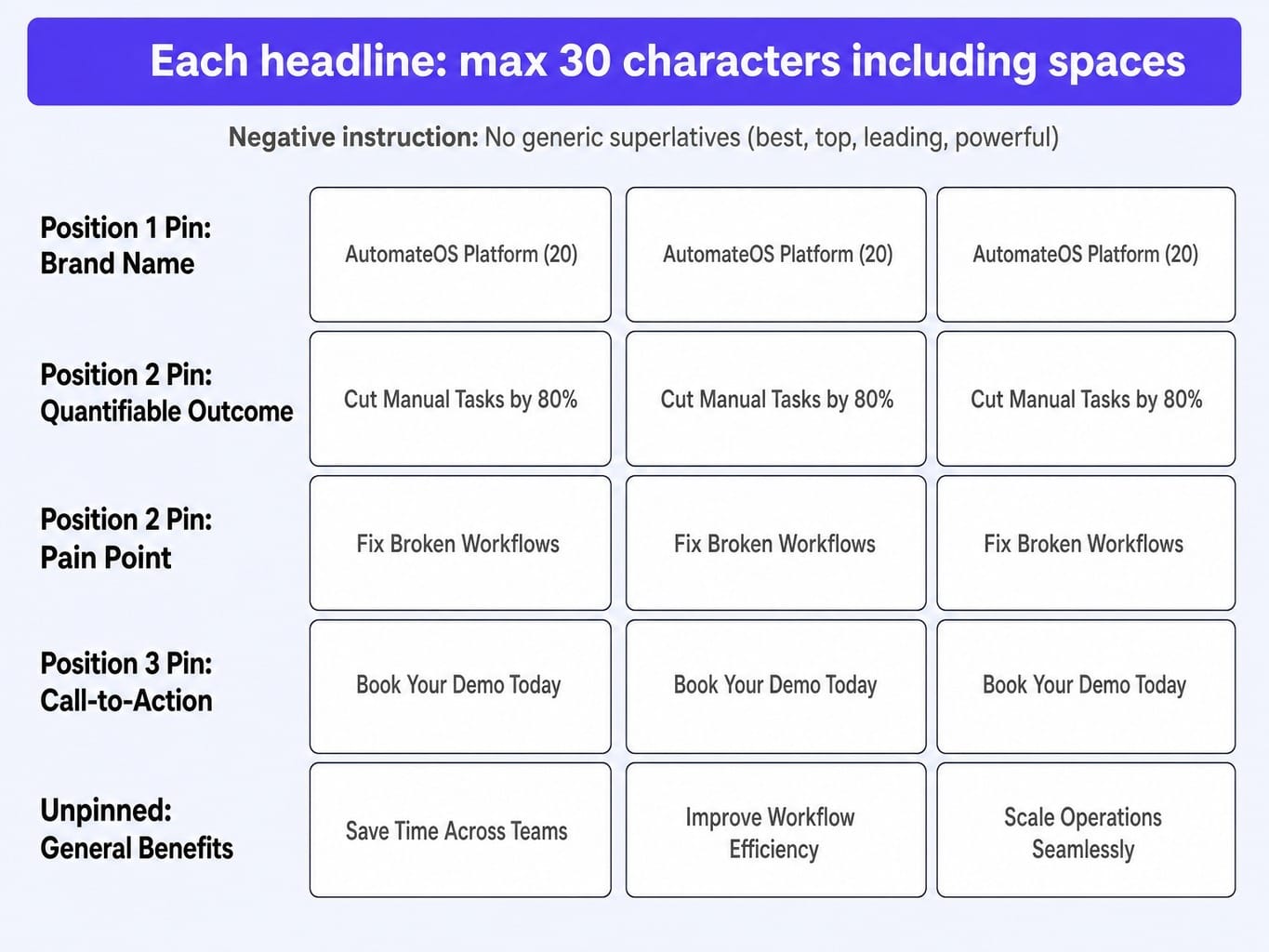
Character Limit: Each headline must be under 30 characters, including spaces.
Pinning Structure:
- Headlines 1-3 (Position 1 Pin): Must include the brand name 'AutomateOS'.
- Headlines 4-6 (Position 2 Pin): Must state a specific, quantifiable outcome (e.g., 'Cut Manual Tasks by 80%').
- Headlines 7-9 (Position 2 Pin): Must address a common pain point (e.g., 'Fix Broken Workflows').
- Headlines 10-12 (Position 3 Pin): Must include a direct Call-to-Action (e.g., 'Book Your Demo Today').
- Headlines 13-15 (Unpinned): Can be general benefits or features. Negative Instruction: Do not use generic superlatives like 'best', 'top', 'leading', or 'powerful'.
Formatting: Output as a numbered list. Next to each headline, show its character count in parentheses, like this: "AutomateOS Platform (20)".
Regenerate any headline that exceeds the 30-character limit before showing me the final list.
Why this prompt works: This prompt is an execution system, not a simple request. The pinning instructions force headline diversity, which is a key factor in Google's ad strength indicator. The negative instruction prevents the bland, generic copy that LLMs default to. Most importantly, forcing the model to count the characters and regenerate failures ensures the output is 100% usable in Google Ads Editor on the first pass.
Description Prompts With 90-Character Limits and Intent Matching
Descriptions aren't just longer headlines. Their job is to expand on the promise made in the headline and align with the searcher's specific intent. A user searching for "AutomateOS pricing" needs a different message than someone searching for "how to automate employee onboarding."
Prompt:
Each description should be tailored to a different keyword intent tier:
For High-Intent Keywords (e.g., 'AutomateOS pricing', 'buy AutomateOS'):
- Angle: Focus on de-risking the purchase. Mention a demo, trial, or guarantee.
- CTA: Drive to the next logical step.
For Comparison Keywords (e.g., 'AutomateOS vs Zapier'):
- Angle: Highlight a key differentiator (e.g., 'enterprise-grade security' or 'dedicated support').
- CTA: Encourage a deeper look at our unique features.
For Problem-Aware Keywords (e.g., 'how to reduce manual data entry'):
- Angle: Frame AutomateOS as the specific solution to their stated problem.
- CTA: Offer a glimpse of the solution via a demo or tour.
For Brand Keywords (e.g., 'AutomateOS'):
- Angle: Reinforce the core value proposition and direct users to the main login or product page.
- CTA: Guide existing users or new prospects appropriately.
Formatting: Label each description with its intent tier and include the character count in parentheses.
Why this prompt works: By tying each description to an intent tier, you force the copy to be more relevant to the search query. This direct mapping of message to intent is a powerful signal for ad relevance, one of the three main components of Quality Score. When ad relevance improves, the ad rank threshold can be met with a lower bid, effectively lowering your CPC.
Ad Extension and Asset Prompts
Ad extensions are often an afterthought, with most marketers just letting ChatGPT generate text that repeats the main ad's message. This is a waste of valuable screen real estate. A good prompt treats each extension as a unique opportunity to provide new information or a different path to conversion.
Prompt:
Task 1: Sitelink Extensions
Generate 4 sitelinks. Each must have a headline (max 25 chars) and two description lines (max 35 chars each). Each sitelink must point to a different page and offer a distinct value proposition:
Sitelink 1: Pricing Page (Headline should be about transparency or value).
Sitelink 2: Case Studies Page (Headline should mention a specific industry, e.g., 'For Finance Teams').
Sitelink 3: Product Tour Page (Headline should be action-oriented, e.g., 'Take a Quick Tour').
Sitelink 4: Comparison Page (Headline should name the competitor, e.g., 'AutomateOS vs. Zapier').
Task 2: Callout Extensions
Generate 6 unique callouts, each under 25 characters. They should highlight features or benefits not mentioned in the main ad copy (e.g., 'SOC 2 Compliant', '24/7 Support', 'No-Code Builder', '100+ Integrations').
Task 3: Structured Snippets
For the 'Service Catalog' header, generate 5 specific services we offer (e.g., 'Workflow Design', 'Process Audits', 'API Integration', 'Team Onboarding', 'Data Migration'). Each value must be under 25 characters.
Formatting: Clearly label each extension type and include character counts for all assets.
Why this prompt works: This prompt forces the AI to think about the entire ad unit as a cohesive but varied system. It prevents the common failure of sitelinks just repeating the main ad's CTA. By specifying different destination pages and angles for each sitelink, you give users more reasons to click and more control over their journey, which is a positive user experience signal.
Landing Page Alignment Prompts: Message Match and CTA Optimization
You've crafted the perfect ad. A user clicks. And they land on a page that feels like it belongs to a different company. This is the single most common reason for a low Quality Score and a high bounce rate. A headline promising "Cut Onboarding Time by 60%" cannot lead to a page that says "The All-in-One Platform for Modern Teams." The message match is broken.
This gap between ad and landing page is a critical execution failure. A single misaligned landing page headline can tank Quality Score and inflate CPC across an entire ad group, meaning the cost of poor message match compounds silently inside the account. The prompts below are designed to close that gap.
Read more: Data-Driven CRO: Evolve Your Marketing Strategy for Revenue
Prompt:
My top 3 performing RSA headlines are:
"Cut Onboarding Time by 60%"
"Automate Your Team's SOPs"
"The Zapier Alternative for Ops"
The current landing page headline is "The All-in-One Platform for Modern Teams."
Task:
Generate three new versions of the landing page's top section. Each version should correspond to one of the RSA headlines above. For each version, provide:
H1 Headline: Must directly reflect the promise of the ad headline.
H2 Subheadline: Must expand on the H1 with a supporting benefit or mechanism.
3 Bullet Points: Each bullet must connect the headline's promise to a specific, tangible outcome a visitor will see if they book a demo.
The primary CTA on the page is 'Book a Demo'.
Why this prompt works: It forces ChatGPT to see the ad and landing page as a single, connected experience. By feeding the model the winning ad copy, you constrain its output to only what's relevant for maintaining scent. Google's Quality Score algorithm explicitly evaluates landing page experience, and this semantic alignment is a primary signal it looks for.
Once the core message is aligned, you can use a second, more focused prompt to optimize the final action.
Prompt:
Specificity: (e.g., 'See It In 15 Mins')
Low Commitment: (e.g., 'Get a Quick Tour')
Curiosity: (e.g., 'Find Your Bottleneck')
Social Proof: (e.g., 'Join 500+ Ops Leaders')
Urgency: (e.g., 'Claim Your Spot')
Why this prompt works: It breaks you out of the "Book a Demo" or "Request a Demo" rut by forcing a look at the different psychological triggers that drive action.
Performance Analysis Prompts: Quality Score Diagnosis and Wasted Spend
Most marketers use dashboards for analysis, but this is where ChatGPT is most underutilized. The model excels at finding patterns in structured text data—if you give it the right input. The following prompts turn ChatGPT into a powerful, on-demand analyst for two of the highest-ROI tasks in any B2B SaaS ad account.
Quality Score Diagnosis Prompt
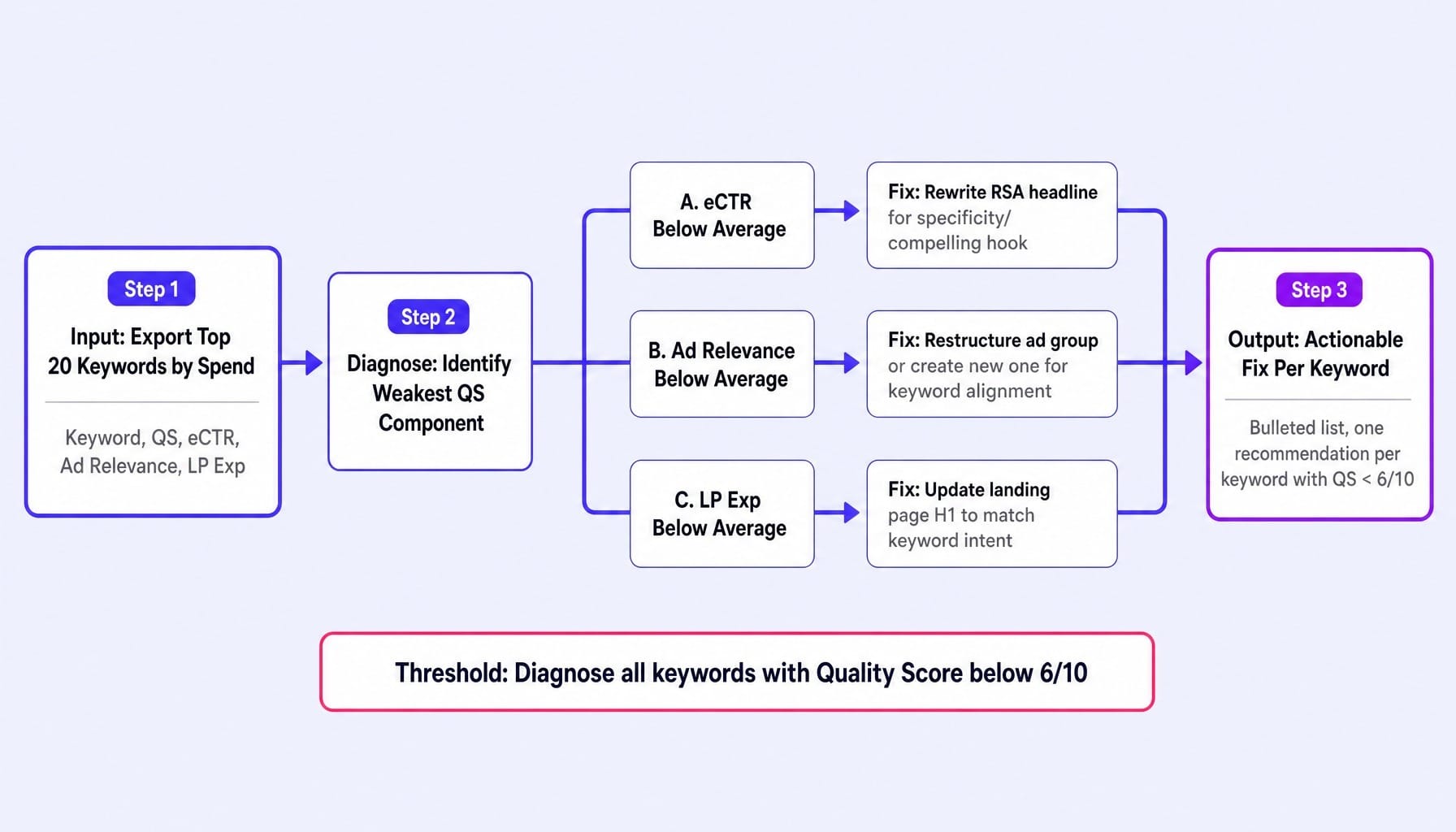
A low Quality Score is a tax on your entire account, forcing you to bid more for the same ad position. Diagnosing it is often a manual, keyword-by-keyword process. This prompt automates the diagnostic reasoning.
Prompt:
[Paste your tab-separated data here, exported from Google Ads Editor. For example:
Keyword QS eCTR Ad Relevance LP Exp 'crm for startups' 4/10 Below Average Average Average 'saas crm tool' 7/10 Average Above Average Average ...]
Your Task:
For each keyword with a Quality Score below 6/10, perform a diagnosis:
Identify the single weakest component (eCTR, Ad Relevance, or LP Exp).
Based on the weakest component, recommend one specific, actionable improvement.
- If eCTR is 'Below Average', suggest a specific change to an RSA headline to make it more compelling or specific.
- If Ad Relevance is 'Below Average', recommend restructuring the ad group or creating a new one to improve keyword-to-ad alignment.
- If LP Exp is 'Below Average', suggest a specific change to the landing page H1 to improve message match with the keyword.
Present your output as a bulleted list, one bullet per keyword diagnosed.
Why this prompt works: This prompt transforms ChatGPT from a generic advisor into a diagnostic engine. The structured data input constrains the output to specific, actionable recommendations tied to individual keywords. While tools like Optmyzr or Adalysis automate this at scale, this prompt is more than sufficient for any team managing fewer than 50 ad groups and provides the same quality of logic.
Wasted Spend and Search Term Audit Prompt
As most PPC practitioners will tell you, it's common for 20-35% of a B2B SaaS ad budget to be wasted on irrelevant search terms. This happens because negative keyword lists are built reactively. This prompt proactively finds the leaks.
Prompt:
Here is the search terms report, sorted by cost descending:
[Paste your tab-separated data here, including columns for Search Term, Clicks, Cost, and Conversions.]
Your Task:
Analyze each search term and categorize it into one of three buckets:
Relevant & Converting: Keep and potentially increase bid.
Relevant but Not Converting: Keep, but monitor. Do not add as a negative.
Irrelevant (Wasted Spend): Should be added as a negative keyword.
For all terms in Bucket 3, perform a second task:
Group the irrelevant terms into themes (e.g., "Jobs", "Free Templates", "Education").
Output a single, de-duplicated negative keyword list in phrase match format based on these themes.
Why this prompt works: It automates a tedious but critical task. ChatGPT can process a 200-row report in seconds and surface patterns—like multiple variations of a job-seeking query—that a human might miss in a quick scan. Providing the output in phrase match format makes it instantly copy-pasteable into Google Ads Editor, closing the loop from analysis to action. This is a perfect example of effective search term sculpting.
Facebook and Meta Ads Prompts for B2B SaaS
Most ChatGPT prompt lists for Facebook Ads assume an ecommerce model: add-to-cart conversions, product carousels, and discount-driven urgency. This advice is actively harmful for B2B SaaS campaigns. For B2B, the conversion is a high-consideration demo booking, the creative must educate, and the sales cycle is measured in weeks, not hours. Every prompt in this section is built for that reality.
Audience Targeting and Exclusion Prompt for Meta Advantage+
In B2B targeting on Meta, who you exclude is more important than who you include. Without strict exclusion criteria, Meta's algorithm will dutifully find you the cheapest clicks, which are almost always students, job seekers, or competitors—none of whom will book a qualified demo.
Prompt:
Generate three audience suggestions for an Advantage+ campaign. For each audience, provide:
Core Targeting: A combination of job function targeting (e.g., 'Marketing Executives'), interests (e.g., 'HubSpot', 'Tableau'), and/or lookalike sources (e.g., '1% Lookalike of existing customers').
Critical Exclusions: A list of audiences to exclude. This is the most important part.
Estimated Audience Size: A rough estimate of the audience size in Meta Ads Manager (e.g., '1.5M - 2M').
Constraint: The exclusion list for ALL audiences must include:
All existing customers (via a customer list).
People who have visited the 'careers' page.
Job functions like 'Human Resources', 'Recruiting'.
Interests related to 'job search' or 'recruitment'.
People who work at known competitor companies.
Students and interns.
Why this prompt works: This prompt hard-codes the most critical part of B2B Meta targeting—the audience exclusion logic—directly into the request. It forces the AI to prioritize conversion quality over conversion volume, countering the platform's natural tendency to optimize for cheap clicks that bleed your frequency capping and exhaust your budget on unqualified leads.
Creative Concept and Hook Prompts for B2B Video Ads
In a B2B context, the "thumb-stop ratio" is everything. You have three seconds to convince a busy marketing director that your ad is not another generic B2C product pitch. This is achieved by leading with a specific, recognizable pain point, not a vague benefit.
Prompt:
Use the Hook-Body-CTA framework. For each of the 5 concepts, provide:
The Hook (first 3 seconds): Must be a question or statement that directly references a pain point Marketing Directors experience weekly. Must be under 10 words.
The Body (15-20 seconds): A brief script that positions DataSift as the solution to the hook's pain point.
The CTA (last 5 seconds): A clear directive to book a demo to see the solution in action.
Constraint: Do not use the words 'free', 'best', 'revolutionary', or 'game-changing'. The hooks should feel like they're starting a real conversation, not a sales pitch.
Why this prompt works: It forces ChatGPT to think about the ad's structure and the viewer's psychology. By demanding pain-point-specific hooks, you get creative that resonates with the target persona's actual work life. Generating five distinct concepts upfront also builds a creative versioning matrix, allowing you to test different angles and systematically combat creative fatigue before it even starts.
Retargeting Sequence Prompt for Demo Nurturing
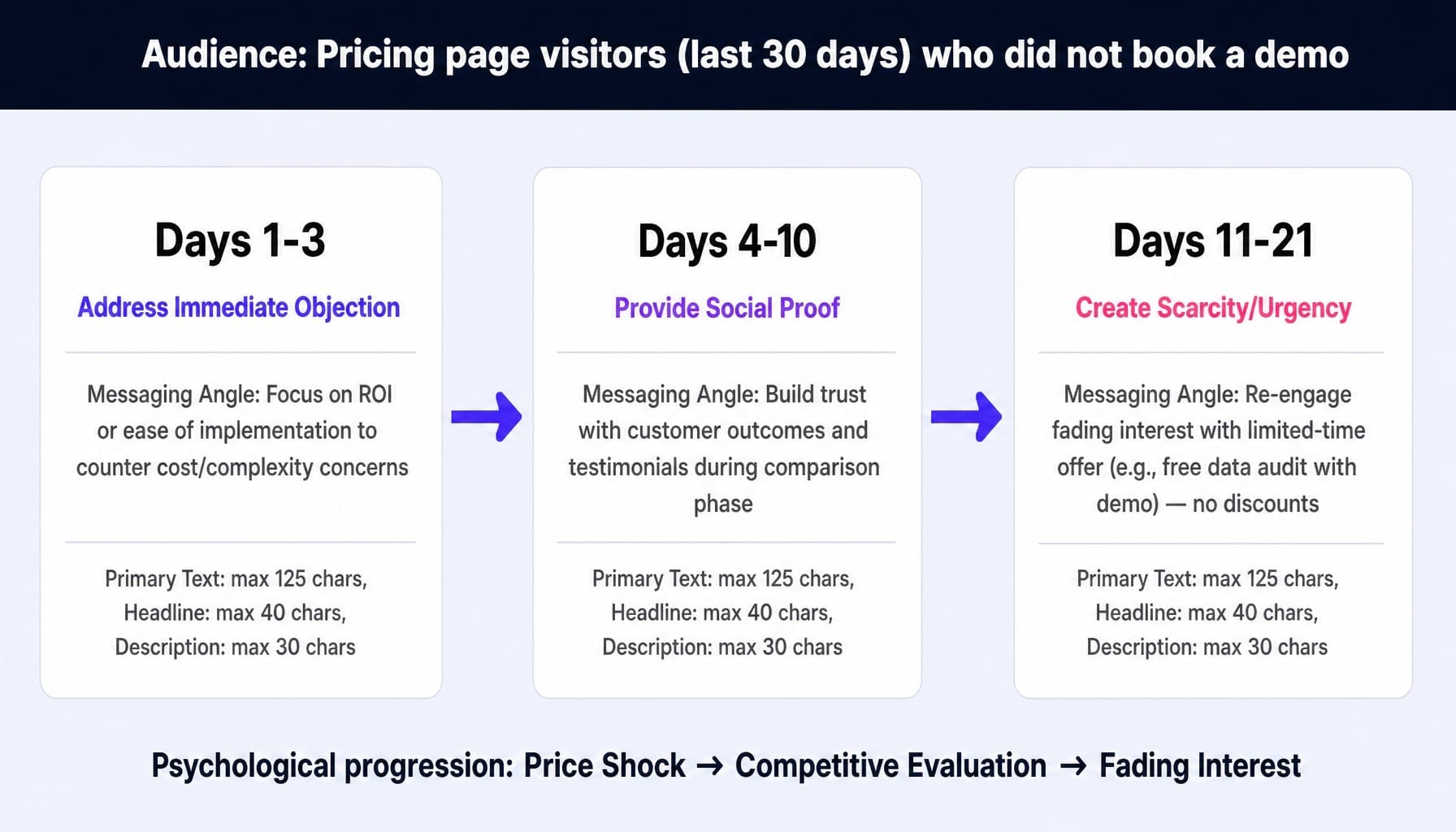
A B2B prospect who visited your pricing page and left is in a very different psychological state than a first-time visitor. Your retargeting ads must reflect that. A one-size-fits-all retargeting ad is a wasted opportunity. This prompt designs a multi-stage sequence that nurtures the prospect based on their likely objections over time.
Prompt:
For each stage, define the messaging angle and write the ad copy assets:
Stage 1: Days 1-3 (Address Immediate Objection)
Angle: The most likely objection is cost or complexity. Address it head-on by focusing on ROI or ease of implementation.
Copy: Write the Primary Text (max 125 chars), Headline (max 40 chars), and Description (max 30 chars).
Stage 2: Days 4-10 (Provide Social Proof)
Angle: The prospect is now comparing options. Build trust with a customer outcome or testimonial.
Copy: Write the Primary Text, Headline, and Description. Reference a specific, impressive customer metric.
Stage 3: Days 11-21 (Create Scarcity/Urgency)
Angle: The prospect is losing momentum. Create urgency without offering a discount. Reference a limited-time offer for a free 'data audit' with the demo, or a closing cohort for new client onboarding.
Copy: Write the Primary Text, Headline, and Description.
Formatting: Ensure all copy adheres to the specified character limits, which are based on standard Demand Gen campaign asset specs.
Why this prompt works: It treats retargeting as a sequence design problem, not a single-ad problem. By mapping the messaging to the buyer's journey—from initial price shock to competitive evaluation to fading interest—the ads become genuinely helpful nudges rather than annoying reminders.
Why Generic ChatGPT Prompts Produce Unusable Ad Copy
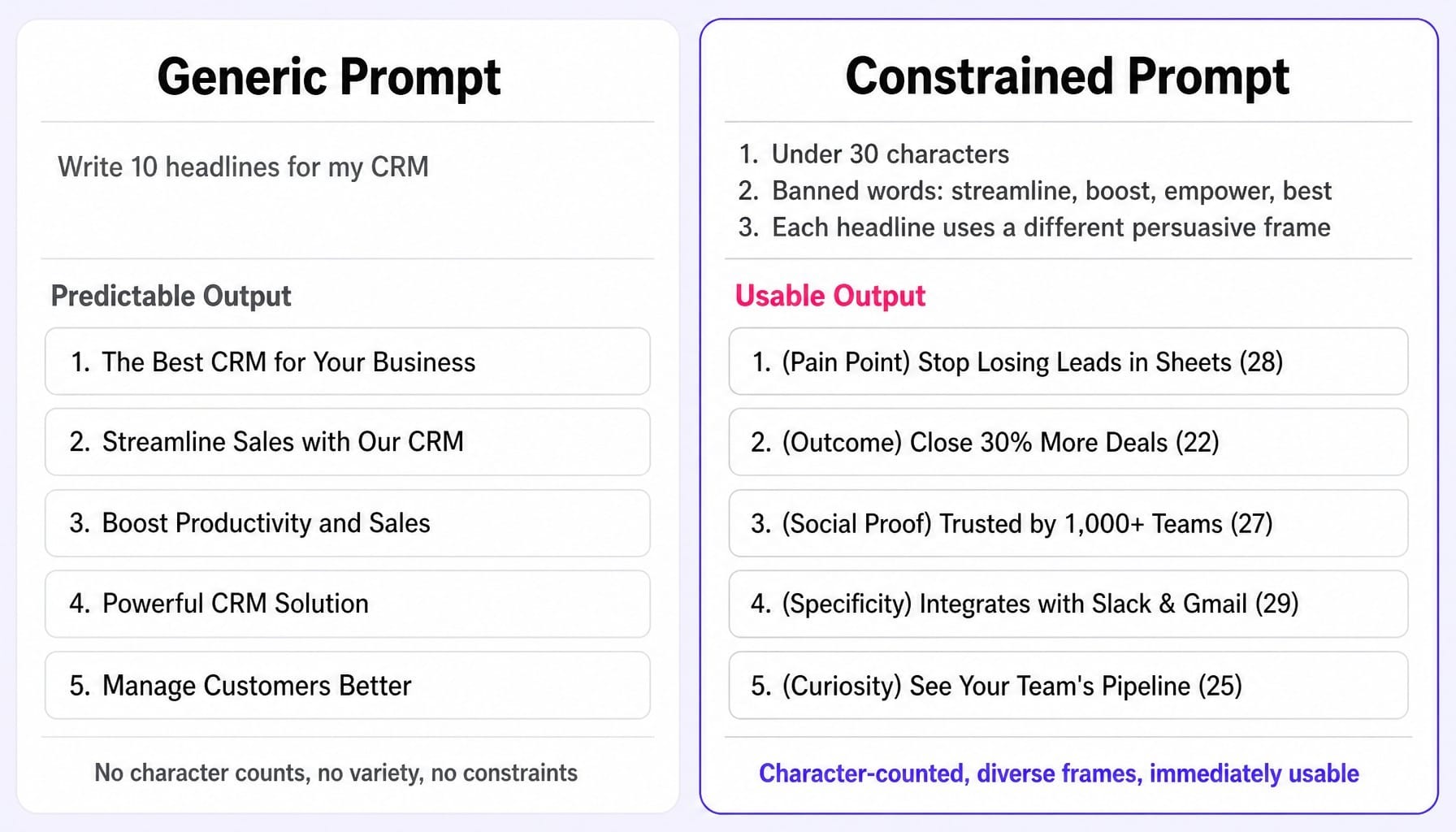
If you've tried using ChatGPT for ads before, you've likely felt the frustration of getting back generic, convergent output. Ask for "10 Google Ads headlines for a CRM," and you'll get ten slight variations of "Streamline Your Sales Process" and "Boost Team Productivity."
This isn't a failure of the model. It's a failure of the prompt.
Unconstrained prompts allow the model to default to its highest-probability completions, which for ad copy, cluster around the most statistically common marketing phrases. The result is an illusion of variety. You get 10 headlines, but they're all the same idea dressed in slightly different words.
Consider the difference:
Generic Prompt: Write 10 headlines for my CRM.
Predictable Output:
- The Best CRM for Your Business
- Streamline Sales with Our CRM
- Boost Productivity and Sales
- Powerful CRM Solution
- Manage Customers Better
...and so on.
Now, let's rewrite the prompt with constraints.
Constrained Prompt:
Generate 10 Google Ads headlines for our CRM. Each must be under 30 characters.
Constraints:
- Do not use the words 'streamline', 'boost', 'empower', or 'best'.
- Each headline must use a different persuasive frame: pain point, outcome, social proof, specificity, or curiosity.
- Output with character counts.
Usable Output:
- (Pain Point) Stop Losing Leads in Sheets (28)
- (Outcome) Close 30% More Deals (22)
- (Social Proof) Trusted by 1,000+ Teams (27)
- (Specificity) Integrates with Slack & Gmail (29)
- (Curiosity) See Your Team's Pipeline (25)
...and so on.
The transferable principle is this: every effective prompt must include at least one negative instruction (what not to do) and one structural constraint (how to organize the output). This is what separates prompt engineering from simple prompt typing. This practice directly combats the diminishing returns problem where, without new constraints, the model's outputs converge, forcing you to waste time re-rolling instead of re-constraining.
When Better Prompts Still Leave You Manually Shipping Every Change
These prompts will give you better raw material. Your headlines will be the right length, your audiences more targeted, your analysis more focused. But a fundamental problem remains: you are still the one manually executing every change.
You're still the one copying the headlines into Google Ads Editor. You're still the one updating the landing page in your CMS to match the ad copy. You're still running the search term audit, refreshing the Meta creative, and trying to connect the dots between them—every week, for every campaign.
Better prompts improve the quality of each task, but they don't solve the marketing team's core throughput problem. The backlog of optimizations that should happen but never do because you're at capacity doesn't shrink.
This is the execution gap that Spike AI is built to close. It's not another prompt library. It's the layer that connects insight to action. Spike AI identifies the highest-impact move across your ads, your landing pages, and your website CRO, and then executes it. Instead of running prompts for ad copy in one tab and editing landing pages in another, the system identifies the alignment gap and ships the fix. It moves you from being the operator of a dozen manual tasks to the orchestrator of a single, unified execution system.
See how Spike AI turns your optimization backlog into a weekly shipping cadence
Conclusion
The quality of an AI's output is not a function of the model version; it's a direct function of the constraints in your prompt. A well-crafted prompt is a miniature execution system—it tells the AI not just what to do, but how to do it, what not to do, and how to structure the result so it's immediately usable.
Every prompt in this guide embeds character limits, negative instructions, and audience specificity because those are the guardrails that produce effective ad copy on the first pass. From RSA headlines and Meta video hooks to search term audits and retargeting sequences, constraints are what turn a generic language model into a specialized PPC assistant.
Your next step is to stop copying prompts and start building a library. Use a tool like Notion AI to create your own workflow templates. Test these prompts against your own campaign data. Iterate on the constraints based on what the model gets wrong for your specific account. The prompts in this article are a powerful starting point, but the real skill is learning which constraints your campaigns need to thrive.
Frequently Asked Questions
Should I use ChatGPT or Google Gemini for Google Ads copy in 2026?
ChatGPT (specifically models like GPT-4o) currently follows tight character constraints and formatting instructions more reliably, making it stronger for prompt-based copy generation. Google Gemini in Ads has the data advantage for in-platform suggestions where it can access your campaign data directly. Use ChatGPT for building from scratch; use Gemini for optimizing what's already running.
How do I prevent ChatGPT from exceeding Google Ads character limits?
State the exact limit in your prompt (e.g., "each headline must be under 30 characters including spaces") and add a formatting instruction to "output each headline with its character count in parentheses." If it still fails, add a final instruction: "Reject and regenerate any headline over 30 characters before including it in the final list."
Can ChatGPT generate Performance Max asset groups from scratch?
ChatGPT is excellent for generating the text assets (headlines, descriptions) and suggesting audience signals for a pMax campaign. However, it cannot create image or video assets. Use a prompt that defines your asset group taxonomy (e.g., theme assets by pain point vs. outcome) and pair ChatGPT's text output with a visual inspiration tool like Foreplay.
How often should I regenerate ad copy variants with ChatGPT to avoid creative fatigue?
Monitor your CTR decay curves. When an ad's CTR drops consistently for 2-3 weeks from its peak, it's time for a refresh. Instead of starting from scratch, feed your top-performing headline back to ChatGPT and ask it to "create 5 variations that preserve this core message but change the framing angle." This extends creative life without losing the winning formula.
What data format should I paste into ChatGPT for a campaign audit?
Export your data from Google Ads Editor as a CSV, then copy and paste the relevant columns as a tab-separated table directly into the prompt. For a Quality Score audit, include Keyword, Match Type, QS, eCTR, Ad Relevance, and LP Exp. For a search term audit, include Search Term, Clicks, Cost, and Conversions. Keep exports under 200 rows for best results, as analysis quality can degrade on larger datasets.
Do these prompts work with Claude or Microsoft Copilot instead of ChatGPT?
The constraint-based prompt structure is effective across all major LLMs. Claude by Anthropic often adheres to character limits more precisely but can produce slightly less creative variations. Microsoft Copilot for Advertising is best for Microsoft Ads integration. For Google and Meta Ads specifically, GPT-4o with the structures in this article provides the most consistently usable output.