Hotjar vs Microsoft Clarity (2026): Which Tool Actually Improves Conversions?

TL;DR
- Choose Microsoft Clarity if you need unlimited session recordings and heatmaps at zero cost and are comfortable with Microsoft's data usage terms. It's a powerful diagnostic tool for finding broken UI elements.
- Choose Hotjar if your CRO process relies on qualitative feedback (surveys, feedback widgets) and you need to connect behavioral data to user sentiment. Be prepared for session caps and paid tiers.
- Run Both Together if you have 10K+ monthly sessions and an active CRO program. Use Clarity for volume-based issue detection and Hotjar for targeted qualitative deep dives on high-friction pages.
- The Real Bottleneck: Neither tool ships improvements. The true challenge is turning the data they provide into prioritized, shipped changes on your website.
- Privacy is a Key Differentiator: Clarity is free because Microsoft may use aggregated data for its services. Hotjar operates on a standard SaaS model with a stronger privacy-first posture.
Your team installs a behavior analytics tool. You watch a dozen session recordings, see the rage clicks on the pricing page, and identify three clear friction points. The findings are shared in Slack. Everyone agrees they're important. Six weeks later, nothing has changed.
This isn't a failure of insight. It's a failure of execution.
The debate over hotjar vs microsoft clarity often misses this point. It fixates on feature lists instead of the real question: which tool helps your team ship improvements that increase revenue? The answer isn't simple. Clarity is a shockingly capable and genuinely free tool from Microsoft. Hotjar integrates the qualitative feedback loop that Clarity completely ignores.
This comparison goes beyond feature parity. We'll analyze heatmaps and session recordings, but also the critical differences in data privacy, the hidden costs of "free," and a dual-stack approach for running both. Most importantly, we'll address the execution gap that neither tool solves on its own.
Hotjar vs Microsoft Clarity: Side-by-Side Feature Comparison
At a high level, both tools provide the core functions of behavior analytics: heatmaps and session recordings. The divergence begins with pricing models, qualitative features, AI capabilities, and their fundamental stances on data privacy. While Hotjar is installed on over 1.2 million live sites compared to Clarity's 575,000, adoption numbers don't tell the full story of capability.
Here's how they stack up feature-for-feature in 2026:
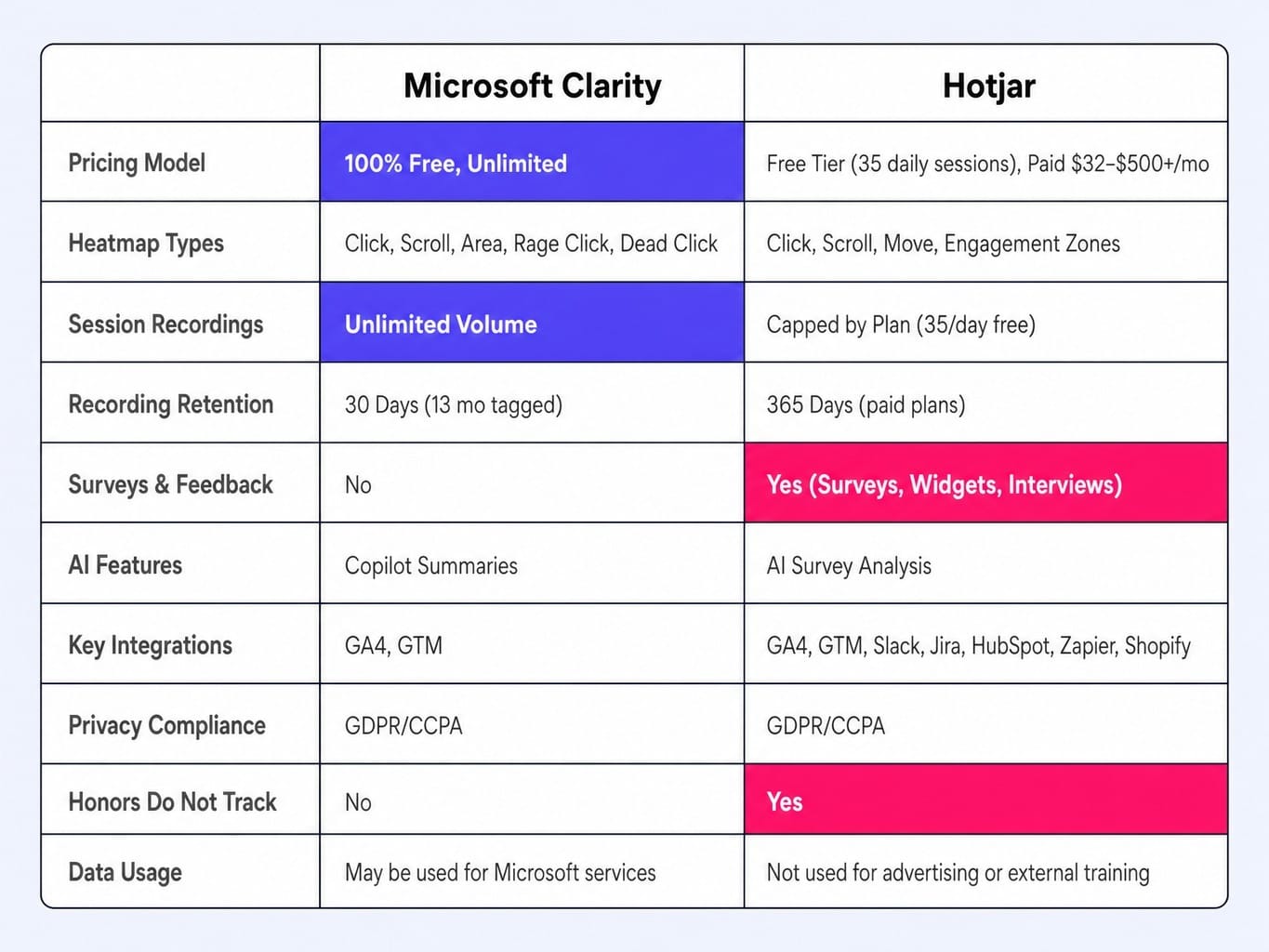
While the table suggests feature parity in some areas, the operational differences are significant. The real comparison emerges in how each tool handles data limits, privacy, and the qualitative feedback loop that connects what users do to why they do it.
Heatmaps and Click Analytics: Where Each Tool Actually Differs
If both tools offer click maps, scroll maps, and rage click detection, why does the choice matter? Because they are optimized for different diagnostic jobs. Clarity excels at finding what's broken. Hotjar excels at understanding what's being ignored. The right choice depends on your site's architecture and the questions you're trying to answer.
Consider a B2B SaaS pricing page built as a React SPA with dynamically loaded comparison tables. Clarity's dead-click detection would instantly flag a non-responsive CTA that Hotjar might miss. Conversely, Hotjar's move maps could reveal that users are hovering over a feature description but not clicking, indicating confusion that a simple click map wouldn't capture.
Microsoft Clarity: Dead Clicks, Error Clicks, and Copilot Summaries
Clarity's strongest heatmap differentiator isn't the standard click and scroll maps; it's the diagnostic click types. Dead clicks (clicks on non-interactive elements) and error clicks (clicks that precede a JavaScript error) automatically surface broken UI elements and bugs without you having to hunt for them in session recordings. This makes Clarity an excellent tool for technical CRO and QA.
Its Copilot AI offers natural-language summaries of heatmap patterns (e.g., "70% of clicks are concentrated on the top navigation bar"), which can accelerate analysis for teams without a dedicated UX researcher. It also offers a free browser extension for quick on-page checks. The tradeoff is fidelity. While Clarity handles most SPA route changes well, its DOM snapshot rendering can sometimes struggle with heavily dynamic pages, leading to less accurate heatmaps on complex client-side applications.
Hotjar: Move Maps, Engagement Zones, and Qualitative Context
Hotjar's unique value comes from move maps, which track mouse movement, not just clicks. This is the only heatmap type that correlates with eye-tracking studies, giving you a proxy for user attention. Combined with Engagement Zones—a feature that blends click, move, and scroll data—you get a much richer picture of what users are actually paying attention to, not just where they click.
Hotjar's heatmaps are also not an island. They are directly connected to session recordings and survey responses. You can click on a heatmap area and instantly filter for recordings of users who clicked there, or see survey feedback from that same page. This creates a powerful feedback loop. The primary limitation is volume. The free plan's 35 daily sessions cap means heatmap data on low-traffic pages can take weeks to become statistically meaningful, pushing most serious teams onto paid plans.
Read more: Hotjar Pricing 2026: Every Plan, Real Costs, and Who Should Skip It
Session Recordings: Sampling, Retention, and AI Summarization
Session recordings are only useful if you can find the right ones quickly and retain them long enough for analysis. While both tools offer filters, speed controls, and event timelines, the critical differences lie in data volume, retention windows, and how each helps you triage hundreds of recordings without watching them all.
This isn't a theoretical concern. A B2B SaaS team running a product launch in Q1 might need to review those session recordings in Q3 to plan the next iteration. With Clarity's 30-day default retention, those recordings are gone unless someone manually tagged them. With Hotjar's 365-day retention on paid plans, they remain accessible for strategic review.
Clarity's Unlimited Volume and Copilot AI Triage
Clarity's core advantage is volume. With unlimited sessions and no data sampling, you capture everything. This is invaluable for catching rare edge-case bugs or understanding user behavior on low-traffic but high-value pages. When I ran both tools on a SaaS onboarding flow, Clarity's complete recording history surfaced a critical drop-off on a conditional form step that Hotjar's sampled recordings missed entirely, simply because the sampling algorithm deprioritized the short sessions of users who failed at that step.
The Copilot AI summarizes individual sessions ("User struggled with the date picker then abandoned the form") and can identify patterns across hundreds of recordings. This is a genuine time-saver. The operational catch is the 30-day default retention. Your team must build a disciplined workflow of tagging and favoriting important sessions immediately, or they will be lost.
Hotjar's Session Caps, Highlights, and Cross-Tool Context
Hotjar's advantage isn't volume; it's context and collaboration. A recording isn't just a video; it's connected to that user's survey responses, feedback submissions, and funnel progression. You can instantly jump from a negative feedback comment to the exact session recording of that user, which is something Clarity cannot do.
The Highlights feature is built for team alignment. You can clip a specific moment of user frustration from a recording, add a comment, and share it directly to Slack or Jira. This turns a UX finding into an actionable ticket for product or engineering teams. The limitation, as always, is cost. The free plan's 35 daily sessions are insufficient for most businesses, and paid plans scale from $32/mo for 100 daily sessions to over $500/mo for higher volumes. Surprisingly for a paid tool in 2026, Hotjar still lacks AI-powered session summarization.
Surveys, Feedback Widgets, and the Qualitative Gap Clarity Cannot Fill
This is the most straightforward part of the comparison: Microsoft Clarity offers no survey tools, no feedback widgets, and no mechanism for collecting qualitative user input.
This isn't a minor feature gap; it's a fundamental philosophical difference. Hotjar is built on the belief that behavioral data (the what) must be paired with qualitative feedback (the why). Clarity is built on the premise that behavioral data is sufficient on its own.
Imagine your heatmaps show a 40% drop-off on your demo request form.
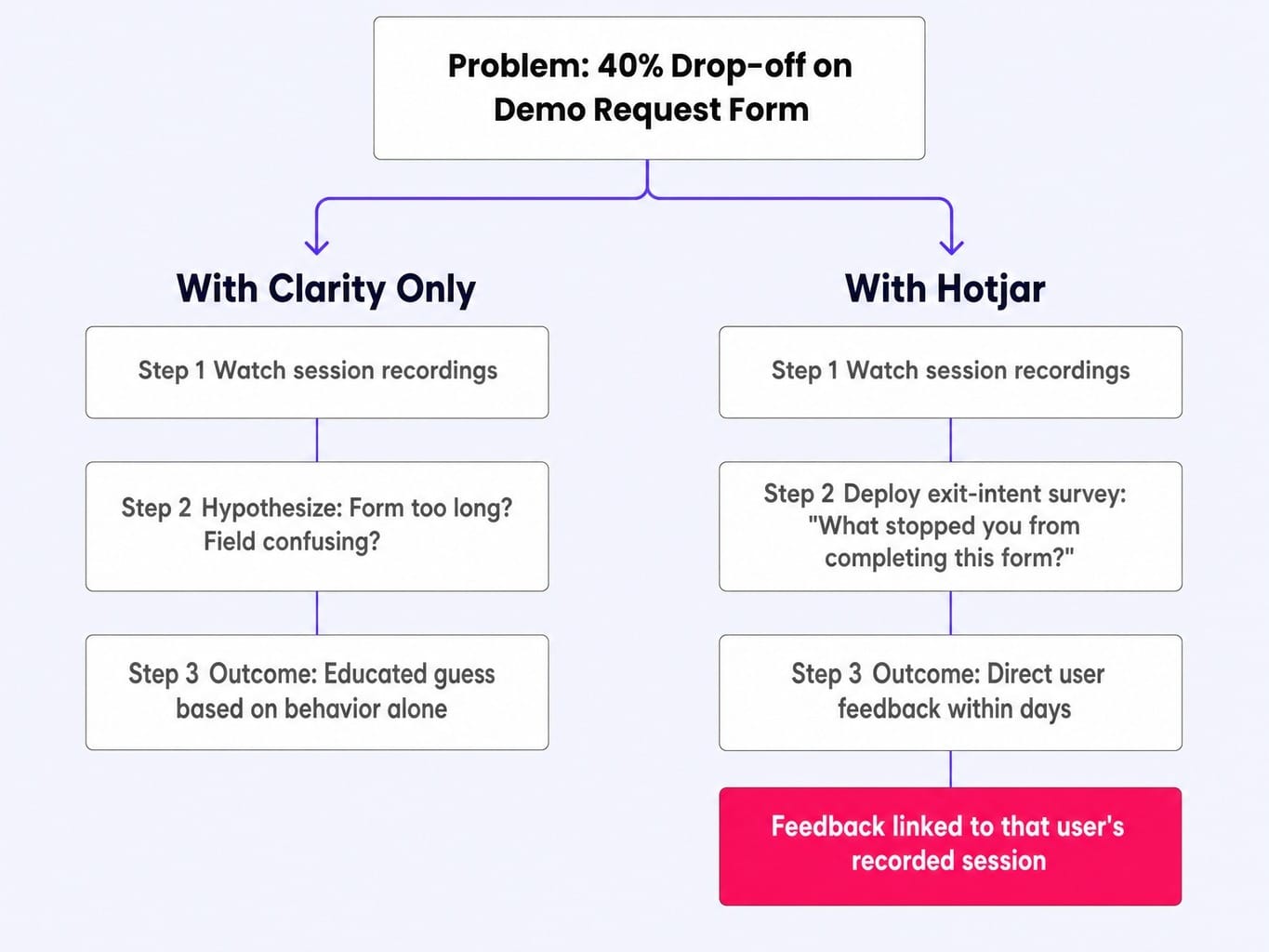
- With Clarity, you can watch recordings and hypothesize. Maybe the form is too long. Maybe a field is confusing. You are guessing based on behavior.
- With Hotjar, you can deploy an exit-intent survey on that specific URL asking, "What stopped you from completing this form?" Within days, you have direct user feedback.
Hotjar's survey suite is robust, with triggers based on exit intent, time on page, scroll depth, and specific events. It enables genuine CRO research, not just NPS collection. While a team using Clarity could pair it with a separate tool like Typeform, this fragments the data, adds cost, and breaks the direct link between a piece of feedback and that user's recorded session. If your process requires knowing why users do what they do, this gap alone may be a dealbreaker.
Privacy, Data Rights, and What 'Free' Actually Costs
If a sophisticated product from a major tech company is completely free, you are paying with something other than money. For B2B teams handling customer data, this isn't cynicism; it's a critical governance concern. The question isn't just whether Clarity is GDPR-compliant—it is, technically—but whether its data usage terms align with your organization's privacy posture.
For scaling B2B SaaS teams, the real expense is not the analytics subscription but the execution gap between insight and action. The hidden cost of a "free" tool like Clarity can be the human bandwidth required to watch endless recordings and manually manage data governance risks. This is why platforms like Spike AI, that act on behavioral patterns to ship improvements, represent a fundamentally different cost structure than just adding another dashboard.
Microsoft's Data Usage Rights: What the Terms Actually Say
Clarity's GDPR/CCPA compliance is sound, but its terms grant Microsoft broad rights. Microsoft reserves the right to use aggregated, anonymized data for purposes including AI model training, enriching advertising profiles, and creating industry benchmarks. Operationally, this means your website's behavioral data could be used to improve Microsoft's Bing search algorithms or other commercial products.
Furthermore, Clarity does not honor Do Not Track (DNT) browser signals. Its terms also restrict use on websites related to healthcare, financial services, and government, a limitation that exists precisely because of these data usage rights. For PII masking, its default rules are aggressive but can miss custom form fields; one team I worked with discovered unmasked tax IDs in recordings for eleven days because a custom input field wasn't caught by the default rules and required manual CSS selector targeting. Finally, you cannot delete an individual user's data from Clarity without deleting the entire project, a significant hurdle for GDPR data subject access requests.
Hotjar's Privacy-First Posture and Where It Still Falls Short
Hotjar's privacy positioning is a core part of its brand. It honors DNT signals, supports individual data deletion requests, and explicitly states it does not sell customer data or use it for advertising purposes. For EU-based companies, Hotjar simplifies compliance by processing and storing data in EU data centers by default.
However, "privacy-first" isn't a set-and-forget solution. Teams must still meticulously configure masking rules for sensitive fields and integrate with a consent management platform. The most significant variable for 2026 is Hotjar's acquisition by Contentsquare, which was completed in July 2025. While Hotjar currently operates with its legacy privacy policy, teams should monitor whether Contentsquare's enterprise-level data practices and terms of service begin to influence Hotjar's posture.
Running Both Tools Together: When the Dual-Stack Approach Wins
You don't have to choose. Many mature CRO teams run both Clarity and Hotjar, using each for what it does best. This dual-stack approach isn't redundancy; it's specialization.
Here's the practical workflow:
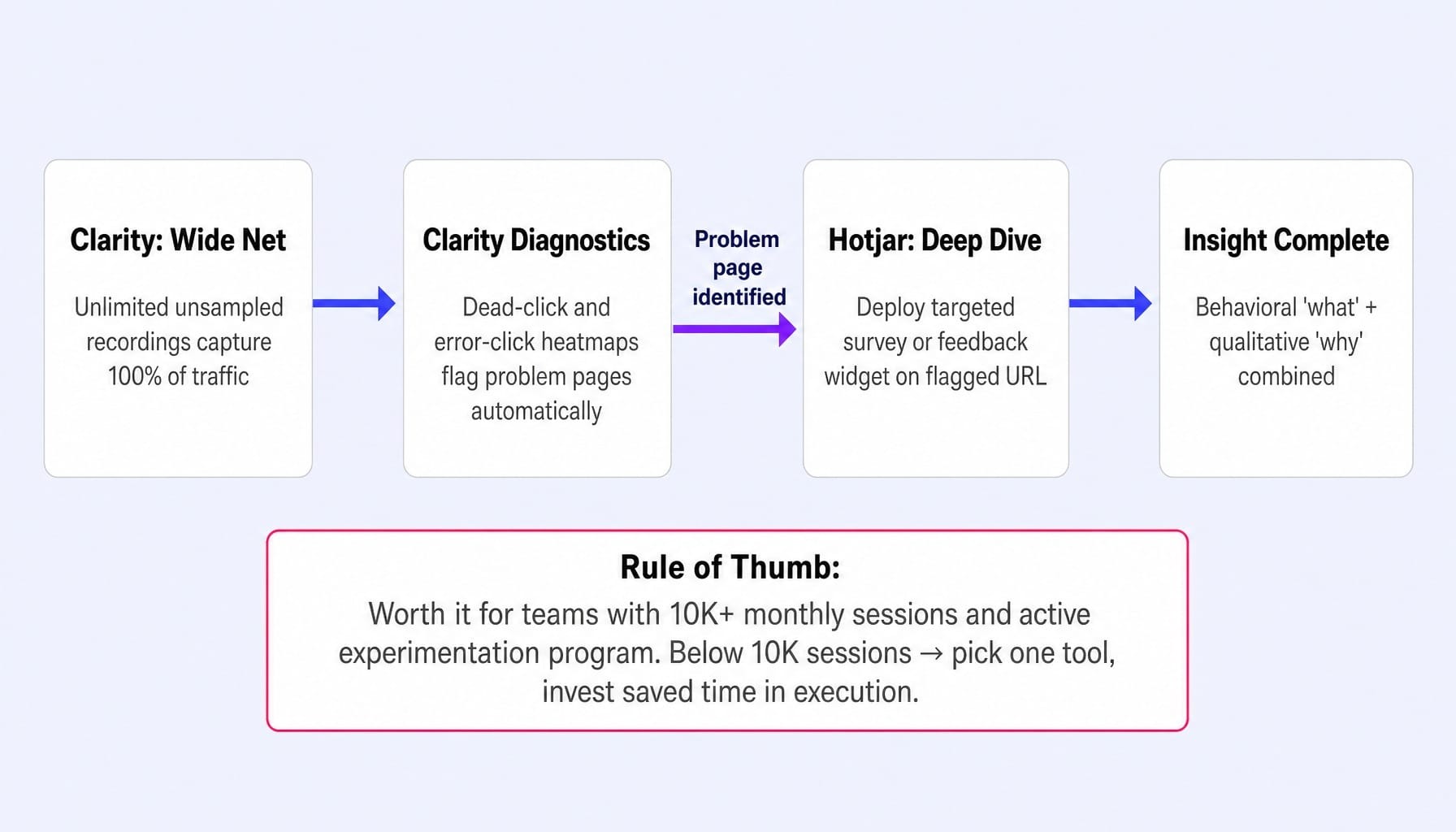
- Use Clarity as the "wide net." Its unlimited, unsampled recordings provide 100% coverage, making it ideal for monitoring all traffic, catching bugs, and using diagnostic heatmaps (dead/error clicks) to flag problem pages.
- Use Hotjar as the "deep dive." Once Clarity identifies a page with a high rage-click rate or a broken element, deploy a targeted Hotjar survey or feedback widget on that specific URL to understand the why behind the behavior.
This combination gives you the "what" at scale and the "why" on demand, without paying for Hotjar's highest enterprise tier across your entire site. The performance impact is minimal; both scripts load asynchronously, and the combined page weight is typically manageable. The real cost is operational overhead: two dashboards to monitor and two sets of masking rules to maintain. Running both scripts also means two independent MutationObserver listeners are serializing DOM changes, which on complex SPAs can create competition and slightly degrade interaction-to-next-paint scores.
Rule of thumb: The dual-stack is worth it for teams with over 10,000 monthly sessions and an active experimentation program. For smaller teams, the overhead outweighs the benefits. Pick one tool and invest the saved time in acting on the data.
The Gap Neither Tool Fills: Turning Behavioral Insights Into Shipped Improvements
You've chosen a tool. The heatmaps are glowing red, the session recordings confirm user frustration, and the surveys tell you exactly what's wrong. And then… nothing.
The insight sits in a Jira backlog or a Slack thread, waiting for engineering bandwidth or a quarterly planning cycle. This is the insight-to-action gap. It's the place where most CRO programs stall, not for lack of data, but for lack of execution capacity. Hotjar and Clarity are diagnostic engines. They tell you what's broken. They do not fix it.
This is the bottleneck Spike AI is built to eliminate. Where behavior analytics tools stop at the dashboard, Spike AI begins. Our platform ingests these signals, prioritizes which fix will have the greatest impact on your conversion goals, and then ships that improvement to your live site—every week. We close the loop between behavioral insight and revenue gain, turning your analytics data into a compounding growth engine.
Spike AI isn't a replacement for Hotjar or Clarity. It's what makes the data from those tools matter, translating observations into shipped improvements without adding headcount or engineering tickets.
Conclusion
The choice between microsoft clarity vs hotjar is a choice between two different philosophies.
- Microsoft Clarity is the right tool for teams needing unlimited behavioral data at zero cost, who are primarily focused on diagnosing technical issues and can accept Microsoft's data usage terms.
- Hotjar is the right tool for teams whose process depends on integrating qualitative feedback with behavioral data, who value a privacy-first posture, and who are willing to pay for it.
For mature teams, running both is a viable strategy. But whichever tool you choose, the harder question remains: does your team have the system to act on what you find? Behavioral insights that sit in dashboards don't improve conversion rates. Shipped improvements do.
Read more: Hotjar vs Crazy Egg (2026): What Each Tool Does Well—And What Neither Does
Frequently Asked Questions
Is Microsoft Clarity really unlimited and free for all website sizes?
Yes—Clarity imposes no session caps, page view limits, or paid tiers. The tradeoff is Microsoft's data usage rights: aggregated behavioral data may be used for AI training and other services. Sites in healthcare, financial services, and government are restricted from using Clarity entirely.
Which tool has less impact on page load speed?
Both tools load asynchronously and have minimal impact on Core Web Vitals when implemented correctly via GTM. Clarity's script is slightly lighter (~17KB vs. ~25KB gzipped), but the difference is negligible on modern connections. The bigger performance risk is misconfigured recording triggers that fire on every page load regardless of user consent.
How does Clarity's Copilot AI compare to Hotjar's AI features?
Clarity's Copilot generates natural-language summaries of individual sessions and surfaces behavioral patterns across sessions—useful for teams without a dedicated UX analyst. Hotjar's AI features focus on survey analysis, summarizing open-ended responses. They solve different problems: Copilot triages recordings, while Hotjar's AI interprets qualitative feedback.
Is Clarity's data retention period long enough for seasonal analysis?
Not by default. Clarity retains session data for approximately 30 days unless you manually tag or favorite specific sessions, which extends retention to 13 months. If your CRO process involves quarterly reviews or seasonal comparisons, you need a disciplined tagging workflow, or you'll lose the data. Hotjar retains data for 365 days on paid plans.
What happens to Hotjar now that Contentsquare acquired it?
Contentsquare completed its acquisition of Hotjar in July 2025. For now, Hotjar plans and features remain available, but pricing and feature bundling may change as platform integration progresses through 2026. Teams evaluating Hotjar should monitor Contentsquare's roadmap for potential changes to privacy terms and plan structures.
Can I export session recording data from either tool for external analysis?
Hotjar allows exporting session metadata as CSV/XLSX and sharing Highlights clips via direct link. Clarity does not support data export of individual recordings but integrates with GA4, allowing you to correlate Clarity behavioral data with GA4 events. Neither tool provides raw session video file exports for offline analysis.