How to Prioritize Technical SEO Fixes by Revenue Impact, Not Audit Severity

TLDR
- Stop prioritizing technical SEO fixes by audit tool severity scores (e.g., 'critical'); they measure technical correctness, not business impact.
- Build a prioritization model based on "Revenue at Risk": (Affected Traffic Value × Fix Confidence) ÷ Implementation Cost.
- Maintain a dual-stack priority list: one for traditional Googlebot visibility and a separate one for AI crawler accessibility (GPTBot, ClaudeBot) to ensure AI citation eligibility.
- Translate your SEO priorities into the RICE (Reach, Impact, Confidence, Effort) framework to get buy-in and velocity from development teams.
- Implement automated regression monitoring for high-priority fixes, as CMS updates and code deploys cause fixed issues to silently return.
It's Monday morning. You run a fresh Screaming Frog crawl and an Ahrefs Site Audit. By 10 AM, you're staring at 847 flagged issues—63 marked 'critical,' 189 as 'warning.' You spend Tuesday building a spreadsheet, color-coding the rows, feeling a sense of organized dread. On Wednesday, the dev lead glances at your spreadsheet and asks the inevitable question: "This is great, but which five should we actually do this sprint?"
You don't have a good answer. Because the audit tools scored each issue by technical correctness, not business impact.
This gap—between the mountain of 'issues found' and the handful of 'issues that matter'—is where most technical SEO programs stall. The backlog grows, the dev team loses interest, and the marketing team can't connect their requests to revenue.
This guide closes that gap. It provides a revenue-at-risk model to prioritize your backlog, explains how to triage fixes for the new world of AI search engines, and shows you how to package the work so your dev team actually ships it.
Why Audit Tool Severity Scores Mislead Your Prioritization
Audit tools like Screaming Frog, Ahrefs, and Semrush are not prioritization engines. They are issue-detection engines. They assign severity labels—critical, warning, notice—based on a simple binary: does this violate a technical spec or a documented best practice? They do not, and cannot, answer the question of whether fixing it would change your rankings, traffic, or revenue.
Consider a common scenario from a GSC coverage report: your site has 40 pages returning soft 404s. An audit tool flags all 40 as 'critical' because a page returning a 200 status code should contain substantive content. But a quick cross-reference with your analytics tells a different story. Thirty-six of those pages are expired blog posts from 2019 with zero backlinks, zero impressions, and no internal links. Fixing them is a low-value cleanup of your crawl waste ratio.
The other four pages, however, are product comparisons that still get 800 monthly impressions for commercial-intent keywords. They're just lingering on page two. Fixing these four pages is a high-impact move that could recover qualified traffic. Fixing the other 36 changes nothing measurable.
This is why the right question is never "How severe is this issue?" but "How much revenue or qualified traffic is at risk if this issue persists?" Sorting your audit spreadsheet by the tool's severity score is the most common mistake in technical SEO. It guarantees you will spend time on technically correct but commercially irrelevant tasks.
A Revenue-at-Risk Model for Prioritizing Technical SEO Fixes
Instead of scoring issues by abstract severity, score them by three variables that together estimate the revenue at risk. This process produces a single, defensible prioritization score for every issue, mapping your technical backlog directly to business outcomes, not just technical purity.
The Three Variables: Affected Traffic Value, Fix Confidence, and Implementation Cost
This model forces you to quantify what's at stake. Let's break down the components.
Variable 1: Affected Traffic Value. This is the potential revenue tied to the URLs with the issue. Pull the monthly organic sessions for all affected URLs from Google Search Console. Multiply that by the page's average conversion rate (from GA4 or a tool like Microsoft Clarity) and the average revenue per conversion. This gives you a dollar figure for what's at stake.
Variable 2: Fix Confidence. This is your estimated probability (High/Medium/Low) that the proposed fix will actually recover or unlock that traffic value. A noindex tag on a high-value page is a High confidence fix (near-certain recovery). A marginal Core Web Vitals improvement on a page already passing thresholds is Low confidence.
Variable 3: Implementation Cost. Use T-shirt sizing (S/M/L/XL) mapped to estimated dev hours. A robots.txt directive change is an S (<1 hour). A full JavaScript rendering pipeline refactor is an XL (40+ hours).
The prioritization score is calculated as: (Affected Traffic Value × Fix Confidence) ÷ Implementation Cost.
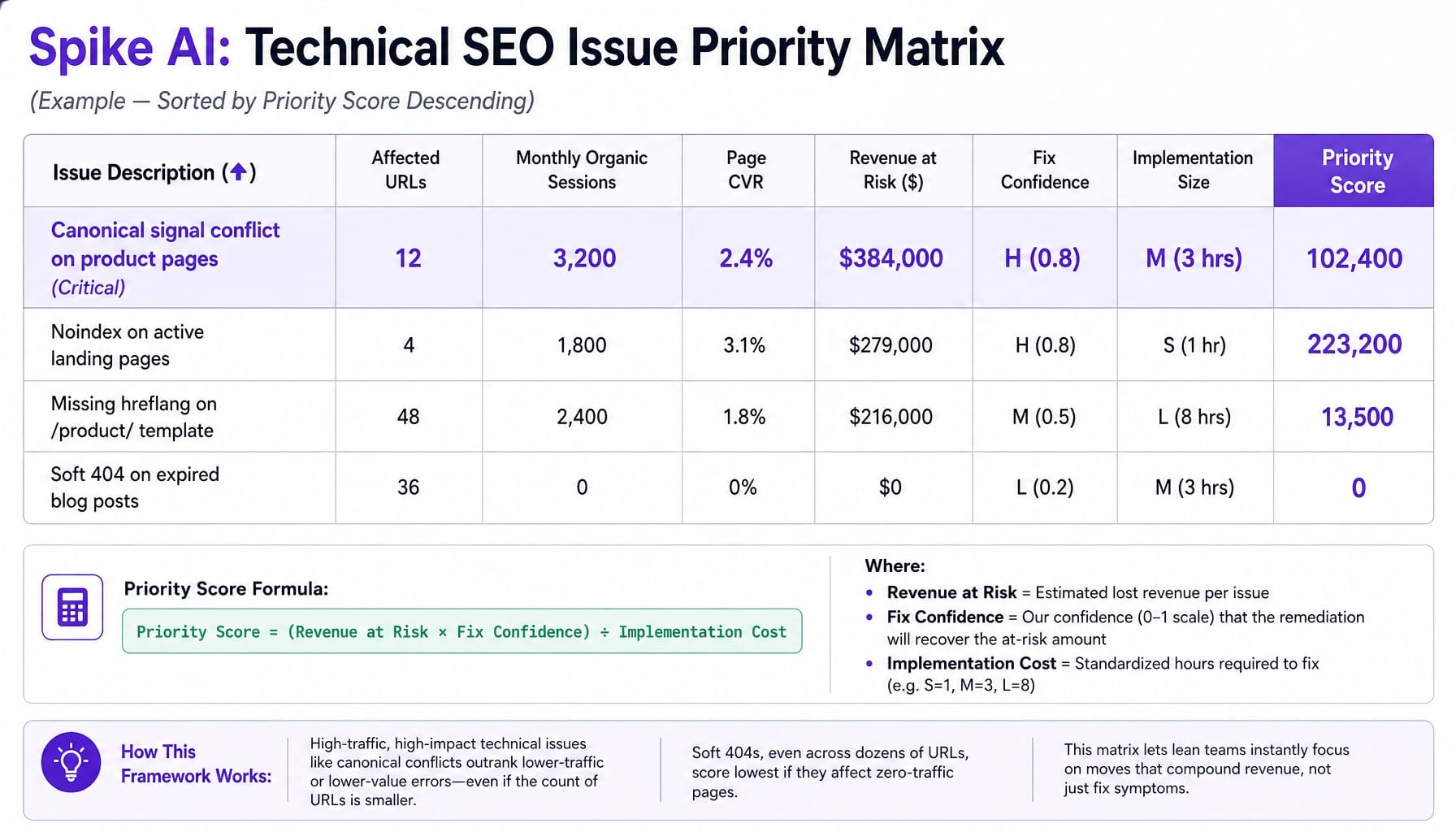
For example, a canonical signal conflict on a product category page getting 3,200 monthly organic sessions with a 2.4% conversion rate and $5,000 average deal size has an Affected Traffic Value of $384,000. If the fix confidence is High (0.8) and the effort is Medium (3 hours), the score is high.
Building the Prioritization Spreadsheet: Column by Column
This model isn't theoretical. It's a spreadsheet you can build in 20 minutes. Instead of sending developers a 200-row audit export, you send them the top five rows of this.
Create a Google Sheet with these exact columns:
- Issue Description: (e.g., "Canonical signal conflict on product pages")
- Affected URLs: (Count of URLs)
- Monthly Organic Sessions: (Sum from GSC for affected URLs)
- Page CVR: (Conversion Rate from GA4/analytics)
- Revenue at Risk ($): (Sessions × CVR × Avg. Deal Value)
- Fix Confidence: (H/M/L, mapped to a value like 0.8/0.5/0.2)
- Implementation Size: (S/M/L/XL, mapped to hours like 1/3/8/20)
- Priority Score: (The calculated formula: (Revenue at Risk × Confidence) / Implementation)
Now, take the ten most common issues from your Screaming Frog crawl that touch pages with measurable traffic. Populate the sheet. Sort by Priority Score descending. The top of this list is your next sprint request. It's no longer a subjective plea; it's a data-driven business case.
Read more: Screaming Frog vs Sitebulb (2026): Which Crawler Fits Your Actual Workflow?
The Dual-Stack Problem: Prioritizing Fixes for Traditional Search vs. AI Engines
Most prioritization frameworks assume a single audience: Googlebot. In 2026, this is a dangerously incomplete view. Your content is also being crawled by GPTBot, ClaudeBot, Perplexity's crawler, and other user agents for Large Language Models (LLMs). Their accessibility requirements differ significantly from Googlebot's.
A page that renders perfectly for Googlebot may be partially or fully inaccessible to GPTBot if your robots.txt blocks it, if critical content is behind JavaScript that LLM crawlers don't execute, or if your CDN aggressively rate-limits non-Google user agents. This means you need two priority lists—one for traditional SERP visibility, one for AI engine citation eligibility—which you then merge into a single, comprehensive backlog. A B2B SaaS company that blocks GPTBot over CTO concerns about training data also prevents its product pages from being cited in the AI-driven research workflows its buyers now use daily.
How to Audit AI Crawler Access Using Log File Segmentation
You can't fix what you can't see. The only way to know if AI crawlers can access your content is to check the logs. Segment your server log files by user-agent string to isolate requests from GPTBot, ClaudeBot, anthropic-ai, and other key AI crawlers. Compare their crawl patterns against Googlebot.
Look for three distinct signals of an AI accessibility gap:
- Crawl Gaps: Pages Googlebot crawls successfully but AI crawlers never request. This often points to robots.txt blocks or internal linking paths that are only discoverable by Google.
- Access Denied: Pages where AI crawlers receive 403 (Forbidden) or 429 (Too Many Requests) responses. This is a clear sign your CDN or WAF is rate-limiting them.
- Rendering Parity Gaps: Pages where AI crawlers get a 200 OK but see different content than Googlebot, often due to a lack of JavaScript execution.
Tools like Screaming Frog's Log File Analyser or Lumar make this analysis straightforward.
Merging Traditional and AI Priority Lists into One Backlog
Once you have two lists, how do you merge them? Add a new column to your revenue-at-risk spreadsheet: 'AI Visibility Impact' (scored High/Medium/Low/None).
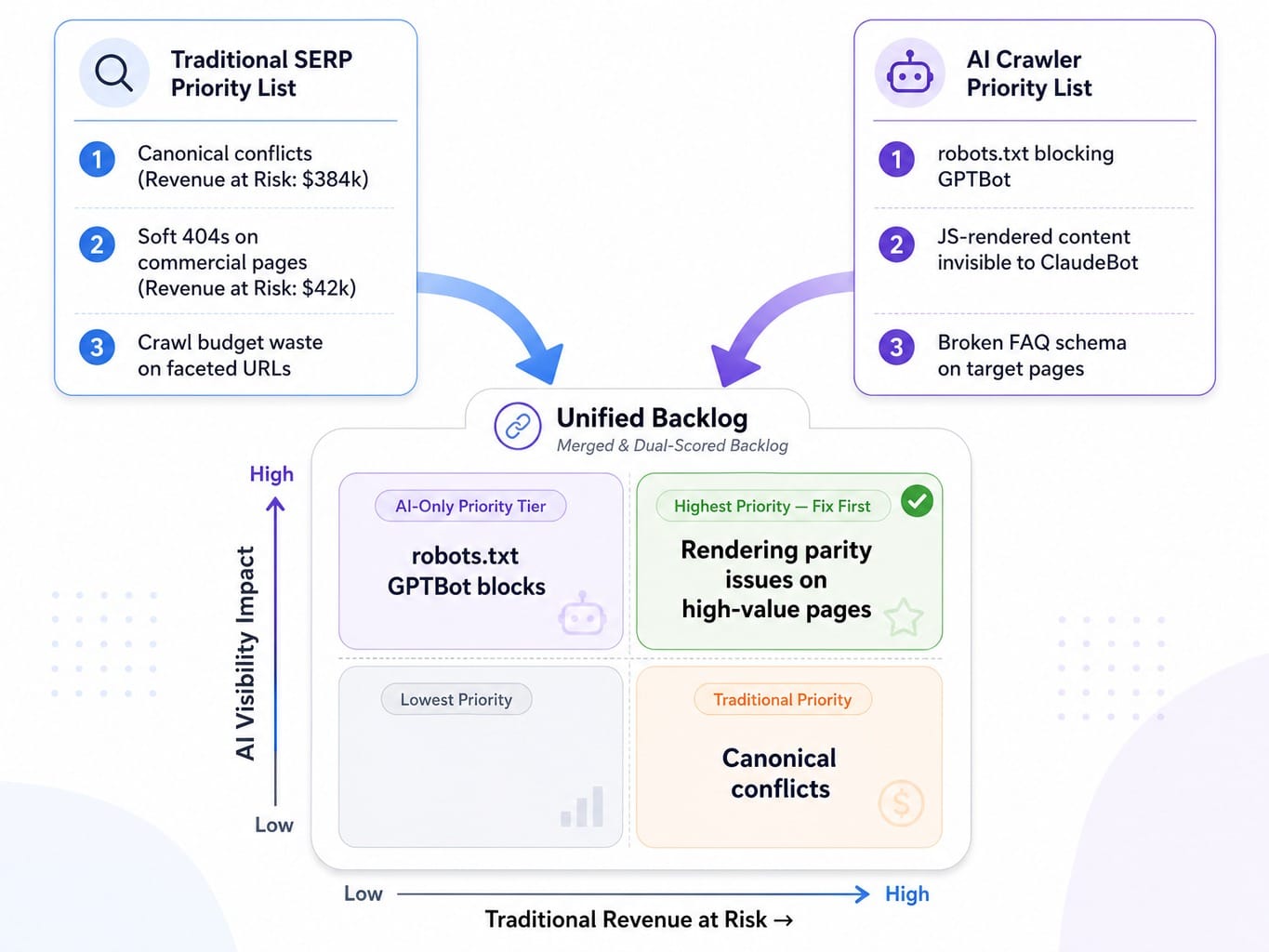
An issue that scores high on both traditional revenue-at-risk and AI visibility impact (like a rendering parity issue on a high-value page) gets elevated to the top of the backlog.
Some issues, like a robots.txt directive blocking Google-Extended, will only appear on the AI priority list. They have no traditional revenue-at-risk score but are critical for AI Overview eligibility. These must be given their own priority tier. This is why most teams miss them entirely—they don't show up in standard audit tools. Similarly, structured data errors, like broken FAQ schema, disproportionately harm AI citation potential and must be prioritized for pages where you want to appear in AI-generated answers.
How to Package Technical SEO Fixes So Dev Teams Actually Ship Them
The most perfectly prioritized backlog is worthless if the fixes never enter a sprint. Most SEO teams fail at this final step, not because developers don't care, but because SEO tickets arrive in a format that doesn't fit how engineering teams evaluate and schedule work.
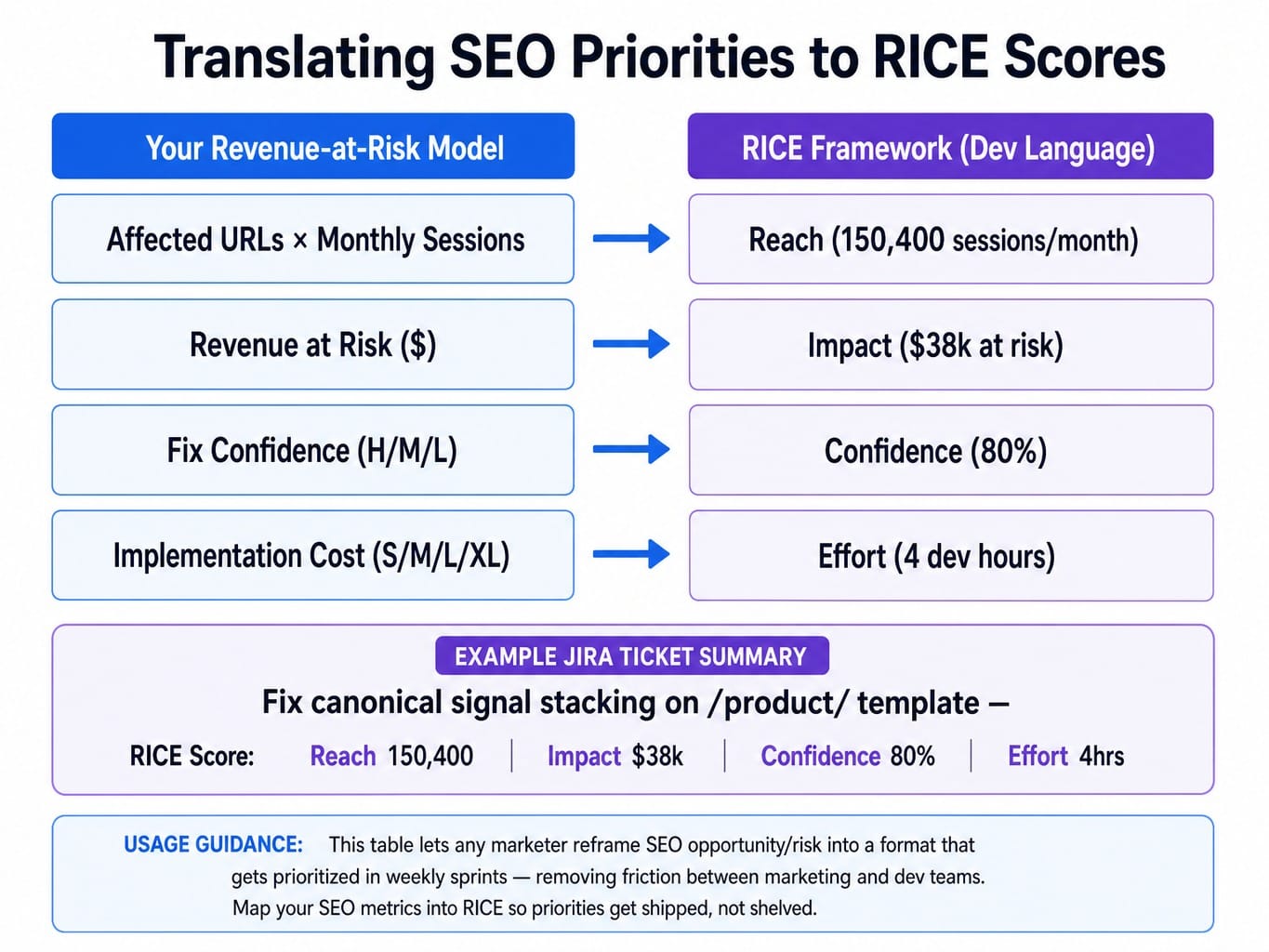
Dev teams use frameworks like RICE (Reach, Impact, Confidence, Effort) to score their backlog. Your revenue-at-risk model already contains these variables; you just need to translate them into the language of engineering.
- Reach: Number of affected URLs × monthly sessions per URL.
- Impact: The "Revenue at Risk" dollar figure from your model.
- Confidence: Your "Fix Confidence" score (H/M/L).
- Effort: Your "Implementation Cost" in dev hours.
When you submit a Jira ticket to fix a canonicalization signal stacking issue and present it with a RICE score—Reach: 150,400 sessions/month; Impact: $38k revenue at risk; Confidence: 80%; Effort: 4 dev hours—it competes on equal footing with new product features. It's no longer a vague "SEO request" but a quantified business opportunity.
One more thing: batch related fixes. If you have canonical tag logic and hreflang implementation issues that both touch your /product/ template, group them into a single, larger ticket. This respects developer time by minimizing context switching.
Why Fixed Technical SEO Issues Keep Coming Back—and How to Stop It
Here's the part most teams don't anticipate: technical SEO fixes are not permanent. A canonical tag you corrected in March gets overwritten by a CMS update in June. A noindex directive you removed reappears when a developer accidentally deploys a staging configuration to production. The redirect chains you cleaned up last quarter slowly grow back.
This is why prioritization cannot be a one-time or even quarterly exercise. It must be continuous. I've seen a SaaS company fix 12 critical indexation issues in Q1, only to find that by Q3, seven of them had silently regressed. When they re-ran the audit, the dev team saw the same "critical" issues reappear, eroding their trust in the SEO team's process.
The solution is automated regression monitoring.
Use a tool like ContentKing or Lumar for real-time change detection on the specific directives and URLs you've fixed. Set up alerts for canonical tag changes, robots meta tag modifications, and HTTP status code changes on your top 20% of pages. Create a "Fixed Issues Watchlist" in your prioritization spreadsheet and have a process to review it monthly. Prioritization without validation is just a treadmill.
What If Prioritization, Execution, and Monitoring Were One Continuous Loop?
You now have a complete framework for technical SEO prioritization. It requires revenue modeling, dual-stack triage for AI and traditional search, dev-compatible packaging, and continuous regression monitoring.
Each of these is a distinct discipline. Together, they represent a recurring operational burden that most lean marketing teams cannot sustain. The prioritization spreadsheet gets built once and goes stale. The log file analysis happens quarterly, if you're lucky. The regression alerts fire, but nobody has the bandwidth to review them.
This is the execution gap Spike AI was built to close. We believe the distance between identifying the highest-impact technical fix and shipping it should be zero.
Instead of handing you another audit report, Spike AI's system continuously identifies the highest-impact move across your website, SEO, and AEO—then models the revenue impact and executes the fix. It's a closed-loop system that turns the manual, frustrating work described in this article into a consistent, weekly shipping cadence. The marketer moves from operator to orchestrator, approving the highest-impact work instead of drowning in the backlog.
See how Spike AI turns your technical SEO backlog into a weekly shipping cadence
From Backlog Anxiety to Compounding Gains
The fundamental belief shift is this: technical SEO prioritization is not about fixing the most issues. It's about consistently fixing the right issues—those with the highest revenue at risk, across both traditional and AI search surfaces.
Audit tools tell you what's broken; a revenue-at-risk model tells you what matters. In 2026, that model must account for AI crawler accessibility alongside traditional indexation. And none of it compounds unless fixes are packaged for dev sprints and monitored to prevent regression.
The teams that win organic visibility in the next 12 months won't be the ones who fix the most issues. They'll be the ones who fix the right five issues every sprint and never let them break again.
Frequently Asked Questions
Should I prioritize Core Web Vitals fixes over crawlability issues?
Almost never. Crawlability and indexation issues prevent pages from appearing in search results entirely, which means zero traffic regardless of page speed. CWV improvements on pages that are already indexed and ranking produce marginal gains unless you're significantly failing thresholds. Fix crawlability first, then address CWV on high-traffic pages where INP or LCP regressions are measurable.
What is the difference between crawlability and indexability when prioritizing fixes?
Crawlability is whether search engines can access a URL, blocked by things like robots.txt or server errors. Indexability is whether a crawled page is eligible to appear in search, affected by noindex tags or canonical conflicts. A page can be crawlable but not indexable. Prioritize crawlability blockers first, then resolve indexability conflicts on your highest-value pages.
Should I allow or block GPTBot and other AI crawlers in robots.txt?
Blocking AI crawlers prevents your content from being cited in AI answer engines like ChatGPT and Perplexity, which are now key parts of the B2B buyer journey. Unless you have specific IP or data-training concerns, allowing them on public-facing content is the higher-leverage move. You can selectively block sensitive areas while keeping product and blog pages accessible.
How do structured data errors affect AI citation and featured snippet eligibility?
Invalid or missing structured data (e.g., FAQ, Article schema) doesn't directly hurt traditional rankings, as Google states it's not a direct ranking factor. However, valid schema significantly increases your eligibility for rich results and AI Overview citations by giving AI systems a machine-readable map of your content. Prioritize schema fixes on pages targeting informational queries where AI Overviews appear.
How do I use log file analysis to identify wasted crawl budget?
Analyze 30 days of server logs and segment Googlebot requests by URL pattern. Calculate your crawl waste ratio: the percentage of hits on URLs that are non-canonical, return errors, or have no organic value. If Googlebot is spending 40%+ of its time on faceted navigation parameters or expired content, those are your highest-priority crawl budget fixes.
Does fixing JavaScript rendering issues improve AI search visibility?
Yes, but the impact differs by crawler. Googlebot renders most JavaScript (with delays). However, many LLM crawlers like GPTBot and ClaudeBot do not execute JavaScript at all. This means any content loaded client-side is invisible to them, killing your chances of being cited in AI answers. Fixing this is a high-priority AI visibility issue, even if your traditional rankings seem fine.