Leadpages Pricing 2026: What You Actually Pay Per Lead
TL;DR
- Leadpages pricing has three tiers: Grow ($49/mo), Optimize ($99/mo), and Scale ($399/mo). Annual billing saves you $144-$300 per year but requires a significant upfront payment.
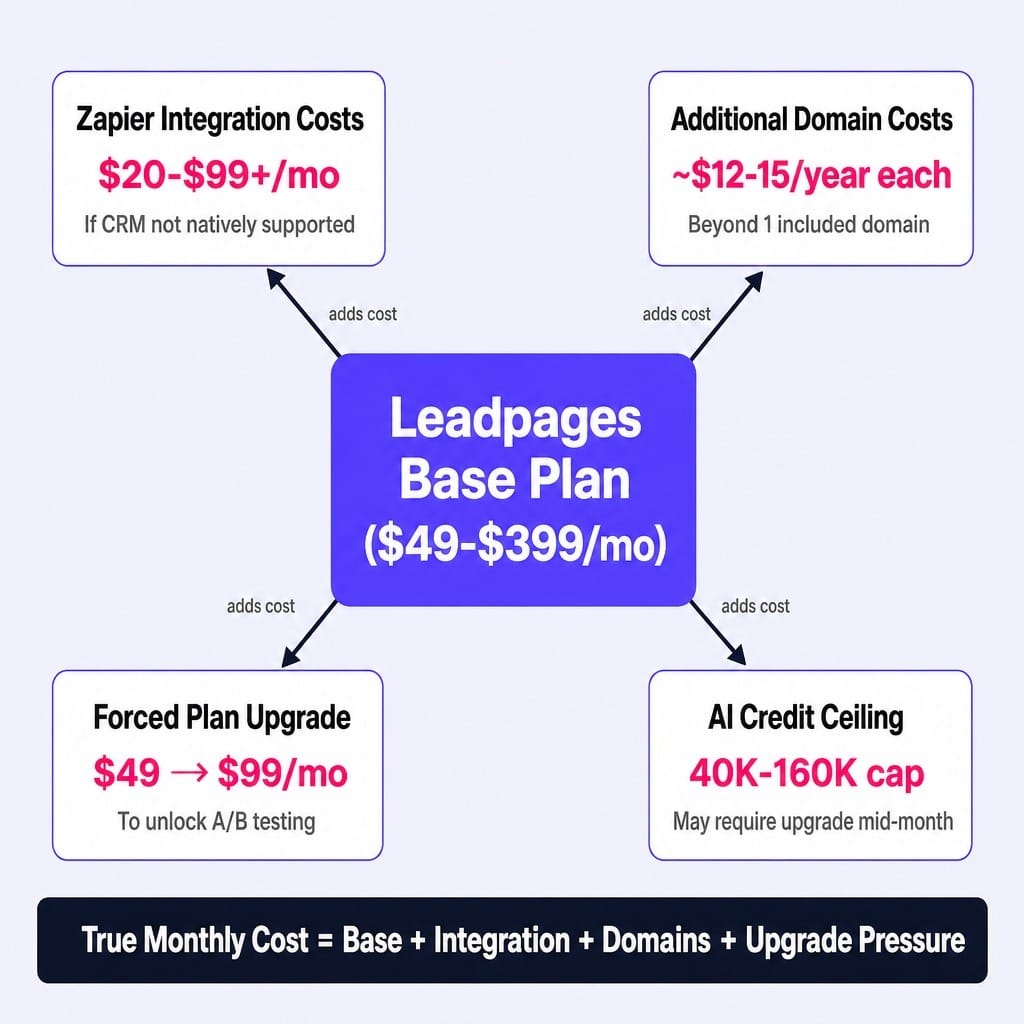
- The sticker price isn't the total cost. Factor in potential expenses for Zapier integrations ($20-$99/mo), additional domains, and the forced upgrade from Grow to Optimize to access A/B testing.
- The most important metric isn't the monthly fee; it's your cost per conversion. Calculate it with this formula: Monthly Plan Cost ÷ (Monthly Traffic × Conversion Rate).
- Leadpages' unlimited traffic model makes it more cost-effective at scale than competitors like Unbounce or Instapage, which have visitor caps on comparable plans.
- The real bottleneck for most teams isn't the tool's price, but the lack of bandwidth for continuous conversion optimization. A low conversion rate makes any tool expensive.
Most Leadpages pricing breakdowns tell you what each plan costs per month. That's the wrong number to focus on.
The number that actually matters to your business is what you pay per qualified lead or conversion. This figure depends on variables most pricing pages ignore: your traffic volume, your landing page's conversion rate, and the hidden costs layered on top of the monthly subscription fee. A cheap plan that doesn't convert is infinitely more expensive than a premium one that does.
This article breaks down every Leadpages plan, surfaces the costs that aren't on the pricing page, and gives you a framework to calculate whether it's truly cost-effective for your specific situation—not just whether it's "affordable" in the abstract.
Leadpages Pricing Plans in 2026: What Each Tier Costs and Includes
Leadpages currently offers three core plans—Grow, Optimize, and Scale—with both monthly and annual billing options. Each tier is designed for a different level of marketing maturity, gating features like A/B testing behind higher price points. Here's how they break down.
Grow Plan: $49/Month
The Grow plan costs $49 per month or $37 per month when billed annually. It's the entry point into the Leadpages ecosystem.
This plan includes the essentials for launching a single campaign: one custom domain, free hosting, unlimited landing pages, and unlimited traffic and leads. You also get access to their library of mobile-responsive templates, pop-up and alert bar builders, and over 40 standard integrations.
The key limitation is the absence of A/B split testing. This makes the Grow plan suitable for a solo marketer or solopreneur running a single offer on one domain who needs to get a page live quickly but doesn't have the traffic or mandate for rigorous experimentation yet. You can start with a 7-day free trial to test the core builder.
Optimize Plan: $99/Month
The Optimize plan costs $99 per month or $74 per month with annual billing. Leadpages positions this as their most popular offering, and for most growth-focused teams, it's the realistic starting point.
The critical addition here is unlimited A/B split testing. This feature alone is why most performance marketers will bypass the Grow plan. It also unlocks heatmaps, auto-personalization, and advanced integrations that allow for deeper connections with CRMs and marketing automation platforms. The AI copywriting credit limit doubles from 40K to 80K.
This plan fits a growth marketer or small team that is actively running experiments, needs to reach statistical significance on variant tests, and requires a workflow that goes beyond basic lead capture. This is the first tier where true conversion rate optimization (CRO) becomes viable.
Scale Plan: $399/Month
The Scale plan is a significant jump to $399 per month, with no promotional discount currently advertised. This tier is built specifically for agencies and larger in-house teams.
The defining features are operational and administrative. You get up to 10 team seats, workspaces for organizing projects, and sub-account provisioning for managing up to 10 client sites under a single master account. It also includes a dedicated Customer Success Manager, audit logs, and the highest AI credit allocation at 160K.
This plan is for agencies managing multiple client accounts or marketing teams at companies with established revenue ($5M+ ARR) that run landing pages across different brands or product lines. If you need to manage more than 10 sites, you'll need to contact sales for custom enterprise pricing, as Leadpages does not publicly list tiers beyond Scale.
Monthly vs. Annual Billing: The Exact Savings and the Tradeoff
Choosing annual billing on the Grow plan saves you $144 per year ($12/mo discount). On the Optimize plan, the savings are $300 per year ($25/mo discount). From a pure math perspective, it's a straightforward decision.
However, the tradeoff is the upfront cash commitment. Annual billing requires paying $444 (Grow) or $888 (Optimize) in a single transaction. For a startup or solopreneur testing a new funnel, that's a meaningful bet to place before you've validated the tool's impact on your conversion rate.
I've seen marketers pay for an annual plan, only to realize two months in that the template constraints don't fit their brand guidelines, locking them into 10 more months of payments for a tool they can't fully use.
The decision logic is simple:
- Go annual if: You've used the 7-day trial, confirmed the builder fits your workflow, and have a funnel that already converts. The savings are real.
- Start monthly if: You're evaluating Leadpages against alternatives or are unsure if your offer will perform. Pay the premium for the first 60-90 days, validate the ROI, and then switch to annual billing.
The Costs That Aren't on the Pricing Page
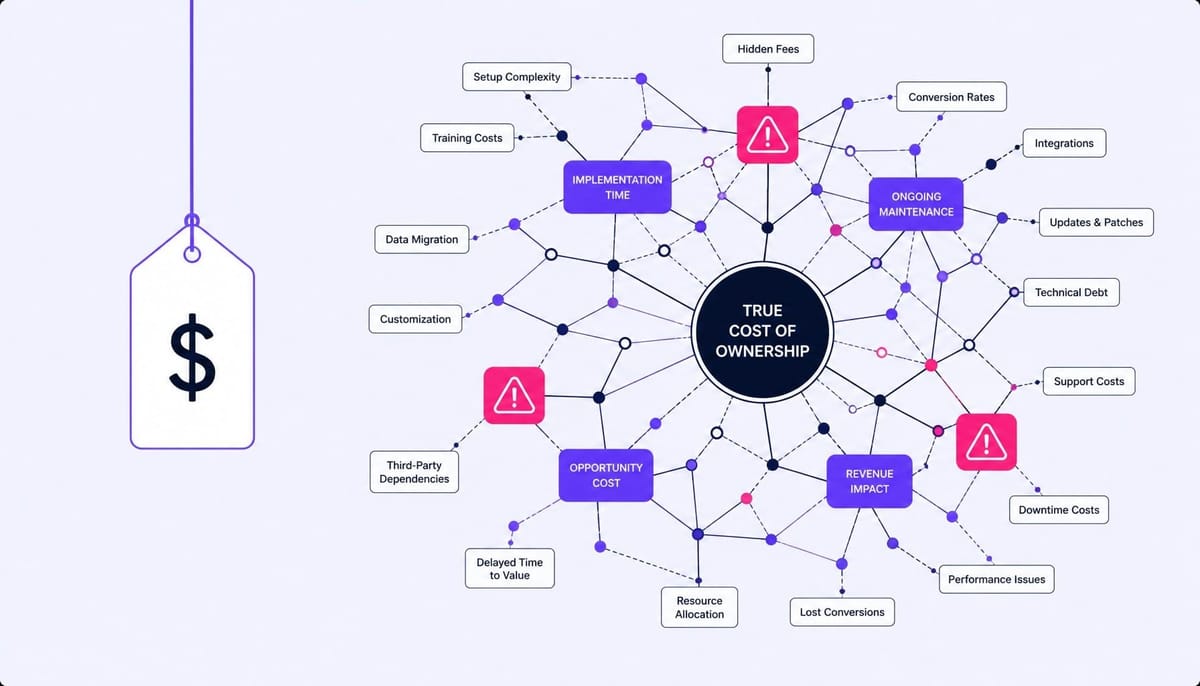
Leadpages' sticker price is only part of your total cost of ownership. Your actual monthly spend can be higher once you account for the ecosystem required to make it fully operational.
- Integration Costs: Leadpages includes over 40 native integrations (Mailchimp, HubSpot, ActiveCampaign, etc.). But if your marketing automation tool or CRM isn't on that list, you'll need a Zapier plan to connect them via webhook. Depending on the volume of leads you process, that adds $20 to $99+ per month to your CRO stack cost.
- Domain Costs: The Grow plan includes one custom domain. If you run multiple campaigns with unique vanity domains for brand consistency, you'll either need to upgrade your plan or purchase domains externally (~$12-15/year each) and manage the CNAME mapping yourself.
- A/B Testing Gating: This is the most common hidden cost. A B2B marketer starts on the $49/mo Grow plan. After launching, they realize they can't split test their primary headline to improve a low conversion rate. To unlock A/B testing, they must upgrade to the Optimize plan—instantly turning a $49/mo tool into a $99/mo tool.
- AI Credit Ceilings: The AI copywriting features are useful but capped. Grow gets 40K credits, Optimize gets 80K, and Scale gets 160K. If your team relies heavily on the AI assistant for generating copy variations, you could hit your limit mid-month and have to wait for the reset or upgrade.
Read more: SaaS Marketing Tools in 2026: How to Build a Stack That Ships, Not Just Reports
What Leadpages Actually Costs Per Conversion
The monthly subscription fee tells you what Leadpages costs your budget. The cost-per-conversion tells you what it costs your business. The second number is the only one that matters for ROI.
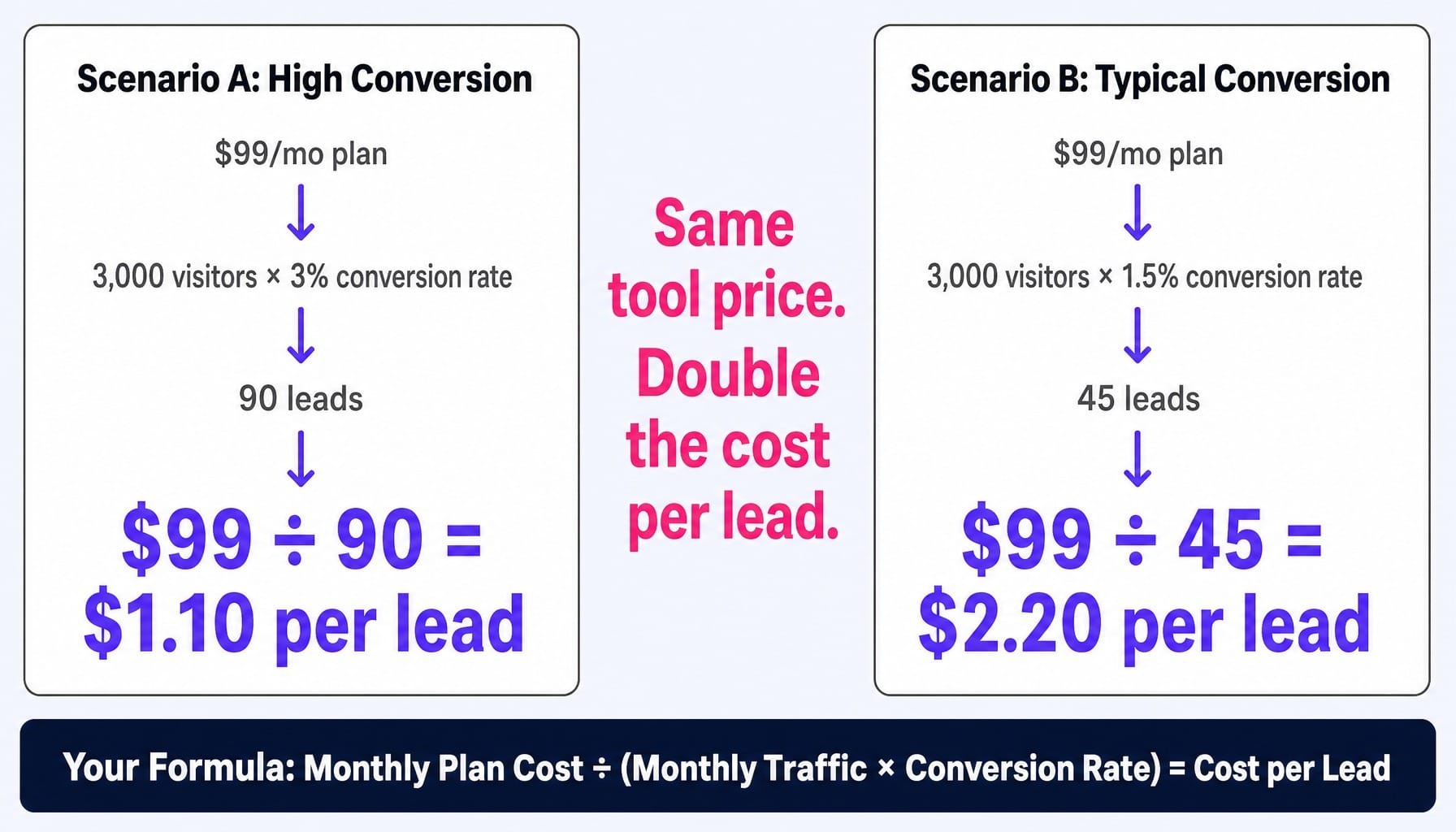
Let's walk through a concrete example. A marketer is on the $99/mo Optimize plan and drives 3,000 visitors to their main landing page.
- Scenario A: The page converts at 3%. They generate 90 leads per month.
$99 ÷ 90 leads = $1.10 cost per lead from Leadpages.
- Scenario B: The page converts at a more typical 1.5%. They generate 45 leads per month.
$99 ÷ 45 leads = $2.20 cost per lead from Leadpages.
The tool's price didn't change, but a dip in conversion performance doubled its effective cost. The real cost driver isn't the plan tier; it's the performance of the pages you build.
You can calculate this for your own business with a simple formula:
Monthly Plan Cost ÷ (Monthly Traffic × Conversion Rate) = Cost per Lead
Most teams obsess over the feature differences between the $49 and $99 plans but never measure if their pages convert well enough to justify any plan. A $49/mo plan with a 5% conversion rate is far cheaper per lead than a $399/mo plan struggling at 1%. Your pricing decision should be downstream of your free trial conversion rate performance.
Leadpages Pricing vs. Competitors: Side-by-Side Comparison
Leadpages is rarely evaluated in a vacuum. Most buyers are comparing it against Unbounce, Instapage, ClickFunnels, and increasingly, simpler no-code builders like Carrd or Swipe Pages.
Here's how they stack up on the dimensions that directly impact your costs and capabilities:
Two insights emerge from this data:
- Leadpages' unlimited traffic model is its key pricing advantage. At higher volumes, its effective cost-per-visitor decreases, while tools like Unbounce and Instapage become progressively more expensive as you cross their traffic thresholds. If you have a high-traffic, low-conversion model, Leadpages is financially more predictable.
- Cheaper tools aren't always more cost-effective. Carrd is incredibly affordable for publishing a simple page, but it's not a conversion tool. It lacks the A/B testing, analytics, and integration capabilities that justify a dedicated landing page builder's cost in the first place. You're buying a publishing tool, not a CRO platform.
Read more: Unbounce vs ClickFunnels (2026): The Difference That Actually Decides It
When Leadpages Stops Being Cost-Effective
Every SaaS tool has a scale threshold where its economics and constraints stop making sense. For Leadpages, that point arrives when your team's operational complexity creates more friction than the platform solves.
Consider a growth team managing 20+ active landing pages, each requiring pixel-perfect design control, custom JavaScript for advanced event tracking, and server-side redirects for SEO experiments. They need to fire webhooks on form submission that pass UTM parameters seamlessly into a data warehouse. At this stage, the team is likely fighting the tool's template structure and integration limits more than they are leveraging its speed.
The alternative—custom-coded landing pages deployed via a flexible CMS like WordPress or Webflow, paired with a dedicated A/B testing tool like VWO or Convert—offers greater control. This approach may have a higher setup cost but can lead to lower CPL and less operational friction at scale.
Here's the decision heuristic: if your team has engineering resources available and your monthly spend on landing page software exceeds $400, it's time to run a total-cost-of-ownership analysis against a custom-coded alternative. If you don't have engineering support, Leadpages remains the more practical system.
What If the Biggest Cost Isn't the Tool—It's the Conversion Rate?
The analysis is clear: a $49/mo plan with a 1.5% conversion rate is more expensive per lead than a $99/mo plan achieving 4%. The real cost driver is performance. Yet most teams pick a plan, build their pages, and then leave optimization to sporadic, manual efforts—a headline test one quarter, a CTA color change the next.
The execution gap isn't the tool; it's the lack of continuous optimization bandwidth.
This is the exact system failure Spike AI is built to solve. Instead of relying on manual testing cycles, Spike AI functions as an autonomous execution layer. It continuously identifies the highest-impact conversion opportunities on your website and landing pages and ships those improvements every single week. The cost-per-conversion math changes fundamentally when your conversion rate compounds weekly, not quarterly.
Spike AI isn't a replacement for Leadpages; it's the execution engine that makes any page builder's pricing justifiable, because the tool's cost becomes trivial when your conversion rate is always improving.
See how Spike AI reduces your cost per conversion
Your Plan Price Doesn't Drive ROI—Your Conversion Rate Does
Leadpages pricing is straightforward, ranging from $49 to $399 per month. But the number that truly determines whether it's worth it is your cost per conversion. That figure is driven by the performance of the pages you build, not the feature list of the plan you choose.
The teams that treat their landing page builder as a fixed cost center will always feel like they're overpaying. The teams that treat their conversion rate as the primary variable will always find the right plan for their needs. Ultimately, your pricing decision for any landing page tool should start with conversion math.
Frequently Asked Questions
Does Leadpages offer a free trial, and do I need a credit card to start?
Yes, Leadpages offers a 7-day free trial for all plans, and a credit card is required to begin. If you cancel before the trial ends, you won't be charged. Use this period to test key features like A/B testing on the Optimize plan before committing.
Can I use one Leadpages account for multiple client websites?
Only on the Scale plan ($399/mo), which includes sub-account provisioning for up to 10 client accounts and supports 10 custom domains. The lower-tier plans are designed for a single site. Agencies managing more than 10 clients should contact Leadpages sales for custom enterprise pricing.
Does Leadpages charge overage fees if I exceed a traffic threshold?
No. All Leadpages plans include unlimited traffic and unlimited leads with no overage charges. This is a significant differentiator from competitors like Unbounce and Instapage, which enforce visitor caps on their comparable plans, making Leadpages more predictable for high-traffic sites.
Does Leadpages include AI copywriting on all plans, or is it an add-on?
AI content generation is included on all plans, but each tier has a monthly credit limit: 40,000 on Grow, 80,000 on Optimize, and 160,000 on Scale. Credits reset monthly. If you rely heavily on AI for copy, monitor your usage to avoid hitting the cap.
What is Leadpages' refund policy if the tool doesn't work for my business?
Leadpages does not offer a money-back guarantee beyond the 7-day free trial. If you are on an annual plan and wish to cancel mid-term, you generally will not receive a prorated refund. This is why starting with monthly billing for the first 60-90 days is a safer approach.
Which Leadpages integrations require Zapier vs. working natively?
Leadpages natively integrates with over 40 tools, including HubSpot, Mailchimp, ActiveCampaign, GA4, and Stripe. If your stack includes less common CRMs, custom databases, or niche marketing platforms, you will likely need a Zapier plan ($20-$99/mo) to connect them. Always check their integration directory against your specific stack.