Leadpages Review for B2B Teams: Where It Works, Where It Breaks, and When to Move On

TL;DR
- Best Use Case: Leadpages excels at rapid, independent deployment of simple campaign landing pages (e.g., webinars, ebooks) for B2B teams bottlenecked by engineering resources.
- Key B2B Limitation: The platform breaks down when pipeline requirements demand deep CRM integration, progressive profiling for lead qualification, or statistically valid A/B testing on low-traffic pages.
- True Cost: The sticker price is misleading. For B2B functionality like A/B testing and Salesforce integration, the total cost of ownership, including the Pro plan and required Zapier subscriptions, is closer to $100-$150/month.
- Outgrowth Signal: If you spend more time building Zapier workarounds than building pages, or if you need dynamic text replacement for PPC, your marketing operation has likely outgrown Leadpages.
- The Verdict: Leadpages is a publishing tool, not an optimization system. It solves the problem of getting pages live but leaves the harder problem of improving their performance entirely on your team.
Nearly every Leadpages review you'll find is written for the same person: a solopreneur selling a course or an author building an email list. For that audience, it's a solid tool. But if you're a B2B marketer managing a pipeline, your evaluation criteria are fundamentally different. This is the honest Leadpages review for you.
You don't care if the drag-and-drop editor is "easy." You care if it can handle multi-step lead qualification forms. You need to know if it passes UTM parameters cleanly to your CRM for attribution, if its A/B testing can produce a statistically significant result at your traffic volume, and whether it will become a source of technical debt as your stack matures.
Most reviews don't answer these questions. This one does.
We're evaluating Leadpages through the specific lens of B2B execution requirements. We'll cover where it genuinely accelerates your workflow, where it creates friction, what it actually costs when you factor in the necessary integrations, and the precise signals that tell you it's time to move on to a more robust system.
What Leadpages Is and What It Isn't: For B2B Teams
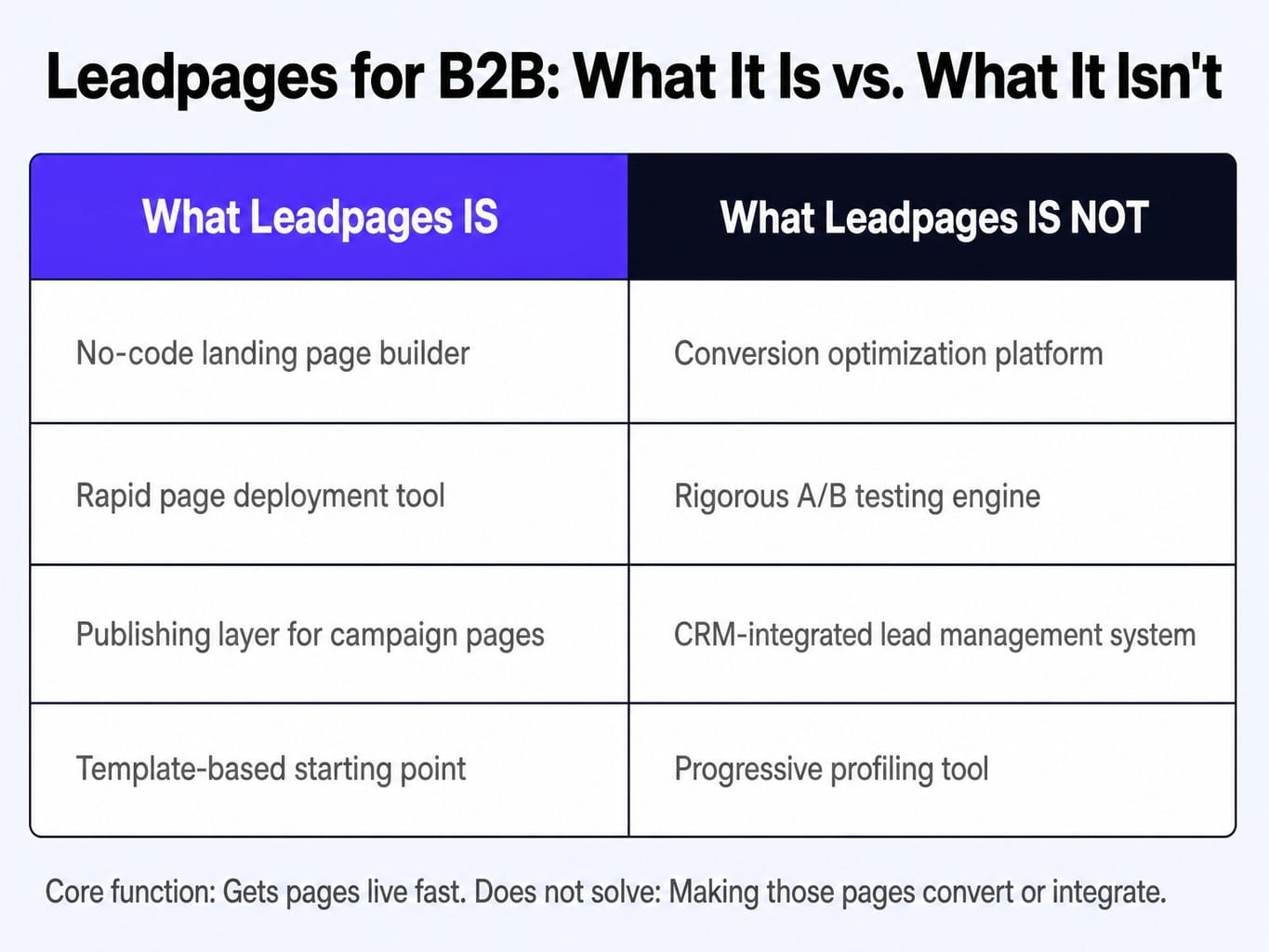
Leadpages is a no-code landing page and website builder designed primarily for small businesses, coaches, and digital product sellers. For a B2B marketing team, it functions as a rapid page deployment tool—a way to get campaign-specific landing pages live without filing an engineering ticket.
It is not a conversion optimization platform. It is not a rigorous testing engine. And it is not a CRM-integrated lead management system.
A B2B growth marketer should view Leadpages as a publishing layer, not an optimization layer. It gets pages live fast. For a demand gen manager who needs a landing page for a webinar campaign by Friday, Leadpages can solve that immediate problem. The same manager who needs to implement progressive profiling across four campaign touchpoints to qualify MQLs will find Leadpages is the bottleneck, not the solution.
Its core capabilities—a drag-and-drop editor, a large template library, and custom domain publishing—are geared toward speed and simplicity. But whether those pages convert high-intent B2B buyers, integrate cleanly into your revenue operations stack, and scale with your pipeline complexity is an entirely separate question. That's what the rest of this review will dissect.
Where Leadpages Genuinely Helps B2B Teams
The strengths of Leadpages are real, but they are specific. For lean B2B teams, particularly those with 1-3 marketers, the platform provides two distinct advantages that address common operational bottlenecks. It's critical to acknowledge where the tool delivers genuine value before examining its limitations.
For a two-person SaaS marketing team needing to launch three campaign-specific landing pages per month without waiting on engineering, Leadpages can be the difference between hitting and missing a pipeline target. Its value is measured in reduced cross-functional friction and increased campaign velocity.
Speed-to-Publish Without Engineering Dependencies
The primary value of Leadpages for any B2B team is the elimination of the engineering ticket as a campaign bottleneck. In a typical B2B organization, launching a new landing page for a paid search or social campaign is a multi-step process: a design request, a development ticket, QA, and a scheduled deployment. This cycle can easily stretch to one or two weeks, killing campaign momentum.
Leadpages compresses this cycle into hours. A marketer can select a template, customize the copy and form, and publish the page live on a custom domain using CNAME mapping. It can also integrate directly with a WordPress site or publish standalone pages, completely bypassing the main corporate website's codebase and release schedule.
This independence is not a minor convenience; it's a significant operational lever. It means marketing can react to opportunities in real-time, spin up pages for niche campaigns, and execute without being constrained by another department's sprint planning. The value isn't the quality of the editor itself—it's the strategic decoupling of campaign execution from engineering bandwidth.
Template Library as a Conversion Baseline
For B2B teams without a dedicated CRO specialist or designer, building a landing page from a blank canvas inside a generic CMS often leads to poor conversion performance. Leadpages' template library provides a structured starting point that is almost always better than a guess. A unique feature is the ability to sort templates by their historical conversion rate, giving you a data-informed baseline to start from.
However, this comes with a critical B2B-specific caveat. Most of the highest-converting templates are designed for B2C use cases: simple ebook downloads, webinar registrations with two-field forms, and course signups. Their layouts prioritize a single, low-friction call-to-action.
A B2B marketer will need to significantly modify these templates. This often involves adjusting the above-the-fold CTA density to accommodate a more considered value proposition, restructuring forms to capture qualifying information (like company size or job title), and adding sections for more robust social proof like case study logos or customer testimonials. The templates are a useful starting point, not a finished product. The B2C bias means you will spend more time customizing than the marketing copy suggests.
Read more: Landing Page Conversion Rate Optimization: A Revenue-Weighted Playbook
Where Leadpages Breaks Down for Pipeline-Driven B2B Marketing
The strengths above apply to a specific job: getting simple pages live fast. The moment your B2B marketing operation requires lead qualification depth, clean data flow to a CRM, or statistically rigorous testing, the limitations of Leadpages become execution bottlenecks.
This isn't necessarily a flaw in the product; it's a scope boundary. The critical question for any B2B team is whether their requirements fall inside or outside that boundary. For a SaaS company running account-based landing pages with 500-2,000 monthly visitors per page, the platform's constraints can actively undermine performance.
The Progressive Profiling Problem
Modern B2B lead qualification depends on progressive profiling: collecting information incrementally across multiple touchpoints rather than demanding everything in a single, high-friction form. Leadpages forms are static. You define the fields, the visitor fills them out, and the data is sent to your email platform or CRM.
There is no native conditional logic, no ability to hide fields a known contact has already provided, and no multi-step form capability that adapts based on the lead's history. The practical impact is significant. A prospect who gave you their email and company name to download a whitepaper is asked for the same information again when they register for a follow-up webinar. This redundant friction reduces the conversion rate on every subsequent touchpoint in your funnel.
For B2B teams running multi-touch nurture campaigns, this limitation directly harms MQL-to-SQL velocity. While competitors like Unbounce offer multi-step forms and platforms like HubSpot have native smart forms that solve this, Leadpages leaves B2B marketers with a frustratingly blunt instrument for lead capture.
CRM and Marketing Automation Integration Friction
Leadpages' marketing materials highlight integrations with HubSpot, ActiveCampaign, and Mailchimp. While these native integrations exist, their depth is shallow. A form submission will push basic contact fields, but the critical data for B2B pipeline management is often lost or requires a workaround.
Specifically, UTM passthrough, custom field mapping for lead scoring, and clear lead source attribution often require Zapier as middleware. Consider a common B2B scenario: a paid search campaign where you need the utm_campaign and utm_term parameters to flow from the ad click, through the Leadpages form submission, and into a custom property on the lead record in your CRM. Achieving this reliably with Leadpages often involves building a multi-step Zapier workflow. This introduces a subscription cost, a maintenance burden, and another potential point of failure in your data pipeline.
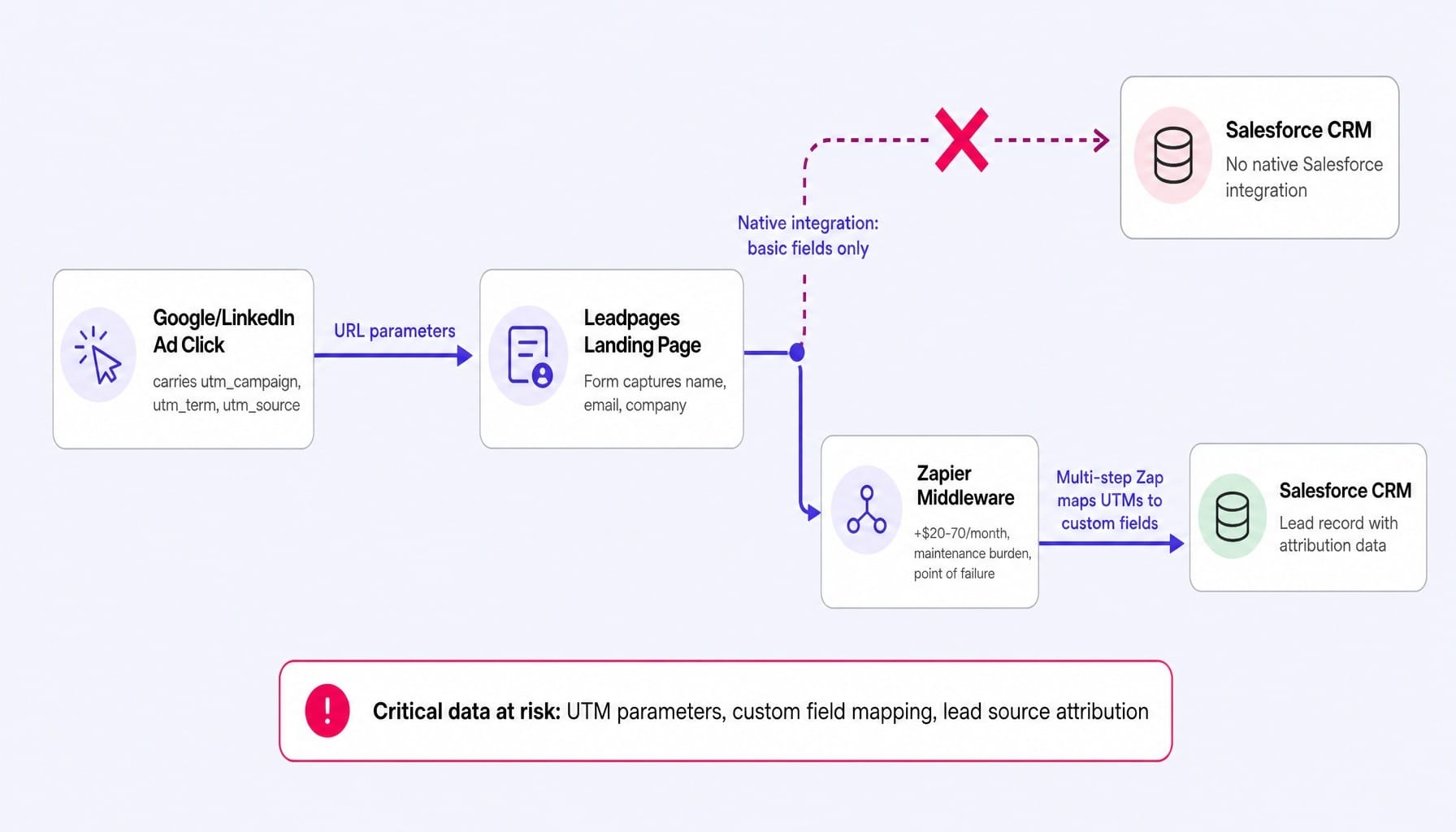
Furthermore, Salesforce integration is not native; it is entirely dependent on Zapier. For the vast number of B2B companies where Salesforce is the system of record, this is a non-starter that most reviews fail to mention. If your RevOps process depends on a clean, direct flow of data into your CRM, Leadpages' "integrations" will feel more like suggestions.
Read more: B2B Lead Scoring: How to Build a Model That Doesn't Break in 90 Days
A/B Testing That Doesn't Scale to B2B Traffic Volumes
Leadpages' A/B testing capability is functionally limited for B2B teams in two compounding ways. First, access to split testing is locked behind the Pro plan ($79/month when paid annually), which immediately erodes its pricing advantage over more powerful tools like Unbounce or Instapage.
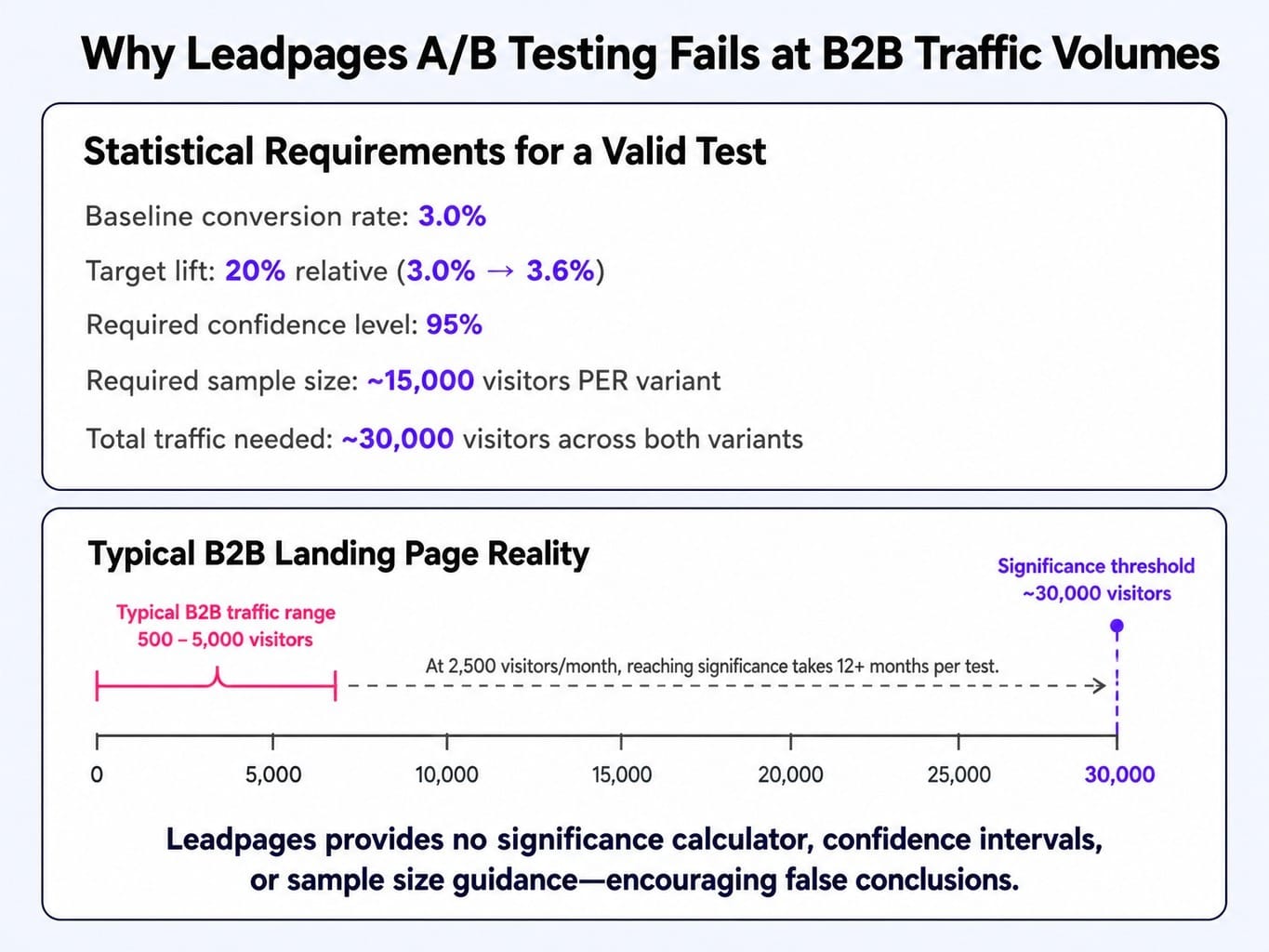
Second, and far more importantly, the testing tool itself is a black box. It provides no statistical significance calculation, no variant winner confidence interval, and no guidance on the minimum sample size required to run a valid test. For B2B landing pages with relatively low traffic volumes (e.g., 500-5,000 monthly visitors), this is a critical failure. It encourages marketers to declare winners based on random noise.
Let's be direct with the math: at a typical 3% baseline conversion rate, detecting a 20% relative CVR lift (i.e., from 3% to 3.6%) requires approximately 15,000 visitors per variant to reach a 95% confidence level. Most B2B campaign landing pages will never see this volume. Leadpages' testing feature is designed for high-traffic B2C scenarios. Using it for low-traffic B2B pages without understanding the statistical requirements will lead to false conclusions and wasted effort, optimizing your pages based on chance.
Leadpages Pricing: What It Actually Costs for a B2B Stack
The sticker price for Leadpages is appealing: the Standard plan is $37/month and the Pro plan is $79/month (when paid annually). But for a B2B team, sticker price is the wrong frame. Total cost of ownership is what matters.
Let's walk through the cost escalation. If you need A/B testing—a fundamental capability for any serious B2B marketer—you are immediately forced onto the Pro plan at $79/month. If your company uses Salesforce as its CRM, you need a Zapier subscription to connect it, which adds another $20-$70/month depending on your task volume. If you need to track conversions accurately, you'll rely on Google Analytics 4, which Leadpages supports only via client-side tracking, a method known to be less accurate due to ad blockers.
A B2B team requiring these basic functions is realistically spending $100-$150 per month for what is primarily a page publishing tool.
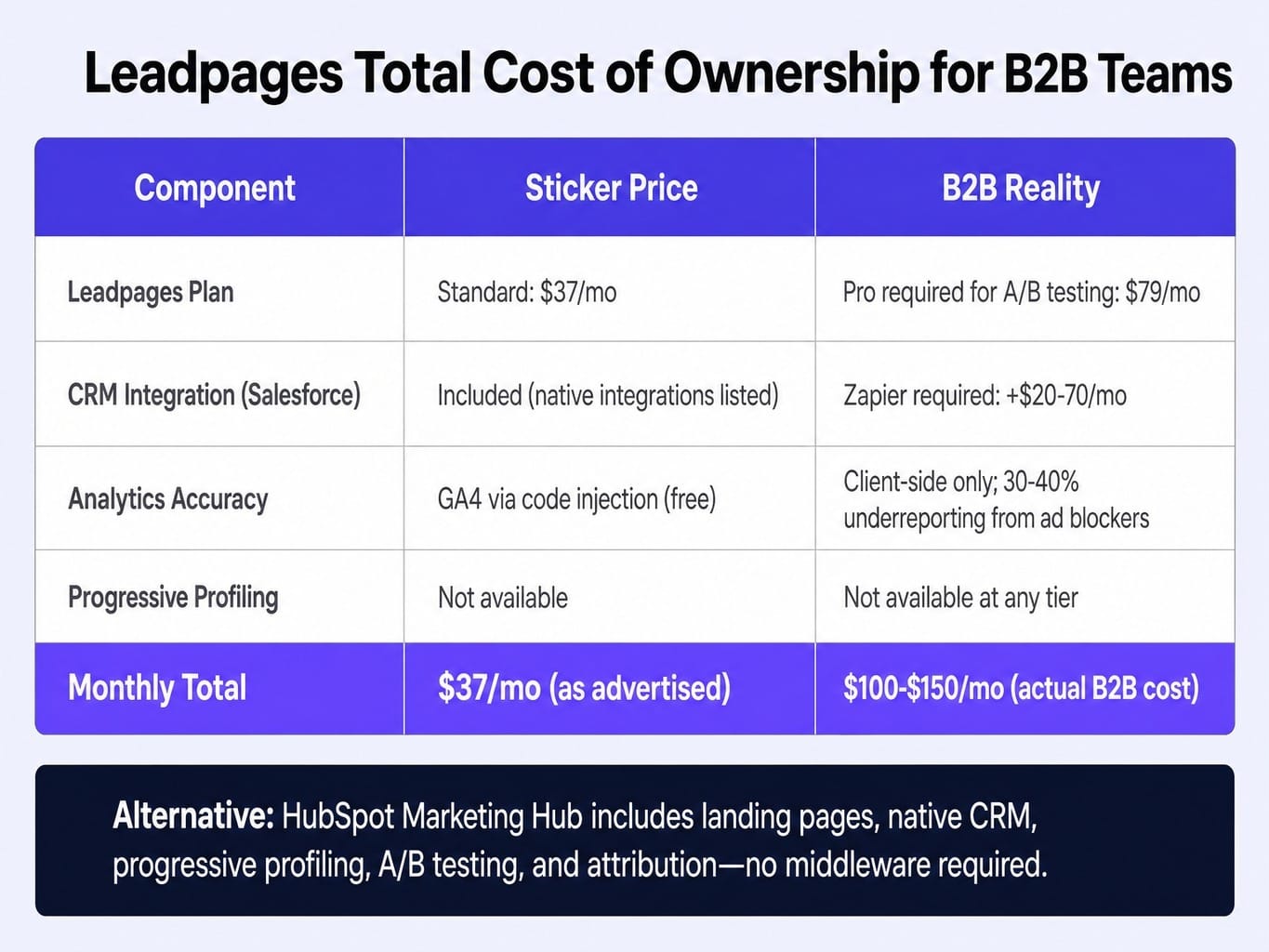
Now, compare this to the alternative. If your team already has a subscription to HubSpot Marketing Hub, you can build landing pages with native forms, deep CRM integration, progressive profiling, robust A/B testing, and clean attribution reporting—all without middleware. In this context, the $100+ monthly cost for Leadpages and its required workarounds becomes difficult to justify. The 14-day free trial also requires a credit card, and it's worth noting some users have reported unexpected price increases upon renewal, so be sure to check the terms.
When evaluating your full SaaS marketing tools stack, the total cost of ownership for each component matters far more than any individual sticker price.
Signals You've Outgrown Leadpages
The most important question isn't "is Leadpages good?" but "when does Leadpages stop being the right tool for my team?" Most reviews won't help you answer this. Here are four concrete signals that your B2B marketing operation has outgrown a simple landing page builder.
- You spend more time building Zapier workarounds than building pages. The tool was adopted to save time, but the integration layer has become a complex system of its own. If a broken Zap is a recurring source of data loss, the "simple tool" is now a maintenance burden.
- Your CRO process requires more testing velocity and sophistication. You need to run server-side tests, personalize content based on firmographics, or use dynamic text replacement (DTR) to match landing page headlines to PPC ad copy. Leadpages does not support DTR, a critical feature for optimizing paid search funnels.
- Your lead scoring model depends on data Leadpages cannot capture. Your process requires passing hidden field values from URL parameters, using conditional logic in forms, or implementing progressive profiling. If your forms are a bottleneck to lead qualification, you've outgrown the tool.
- You manage landing pages as a separate silo from your main website. This creates brand inconsistencies, design drift, and duplicate analytics configurations. You find yourself managing two sets of tracking scripts and brand assets, increasing complexity instead of reducing it.
If any of these describe your situation, Leadpages is no longer saving you time—it's costing you pipeline velocity and creating technical debt. These are the same kinds of friction points that stall a B2B SaaS growth strategy when execution can't keep pace with planning.
What Happens When Your Landing Pages Need More Than a Builder
Leadpages solves the publishing problem: getting a page live without calling engineering. It's a valuable first step. But for B2B teams, the real execution bottleneck isn't building the page. It's the relentless cycle of diagnosing underperformance, deciding what to change, implementing that change, measuring the result, and re-prioritizing for the next sprint. This is the execution gap that no landing page builder can close.
This is the system-level problem Spike AI is designed to solve. It's not another page builder. It's the execution layer that continuously identifies the highest-impact conversion opportunity across your entire marketing funnel—and then ships the fix.
Instead of running a single A/B test for a quarter and hoping for statistical significance, Spike AI's weekly cadence changes the game. Every week, our system identifies and deploys the change most likely to move qualified leads, whether it's on a landing page, your homepage, or deep within your site's technical SEO. The compounding effect of these weekly releases replaces the sporadic, manual optimization cycle that tools like Leadpages leave entirely on your plate.
The builder was never the bottleneck. The optimization cycle was.
Conclusion: A Publishing Tool, Not an Optimization System
The single most important takeaway from this review is this: Leadpages is a publishing tool, not an optimization system. The right evaluation depends entirely on which problem you are actually trying to solve.
For B2B teams whose primary bottleneck is getting campaign pages live without engineering dependencies, Leadpages earns its place. It's fast, it's independent, and its templates provide a better-than-blank-canvas starting point.
It stops earning its place the moment your operational requirements include deep lead qualification, CRM data integrity, or statistically rigorous testing. At that point, the workarounds required to make it function in a B2B stack begin to negate its core value proposition of simplicity.
The real question isn't whether Leadpages is a good tool. It's whether your marketing operation needs a better builder, or if it needs a better execution system. As B2B marketing matures, the competitive advantage is shifting away from tools that simply build assets and toward systems that continuously improve their performance. The builder is becoming a commodity; the data-driven CRO optimization loop is where growth is won.
Frequently Asked Questions
Does Leadpages support dynamic text replacement for PPC campaigns?
No. Leadpages does not offer dynamic text replacement (DTR), meaning you cannot automatically match landing page headlines to the ad copy or keyword that triggered the click. For B2B teams running granular Google Ads campaigns, this requires creating numerous page variants manually or accepting a headline-to-ad mismatch that can reduce Quality Score and conversion rates.
Can I use Leadpages without WordPress or any CMS?
Yes. Leadpages can publish pages directly to a custom domain that you own, so you don't need a separate CMS like WordPress. However, managing landing pages on a separate subdomain from your main site can create split analytics setups, potential brand inconsistencies, and SEO fragmentation if your canonical and linking strategies aren't carefully managed.
How does Leadpages handle GDPR cookie consent for B2B audiences?
Leadpages allows you to add custom scripts from third-party cookie consent tools (like Cookiebot or OneTrust) via its code injection feature. It does not have a native GDPR consent management system. B2B teams selling into Europe must configure consent banners and conditional script firing manually, which adds a layer of technical setup and compliance risk.
Does Leadpages support server-side analytics or only client-side tracking?
Leadpages supports only client-side tracking. You can add scripts like Google Analytics 4 or the Meta Pixel via code injection, but server-side tracking, which improves data accuracy by bypassing ad blockers, is not an option. For B2B audiences where ad blocker usage can be 30-40%, this means your analytics may significantly underreport actual conversions.
Is Leadpages better than building landing pages directly in HubSpot?
If your team already uses HubSpot Marketing Hub, building pages there is almost always the better choice for B2B. You get native CRM integration, progressive profiling, smart content, and clean attribution reporting without middleware. While Leadpages' editor might offer more visual flexibility, the data and workflow advantages of staying within the HubSpot ecosystem typically outweigh this for pipeline-focused teams.
Does Leadpages offer enterprise features like SSO or team permissions?
Leadpages' Advanced plan ($321/month) offers sub-accounts, but it lacks true enterprise features like SSO (Single Sign-On), granular role-based access controls, or audit logs. For B2B teams needing these security and governance features, platforms like Instapage or Unbounce's higher tiers often provide better value and more robust multi-user management.