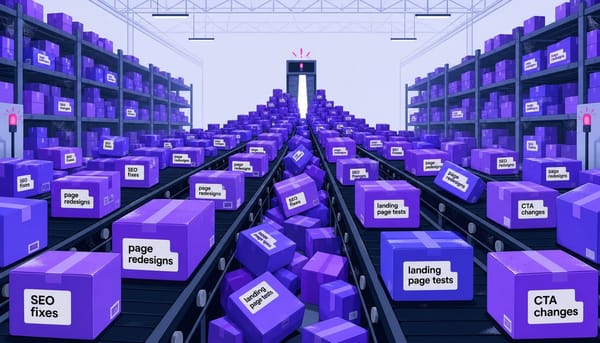
Your Marketing Backlog Is a Revenue Queue, and It's Leaking

TL;DR
- The Approval Cycle Tax is the hidden cost of every insight that ages in a queue. A 10-minute fix can take 30+ days to ship due to sequential handoffs and reviews.
- Your marketing backlog isn't just a list; it's a decaying asset. Insights lose relevance over time, meaning you're often shipping fixes for problems that no longer exist in the same way.
- Run a Backlog Aging Analysis this week. Categorize your backlog items by age (under 1 week, 1-4 weeks, 1-3 months, 3+ months) to calculate the total unrealized revenue sitting in your queue.
- Fix your backlog's structure with a single intake point, required fields that enforce clarity (like 'business outcome' and 'definition of done'), and a ruthless weekly grooming cadence.
- The core problem isn't prioritization; it's the latency between knowing what to do and getting it live. The goal is to collapse that distance.
Your CRO tool flags it on a Tuesday morning: a key landing page headline is underperforming. The data is clear, the A/B test a clean winner. The fix—rewriting twelve words—is a ten-minute job for a competent marketer.
That ten-minute fix doesn't ship for five weeks.
The journey is painfully familiar. The data is reviewed, a brief is written, stakeholder alignment on messaging is sought, a ticket is filed with the web team, it waits in a sprint queue, the implementation is reviewed, a revision is requested, final approval is granted, and it's finally deployed. The problem isn't that your team is slow; it's that your system is serialized.
This is the fundamental misunderstanding of the marketing backlog. We treat it as a list of things we need to do. It's not. It's the list of things we already know we should do but can't ship fast enough.
Every item in that queue is subject to the Approval Cycle Tax—the compound cost of every insight that ages while waiting for permission to exist. This article will trace that cost, give you a framework to measure it, and show you what a backlog built for shipping, not archiving, actually looks like.
What a Marketing Backlog Is and What It Quietly Becomes
A marketing backlog is a single, prioritized queue of all work a marketing team could do, ordered by expected impact on business outcomes. It is not a to-do list. A to-do list is a memory aid for an individual; a backlog is a decision system for a team. Its order is the strategy.
In practice, however, most backlogs become something else entirely: a graveyard of good intentions. I once ran a backlog aging audit for a B2B SaaS team and found that a significant portion of their queue had been open longer than the data that justified them was still statistically valid. The conversion rate benchmarks cited in the original tickets had shifted by the time the work shipped. The team was optimizing against stale baselines. The backlog wasn't a list of work to do; it was a museum of expired insights.
This is backlog decay. Every item in your queue has a half-life. A competitive positioning recommendation from Q1 is irrelevant by Q3. An A/B test insight from three months ago may no longer reflect your current traffic mix. Most teams conflate backlog grooming with backlog prioritization; grooming is about removing items that are no longer valid, while prioritization assumes everything is. Skipping the first step poisons the second.
This problem is unique to marketing. A product backlog feeds into engineering sprints with defined deployment pipelines. A marketing backlog feeds into… what, exactly? A chain of emails, Slack threads, and cross-functional dependencies. And that's where the real cost accumulates.
The Approval Cycle Tax: Tracing a Single Change Through Your Organization
Let's make this concrete. Consider a B2B SaaS company. Their CRO tool identifies that a key demo request page headline has a 1.4% conversion rate against a 2.1% benchmark for similar pages. The recommended fix is a new headline. The implementation—changing 12 words in the CMS—takes ten minutes of hands-on-keyboard work.
Now, let's trace its journey.
The 10-Step Lifecycle of a 10-Minute Fix
- Step 1: Insight Generation (Day 0). The CRO tool flags the underperforming headline. An alert is generated.
- Step 2: Data Validation (Days 1–3). A marketer sees the alert. They spend an hour cross-referencing it with analytics and heatmaps to confirm the signal is real and not a statistical anomaly. This is often delayed because they're juggling other priorities.
- Step 3: Brief Creation (Days 3–5). The marketer writes a one-page brief for the new headline, outlining the data, the proposed direction, and brand voice considerations.
- Step 4: Stakeholder Alignment (Days 5–10). The brief is sent to the VP of Marketing and the Head of Product Marketing for messaging alignment. This is where calendar time explodes. It's not about work complexity; it's about finding a 30-minute slot on two busy calendars. Async review adds more latency.
- Step 5: Ticket Submission (Day 11). With approval, the marketer files a ticket in Jira or Asana for the web team.
- Step 6: The Sprint Queue (Days 11–18). The ticket enters the web team's backlog. They run on a two-week sprint cadence, and the current sprint is already underway. The ticket waits.
- Step 7: Implementation (Day 19). The developer picks up the ticket. The actual work takes 15 minutes. The change is pushed to a staging environment.
- Step 8: Review & Revision (Day 20). The marketer reviews the change on staging and notices a minor formatting issue. A revision is requested.
- Step 9: The Revision Queue (Days 21–25). The ticket goes back into the developer's queue, waiting for a free moment between other scheduled tasks.
- Step 10: Final Deployment (Day 26). The revision is made, final approval is given, and the change is deployed to production.
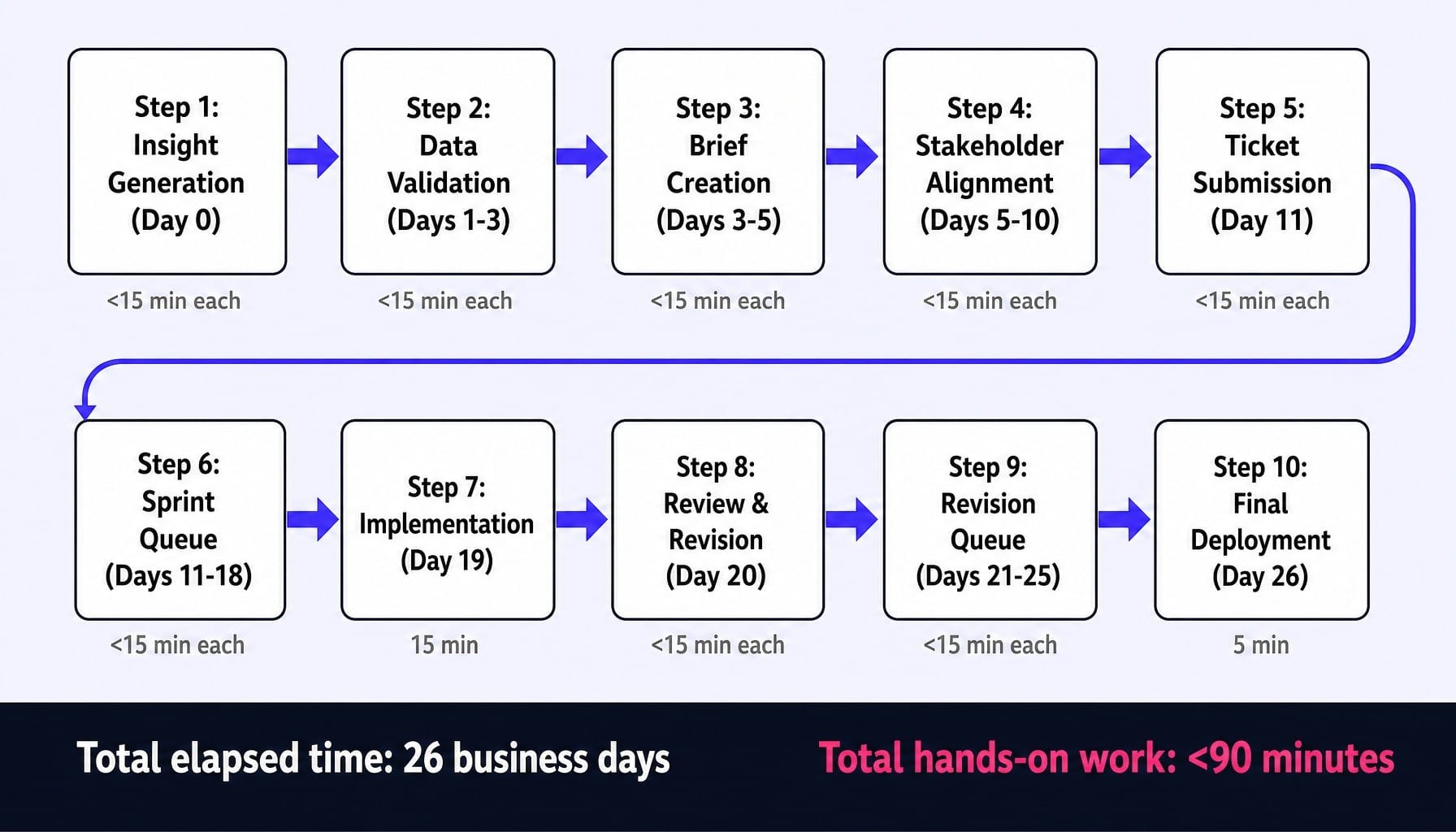
Total time from insight to live change: 26 business days. Actual hands-on-keyboard work: less than 90 minutes.
Now Multiply by Your Entire Backlog
Open your backlog right now. As most marketing ops leaders know, lean B2B SaaS marketing teams often carry 15-40 such items at any given time. If each one carries a similar Approval Cycle Tax, the compound cost is staggering.
This is a throughput problem. If your process allows you to ship three meaningful changes per month, but your analytics tools and team generate eight new, valid ideas, your backlog grows by five items every month. This is backlog debt.
The compounding cost of this aging is invisible in standard marketing dashboards because no one tracks the delta between the conversion rate you could have had and the one you actually ran with for four extra weeks. For scaling SaaS companies, that delta translates directly into pipeline dollars lost to execution latency. Platforms like Spike AI exist precisely because that gap is where the latency between identifying a problem and resolving it on a live page collapses. The oldest items in your backlog become less relevant, meaning you're not just slow—you're shipping work that's already stale.
Read more: Data-Driven CRO: Evolve Your Marketing Strategy for Revenue
Backlog Aging Analysis: Measuring What Your Queue Is Costing You
You can diagnose this revenue leakage this week. The Backlog Aging Analysis is a simple framework for categorizing every item in your current queue by its age and estimating the opportunity cost. It's not about shaming the team; it's about making an invisible systemic cost visible to leadership.
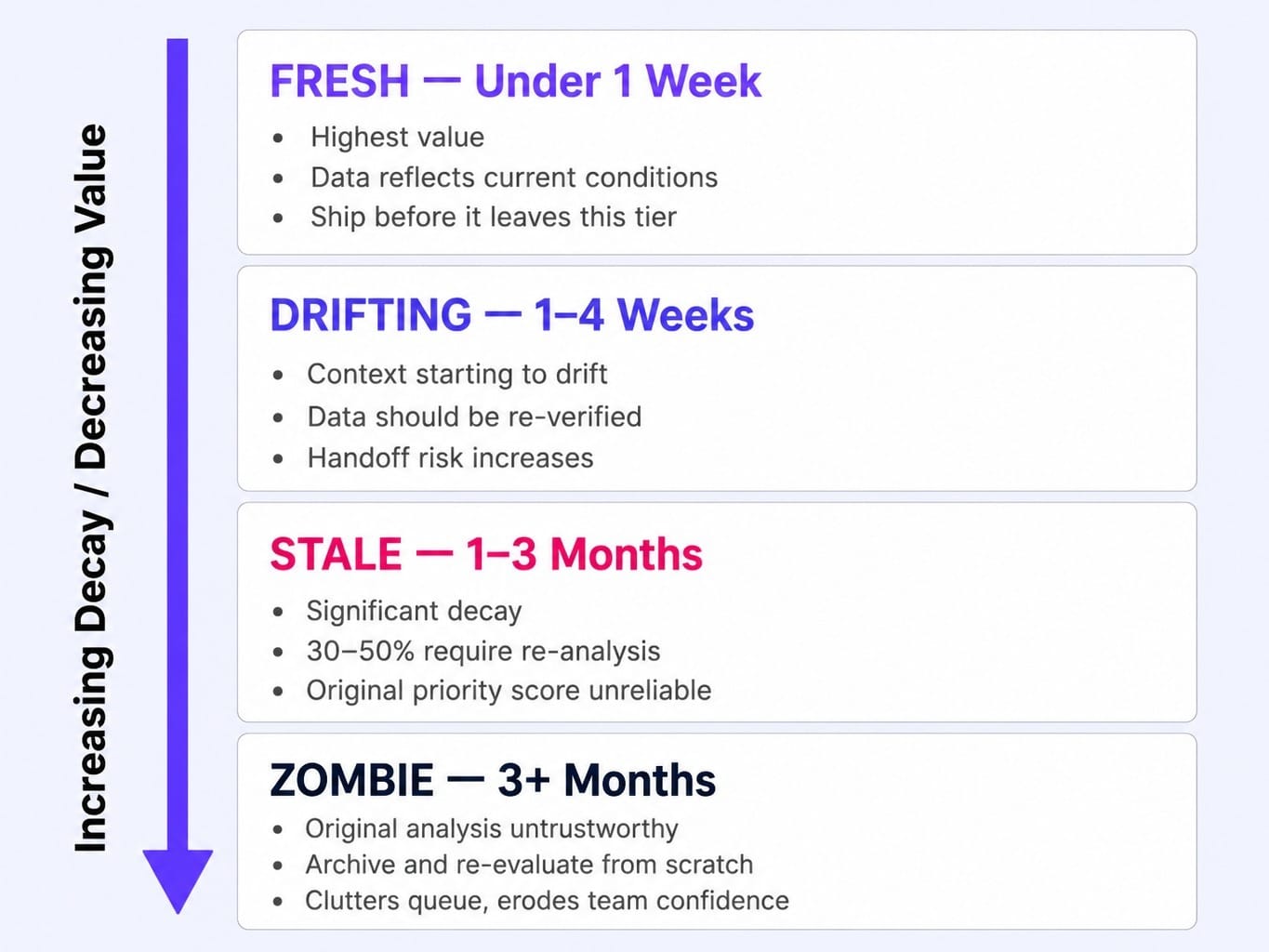
The Four Aging Tiers and What They Tell You
Categorize every item in your marketing backlog into one of these four tiers:
- Tier 1: Fresh (Under 1 Week Old). These are your highest-value items. The insight is warm, the data reflects current conditions, and the context is fresh in the creator's mind. Your system's goal should be to ship these items before they ever leave this tier.
- Tier 2: Drifting (1–4 Weeks Old). Context is starting to drift. The data is likely still valid but should be re-verified before acting. The person who created the ticket may have already moved on to other priorities, requiring a handoff to get it moving again.
- Tier 3: Stale (1–3 Months Old). Significant decay has set in. Traffic patterns, competitive messaging, and seasonal factors have likely shifted. A backlog item's priority score at the time of creation is almost never its true priority at the time of execution. Estimate that 30-50% of items in this tier require re-analysis before they can be acted on, partially wasting the original work.
- Tier 4: Zombie (3+ Months Old). This is zombie territory. These items must be audited ruthlessly. The original analysis is no longer trustworthy. The honest move is to archive them and re-evaluate from scratch if the underlying problem still exists. Keeping them clutters the queue and erodes the team's confidence in the backlog itself.
Running the Analysis on Your Own Backlog
Here is a 4-step process you can execute in under an hour:
- Export your backlog from your project management tool (Asana, Jira, ClickUp, Monday.com, Notion, etc.) into a spreadsheet.
- Add two columns: 'Date Created' and 'Estimated Monthly Revenue Impact'. For impact, even a rough estimate is better than nothing. Consider a headline change that could lift a demo page's conversion rate. If that page generates $100,000 in monthly pipeline, a 0.5% lift is worth $500/month.
- Categorize every item into one of the four aging tiers based on its creation date.
- Calculate the opportunity cost. For an item in the 'Stale' tier (e.g., 10 weeks old) with a $500/month impact, the unrealized value is roughly $1,250 ($500 / 4 weeks 10 weeks). Sum this for every item.
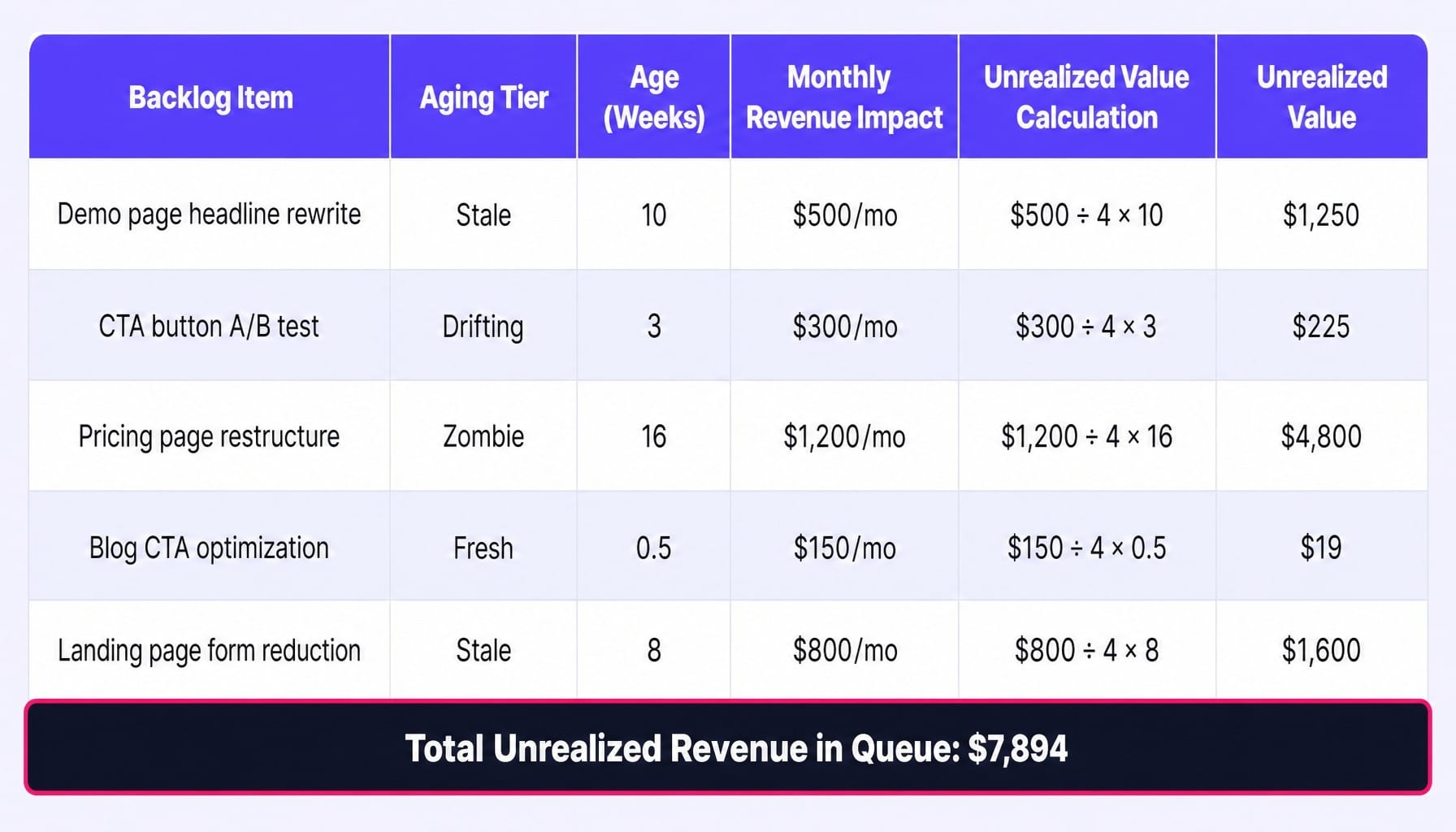
The final output is a single, powerful number: the total revenue currently sitting in your queue, aging. Present this to your leadership not as a project management issue, but as a direct revenue leakage problem.
Five Backlog Anti-Patterns That Guarantee Aging
If you recognize three or more of these patterns, your backlog is structurally designed to age, not ship.
- The Open Door Intake. Anyone can add items to the backlog without a standardized form. You know you have this problem when your standup includes the phrase, "Let me check who requested that." Items enter without enough context, requiring follow-up conversations that add days of delay before work can even be estimated.
- Priority Ties. Multiple items are marked 'P1' or 'High Priority'. This means nothing is actually prioritized. The team defaults to working on what feels easiest, what's most visible, or what was requested by the most senior person. A proper prioritization framework like RICE or ICE scoring forces a ranked list, not a bucket.
- The Approval Daisy Chain. Every change requires sign-off from multiple stakeholders in sequence, not in parallel. A designer, a copywriter, a legal reviewer, and a manager each take a day to review. In a parallel process, this is one day of calendar time. In a sequential chain, it's four.
- No WIP Limits. The team is actively "working on" 12 different things. As a result, nothing gets finished quickly. Adopting the Kanban method of strict Work-In-Progress (WIP) limits forces the team to finish what it starts, dramatically reducing the cycle time for every single item.
- No Retirement Policy. Items are never archived. The backlog grows monotonically until it's a 200-item list of 'zombie tickets' that erodes all confidence. A simple rule—any item untouched for 90 days is automatically reviewed for archival—keeps the backlog honest.
Building a Backlog That Ships: Structure, Fields, and Cadence
If you're rebuilding your backlog today, focus on these three structural decisions.
Intake: One Door, One Form, One Owner
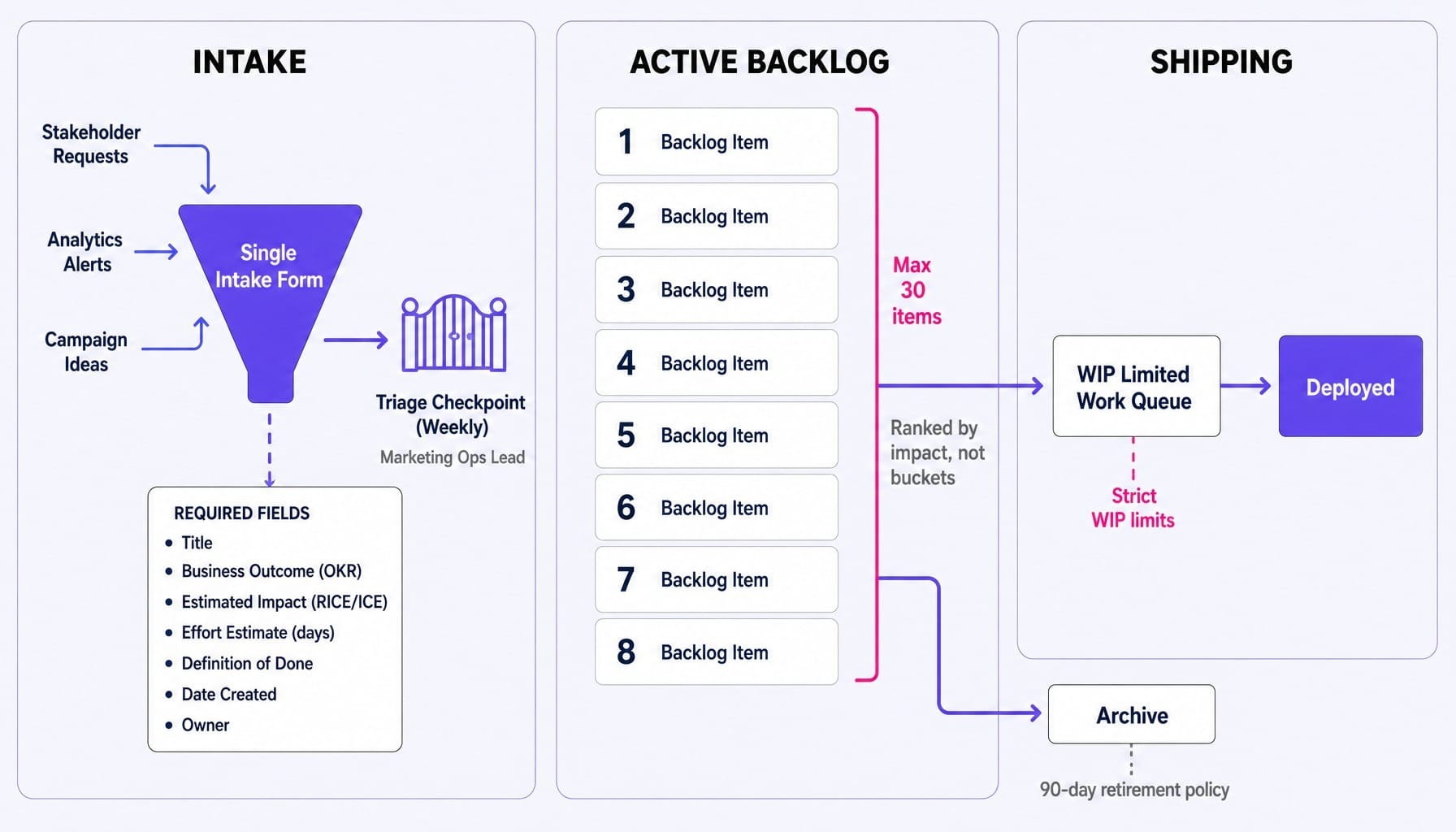
The single most critical decision is how work enters the queue. All requests must flow through a single, standardized intake form. This form, whether in Asana, Notion, or ClickUp, must capture the essential context upfront: what the request is, which business outcome it supports, who requested it, and a link to the supporting data. One person—typically a marketing ops lead or team lead—triages this intake queue weekly. No item enters the active backlog without passing this checkpoint.
Required Fields That Make Items Actionable
Every item in your backlog must contain these fields to be actionable without a follow-up meeting:
- Title: A clear, specific description of the task.
- Business Outcome: Which OKR or revenue metric does this move?
- Estimated Impact: A RICE/ICE score or a simple High/Medium/Low.
- Effort Estimate: In days (e.g., 0.5, 1, 3, 5+), not story points. Marketing teams rarely have the calibration for story points to be meaningful.
- Definition of Done: What does 'shipped' look like? A live URL? A report delivered?
- Date Created: Essential for aging analysis.
- Owner: The single person responsible for shepherding this item to completion.
Items missing these fields should be returned to the requester, not accepted into the backlog.
Grooming Cadence: Weekly, Not Quarterly
Backlog grooming must be a weekly, 30-minute habit. The goal is not sprint planning; it's to maintain the integrity of the queue. In this session, the team reviews the top 10-15 items, re-evaluates priorities based on new data, and ruthlessly archives anything older than 90 days with no activity. If your grooming session consistently surfaces items nobody remembers creating, your backlog is too large. A rule of thumb: if your active marketing backlog has more than 30 items, you don't have a backlog—you have a wish list.
Read more: Agile Digital Marketing: What a Weekly Channel Sprint Actually Contains
What If the Backlog Shipped Itself?
The structural fixes—intake forms, required fields, weekly grooming—are necessary. They reduce the Approval Cycle Tax. But they don't eliminate it. The fundamental constraint remains: human handoffs and sequential approval chains. Even a perfect backlog suffers from the gap between knowing what to change and the change being live.
This is where the system itself needs to change. Spike AI is designed not to manage your backlog, but to make it obsolete by collapsing the approval lifecycle.
It operates on a simple loop. First, it identifies the highest-impact change across your website, SEO, or ads—just as a CRO tool flags an underperforming headline. But then, it executes the change directly. The 10-step, 26-day lifecycle becomes a two-step process: identify, then ship. There is no ticket to file, no sprint queue to wait in, no staging environment to review. The distance between insight and deployment approaches zero.
Where teams typically see a 26-day cycle for a minor change, Spike AI delivers a weekly release cadence. The backlog stops aging because insights stop waiting.
See how Spike AI turns your backlog into a weekly shipping cadence →
Conclusion
Your marketing backlog is not a planning artifact. It is a revenue queue. Every week an item sits unshipped is a week of unrealized impact.
The Approval Cycle Tax shows that most teams spend 95% of their time getting permission to ship and only 5% of their time actually shipping. The Backlog Aging Analysis gives you a tool to measure what this latency costs in real dollars. Structural fixes can reduce the tax, but the teams that win in the long run are those that find a way to collapse the distance between knowing and doing.
Export your backlog today. Run the analysis. Confront the number. That number isn't a measure of your team's motivation; it's a measure of your system's friction. And it's your starting point.
Frequently Asked Questions
How does a marketing backlog differ from a product backlog in practice?
A product backlog feeds into engineering sprints with defined deployment pipelines and CI/CD automation. A marketing backlog rarely has an equivalent deployment mechanism. Changes depend on cross-functional handoffs to web teams, agencies, or designers, which is why marketing backlogs age faster. The fix is to give marketing teams direct deployment capabilities for their own channels.
Should marketing teams use story points for backlog estimation?
For most marketing teams, no. They lack the stable sprint history needed for story points to be meaningful. Estimating in calendar days (e.g., 0.5 days, 1 day, 3 days) is more intuitive and accurate for teams without mature agile practices. Use day-based estimates to enforce a sizing rule: if an item is over 3 days, break it down before it enters the active backlog.
Can a marketing backlog work for teams that are not fully agile?
Yes. The backlog is a prioritization and shipping tool, not an agile ceremony. You don't need sprints or a scrum master. You need a single prioritized queue, a weekly grooming habit, and a clear intake process. A backlog forces prioritization decisions that are otherwise made implicitly or politically, which benefits any team, regardless of methodology.
How do you handle urgent stakeholder requests that bypass the backlog?
Create an explicit "expedite lane" with a strict WIP limit of one item. Any expedited request must displace something currently in progress, and the owner of the displaced item must be notified. This makes the cost of bypassing the backlog visible to leadership. When every expedite is shown to delay another revenue-impacting item, the frequency of "urgent" requests naturally declines.
How do you align a marketing backlog with quarterly OKRs?
Tag every backlog item with the specific OKR it supports. During weekly grooming, filter the backlog by OKR to see if the work being prioritized actually aligns with your committed outcomes. If your top 10 items don't map to your top 3 OKRs, your backlog has drifted from your strategy. Re-prioritize the work or renegotiate the OKRs.
How should a marketing backlog handle always-on campaigns versus one-off projects?
Separate them using swim lanes or distinct views within the same backlog; do not create two separate backlogs. Always-on work (like weekly blog publishing) should have recurring items that don't compete for prioritization with strategic projects. The key is to set a capacity allocation rule (e.g., 60% strategic, 40% always-on) to ensure that routine tasks don't consume all available bandwidth.