SaaS Marketing Automation in 2026: The Revenue-Event Framework That Works

TLDR
- Stop building automation around marketing funnel stages (MQLs, SQLs). The highest-performing SaaS teams build automation around revenue events—product interactions that predict conversion, expansion, or churn.
- Prioritize automating expansion and retention signals before acquisition. Workflows triggered by plan limit warnings or usage drops have a higher and faster ROI than most lead nurturing sequences.
- Evaluate marketing automation platforms based on their ability to ingest product-usage data natively, not on their feature lists. If a platform can't handle behavioral triggers, it's the wrong choice for a modern SaaS company.
- Audit your workflows quarterly to combat "automation debt." Outdated sequences, conflicting logic, and incorrect suppression lists silently degrade performance over time.
- The most common failure isn't the tool or the email copy; it's an architecture that scores email opens over product activation. A user who activates a core feature is 10x more valuable than one who just opens your emails.
SaaS marketing automation is the use of software platforms to automate customer acquisition, onboarding, and retention tasks—lifecycle emails, lead scoring, in-app messaging, behavioral triggers—based on user behavior and product usage data. But most SaaS teams automate the wrong things.
Consider a typical B2B SaaS team. They have 14 active drip sequences in ActiveCampaign, a lead scoring model in HubSpot, and a polished welcome series. Yet their trial-to-paid conversion rate hasn't moved in three quarters. The problem isn't the platform or the copy. It's that every automation fires based on a contact's marketing funnel position (MQL, SQL, Opportunity) rather than the revenue events that actually predict conversion: feature activation, usage thresholds, and expansion signals.
This guide is different. We'll cover what SaaS marketing automation is, why most implementations underperform at the product-data layer, and provide a revenue-event framework to rebuild around. We'll also cover platform selection criteria that matter and the five workflows that actually drive growth.
What Is SaaS Marketing Automation?
SaaS marketing automation refers to cloud-based platforms that streamline and scale customer acquisition, onboarding, and retention by automating repetitive lifecycle tasks based on user behavior and product usage data. These tasks typically include:
- Lifecycle emails: Onboarding drips, trial expiration reminders, and re-engagement campaigns.
- Lead scoring: Assigning a numerical value to contacts to represent their conversion probability based on engagement and, more importantly, product usage.
- In-app messaging: Contextual prompts, guides, and feature announcements triggered by specific user actions within the product.
- Behavioral triggers: Using webhook-fired enrollment or API calls to start or stop sequences based on events happening inside your product.
- Cross-channel orchestration: Coordinating a unified customer journey across email, SMS, push notifications, and in-app messages.
This is fundamentally different from ecommerce or B2C automation. For a SaaS business, the 'product' is the primary data source. Usage patterns, feature adoption rates, and account health signals matter infinitely more than page views or email opens. This distinction is where most implementations go wrong, creating a system that's busy but not effective.
Why Most SaaS Marketing Automation Fails at the Product-Data Layer
Most SaaS marketing automation underperforms not because of bad tools or weak copy, but because the automation logic is built around marketing funnel stages—MQL, SQL, opportunity—instead of the product events that actually predict revenue.
Imagine this common scenario: a 30-person B2B SaaS company uses HubSpot. Their lead scoring model awards points for email opens, page visits, and form fills. A trial user who opens six emails, visits the pricing page twice, and downloads a whitepaper scores a 95. A second trial user activates the core feature, invites three teammates, and sets up an integration—but never opens a single marketing email. They score a 20.
The second user is 10 times more likely to convert, yet the automation treats them as a lower priority. This happens because of three core architectural failures:
- Scoring on engagement signals instead of activation signals. Email opens and page views are proxy metrics. Their predictive value decays rapidly as a user moves from prospect to active trialist. Product activation is a direct signal of intent and value realization. Most automation systems are blind to it.
- Triggering sequences on lifecycle stage transitions instead of usage thresholds. Moving a contact from 'Trial' to 'Active' based on a calendar date is arbitrary. The sequence should fire when the user hits a key activation milestone, regardless of whether it's day 2 or day 12 of their trial.
- Building suppression lists and re-enrollment guardrails around contact properties instead of account-level behavior. In B2B SaaS, you sell to buying committees, not individuals. Your automation logic must understand this. If one user from an account is in a sales sequence, another user from the same account shouldn't be getting a "start your trial" email. This requires object-level triggers that most generic marketing automation platforms struggle with.
The problem isn't the content inside the emails; it's the signal-to-sequence mapping. Most teams map signals that are easy to track (email clicks) rather than signals that are predictive (product usage). As a result, companies using product-usage-based triggers see 2-3x higher trial-to-paid conversion rates than those relying on email engagement alone.
The Revenue-Event Automation Framework
Instead of building automation around where a contact sits in your funnel, build it around the revenue events that predict whether they will pay, expand, or churn. A "revenue event" is any product interaction, account behavior, or commercial signal that has a statistically validated correlation with revenue outcomes.
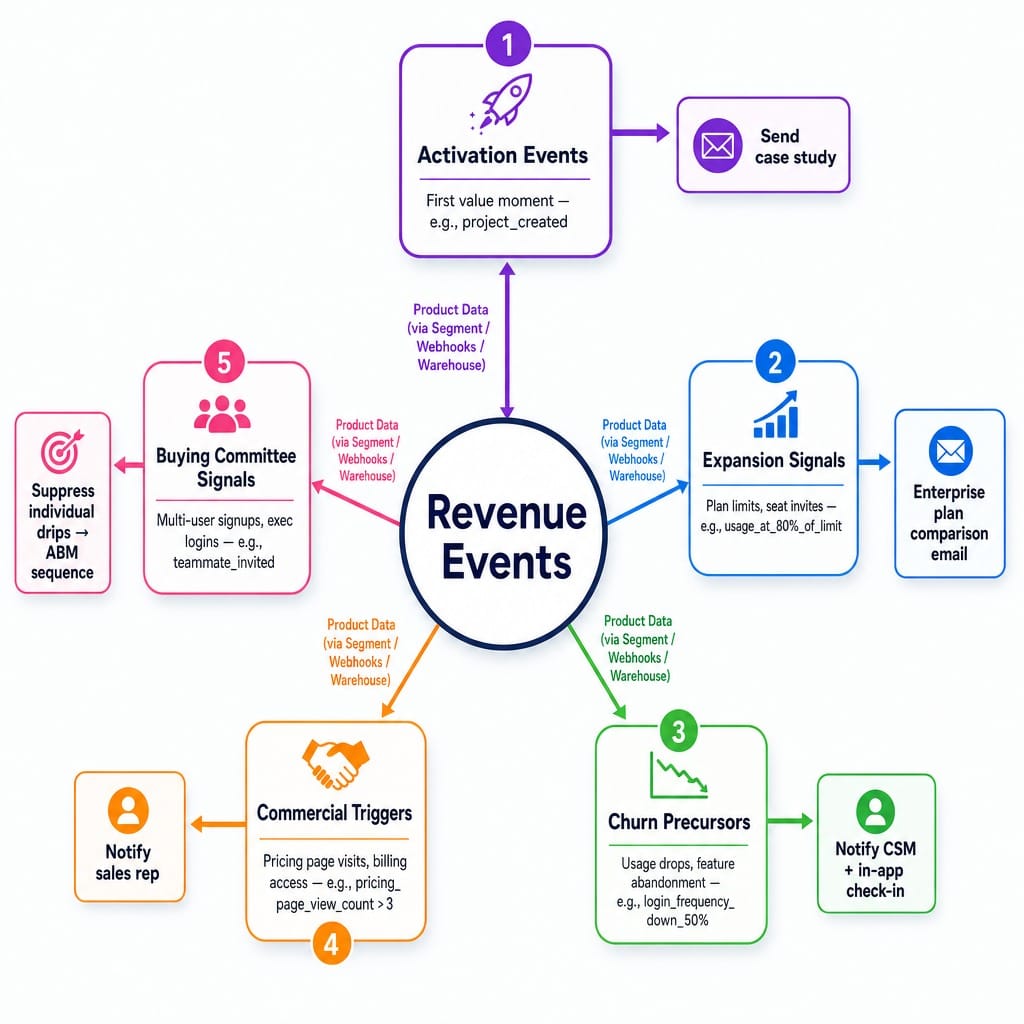
These events fall into five main categories:
- Activation events: The "first value moment." The user creates their first project, sends their first campaign, or completes the core workflow. (Trigger: project_created → Action: Send case study from a similar company).
- Expansion signals: The user invites seats, approaches plan limits, or shows a spike in API call volume. (Trigger: usage_at_80%_of_limit → Action: Trigger enterprise plan comparison email).
- Churn precursors: Login frequency drops, a key feature is abandoned, or support ticket volume spikes. (Trigger: login_frequency_down_50% → Action: Notify CSM and trigger in-app check-in).
- Commercial triggers: A user on a trial visits the pricing page multiple times, accesses the billing portal, or a contract renewal window opens. (Trigger: pricing_page_view_count > 3 → Action: Notify sales rep).
- Buying committee signals: Multiple users sign up from the same domain, an executive-level title logs in, or a shared workspace is created. (Trigger: teammate_invited → Action: Suppress individual-focused drips, enroll account in ABM sequence).
Most modern marketing automation platforms can handle this logic, provided the product data is piped in correctly via tools like Segment, warehouse-native integrations, or simple webhook-fired enrollments.
Mapping Revenue Events to Automation Sequences
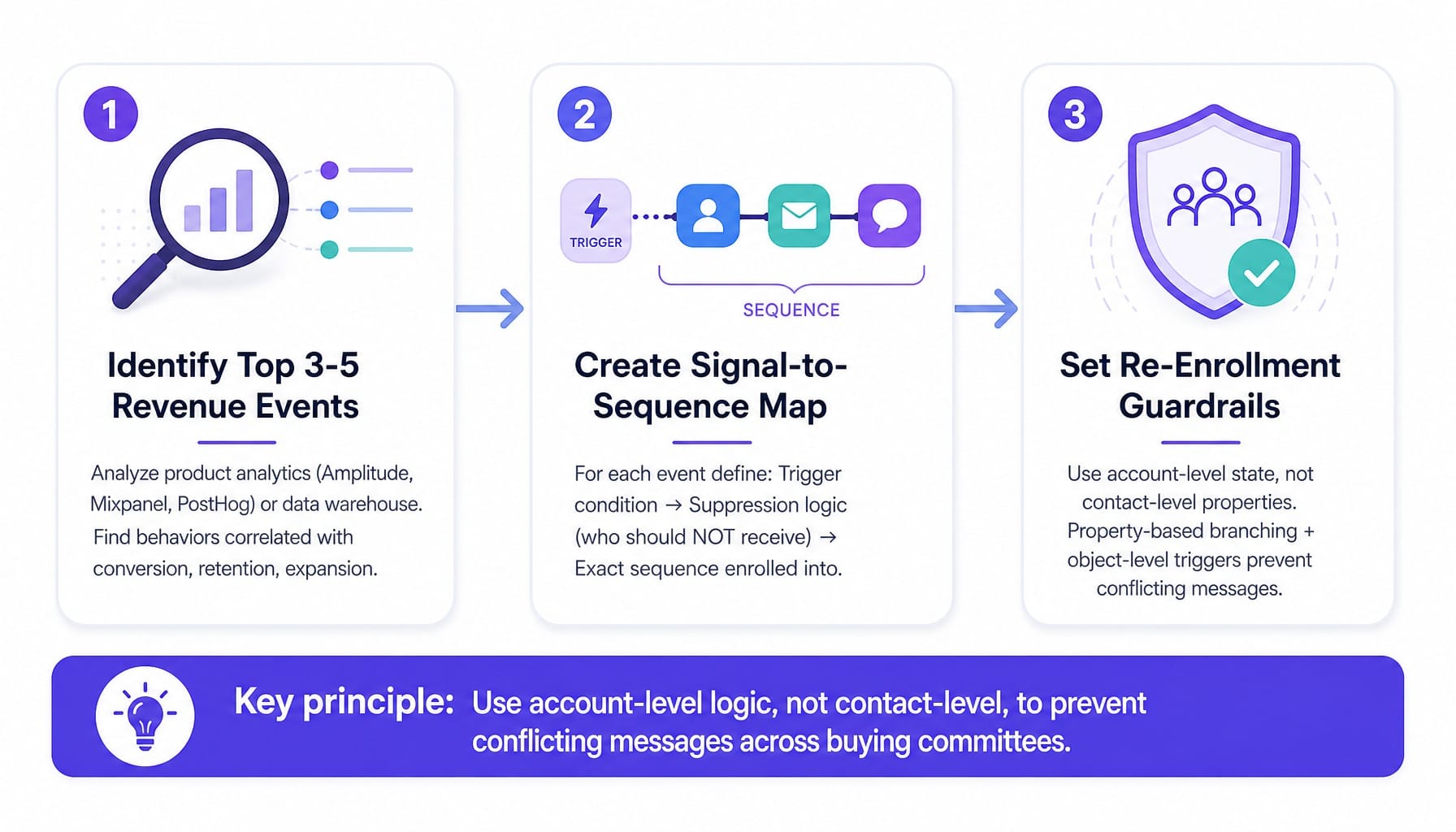
The practical mapping process is straightforward.
- Identify your top 3-5 revenue events. Analyze your product analytics (Amplitude, Mixpanel, PostHog) or data warehouse to find which user behaviors have the strongest correlation with conversion, retention, and expansion. Don't guess.
- Create a signal-to-sequence map. For each revenue event, define the trigger condition, the suppression logic (who should not receive this), and the exact sequence it enrolls the user or account into.
- Set re-enrollment guardrails. This is critical. Use account-level state, not contact-level properties, to prevent multiple contacts at the same company from receiving conflicting messages. This requires property-based branching and, ideally, object-level triggers that your platform can understand.
Why Expansion Signals Should Be Automated Before Acquisition Signals
Here's a slightly contrarian take: most SaaS teams build their automation architecture backwards. They focus on acquisition first—lead nurturing, MQL handoffs—and treat expansion as a manual, customer-success-driven process.
This is a mistake. Expansion revenue has a lower customer acquisition cost (CAC), higher close rates, and shorter sales cycles. Yet it's often the last thing teams automate. I've seen SaaS companies spend $15,000 in CAC to land a new logo while leaving $200,000 in potential expansion revenue on the table because nobody automated a sequence for the "approaching plan limit" trigger. Build your expansion revenue workflows and customer health scoring models first. They will generate cash faster, which you can then reinvest into top-of-funnel acquisition.
Read more: Pipeline Marketing in 2026: Strategy, Metrics, and Why Most Teams Regress to Lead Gen
How to Choose a SaaS Marketing Automation Platform
The right SaaS marketing automation platform depends on three variables: your growth motion (PLG, sales-assisted, or sales-led), your data architecture, and your team's technical capacity. Most comparison articles evaluate platforms on features and pricing, but for SaaS, the most important question is whether the platform can ingest and act on product data natively. This is the single biggest differentiator.
Use this conditional framework to evaluate your options:
- Native product-data integration: Critical if you have a PLG or product-led motion. Less important if you are purely outbound sales-led. Platforms like Customer.io and Braze are built for this; others may require middleware.
- Behavioral trigger granularity: Critical if you need object-level triggers and webhook-fired enrollment to manage complex B2B logic. Less important if your automation is primarily time-based drips.
- Multi-channel orchestration: Critical if your customer journey involves email, in-app messages, and SMS. Deprioritize if you are email-only for now.
- Warehouse-native connectivity: Critical if your single source of truth is a data warehouse like Snowflake or BigQuery. Less important if you use a CDP like Segment to route data.
Platform Recommendations by Growth Motion
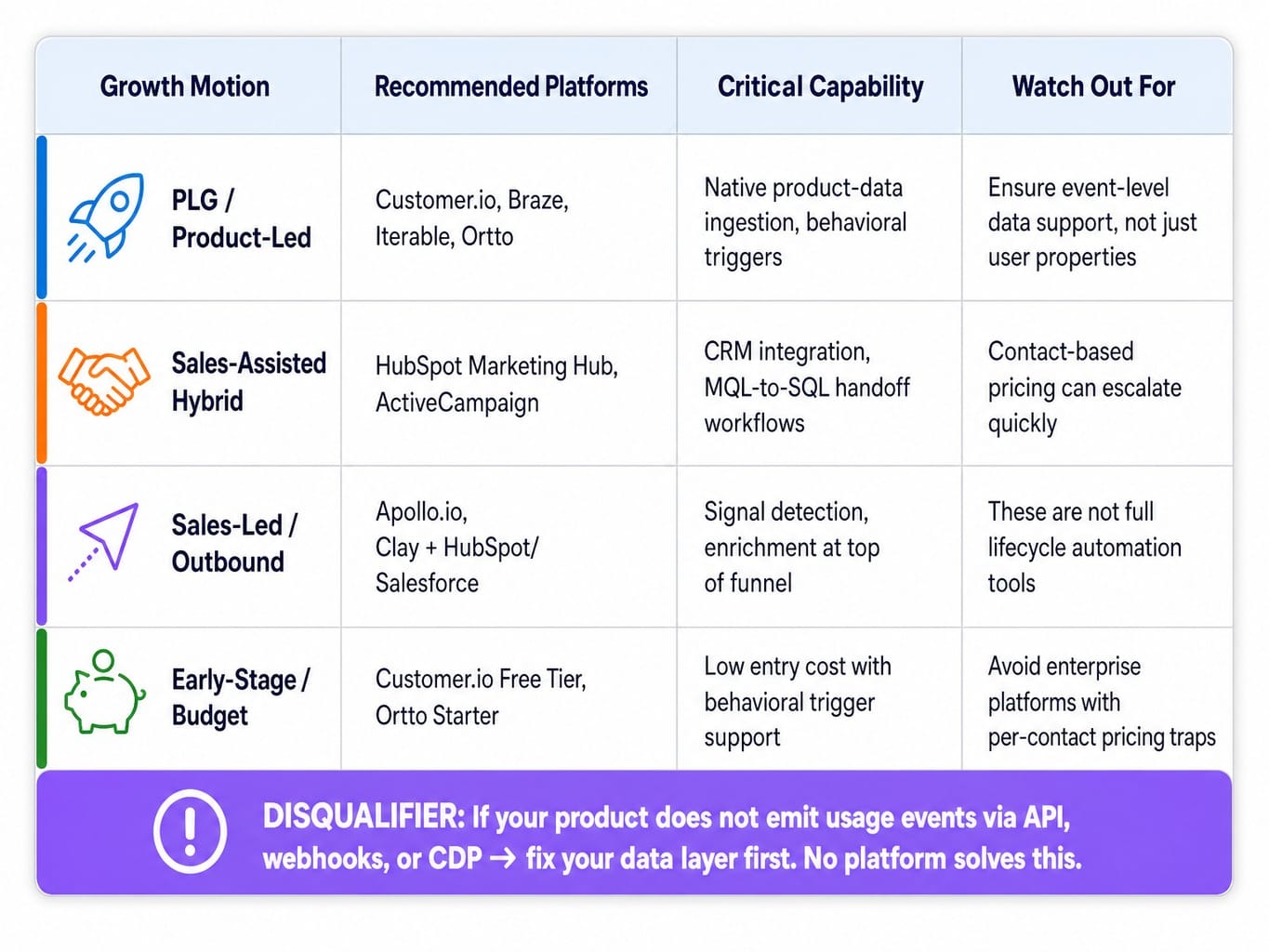
- PLG / Product-Led: Customer.io (for behavior-triggered lifecycle campaigns), Braze or Iterable (for multi-channel orchestration at scale), and Ortto (for its visual journey builder that understands product data).
- Sales-Assisted Hybrid: HubSpot Marketing Hub (for its tight CRM integration and MQL-to-SQL handoff workflows) and ActiveCampaign (for its affordable and powerful branching logic for mid-market teams).
- Sales-Led / Outbound-Heavy: Apollo.io and Clay are better for signal detection and enrichment at the top of the funnel. The sequences can then be managed in a CRM-integrated tool like HubSpot or Salesforce.
- Early-Stage / Budget-Constrained: Start with the Customer.io free tier or an Ortto starter plan. Avoid enterprise platforms that look cheap but charge heavily per contact, as your costs will explode.
And here is the disqualifying case most articles won't mention: if your product does not emit usage events via API, webhooks, or a CDP, no marketing automation platform will solve your conversion problem. Fix your data layer first.
Pricing Realities Most Comparison Articles Ignore
SaaS marketing automation pricing is deceptive. Most platforms advertise a low starting price that balloons as your contact list grows. A 50,000-contact database on HubSpot Marketing Hub Professional can cost over $800/month. The same list on Customer.io might be closer to $150/month.
But that's not the full story. HubSpot includes a CRM; Customer.io does not. The true cost comparison must factor in middleware (Segment, Zapier), your CRM, and the engineering time needed to build and maintain the integrations. As a rule of thumb, budget 2-3x the platform's listed price for the total cost of ownership in year one.
5 SaaS Marketing Automation Workflows That Drive Revenue
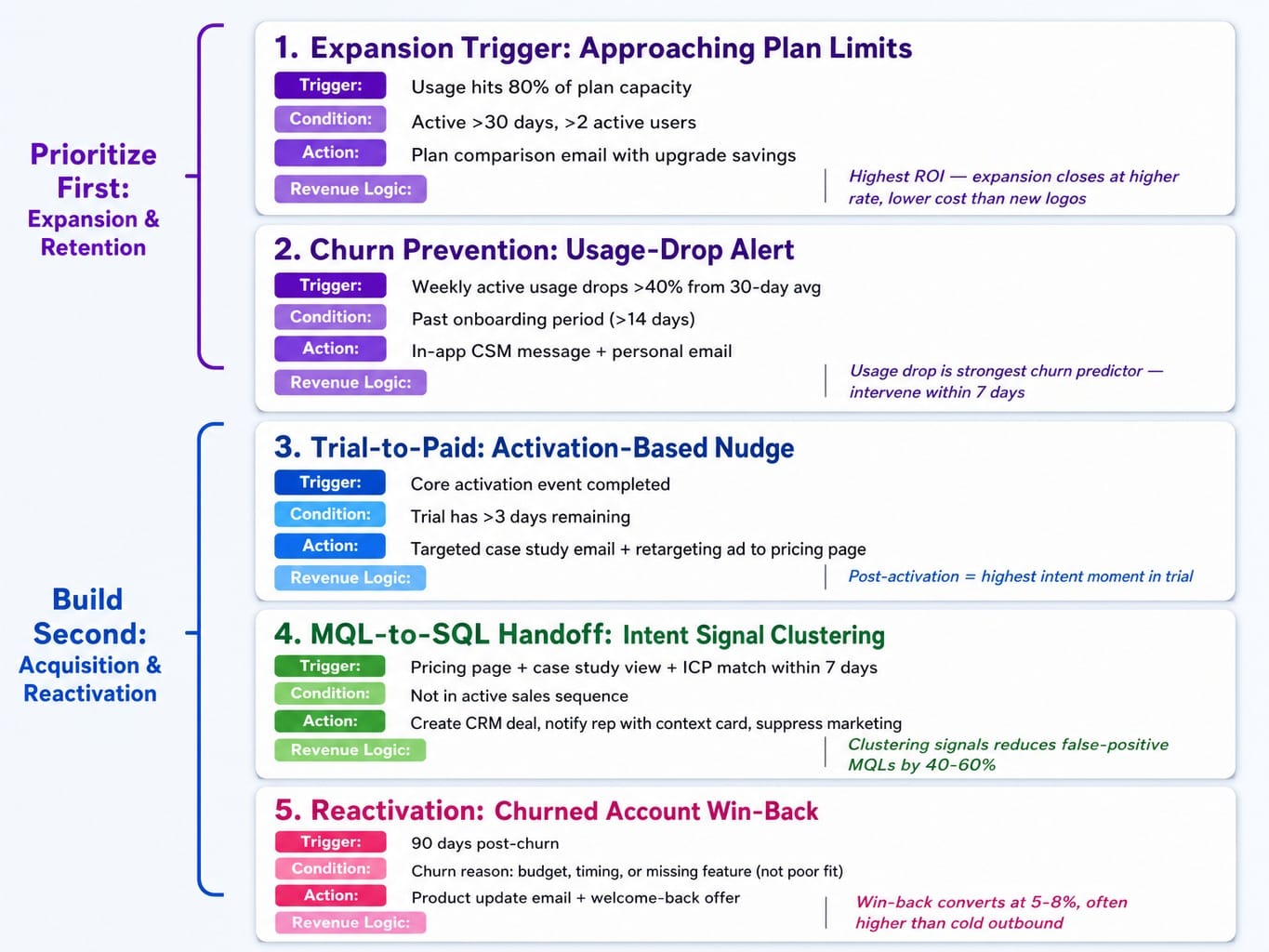
These five workflows are ordered by their direct impact on revenue, not their position in the marketing funnel. The first two target expansion and retention, as they compound faster and more cheaply than acquisition.
1. Expansion Trigger: Approaching Plan Limits
- Trigger: User or account usage hits 80% of their current plan's capacity (e.g., seats, contacts, API calls).
- Condition: The account has been active for more than 30 days and has more than two active users.
- Action: Send a proactive email comparing their current plan to the next tier, highlighting the features they would unlock and the projected cost savings from upgrading now vs. paying overage fees.
- Why it works: Expansion revenue closes at a much higher rate and lower cost than new logos. This is the lowest-hanging fruit in SaaS.
2. Churn Prevention: Usage-Drop Alert
- Trigger: An account's weekly active usage drops by more than 40% from its 30-day average.
- Condition: The account is past the initial onboarding period (e.g., >14 days old).
- Action: Immediately trigger an in-app message from a CSM and a personal email from the account owner with a simple, helpful "We noticed you've been less active, is there anything we can help with?" framing.
- Why it works: A sudden drop in usage is the single strongest predictor of churn. Early intervention within 7 days of the drop has the highest save rate.
3. Trial-to-Paid Conversion: Activation-Based Nudge
- Trigger: A trial user completes their core activation event (e.g., creates their first dashboard, sends their first campaign).
- Condition: The trial has more than 3 days remaining.
- Action: Immediately send a targeted case study email showing the outcomes achieved by a similar company, followed by a retargeting ad driving to the pricing page.
- Why it works: The moment right after activation is the point of highest intent in the entire trial. Most teams waste it with generic "your trial is expiring soon" emails.
4. MQL-to-SQL Handoff: Intent Signal Clustering
- Trigger: A contact visits the pricing page, views a specific case study, and matches ICP firmographic criteria within a 7-day window.
- Condition: The contact is not already in an active sales sequence.
- Action: Automatically create a deal in the CRM, notify the assigned sales rep with a context card summarizing the signals, and suppress all general marketing sequences.
- Why it works: Clustering multiple high-intent signals reduces false-positive MQLs by 40-60% compared to models based on a single score threshold.
5. Reactivation: Churned Account Win-Back
- Trigger: 90 days have passed since an account churned.
- Condition: The account's churn reason was related to budget, timing, or a missing feature (not a poor product fit).
- Action: Send a personalized product update email highlighting 2-3 major features released since they left, along with a special "welcome back" offer.
- Why it works: Win-back sequences targeting customers who churned for timing-related reasons can convert at 5-8%, which is often higher than cold outbound prospecting.
Automation Debt: The Silent Performance Killer
Automation debt is the accumulation of outdated, redundant, or conflicting automation workflows that silently degrade campaign performance over time—the marketing equivalent of technical debt.
Think of a SaaS company that's been using their marketing automation platform for three years. They have 47 active workflows. Twelve were built by someone who left the company. Three different workflows enroll the same contacts into conflicting sequences. Two reference lifecycle stages that no longer match the current sales process. Nobody audits them because they "still work," but engagement decay scoring shows open rates dropping 2-3% each quarter. Nobody connects this decay to the crumbling automation architecture.
Automation debt manifests in three ways:
- Branching logic decay: Conditional branches in your workflows reference outdated properties or segments that are no longer maintained.
- Contact lifecycle stage drift: Contacts get stuck in stages that no longer reflect their actual relationship with your product or sales team.
- Suppression list bloat: Overly aggressive or outdated suppression lists prevent high-intent contacts from receiving relevant messages.
Quarterly automation audits are not optional; they are as crucial to marketing health as code reviews are to engineering.
When the Problem Isn't Your Automation Platform — It's Your Execution Bandwidth
You now understand the problem. SaaS marketing automation fails when it's built around the wrong signals, evaluated with the wrong criteria, and allowed to accumulate debt. You know what to fix. But mapping revenue events, rebuilding workflows, and auditing 47 legacy sequences requires sustained execution capacity—a resource most lean marketing teams simply don't have.
This is the execution gap that Spike AI is built to close.
Spike AI isn't another automation platform. It's the execution layer that runs on top of your existing stack. Every week, it identifies the single highest-impact optimization across your website, SEO, and conversion funnel—and ships it. We operate on the same revenue-event logic this guide describes, prioritizing changes based on their projected impact on qualified leads and pipeline velocity, not vanity metrics.
You know what needs to be fixed. Spike AI is how it actually gets done—every week, without you needing to hire more people or write another line of code.
Conclusion
The most important shift in thinking is this: SaaS marketing automation is an architecture problem, not a tool-selection problem. The teams that win don't necessarily have better platforms; they automate around revenue events instead of funnel stages, evaluate tools on product-data integration instead of feature lists, and treat automation maintenance as seriously as code maintenance.
The next time you build a workflow, ask one question: is the trigger a marketing event or a revenue event? If it's a marketing event, you're optimizing for activity. If it's a revenue event, you're optimizing for growth.
Frequently Asked Questions
What is the difference between marketing automation and CRM workflows for SaaS?
Marketing automation platforms (Customer.io, Braze) manage multi-channel messaging triggered by behavioral and product-usage data. CRM workflows (HubSpot, Salesforce) manage deal stages, sales tasks, and internal notifications. The key overlap is the MQL-to-SQL handoff, which requires both systems to be tightly integrated via native connection or middleware.
How do you connect in-app behavior to email automation in a SaaS stack?
You pipe product events from your app to your marketing automation platform using a CDP like Segment, a reverse ETL tool like Census, or direct webhook-fired enrollments from your backend. The key is to send event-level data (e.g., feature_activated), not just user properties. Without event data, your automation can only react to email engagement, which is a weak proxy for intent.
How do you build a lead scoring model for a product-led SaaS company?
Replace traditional engagement scoring (email opens) with activation scoring. Assign points based on product usage milestones: core feature activation, teammate invitations, integration setup. Weight these scores by their actual correlation with historical conversion data, not intuition. Use engagement decay scoring to ensure inactive trial users don't remain falsely high-scored.
Can you use AI to personalize SaaS marketing automation sequences in 2026?
Yes, but the highest-impact AI applications are predictive lead scoring, send-time optimization, and anomaly detection in churn signals. These systems identify which trial users will convert based on usage patterns and flag accounts at risk. Generative AI for email copy is useful, but the underlying sequence architecture still matters more than the words inside it.
What metrics should you track to measure SaaS marketing automation ROI?
Track pipeline velocity by source (how fast automated leads move through stages), trial-to-paid conversion rate segmented by workflow, and expansion revenue attributed to automated triggers. Avoid vanity metrics like open rates or total MQLs. Measure the revenue contribution per workflow, not the activity volume.
When should a SaaS company NOT invest in marketing automation?
If you have fewer than 500 monthly leads, your time is better spent on acquisition. If your product doesn't emit usage events via an API or webhooks, no platform can build meaningful behavioral triggers. And if you haven't validated your ICP and messaging through manual outreach, automating unvalidated sequences will only scale the wrong message faster.