SaaS Onboarding Emails That Actually Drive Activation — Not Just Opens
TLDR
- Most SaaS onboarding emails fail because they are built on fixed time delays (drips) instead of user actions (triggers). This article shows you how to build a behavior-triggered sequence.
- The highest-leverage emails are the ones that respond to what a user hasn't done, like a setup nudge for a user who hasn't logged in, or an intervention for a user stalled at a key step.
- Measure success with activation metrics like email-to-activation rate and cohort decay curves, not vanity metrics like open rates. A 45% open rate means nothing if users don't activate.
- Coordinate emails with in-app messages to avoid overwhelming users. Use email to bring inactive users back to the product, and in-app messages to guide users who are already active.
- Copying another company's email template is less important than understanding the transferable principle that makes it work. We break down 4 examples to show you the principles, not just the pixels.
A marketing team at a B2B SaaS company launches a 7-email onboarding drip campaign. The open rates look healthy, hovering around 40%. Click rates are decent. But trial-to-paid conversion stays flat at 3%.
So they rewrite the subject lines. They redesign the templates. They add an eighth email. Nothing moves the needle.
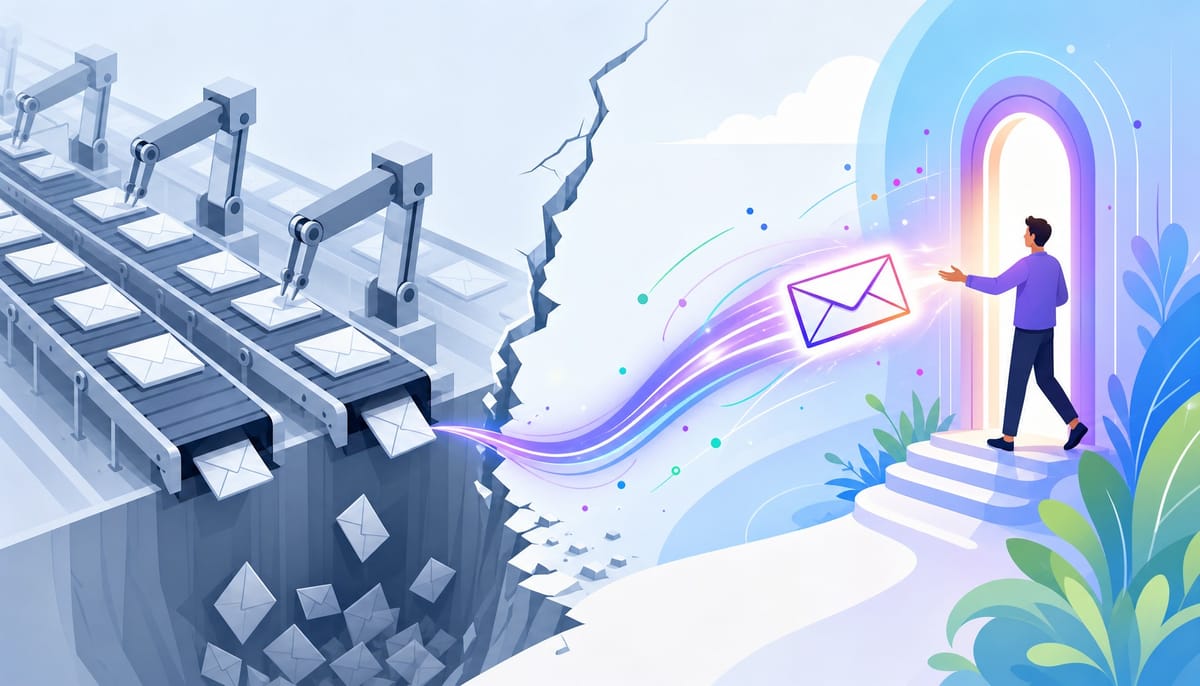
The problem was never the copy or the design. It was the architecture. Every user received the same sequence on the same schedule, regardless of whether they completed setup in ten minutes or never logged in after signing up.
This is the central failure of most SaaS onboarding programs. The emails that drive activation are not the ones sent on a fixed calendar; they are the ones sent in response to what users actually do—or fail to do—inside the product.
This guide provides the framework to build that adaptive sequence. We'll cover the difference between drips and triggers, a 6-email sequence with copy-paste templates, real-world examples with the principles that make them work, and the metrics that separate vanity engagement from real activation.
Drip Campaign vs. Triggered Sequence: Why the Distinction Changes Everything
A SaaS drip campaign sends emails on a fixed schedule after signup. A triggered onboarding sequence sends emails based on specific user actions—or inactions—inside the product. This distinction is the difference between broadcasting and communicating.
Let's ground this with a concrete example.
- User A signs up, completes setup, and creates their first project within two hours.
- User B signs up and never logs in again.
In a standard drip campaign, both users receive the same "Complete your setup!" email on Day 2. For User A, this email is irrelevant and slightly insulting; they already did it. For User B, it's a passive nudge that will likely be ignored.
In a triggered sequence, the system responds to behavior:
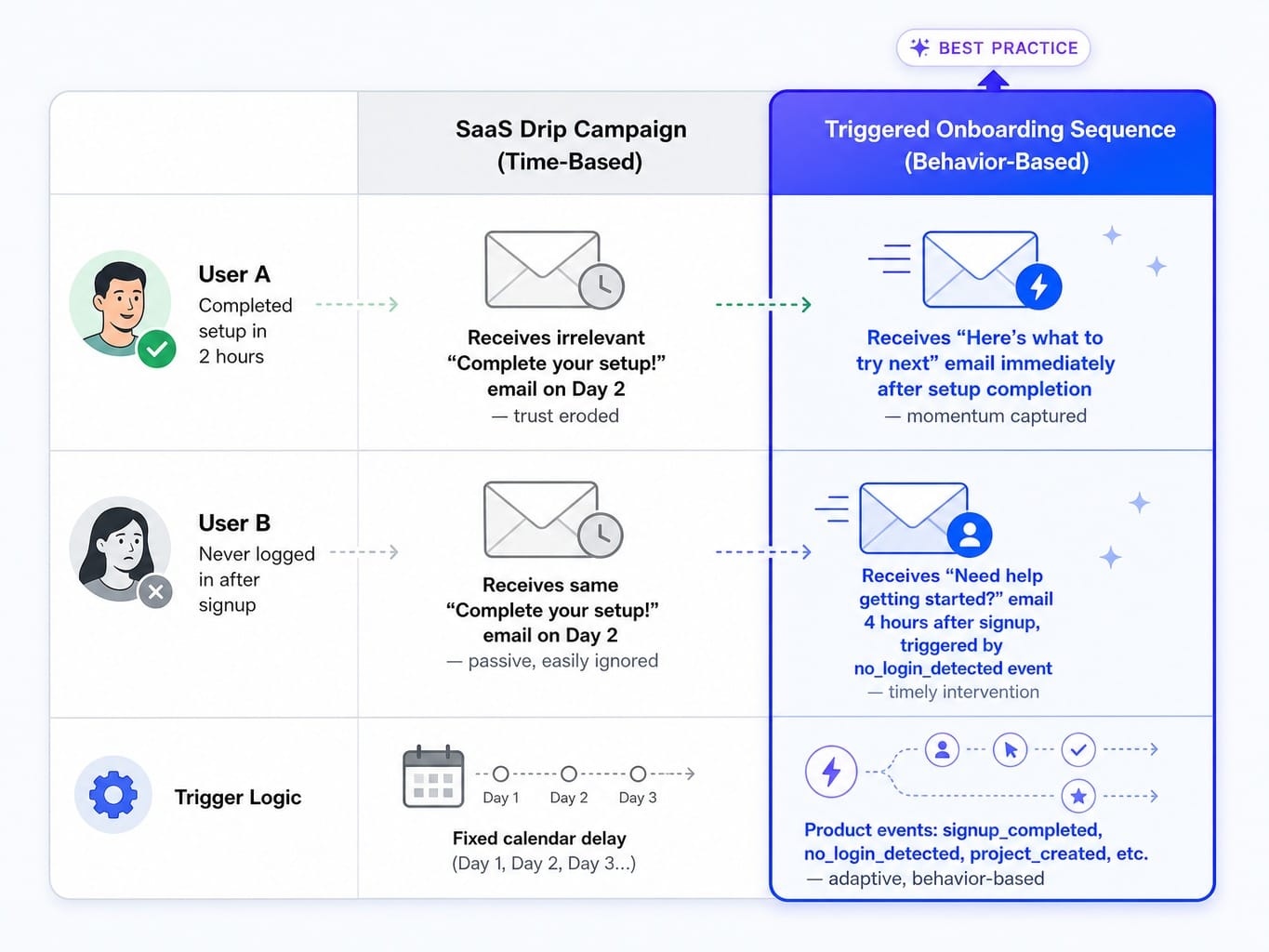
- User A receives a "Here's what to try next" email the moment they complete setup, capitalizing on their peak engagement to guide them toward the next value layer.
- User B receives a "Need help getting started?" email four hours after signup, triggered by the no_login_detected event.
This isn't theoretical. Event-based platforms like Customer.io and Iterable are built for this branching logic. You pipe in product events from tools like Segment or PostHog, and those events become the triggers for your entire sequence.
The decision rule is straightforward: if your product has fewer than 50 signups a month, a well-timed drip might be sufficient. But as you scale, the activation gap between a generic drip and a responsive, triggered sequence compounds quickly.
A 6-Email Adaptive Onboarding Sequence (With Copy-Paste Templates)
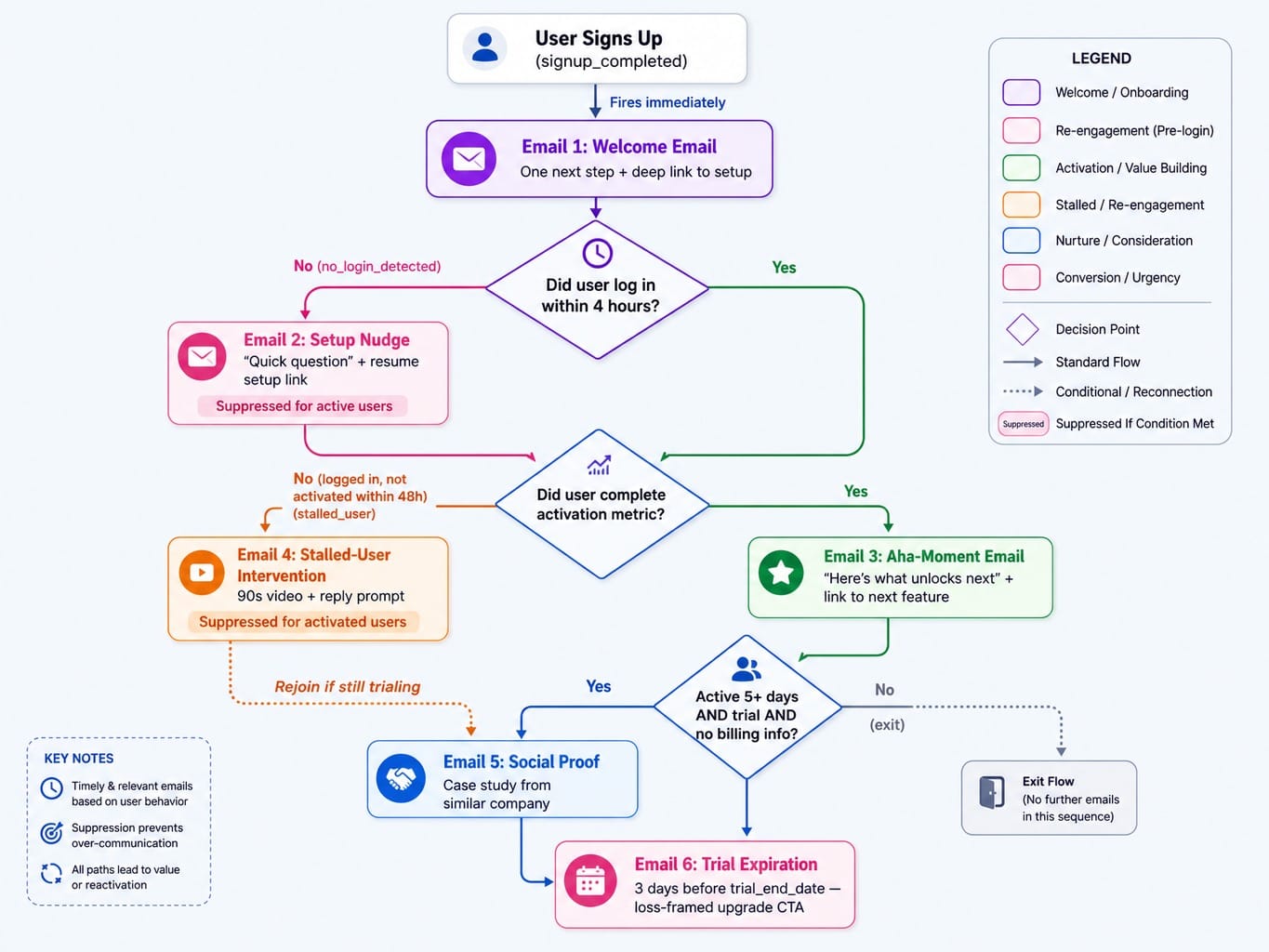
This sequence is not organized by day—it is organized by what the user has or has not done. Each email fires on a behavioral trigger, not a calendar date. Users who activate fast will skip re-engagement emails entirely, while stalled users get interventions that active users never see.
The templates below use liquid-style variables (like {{first_name}}) and are written in a plain-text, human style. For B2B SaaS activation, emails that feel like a personal check-in from a founder or product lead consistently outperform heavily designed marketing templates.
Welcome Email + Setup Nudge
Email 1: The Welcome Email
- Trigger: signup_completed. Fires immediately.
- Subject: You're in, {{first_name}} — here's your one next step
- Body:
Hey {{first_name}},
Thanks for signing up for {{product_name}}.
The single most important thing to do right now is to [describe the first critical setup step, e.g., 'install our tracking script']. It takes about two minutes.
Here's the direct link to get that done: [deep link to the specific setup page]
Cheers,
[Founder Name]
- CTA: A single, deep link to the first setup step.
- Why it works: It reduces the time-to-value by giving the user one specific action, not a feature tour. The CTA links directly to the task, removing every unnecessary click between the email and the first moment of activation.
Email 2: The Setup Nudge
- Trigger: no_login_detected 4 hours after signup_completed.
- Subject: Quick question, {{first_name}}
- Body:
Hey {{first_name}},
Just saw you signed up for {{product_name}} a few hours ago but haven't had a chance to log in and get set up yet.
Did something go wrong, or just get busy? Here's the link to pick up where you left off: [deep link to setup]
Let me know if you ran into any trouble.
Best,
[Founder Name]
- CTA: Link to resume setup and an implicit CTA to reply.
- Why it works: This is a suppression-aware email. It only fires for users who haven't logged in, so active users never see it. Most teams send this on Day 2 regardless of login status, which means active users get a patronizing email that erodes trust.
Aha-Moment Email + Stalled-User Intervention
Email 3: The Aha-Moment Email
- Trigger: User completes the activation metric (e.g., event: project_created, event: teammate_invited).
- Subject: {{first_name}}, you just [completed key action] — here's what unlocks next
- Body:
Hey {{first_name}},
Awesome, you just created your first project in {{product_name}}.
Now that you have your project set up, the next step is to [describe next logical action, e.g., 'invite your team so they can start collaborating']. This is where the real power of the platform kicks in.
Here's how to do it: [deep link to the next feature]
Keep up the momentum,
[Product Lead Name]
- CTA: Link to the next logical value-driving step.
- Why it works: This email arrives at the moment of highest user engagement and channels that energy forward. To find your activation metric, look at your cohort decay curves in a tool like PostHog—which user actions correlate highest with 30-day retention? That action is your trigger.
Email 4: The Stalled-User Intervention
- Trigger: user_logged_in but NOT activation_metric_completed within 48 hours.
- Subject: Getting started with {{product_name}}? Here's a shortcut.
- Body:
Hey {{first_name}},
I noticed you signed in but haven't had a chance to [describe the incomplete activation step] yet. This is the step where most new users see the "aha moment."
Sometimes the setup can be a little tricky. Here's a 90-second video showing exactly how to do it: [link to short video/GIF]
If you're still stuck, just reply to this email and I'll personally help you out.
Cheers,
[Product Lead Name]
- CTA: Link to a short instructional video and a reply prompt.
- Why it works: This email uses negative engagement signals (logged in but didn't activate) to deliver targeted help instead of a generic feature promotion that would only overwhelm a stalled user.
Social Proof Email + Trial Expiration
Email 5: The Social Proof Email
- Trigger: user_active_for_5_days AND plan_is_trial AND no_billing_info.
- Subject: How {{similar_company_name}} uses {{product_name}} to [achieve specific outcome]
- Body:
Hi {{first_name}},
Thought you might find this interesting. We have a few other [user_industry] companies using {{product_name}}, and one of them, {{similar_company_name}}, was able to [achieve specific, quantifiable outcome, e.g., 'reduce their reporting time by 10 hours a week'].
They did it primarily by using our [specific_feature] to automate their workflow. It looks like you've already started using that feature, so you're on the right track.
You can see their full story here: [link to case study]
Best,
[Marketing Lead Name]
- CTA: Link to a case study or a plan upgrade page.
- Why it works: The user understands the product but hasn't committed. Social proof from a similar company resolves the "is this worth paying for?" question. Personalizing the case study based on user role or use case (from zero-party data gathered at signup) makes this dramatically more effective.
Email 6: The Trial Expiration Email
- Trigger: 3 days before trial_end_date.
- Subject: Your {{product_name}} trial ends on {{trial_end_date}}
- Body:
Hi {{first_name}},
Just a heads-up that your trial for {{product_name}} is ending in 3 days.
When it ends, you'll lose access to the [number] projects you created and the [specific configuration] you set up.
If you're ready to keep your progress, you can choose a plan here: [link to pricing/billing page]
Let me know if you have any questions before the trial ends.
Thanks,
[Founder Name]
- CTA: "Keep your work" by upgrading.
- Why it works: This email frames the upgrade around loss aversion, which is a stronger motivator than gain framing. Sending it 3 days before expiration—not on the last day—gives the user time to get internal budget approval, which is critical in B2B.
4 Real SaaS Onboarding Emails and the Principle That Makes Each One Work
Screenshots are useful. But copying an email without understanding the principle behind it produces a worse version of their sequence, not a better version of yours. For each example, we name the specific, transferable principle you can apply to your own SaaS drip campaign.
1. Slack: The Inviter is the Hero
!Image of a Slack invitation email, showing it comes from a teammate's name, not from Slack corporate.
- What it does differently: The email comes from the teammate who invited you, not from "Slack." The subject line is "[Teammate's Name] has invited you to join them in Slack." The entire email is framed around joining a person, not a product.
- The Transferable Principle: The best onboarding emails make the user's colleague the hero, not the product.
- How to apply it: When your product has a team-based adoption model, trigger invitation emails to come from the user who sent the invite. This creates social accountability to log in and makes the first action feel like connecting with a colleague, not testing software.
2. Loom: Show the Product Working Inside the Email
!Image of a Loom onboarding email featuring an embedded, playable video of a Loom recording.
- What it does differently: Instead of describing what Loom does, the email contains a playable Loom video from their VP of Product. The user experiences the product's core value—watching a quick, personal video message—without ever leaving their inbox.
- The Transferable Principle: Demonstrate your product's "aha moment" in the email itself, before the first login.
- How to apply it: If your product's output is easily shareable (a report, a design, a video, a snippet of code), embed it directly in an early onboarding email. This removes all friction to understanding your value proposition.
3. Notion: Replace Feature Lists with a Progress Framework
!Image of a Notion welcome email that shows a checklist of 3-4 "getting started" tasks.
- What it does differently: The email doesn't list features. It presents a "Getting Started" checklist with 3-4 simple tasks (e.g., "Write your first line," "Create a new page"). This reframes onboarding from a tour of features into a game of completion.
- The Transferable Principle: Guide new users with a checklist, not a menu.
- How to apply it: Identify the 3-5 sequential actions that lead a user to activation. Present them as a checklist in your welcome email. This creates a psychological drive to complete the list and gives users a clear path forward, avoiding the overwhelm of a feature-dump email.
4. The Anti-Example: The Generic Feature-Dump
!Image of a poorly designed welcome email with multiple CTAs, a generic feature list, and a 'noreply' sender address.
- What it does differently: This email, a composite of common mistakes, does everything wrong. It lists 8 features, has three different CTAs ("See Pricing," "Watch Demo," "Read Docs"), and is sent from noreply@generic-saas.com.
- The Transferable Principle: Every element in an onboarding email that does not serve the single goal of activation actively hurts it.
- How to apply it: Audit your own emails against this failure. Multiple CTAs split attention and create decision paralysis. A feature list overwhelms users who lack context. A noreply@ address kills the potential for high-signal replies that can kickstart a sales conversation.
3 Onboarding Email Anti-Patterns That Silently Kill Trial Conversion
SaaS onboarding emails fail in predictable ways. These three anti-patterns are present in the majority of trial sequences we've analyzed—and each one is invisible in open-rate dashboards, which is why teams never catch them.
- The Feature-Dump Welcome Email. This is a welcome email that lists 5-8 product features, each with its own link. It fails because a user who just signed up has zero context for evaluating features. They need one next step, not a menu of options. The diagnostic: If your welcome email has more than one primary call-to-action, you have this problem.
- Calendar-Based Sequences with No Suppression Logic. This is sending "Complete your setup!" on Day 2 to users who already completed it on Day 1. It fails because it signals that you don't know what the user has done, destroying the trust that personalization is supposed to build. The diagnostic: Check your email platform's logs. Are you sending activation-focused emails to already-activated users? If so, your suppression list logic is broken or non-existent.
- Sending from noreply@. This one is simple. It tells the user this is a one-way broadcast, not a conversation. For B2B SaaS, replies to onboarding emails are one of the highest-signal forms of engagement. They are a direct pipeline for MQL-to-PQL handoffs and a rich source of feedback. Sending from noreply@ eliminates this channel entirely.
Metrics That Measure Activation, Not Vanity Engagement
SaaS onboarding email performance should be measured by activation rate and trial-to-paid conversion, not open rates or click-through rates. A 45% open rate on a welcome email means nothing if the user never completes setup and churns.
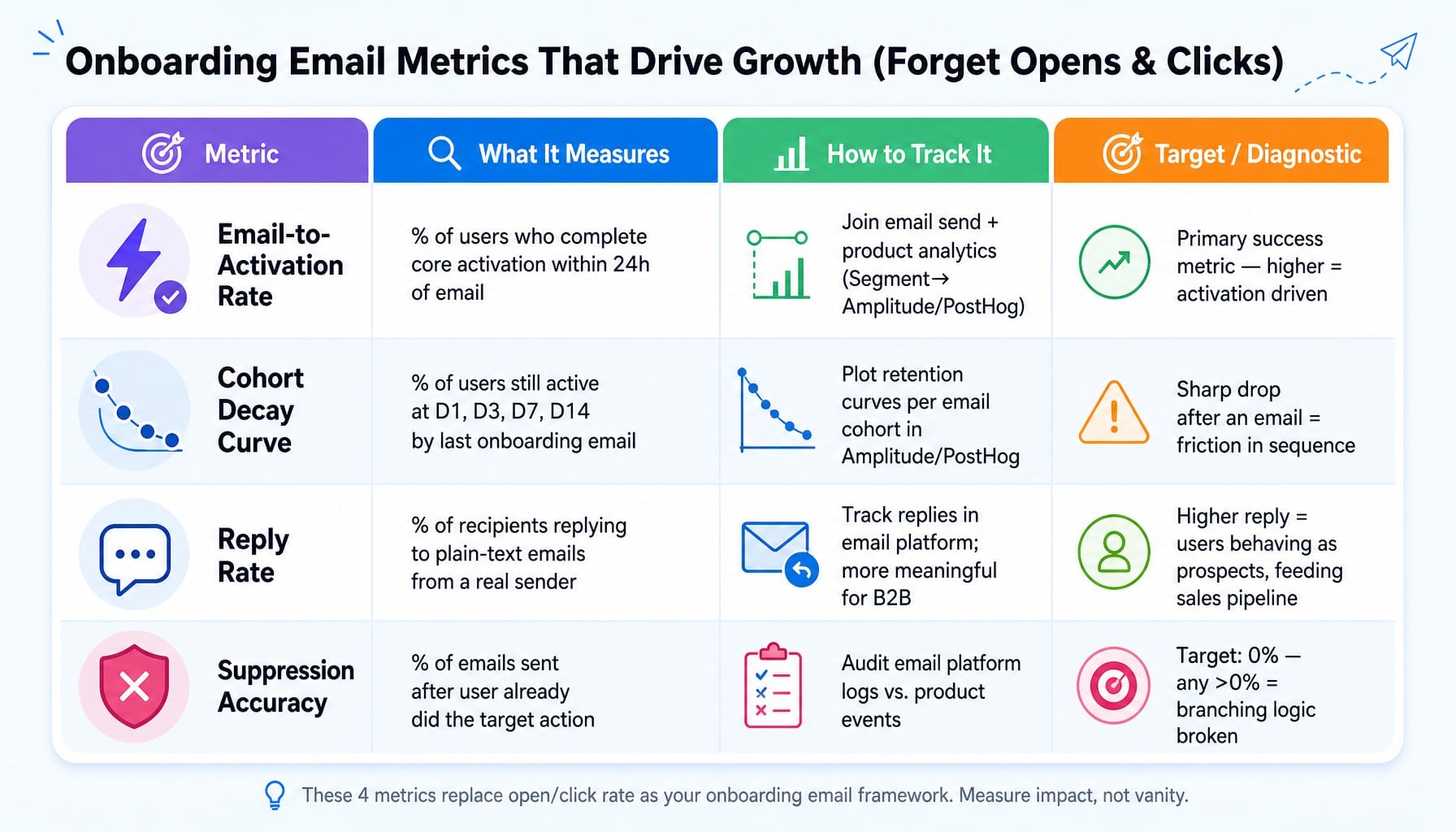
The metrics that actually matter are:
- Email-to-Activation Rate: The percentage of users who complete your core activation metric within 24 hours of receiving a specific email. This requires email-to-in-app attribution, which tools like Segment connected to Amplitude or PostHog can provide by joining email send events with product analytics events.
- Cohort Decay Curve: Plot the percentage of users still active at Day 1, 3, 7, and 14, segmented by which onboarding email they last received. If the curve drops sharply after a specific email, that email might be causing friction rather than reducing it.
- Reply Rate: For plain-text emails sent from a real person, reply rate is a stronger engagement signal than click rate. It indicates the user is treating the email as a conversation, a critical step in a high-touch B2B sales process.
- Suppression Accuracy: What percentage of your emails are sent to users who have already completed the action the email asks them to take? This should be 0%. If it's not, your event-based branching logic is broken.
A quick note on testing: performing a multivariate send test on onboarding emails requires careful cohort isolation. You cannot simply A/B test subject lines on a live audience, because differences in their product behavior will confound the email variable.
Read more: How to Build SaaS Marketing Attribution That Actually Drives Pipeline (Not Just Dashboards)
Coordinating Onboarding Emails with In-App Messages Without Overwhelming Users
Most SaaS teams run onboarding emails and in-app messages as separate systems—different tools, different owners, different triggers. The result is a user who gets a tooltip saying "Try feature X" inside the product while simultaneously receiving an email saying "Complete your setup"—two conflicting instructions from the same company.
The coordination principle is this: email should handle re-engagement, while in-app messages should handle guidance.
- Use email to bring inactive users back to the product.
- Use in-app messages (like tooltips or modals) to direct users who are already inside the product.
The two channels should never ask the user to do the same thing at the same time. A practical rule is to implement a frequency cap and channel hierarchy. If a user is active in the product right now, suppress the next scheduled email. If a user hasn't logged in for 24 hours, suppress in-app messages (they won't see them anyway) and rely on an email to re-engage them.
Tools like Knock or Intercom can orchestrate notifications across channels from a unified event stream, but the key is the strategic decision to treat them as one coherent experience, not two parallel sequences competing for attention.
When Onboarding Optimization Needs to Extend Beyond Email
Effective onboarding requires behavioral triggers, cross-channel coordination, and continuous measurement. Most lean marketing teams understand this but lack the bandwidth to continuously optimize every surface—they build a sequence, launch it, and move on. The sequence decays as the product evolves and what worked last quarter stops working.
This is where the system breaks at the last mile. Your onboarding emails can be perfect, but if they drive users back to a landing page or signup flow that hasn't been optimized for their activation path, the effort is wasted.
Spike AI continuously identifies and executes the highest-impact optimizations across your website and conversion touchpoints. It treats your website as a living conversion system, not a static destination. While you focus on perfecting the email sequence, Spike AI ensures the pages those emails link to are always optimized for the next step in the user's journey. Onboarding doesn't end with a click; it extends to every surface the user touches.
See how Spike AI optimizes the conversion surfaces your onboarding emails point to
Your Sequence Is an Architecture, Not a Collection of Copy
The difference between onboarding sequences that drive activation and those that just generate opens is architectural, not copywriting. Sequences built on behavioral triggers, suppression logic, and cross-channel coordination outperform calendar-based drips because they treat each user as an individual with a specific path, not a name on a list.
The real takeaway is this: audit your current onboarding sequence against the three anti-patterns in this article. If your emails fire on calendar dates, come from noreply@, or have more than one CTA, you have the diagnosis. The templates and principles above give you the fix. The work isn't rewriting another subject line; it's rebuilding the logic.
Read more: Pipeline Marketing in 2026: Strategy, Metrics, and Why Most Teams Regress to Lead Gen
Frequently Asked Questions
Should SaaS onboarding emails come from a founder's name or a product address?
For B2B SaaS, send from a real person—founder, product lead, or customer success. Plain-text emails from a named sender generate higher reply rates, and those replies are high-signal engagement indicators that can feed directly into sales qualification. Use a generic product address only for purely transactional emails like password resets.
How do you prevent SaaS onboarding emails from landing in spam?
Warm up your sending domain for 2-4 weeks before launching. Use a subdomain (e.g., mail.yourproduct.com) to isolate its reputation. Authenticate with SPF, DKIM, and DMARC, and monitor your reputation with Google Postmaster Tools. The biggest trigger is sending identical content to unengaged users, which behavior-triggered sequences naturally avoid.
How do you A/B test onboarding emails without skewing activation data?
Isolate test cohorts by signup date to ensure comparable intent levels. Test one variable at a time (subject line, CTA) and measure against activation rate, not open rate. You typically need 500+ users per variant to detect a meaningful difference in trial-to-paid conversion without results being skewed by confounding variables.
How do you personalize onboarding emails by user role without a long signup form?
Use progressive profiling. Ask one question at signup (e.g., role), then enrich with behavioral data from their first session. Alternatively, use a single-question in-app welcome survey after first login (tools like Userflow support this) and pipe the response into your email platform via webhook to branch the sequence immediately.
When should you stop sending onboarding emails and hand off to customer success?
The handoff trigger should be event-driven, not calendar-based. Once a user completes the core activation metric and converts to a paid plan, transition them from the onboarding sequence to a customer success flow focused on adoption and expansion. The MQL-to-PQL handoff is also an event: 'user completed X but hasn't upgraded' is a signal for human outreach.