Unbounce Pricing 2026: Every Plan Compared + The Real Cost of Running It
TL;DR
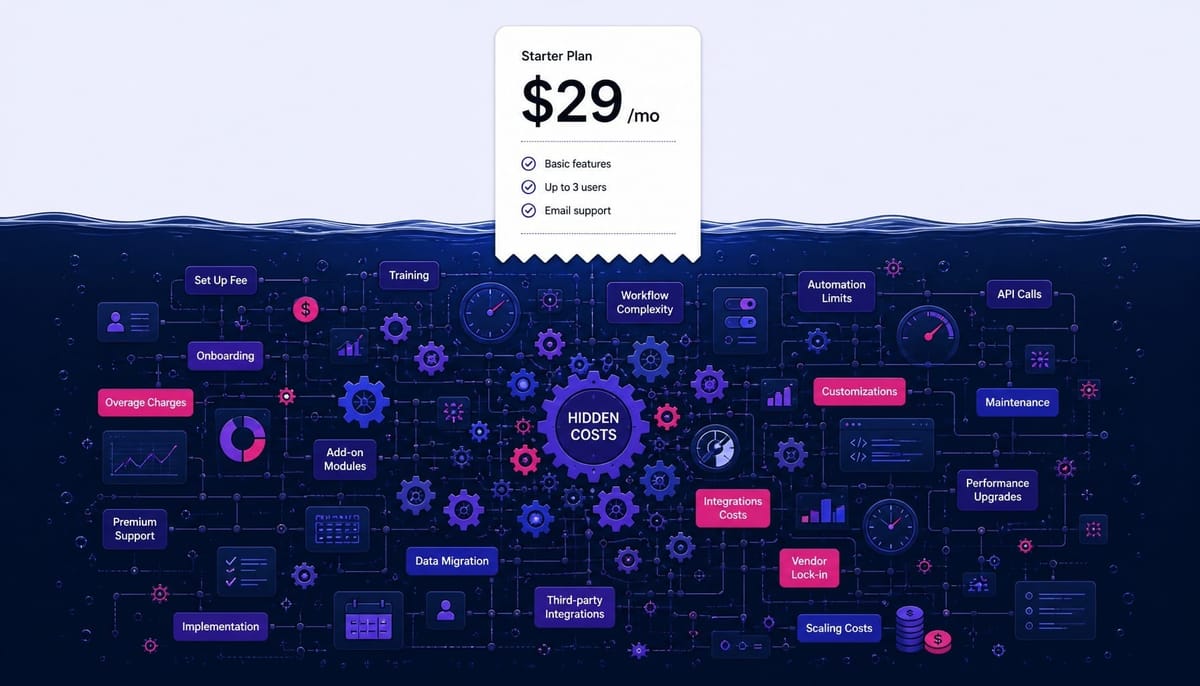
- The real Unbounce cost isn't the monthly fee; it's the Total Cost of Ownership (TCO), which includes tools like Zapier/Hotjar and 8-15 hours/month of your team's optimization labor, often doubling the sticker price.
- Beware the "conversion cap trap": high-converting pages can force you into a more expensive plan due to conversion limits, even if you're well under your monthly visitor cap. Always calculate your expected conversions before choosing a tier.
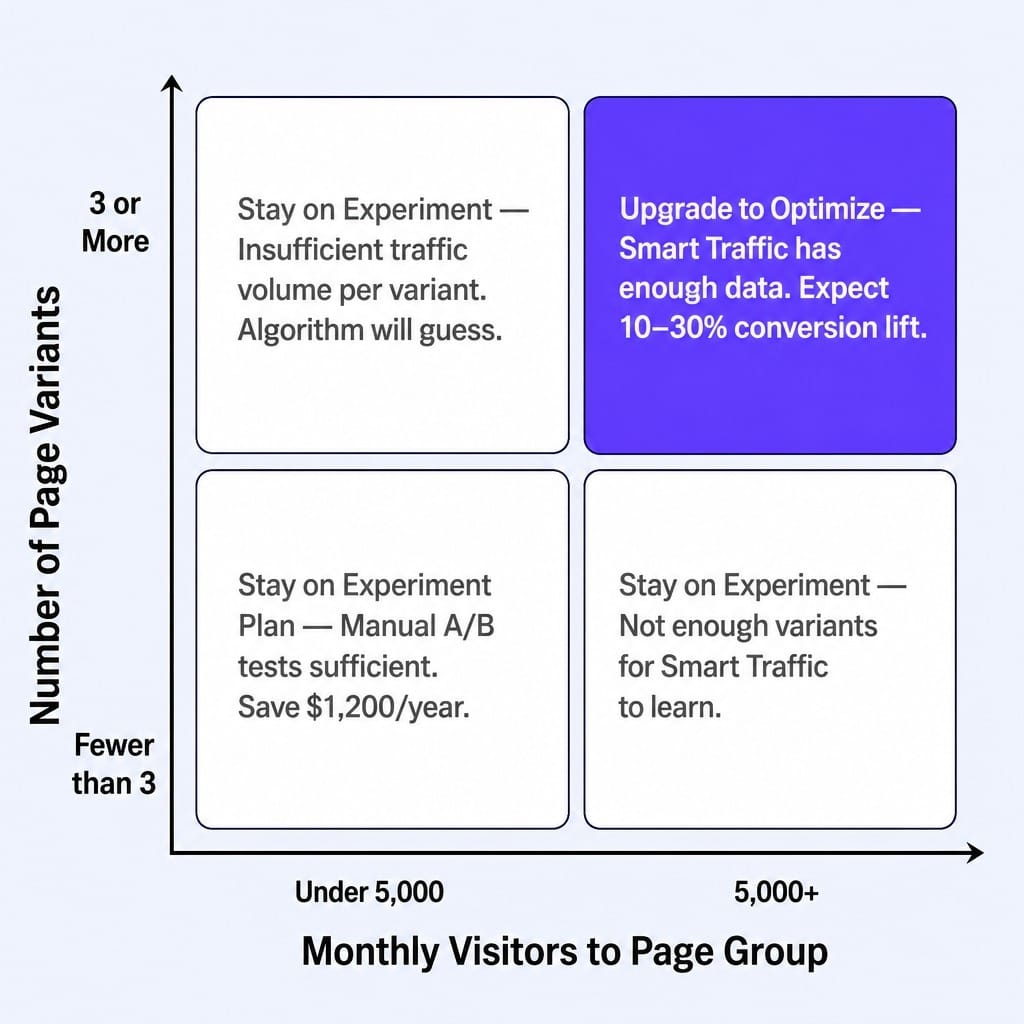
- Smart Traffic only justifies the Optimize tier's extra cost if you have 5,000+ monthly visitors and at least 3 variants. Below that, you're better off running manual A/B tests on the cheaper Experiment plan.
- Leadpages is the budget choice for low traffic, Instapage excels at granular ad-to-page mapping for enterprise, and Unbounce is ideal for teams with 10k+ visitors who can leverage its AI optimization.
- When negotiating enterprise pricing, leverage multi-year commitments and case study participation for potential 15-25% discounts off the initial quote.
You've signed up for the Unbounce Build plan at $99/month. You launch three slick landing pages for a new paid campaign, and traffic starts flowing. Then, two weeks into the month, your campaigns go dark. You've hit the 20,000 visitor cap and now face a choice: upgrade to a $149/month plan mid-billing cycle or pause the campaign that was just gaining momentum.
This is the moment most Unbounce pricing guides don't prepare you for.
This guide breaks down every Unbounce plan with exact 2026 pricing. But more importantly, it dissects the three cost dimensions that trip up most marketing teams: the conversion caps that force premature upgrades, the true total cost of the optimization workflow around Unbounce, and when a cheaper alternative actually makes more sense. This isn't a summary of a pricing page; it's a budget model for running landing pages in the real world.
What Every Unbounce Plan Costs in 2026 (Monthly and Annual)
Unbounce has six core pricing tiers, and most guides are outdated. The plan you choose is determined by three constraints: your monthly visitor traffic, your expected conversions, and the number of users who need access.
Here's a breakdown of the Unbounce pricing plans, focusing on the numbers that actually matter.
The Starter plan is often missed but exists for very low-traffic use cases, though its 5-page limit is a major bottleneck. The Build plan is the functional entry point, offering unlimited pages but no testing capabilities.
The real split happens at the Experiment tier, which unlocks A/B testing and Dynamic Text Replacement (DTR)—the minimum viable features for any serious paid search campaign. Moving to Optimize gets you access to Unbounce Smart Traffic, their AI optimization engine.
Concierge and Agency plans are quote-based, typically starting around $625/month. They offer higher caps, more domains, and dedicated support.
The plan grid looks simple. But the real Unbounce cost question isn't on this chart. It's what happens when your campaign success pushes you past these neat little boxes.
Annual vs Monthly Billing: The Actual Dollar Savings Per Tier
Unbounce offers a discount of around 25% for annual billing, but the dollar impact changes your commitment calculus. It's not just a percentage; it's cash you could be allocating elsewhere.
Here's the breakdown:
- Build Plan: $99/month vs. $74/month on annual. You save $300 per year.
- Experiment Plan: $149/month vs. $112/month on annual. You save $444 per year.
- Optimize Plan: $249/month vs. $187/month on annual. You save $744 per year.
The practitioner recommendation is simple: start on a monthly plan for the first 30-60 days. Use this time to validate that your traffic and conversion volume actually fits the tier you've chosen. Once you're confident you won't be forced into a premature upgrade, switch to annual billing to lock in the savings.
This strategy prevents you from prepaying for a year on the Experiment plan, only to discover in month two that your conversion rate requires the Optimize tier, effectively wasting a portion of your annual commitment. This kind of SaaS pricing strategy consideration—understanding how plan tiers interact with real usage—is something most buyers overlook.
The Conversion Cap Trap: Why Mid-Tier Plans Force Premature Upgrades
Unbounce plans have two caps—visitors and conversions—and most marketers only look at the visitor number. This is a critical mistake. The conversion cap is the number Unbounce doesn't put in the headline, and it's the one that actually determines your real-world plan.
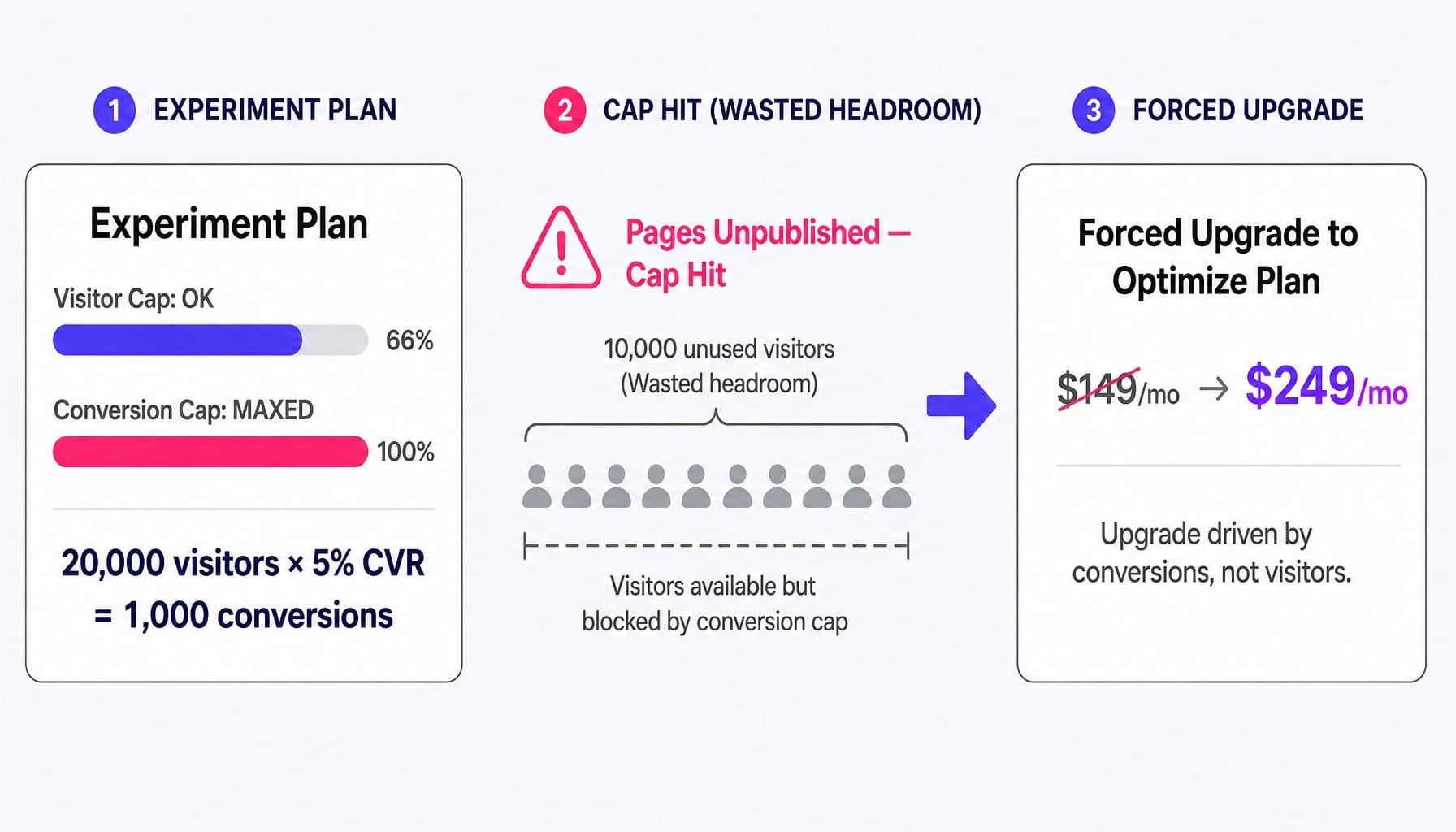
Consider this scenario: A B2B SaaS team is running LinkedIn ads to a gated whitepaper. They're on the Experiment plan, which allows 30,000 visitors and 1,000 conversions per month.
Their landing page is well-tuned and converts at a healthy 5%.
Here's the math: 20,000 visitors x 5% conversion rate = 1,000 conversions
They hit their 1,000-conversion cap after just 20,000 visitors. Their campaigns go dark, even though they still have 10,000 visitors of "headroom" left in their plan. They are forced to upgrade to the Optimize plan ($249/month) not because they need Smart Traffic, but simply because the conversion cap on their current plan is throttling their growth.
This is the conversion cap trap: for high-converting pages, the conversion limit is the real scaling constraint, not the visitor limit.
Before you choose a plan, use this rule of thumb: Multiply your expected monthly visitors by your average landing page conversion rate. If that number exceeds the conversion cap of your target plan, you need the next tier up, regardless of your visitor volume.
The True Cost of Running Unbounce: What the Pricing Page Doesn't Include
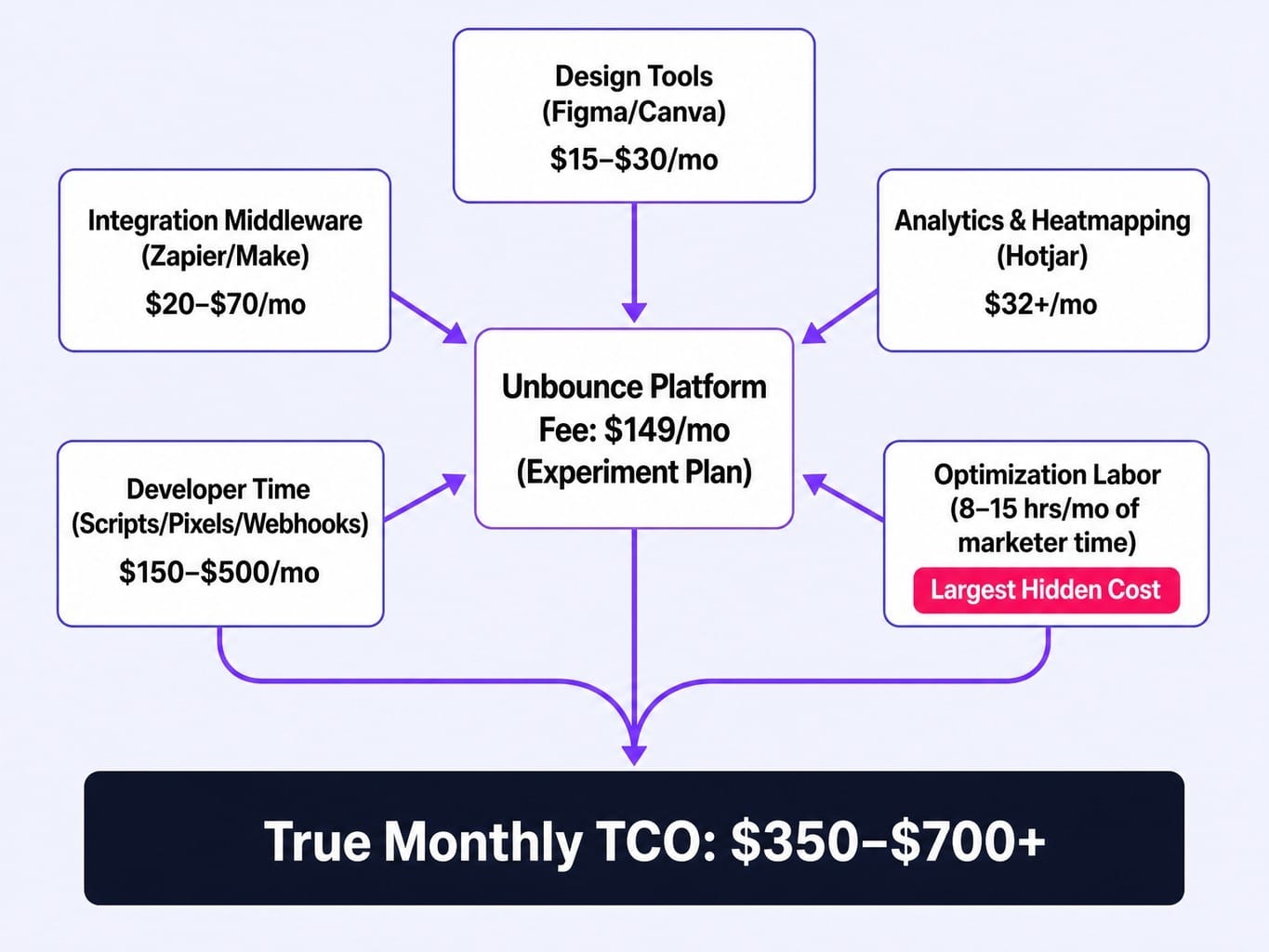
The Unbounce platform fee is just the starting point. For most teams, it represents only 40-60% of the true monthly spend on a landing page optimization program. The rest is the ecosystem of tools, labor, and integrations required to make Unbounce generate results.
Here's a realistic look at your true total cost of ownership (TCO):
- Design Tools ($15-$30/month): If you don't have a dedicated designer, you're paying for Figma, Canva Pro, or other tools to create the visual assets that go into the Unbounce Smart Builder.
- Integration Middleware ($20-$70/month): Unbounce's native integrations are basic. Most B2B teams need Zapier or Make to reliably send form submissions to a CRM like HubSpot, enrich leads, and trigger Slack notifications. Your webhook payload mapping needs to go somewhere.
- Analytics & Heatmapping ($32+/month): The built-in analytics are thin. You'll almost certainly layer on Hotjar for heatmaps and session recordings to understand user behavior.
- Developer Time ($150-$500/month): Implementing custom scripts for tracking, debugging pixels, and handling complex webhook setups often requires 2-5 hours of a developer's time each month.
- Optimization Labor (Your Marketer's Salary): This is the biggest hidden cost. Someone has to analyze results, form hypotheses, write new copy, build variants, and manage the testing cadence. For a lean team, this is easily 8-15 hours per month of a skilled marketer's time that could be spent on strategy. And let's be honest, that's a conservative estimate.
A team on the $149/month Experiment plan is realistically spending $350-$700+ per month when you factor in this ecosystem. This reframes the question from "Can I afford $149?" to "Is a $500+/month landing page optimization workflow the right investment for us right now?"
Read more: Data-Driven CRO: Evolve Your Marketing Strategy for Revenue
What If the Optimization Layer Around Your Landing Pages Ran Itself?
The analysis is clear: the platform fee is a fraction of the real cost. The largest expense is the manual optimization workflow—the hours your team spends analyzing data, building variants, managing tests, and the subscription fees for the tools that support this cycle. Most lean teams simply can't sustain this cadence.
This is the execution gap Spike AI is built to close. We operate as the intelligence and execution layer that eliminates the costly, manual work around your landing page builder.
Instead of your team spending 8-15 hours a month interpreting Hotjar, building variants in Unbounce, and prioritizing tests based on gut feel, Spike AI's system does it continuously. We identify the highest-impact change to make across your site—whether it's a headline test, a new content section, or a technical SEO fix—and then we execute it. You get weekly releases that compound, turning your optimization backlog into a shipping engine.
The budget argument is a simple reallocation. Instead of paying $500+ for a fragmented stack of tools and your own team's manual hours, you get a unified system that handles the intelligence, prioritization, and execution. If optimization labor is your largest hidden cost, the highest-ROI move isn't a cheaper page builder—it's removing the manual workflow entirely.
See how Spike AI replaces your optimization stack →
When Smart Traffic Justifies the Optimize Tier (and When It Doesn't)
Smart Traffic is Unbounce's AI feature that automatically routes visitors to the landing page variant most likely to convert them. It's the primary reason to upgrade from the Experiment to the Optimize plan, a $100/month jump. But it only works if it has enough data to learn.
The rule of thumb is you need at least 1,000 visitors per variant per month for Smart Traffic to have enough signal to reliably outperform a simple A/B test.
If you're running a test with three variants, you need a minimum of 3,000 monthly visitors to that page group. Realistically, you want 5,000+ visitors to see the kind of 10-30% conversion lift Unbounce reports in its case studies.
Below that threshold, you're paying an extra $100 a month for an algorithm that's essentially guessing. The variant weight distribution will be too noisy to be meaningful.
The decision is binary:
- Above 5,000 visitors/month with 3+ variants? The Optimize plan and Smart Traffic will likely pay for themselves in lift.
- Below that threshold? Stick with the Experiment plan and run manual A/B tests. You'll save $1,200 a year and get statistically sound results.
Unbounce vs Instapage vs Leadpages: Pricing for the Features That Actually Matter
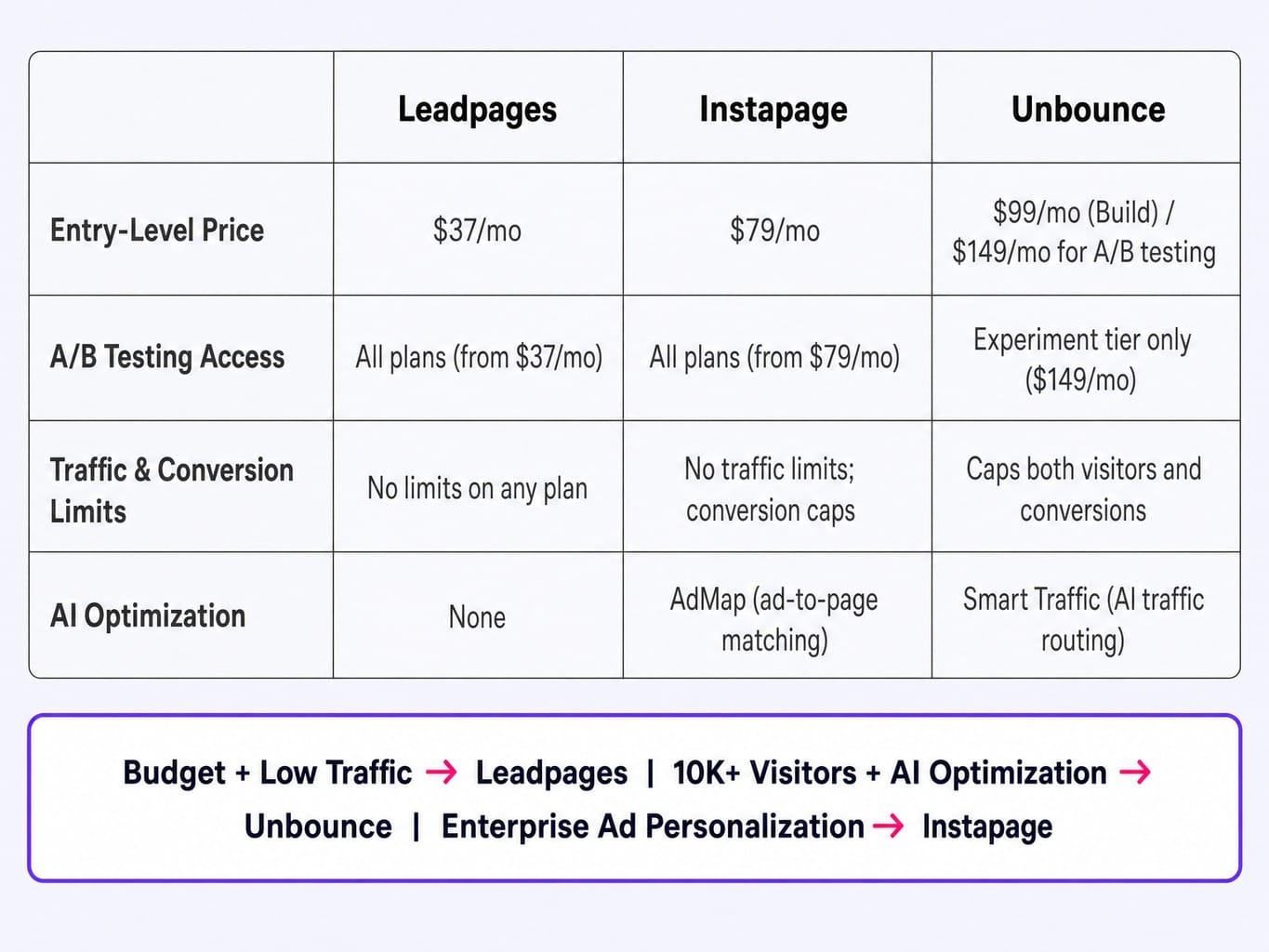
Most "Unbounce vs. X" articles are biased. Here's a neutral comparison based on the four factors that actually drive the buying decision for most teams.
- Entry-Level Price:
Leadpages: Starts at $37/month.
Instapage: Starts at $79/month.
Unbounce: Functional entry is the Build plan at $99/month.
Verdict: Leadpages is the cheapest entry point, but with significant feature limitations.
- A/B Testing Access:
Leadpages: Included on all plans, even the $37/month tier.
Instapage: Included on its entry $79/month plan.
Unbounce: Locked behind the $149/month Experiment tier.
Verdict: If A/B testing is non-negotiable, Unbounce's effective entry price is $149/month, making it the most expensive to start testing with.
- Traffic & Conversion Limits:
Leadpages: No traffic or conversion limits on any plan.
Instapage: No traffic limits, but caps conversions.
Unbounce: Caps both visitors and conversions on all plans.
Verdict: This is the biggest structural difference. Teams with unpredictable or high traffic spikes may find Leadpages' unlimited model safer.
- AI Optimization Features:
Unbounce: Smart Traffic offers AI-driven traffic allocation.
Instapage: AdMap provides 1:1 ad-to-page personalization.
Leadpages: No equivalent AI optimization features.
Verdict: Unbounce and Instapage offer sophisticated AI, but for different use cases—traffic routing vs. message matching.
Decision Framework:
- Choose Leadpages if your budget is tight, your monthly traffic is under 5,000 visitors, and you need unlimited pages without worrying about caps.
- Choose Unbounce if you have 10,000+ visitors/month, want to leverage AI for traffic allocation, and value a best-in-class page builder.
- Choose Instapage if you're an enterprise or agency team managing dozens of ad variants and need granular ad-to-page personalization at scale.
Read more: SaaS Landing Page Best Practices: What Actually Converts in 2026
Unbounce Enterprise and Agency Pricing: What Custom Plans Actually Include
Unbounce's high-tier Concierge and Agency plans are quote-based, but here's what practitioners report.
The Concierge plan starts around $625/month and is built for high-volume marketing teams. It typically includes a cap of 100,000+ visitors, 5,000+ conversions, 15 user seats, 5 root domains, and, most importantly, a dedicated Customer Success Manager (CSM) for strategic support.
Agency plans have similar starting prices and caps but are structured for managing multiple clients, with 10+ root domains and features for sub-account margin stacking.
Here are two insights you won't find in other guides:
- Negotiation Leverage: Unbounce sales teams are known to be flexible. Committing to a multi-year deal or agreeing to participate in a public case study can often secure a 15-25% discount from the initial quote. Annual commitment is your baseline leverage.
- Agency Margin Modeling: Successful agencies typically mark up their Unbounce costs by 2-3x when bundling landing page services into retainers. The key is to structure client sub-accounts carefully to keep each client's traffic within the plan's per-domain allocation, preventing overage triggers that can instantly erode your profit margin.
Conclusion
Choosing an Unbounce plan is not a platform cost decision—it's a total optimization system cost decision.
The sticker price matters far less than whether your traffic and conversion rates fit the plan's caps. It matters less than whether you've budgeted for the ecosystem of tools and labor required to make Unbounce actually produce a positive ROI. And it matters less than whether your team has the bandwidth to sustain the optimization cycle week after week.
Before you choose a plan, model your true monthly cost. Add the platform fee, the integration tools, the analytics software, and the cost of your team's time. If that number is higher than you expected, the problem isn't Unbounce's pricing. It's that effective landing page optimization has always been more expensive than the platform fee suggests. The teams that win are those who build systems to make that optimization cycle continuous and scalable, without scaling headcount.
Frequently Asked Questions
Does Unbounce offer a free trial, and which plan features does it include?
Yes, Unbounce offers a 14-day free trial that gives you full access to the features of whichever plan you select, including Smart Traffic on the Optimize tier. No credit card is required to start. If you don't upgrade by day 15, your account is paused.
What happens if you exceed your visitor or conversion cap mid-month?
Unbounce does not charge overage fees. Instead, your landing pages and popups will be unpublished once you hit either your visitor or conversion limit, effectively pausing your campaigns. The only way to reactivate them is to upgrade to a higher-tier plan.
Does Unbounce offer discounts for nonprofits, startups, or educational organizations?
Unbounce does not publicly advertise these discounts. However, some users have reported success in securing a 10-20% discount on annual plans by contacting the sales team directly with proof of nonprofit status. As of 2026, there is no formal startup program.
How many landing pages can you publish on the lowest Unbounce plan?
The entry-level Starter plan ($29/month) is limited to only 5 published landing pages. The Build plan ($99/month) and all higher tiers allow for unlimited published pages, making the Build plan the practical minimum for any team running multiple campaigns.
Can you downgrade your Unbounce plan without losing your landing pages?
Yes, you can downgrade your plan at any time. Your existing pages are preserved, but any pages exceeding the new, lower plan's limits will be unpublished. Features from your old plan, like Smart Traffic, will stop functioning, but your historical test data is retained.