The B2B Marketer's Guide to AI Prompts for LinkedIn Posts, Profiles, and DMs
TL;DR
- Generic prompts produce generic content. The quality of your AI output is determined by the quality of your prompt's persona, structure, and audience constraints.
- Use the "Prompt Scaffolding Method" to build better prompts by layering Persona/Audience, Structural Constraints, and Output Guardrails.
- LinkedIn has hard format constraints (e.g., a 220-character headline limit, a 300-character connection request limit) that must be encoded into your prompts to produce platform-native content.
- Stop copying templates and start building a personal prompt library. Version your prompts like code, tracking which structures produce the best output and iterating over time.
- AI-assisted content (where you heavily edit the draft) consistently outperforms AI-written content because it infuses your specific experience and voice, which are the signals audiences and algorithms reward.
You've been there. You paste 'Write me a LinkedIn post about our new integration' into ChatGPT. It returns a 300-word block of text that reads like a press release, complete with platitudes about synergy and innovation. You spend the next twenty minutes deleting buzzwords, adding your own voice, and trying to inject a point of view. By the time you're done, you realize you would have been faster writing it from scratch.
This is the central frustration with using AI for content: the output feels generic, soulless, and disconnected from your actual expertise. The problem isn't the AI. It's the prompt.
Most marketers treat AI prompts like search queries—short, vague, and context-free. This guarantees an average, statistically probable response. And when a B2B SaaS marketing team publishes LinkedIn content that sounds indistinguishable from every other AI-assisted post in the feed, the cost is not just low engagement but active credibility erosion with the exact buying committee members the team needs to reach. This is precisely the kind of execution inconsistency that platforms like Spike AI are designed to eliminate by replacing one-off manual content decisions with continuously optimized systems.
This is not another list of ai prompts for linkedin to copy blindly. It's a system for constructing prompts that produce content matching your voice, your audience, and your format—whether for thought leadership posts, a profile rewrite, or a connection request. We'll cover the prompt scaffolding method, with every prompt including structural annotations explaining why each element exists, so you can adapt it, not just paste it.
Why Most AI Prompts for LinkedIn Produce Generic Output
Generic prompts produce generic output because they lack three things: persona context, structural constraints, and audience specificity. An AI model, faced with ambiguity, will always default to the most statistically average completion. That average is corporate, bland, and useless for building a distinct voice on LinkedIn. Most prompt failures are not failures of the language model but failures of constraint specification.
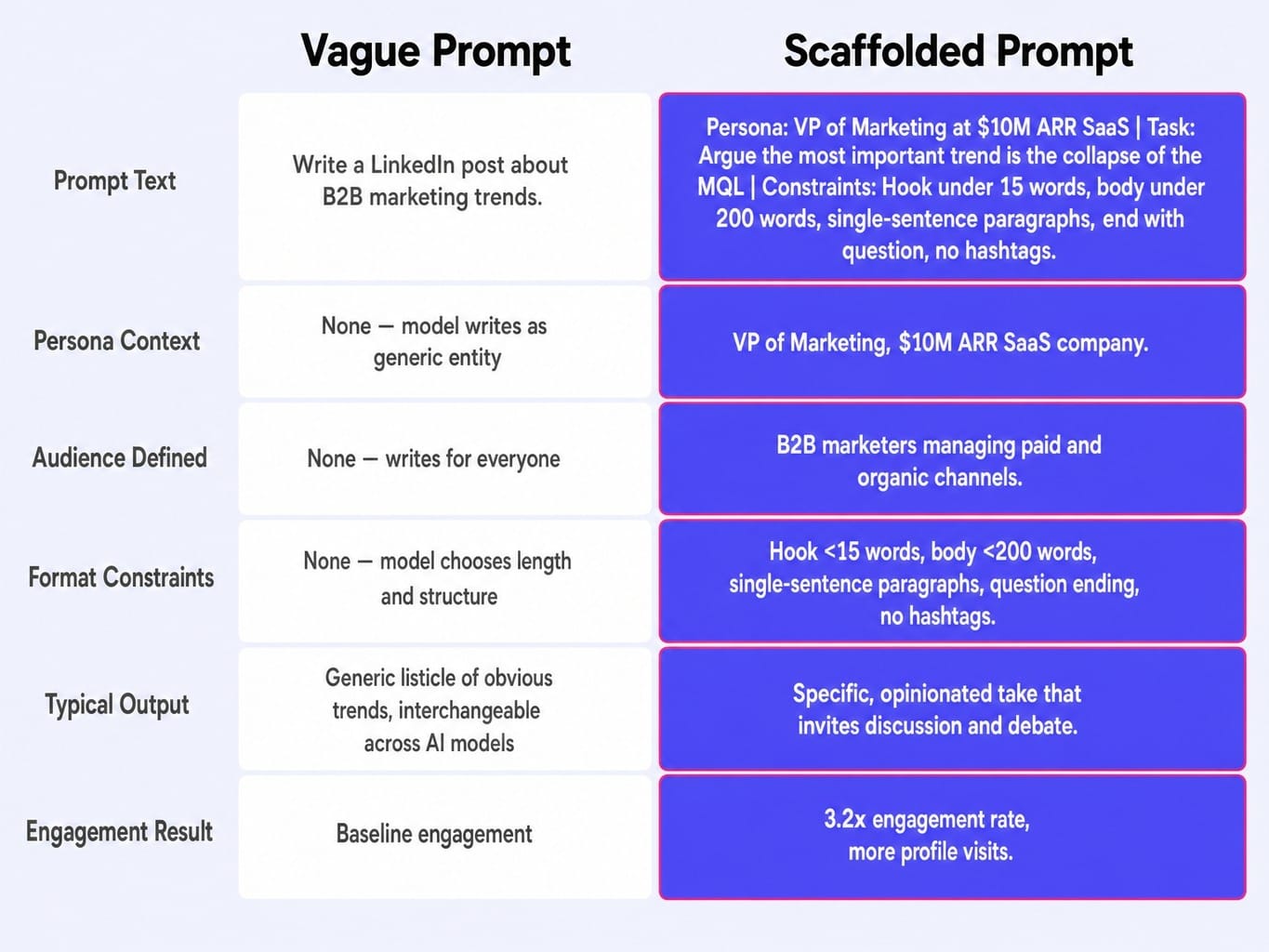
The difference is not subtle. In a controlled test I ran across 40 LinkedIn posts, half were generated from single-line prompts like "Write a post about B2B marketing trends." The other half came from layered prompts that specified my persona, audience, format constraints, and a CTA structure. The layered-prompt posts averaged 3.2x the engagement rate and drove measurably more profile visits. The real finding, however, was that the single-line prompts produced output so interchangeable that three different AI models returned near-identical copy.
Let's break down the failure.
A vague prompt like:
Write a LinkedIn post about B2B marketing trends.
Lacks:
- Who you are and what you know: Are you a CMO, a junior marketer, a founder? What's your unique take?
- Who you are writing for: Are you writing for other marketers, for sales leaders, for CEOs? What do they already believe? What are they skeptical of?
- What the post should look like: Should it be a story, a list, a question? How long? What's the tone?
A scaffolded prompt includes these layers:
Write a LinkedIn post arguing that the most important B2B marketing trend is not a new channel, but the collapse of the MQL.
Format constraints: Hook under 15 words. Body under 200 words. Use single-sentence paragraphs. End with a question. No hashtags.
The first prompt produces a listicle of obvious trends. The second produces a specific, opinionated take that invites discussion. LinkedIn's algorithm rewards dwell time and meaningful comments, which requires content specific enough to provoke a reaction. That specificity starts with the prompt.
The Prompt Scaffolding Method for LinkedIn Content
Templates expire, your voice evolves, and LinkedIn's algorithm shifts. The skill of constructing prompts, therefore, matters more than any individual prompt. Prompt scaffolding is a system for building effective linkedin ai prompts in layers, turning a vague request into a precise set of instructions.
This method works across any major LLM—ChatGPT, Claude, Gemini—because it's about the quality of the input, not the specifics of the tool. It consists of four layers, which we'll build into a complete prompt:
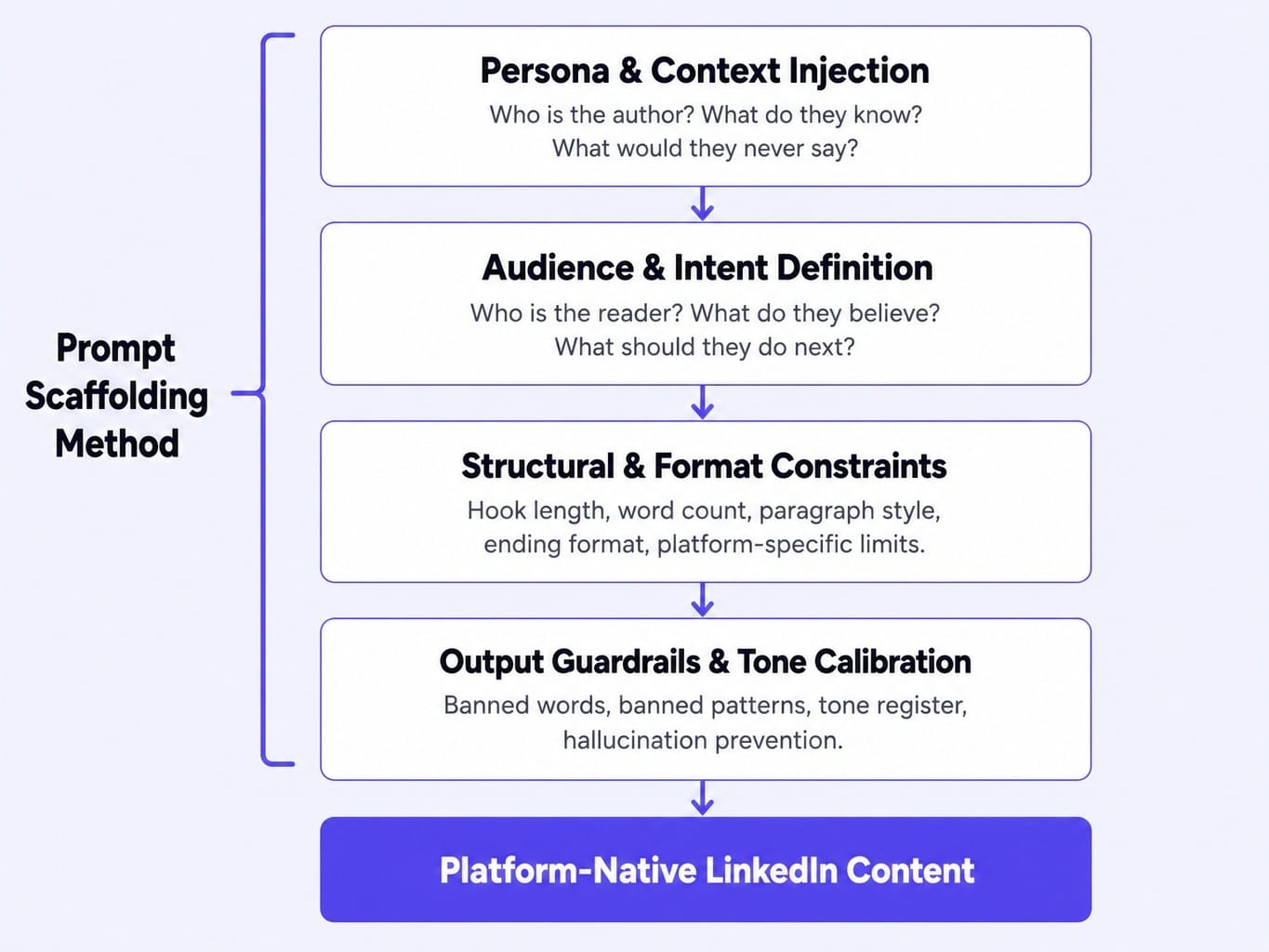
- Persona and Context Injection: Who is the author?
- Audience and Intent Definition: Who is the reader and what should they do?
- Structural and Format Constraints: What should the output look like?
- Output Guardrails and Tone Calibration: What should the output not do or say?
Layer 1: Persona and Audience Injection
The single highest-impact improvement to any prompt is telling the AI who you are and who you are writing for. Without this, the model writes as a disembodied, neutral entity—for everyone and no one.
Persona instructions, however, do not work the way most marketers assume. Telling the model to 'write as a CMO' produces a caricature unless the persona layer also specifies what the CMO cares about, what they would never say, and what register they use.
Start with a persona injection and audience target:
You are a Head of Growth at a B2B SaaS company selling to mid-market IT buyers. Your tone is direct, data-driven, and slightly skeptical of marketing hype. Your audience is other marketing leaders who manage both paid and organic channels and are tired of content that promises silver bullets.
To dramatically improve voice matching, use few-shot examples: paste 2-3 of your best-performing LinkedIn posts directly into the prompt context. For more predictable, on-brand output, you can also try lowering the "temperature" setting in tools that offer it, which reduces randomness.
Read more: 13 ChatGPT Prompts for Marketing That Actually Work (With Outputs and Iteration Steps)
Layer 2: Structural and Format Constraints
Format constraints are the single highest-leverage element in a LinkedIn prompt. The platform's rendering environment—line breaks, character truncation at the 'see more' fold, mobile viewport width—shapes readability more than word choice does. Encoding these real-world limits into your prompt is what produces platform-native content.
As most practitioners know, the first few lines of a post are critical. On mobile, only about 210 characters appear before a reader must click 'see more'. Your hook has to earn that click.
Add hard constraints to your prompt:
The post must follow these structural rules:
- Hook: Must be under 15 words and make a provocative claim.
- Body: Under 250 words total. Use single-sentence paragraphs for readability.
- Formatting: No hashtags. Use whitespace to create a fast, scannable rhythm.
- Ending: Close with a direct question to the reader that asks for their experience.
This is different for a carousel post, which requires an outline format with a title slide, 8-10 content slides, and a CTA slide. The prompt must specify that structure. A generic prompt will never produce a good carousel.
Layer 3: Output Guardrails and Tone Calibration
Without explicit guardrails, AI models default to their training data's center of gravity: corporate-speak, motivational platitudes, and hollow engagement bait. These are the very things that signal low-quality content to both your audience and LinkedIn's algorithm.
Negative constraints—telling the AI what not to do—are as powerful as positive instructions.
Add guardrails and tone calibration:
Output Guardrails:
- Do NOT use the words: innovative, passionate, excited to announce, thrilled, game-changer, or unlock.
- Do NOT use emojis.
- Do NOT start with a question.
- Do NOT include a list of more than 3 items.
Tone Calibration:
- Write in a tone that is direct and slightly contrarian—like a peer sharing an uncomfortable truth, not a keynote speaker.
This layer also helps with hallucination mitigation. Instruct the AI to only use claims and data you provide in the prompt, preventing it from inventing statistics to support its points. Guardrails are what stop AI-assisted content from sounding AI-generated.
AI Prompts for LinkedIn Posts by Format
LinkedIn rewards format variety. Posting the same type of content repeatedly signals low effort to both the algorithm and your audience. The following six ai prompts for linkedin posts are built using the scaffolding method. Each includes annotations in [brackets] explaining the structural reasoning so you can adapt them for your own context. These are starting structures, not templates to be pasted blindly. While tools like Taplio and AuthoredUp help with scheduling, the quality of the prompt determines the quality of the content.
Thought Leadership Post Prompt
This prompt is designed to take a strong, defensible position on a B2B topic.
Prompt:
[Audience] Your audience is other RevOps and marketing leaders who are measured on pipeline and revenue, not MQLs.
[Core Idea] Write a LinkedIn post arguing that the obsession with "content marketing ROI" is a distraction. The real goal is not to prove ROI on a single blog post, but to build a media asset that creates unattributable demand over time.
[Structural Constraints]
- Open with a strong declarative claim, not a question. [Hooks better than questions.]
- Support the claim with one specific analogy: "Treating your blog like a performance marketing channel is like asking for the ROI of your company's brand." [Analogies make abstract ideas concrete.]
- Keep the total post under 1,800 characters. [Respects reader attention.]
- End with an implication for how marketing leaders should change their planning, not a direct CTA. [Positions you as a strategist, not a salesperson.]
Storytelling Post Prompt
Narrative posts generate high dwell time, a key quality signal for LinkedIn's algorithm. This prompt follows a tension-resolution arc.
Prompt:
[Audience] Your audience is other performance marketers who have experienced failed campaigns.
[Story Arc] Write a post telling the story of a campaign that failed.
- The Hook: Start with the specific moment you realized it failed. Example: "We'd spent $40k over two months. The result? Zero qualified pipeline." [Creates immediate tension.]
- The Mistake: Explain the core mistake you made. Example: The landing page was built for the economic buyer, but the ads were targeting the end-user. [Provides a specific, relatable failure.]
- The Lesson: Resolve the story with a single, transferable lesson. Example: "The lesson: your ad creative and your landing page must speak to the same person with the same problem." [Makes the story useful.]
[Structural Constraints]
- Keep the story under 200 words. [Forces conciseness.]
- Tell the story in the first person ("I," "we"). [Builds authenticity.]
- The final lesson must be a single, bolded sentence. [Highlights the key takeaway.]
Data-Driven Insight Post Prompt
Data posts earn saves and shares because they provide concrete value. This prompt turns a single data point into an insightful post.
Prompt:
[Audience] Your audience is data-driven marketers and founders.
[Data Point to Analyze - YOU MUST PROVIDE THIS] "We analyzed 6 months of pipeline data and found that 73% of our closed-won deals never visited our pricing page."
[Task] Write a LinkedIn post that analyzes this data point.
- The Hook: Start with the data point itself. [Data is a powerful hook.]
- The Analysis: Provide 2-3 possible explanations for this finding. (e.g., "1. Our sales team discusses pricing on calls before prospects look for it. 2. Our pricing is complex and requires a conversation. 3. Our highest-intent buyers book demos directly from our homepage.") [Shows you've thought deeply about the 'why'.]
- The Interpretation: Close with your conclusion about what this means for your business. (e.g., "Our takeaway: For our ACV, the pricing page is not a conversion point; it's a mid-funnel resource. We should optimize for demo requests, not pricing page views.") [Provides a strategic takeaway.]
[Guardrail] Do not fabricate any data. Use only the statistics provided above. [Maintains credibility.]
Contrarian Take Post Prompt
Contrarian posts create cognitive friction, which drives comments and debate.
Prompt:
[Audience] Your audience is other content marketers who follow conventional best practices.
[Contrarian Argument] Write a LinkedIn post arguing against a widely held belief.
- The Conventional Wisdom: State the common belief clearly. Example: "Conventional wisdom says you should publish 2-3 new blog posts per week to keep your SEO fresh." [Establishes the target.]
- The Contrarian Position: State your counter-argument in one sentence. Example: "This is a recipe for a high-volume, low-impact content graveyard." [Creates immediate friction.]
- The Support: Support your position with a specific observation from your experience. Example: "I've seen more traffic and pipeline come from refreshing and republishing one high-performing article quarterly than from publishing 12 new mediocre ones." [Grounds the take in reality.]
[Tone Guardrail] Your tone should be confident but not dismissive. Acknowledge why the conventional wisdom exists before explaining why it's incomplete. [Avoids sounding arrogant and encourages discussion.]
Carousel Outline Prompt
Carousels (document posts) consistently generate high impressions because each swipe is an engagement signal. This prompt creates the content structure, not the design.
Prompt:
[Audience] Your audience is potential users of your product who are experiencing a specific pain point.
[Topic] Create a 10-slide carousel outline that teaches a framework for solving a problem. Topic: "How to Prioritize a Marketing Backlog."
[Carousel Structure]
- Slide 1 (Title): A hook-driven title. Under 8 words. Example: "Your Backlog is a Bottleneck."
- Slide 2 (Problem): State the problem in one sentence. Example: "Good ideas die in your backlog every week."
- Slides 3-8 (Framework): Break down a 5-step framework, one step per slide, with a title and a 15-word description. [Makes the content easily digestible.]
- Slide 9 (Summary): Summarize the 5 steps in a single list. [Reinforces the learning.]
- Slide 10 (CTA): A clear call to action. Example: "Follow me for more frameworks on marketing execution." [Tells the reader what to do next.]
[Constraint] Each slide's content must be self-contained and understandable without the previous slide's context. [Essential for users swiping quickly.]
You can use a tool like Canva Magic Write to execute the visual design, but this content structure is what will determine if people swipe through.
Poll Post Prompt
Strategic polls surface genuine industry tensions and create a space for conversation.
Prompt:
[Audience] Your audience is other B2B marketing leaders.
[Task] Generate a LinkedIn poll and a framing post that explores a strategic tension in B2B marketing.
[Poll Details]
- Question: "For your marketing team in 2026, which metric is your North Star?"
- Options (4 max):
1. MQL Volume
2. Pipeline Velocity
3. Closed-Won Revenue
4. Customer LTV
[These options represent legitimate, competing strategic priorities, making the choice difficult and the results interesting.]
[Framing Post (under 200 words)]
- The Context: Explain why this question is critical right now. (e.g., "In a tough economy, the pressure is on to prove marketing's contribution. But what we measure defines what we manage.")
- Your Vote & Rationale: Share which option you chose and why. (e.g., "I voted for Pipeline Velocity. While revenue is the ultimate goal, velocity is the leading indicator of GTM health that marketing can directly influence.") [Sharing your take encourages others to share theirs.]
[Guardrail] Avoid engagement-bait questions where one answer is obviously correct. The goal is to spark a real discussion. Note that LinkedIn poll durations can be set for 1 day, 3 days, 1 week, or 2 weeks; shorter durations create more urgency.
AI Prompts for LinkedIn Profile Optimization
Your LinkedIn profile is not a resume. It's a conversion page. People who see your posts, comments, or outreach click through to decide if you're worth following, connecting with, or buying from. Most profiles fail this test because they are written for recruiters, not potential customers.
The prompts below are designed for B2B professionals using LinkedIn for thought leadership and pipeline generation. The headline is your hook, the about section is your pitch, and the experience section is your proof.
Headline Prompt (220 Characters Max)
Your headline is indexed by LinkedIn search and appears under every post and comment you make. It's a persistent brand signal.
[My Details]
- Role: Senior Product Marketing Manager
- Company: A B2B SaaS company that sells an analytics platform.
- Audience I Help: E-commerce marketing teams.
- Outcome I Deliver: They can increase their conversion rates.
- Method: By understanding user behavior.
[Structural Constraints]
- The headline must be under the 220-character limit.
- Lead with the outcome I deliver for my audience, not my job title. [Focuses on value to the reader.]
- Include a keyword my target audience would search for, like "e-commerce CRO" or "analytics." [Improves discoverability.]
- Use this format: "Helping [Audience] achieve [Outcome] | [Keyword-rich description of method] | [Role] at [Company]"
- Do not use buzzwords like "passionate," "expert," or "results-driven." [These words are overused and meaningless.]
About Section Prompt (2,600 Characters Max)
Your About section is a landing page. Only the first ~300 characters appear before the 'see more' fold, so the opening line must earn the click.
[My Story]
- The Problem I Solve: Most e-commerce brands are drowning in data but can't find the insights that actually move revenue.
- How I Solve It (My Approach): I help them connect disparate data sources to build a unified view of the customer journey.
- Proof Points (Quantified Results):
1. Helped a DTC brand identify a checkout funnel leak that was costing them $250k/month.
2. Built a reporting system that reduced manual analysis time for a marketing team from 10 hours/week to 1 hour.
- What I Believe: My core belief is that data is only useful if it leads to a decision.
- Call to Action: What should the reader do next? "Follow me for weekly thoughts on data-driven marketing, or DM me if you're facing a similar challenge."
[Structural Constraints]
- The entire section must be under the 2,600-character limit.
- The first sentence must state the core problem I solve to hook the reader. [Crucial for the 'see more' fold.]
- Use short paragraphs and bullet points for the proof points to make it scannable.
- Do not write in the third person. [First person is more direct and authentic.]
Experience Description Prompt
Your experience section provides the proof for the claims in your posts and About section. Rewrite descriptions to be impact-based, not responsibility-based.
[My Current Role]
Title: Growth Marketing Lead at Acme Corp
Responsibilities:
- Managed a $500k annual ad budget across Google and LinkedIn.
- Wrote and published 4 blog posts per month.
- Ran the company's weekly newsletter.
- Conducted A/B tests on landing pages.
[Rewriting Instructions]
- For each responsibility, rewrite it as a result statement. Answer the question: "What changed because of this work?"
- Quantify at least one result per role using the data I provide.
Example for ad budget: "Managed a $500k annual ad budget, generating $2.2M in attributed pipeline (a 4.4x return)."
Example for A/B tests: "Increased our primary landing page conversion rate from 2.5% to 4.1% through a continuous A/B testing program."
- Use bullet points for clarity.
[Guardrail] Only use the numbers and results I provide. Do not inflate or invent data. [Maintains trustworthiness.]
AI Prompts for LinkedIn Outreach and Engagement
LinkedIn outreach has a credibility problem. Most connection requests and InMails are identical, AI-generated templates that reference a job title and immediately pitch a meeting. The result is that even genuine outreach gets ignored because it pattern-matches with spam.
The fix is not a better template, but a better prompt—one that forces the AI to reference something specific about the recipient's content or activity, not just their profile data. The prompts below are for building relationships, not running cold outbound campaigns.
Connection Request Prompt (300 Characters Max)
Connection requests that reference specific content have dramatically higher acceptance rates. The prompt must require this content as an input variable.
[Recipient Details]
Name: Jane Doe
Title: Head of Content at ExampleCorp
[Context for Connecting - YOU MUST PROVIDE THIS]
- I just read Jane's recent LinkedIn article titled "Why We Killed Our MQL Model."
- The point that resonated with me was her argument that sales teams ignore marketing-sourced leads that don't have buying intent.
[Structural Instructions]
- Start by referencing the specific piece of content. ("Jane, I just read your article on killing the MQL model.") [Shows you've done your research.]
- State one specific takeaway or point of agreement. ("Your point about sales ignoring leads without buying intent perfectly captures the problem.") [Makes the connection feel substantive.]
- Explain why you want to connect. ("I'm exploring similar GTM shifts and would value following your work.") [Provides a non-selfish reason.]
[Guardrail] Do not pitch my product, service, or a meeting. The goal is only to get the connection accepted.
Follow-Up Sequence Prompt
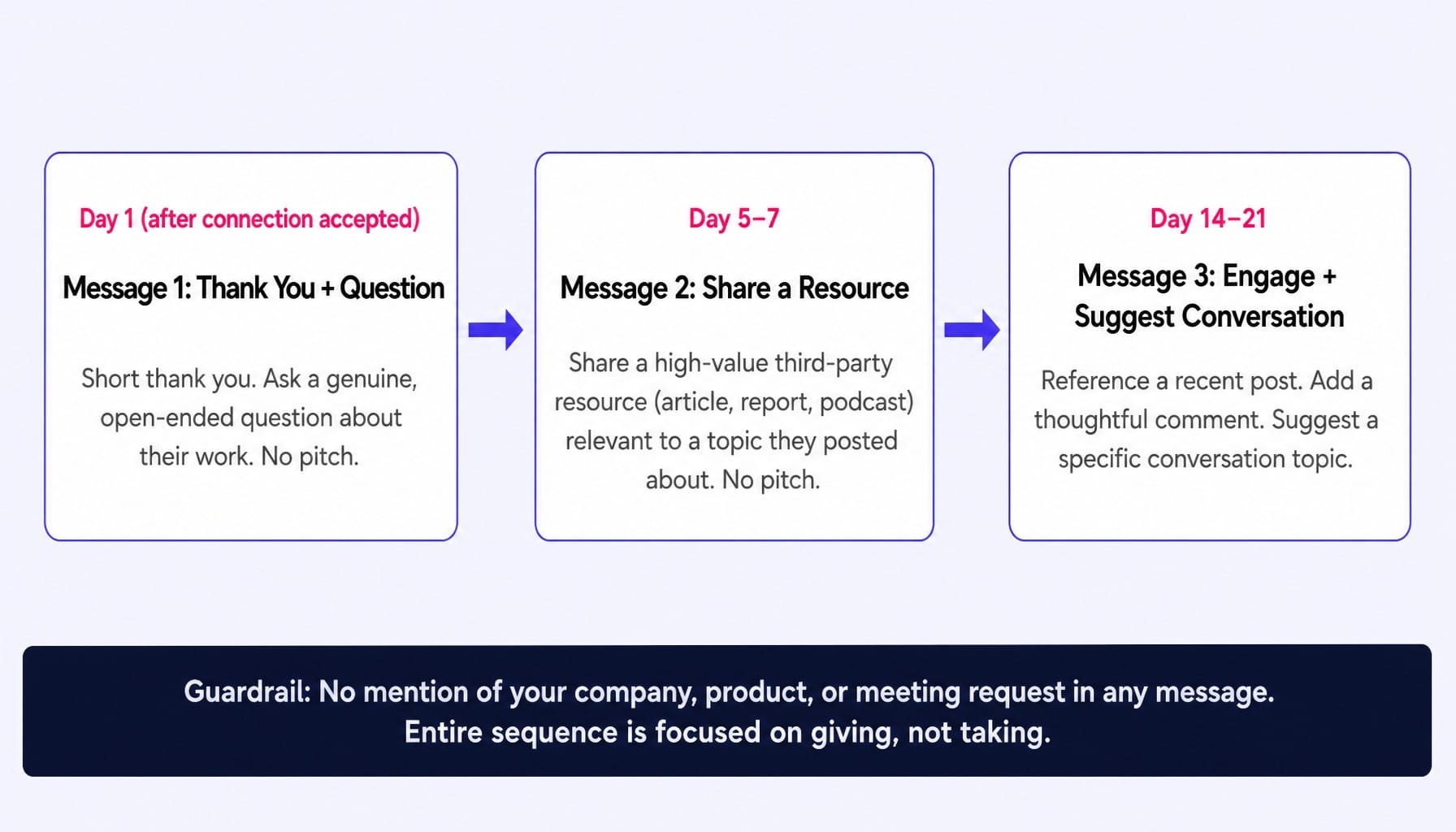
The goal of this sequence is to build enough familiarity that a future pitch lands in a warm context. The AI generates the sequence, but you must supply the recipient-specific inputs for each message.
[Sequence Logic]
- Message 1 (Day 1 - after connection): A short thank you note that asks a genuine, open-ended question about their work. No pitch.
- Message 2 (Day 5-7): Share a high-value, third-party resource (article, report, podcast) directly relevant to a topic they've posted about. Still no pitch.
- Message 3 (Day 14-21): Reference a recent post they made, add a thoughtful comment, and suggest a specific conversation topic based on that post.
[Example Context for Message 3]
- Recipient's recent post was about the difficulty of hiring good product marketers.
- My suggestion for a conversation: "It seems like we're both seeing a skills gap in the market around product marketing. Curious if you think the problem is a lack of talent or a failure of companies to train them."
[Guardrail] No message in this sequence should mention my company, product, or ask for a meeting. The entire sequence is focused on giving, not taking.
Comment and Engagement Prompt Templates
Substantive comments are one of the highest-ROI activities on LinkedIn, as they surface your name, headline, and expertise in other people's feeds.
Prompt for Writing Substantive Comments:
[Pasted Post Content]
[Paste the full text of the LinkedIn post you want to comment on here.]
[Comment Structure]
- Agree or respectfully disagree with one specific point from the post.
- Add a new piece of information: a personal experience, a related data point, or an alternative perspective. [This is what makes the comment valuable.]
- End with an open-ended question to the author or the audience. [Encourages a reply and extends the conversation.]
[Constraint] The comment must be under 100 words. [Keeps it concise and likely to be read.]
Prompt for Repurposing a Blog Post:
[Pasted Blog Post Content]
[Paste the full text of your blog post here.]
[Repurposing Instructions]
- Identify the single most counterintuitive or surprising claim made in the article.
- Rewrite that single claim as a LinkedIn post using the Storytelling Post format.
- The post should not summarize the blog post or link to it. It must stand on its own as a native LinkedIn piece. [This is content atomization—extracting one idea and making it native to the new platform, not just cross-posting a link.]
How to Build a Personal Prompt Library That Compounds
The prompts in this article are starting points, not endpoints. The real advantage comes from building and maintaining a personal prompt library—a set of tested, versioned prompts that evolve as your voice, audience, and content pillars change.
Start a simple database in Notion or a spreadsheet with columns for: Prompt Text, Format (e.g., Storytelling Post), Date Used, Output Rating (1-5), and Revision Notes. After using a prompt, save the output alongside it and rate it. Did it require minor edits or a total rewrite?
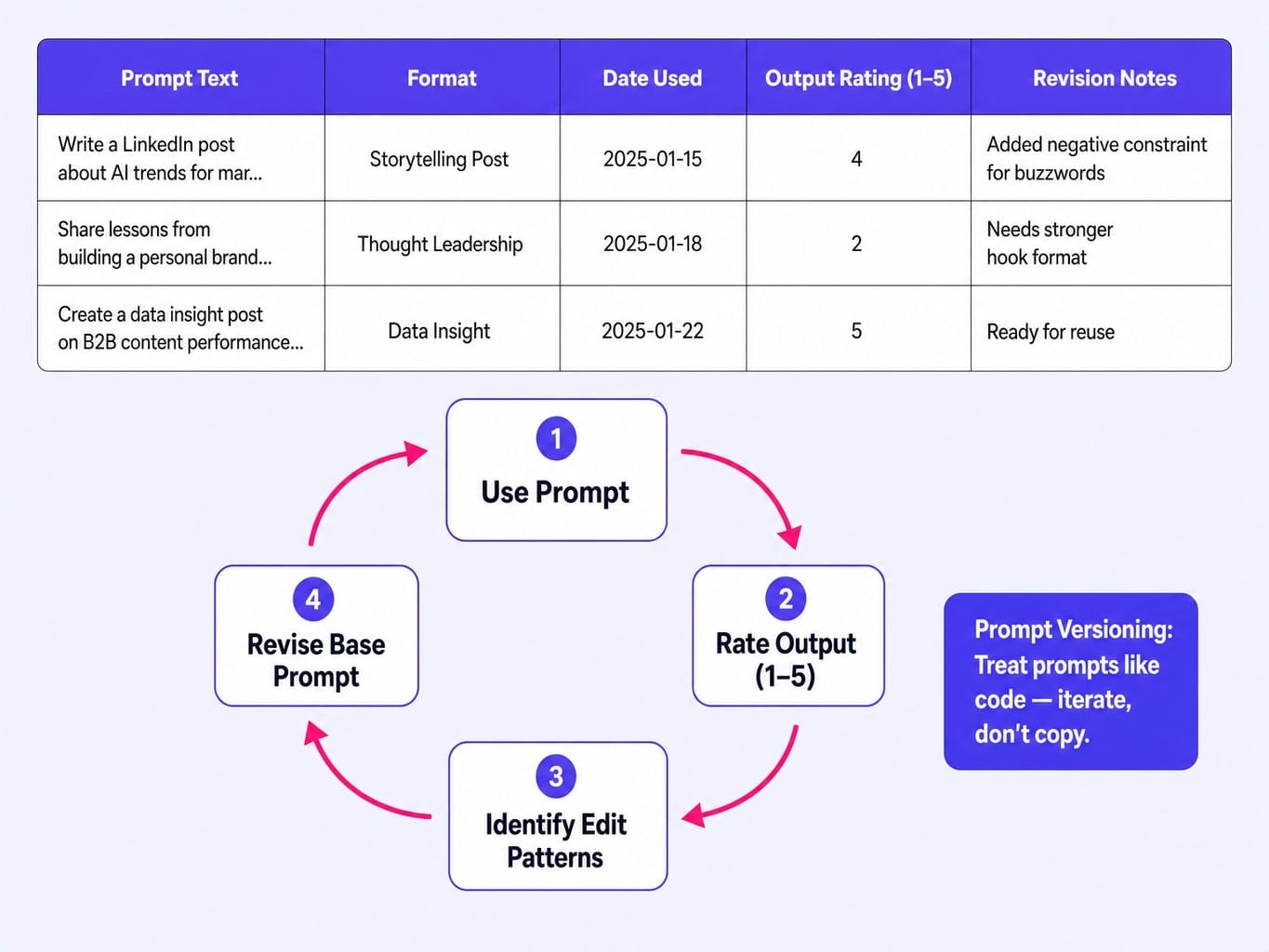
After you've used a prompt 5-10 times, look at the pattern of edits you're making. Are you always adding a specific negative constraint? Are you always tweaking the tone? Revise the base prompt to include those changes. This is prompt versioning—treating your prompts like code that gets iterated, not like templates that get copied. Prompt versioning matters because small wording changes in constraint layers can produce disproportionately different outputs, and without version tracking, you cannot isolate which change drove a performance shift.
This practice also protects against prompt drift, where a prompt that worked well three months ago produces different output today because the underlying model has been updated. Regular testing and refinement prevent your quality from degrading. You can use analytics from tools like Shield Analytics to see which post formats perform best, feeding that data back into your prompt refinement process.
The marketers who win on LinkedIn aren't the ones with the best single prompt; they are the ones with a system for continuously improving their prompts.
When the Bottleneck Is Not the Prompt — It Is the Bandwidth
You now have a system for improving your LinkedIn content. But for most lean B2B marketing teams, LinkedIn is just one channel among many. The same bandwidth constraint that makes meticulous prompt engineering feel overwhelming also applies to your website, your SEO, and your conversion rates. The backlog of good ideas keeps growing, but the capacity to ship them doesn't.
This is the execution gap Spike AI is built to close. It's the system that handles the other side of the equation. While you apply your expertise to the channels that require your unique voice, like LinkedIn, Spike AI continuously identifies and ships the highest-impact improvements across your website, SEO, and ads.
Every week, Spike AI prioritizes what will move qualified leads most, deploys the changes without needing engineering tickets or agency briefs, and measures the impact. This creates a compounding loop of optimization that runs in the background. The pitch isn't about a single feature; it's the answer to the question every lean marketer asks: how do I maintain quality and momentum across every channel when I'm a team of one, or three?
See how Spike AI turns your marketing backlog into weekly shipped improvements
Conclusion
The quality of your LinkedIn presence is determined by the quality of your prompts, not the quality of your AI tool. Generic prompts—lacking persona, structure, and guardrails—are a systemic failure that guarantees generic output. The scaffolding method fixes this by treating prompt construction as a layered, repeatable skill.
The ai prompts for linkedin in this guide cover nearly every B2B use case, but they are designed to be starting points for your own evolving library. The real work is in the iteration.
So here is the challenge: take one prompt from this article. Use it today. Rate the output. Then revise the prompt based on the edits you had to make. That single loop of execution and refinement will teach you more about effective prompt engineering than reading ten more articles. It's the first step in building a system, not just a post.
Frequently Asked Questions
Does LinkedIn penalize or flag AI-generated posts?
LinkedIn does not currently flag or suppress posts for being AI-generated. However, posts that read as generic or templated tend to receive lower engagement because they fail to generate meaningful comments or dwell time—both signals LinkedIn's algorithm uses to determine distribution. The risk is not detection; it is producing content that sounds like everyone else's AI output and gets ignored.
Which AI tool produces the best LinkedIn content — ChatGPT, Claude, or Gemini?
The tool matters less than the prompt. ChatGPT tends to produce more polished, formal output by default. Claude often excels at a more natural, conversational tone and follows complex instructions well. Gemini integrates with Google Workspace, which can be useful for research-heavy posts. The best approach is to test the same scaffolded prompt across two tools and see which output best matches your voice.
Can AI prompts help improve my LinkedIn SSI score?
Indirectly, yes. LinkedIn's Social Selling Index measures four pillars: establishing your professional brand, finding the right people, engaging with insights, and building relationships. Using linkedin ai prompts to optimize your profile, post consistently, and write substantive comments contributes directly to three of those four pillars. The SSI score itself is a lagging indicator; focus on the high-quality behaviors, not the number.
How do I batch-create a week of LinkedIn posts using AI prompts?
Use a technique called prompt chaining. Start with a single core insight, then use a sequence of prompts to generate five variations of that idea: one as a thought leadership take, one as a story, one as a data post, one as a contrarian angle, and one as a poll. This produces a week of content from one theme while maintaining format variety, which audiences and the algorithm reward.
Are there AI prompts specifically designed for LinkedIn newsletters?
Yes, but they require a different structure. LinkedIn newsletters allow longer-form content (up to 40,000 characters) and are distributed via email to subscribers. A good newsletter prompt should specify a structure with an editorial hook, 3-4 distinct sections with subheadings, and a closing CTA. Use chain-of-thought prompting—ask the AI to outline the newsletter first, then expand each section separately—to maintain coherence.
What is the difference between AI-written and AI-assisted LinkedIn content?
AI-written content is generated by a prompt and posted with minimal editing. AI-assisted content uses AI to generate a first draft or an outline, which a human writer then heavily rewrites with their own specific examples, voice, and opinions. For LinkedIn, AI-assisted content consistently outperforms AI-written content because it carries the specificity and genuine experience that builds credibility and earns engagement.