SaaS PPC Strategy for 2026: Why Most Campaigns Leak Budget & How to Fix the Feedback Loop
TL;DR
- Stop optimizing for MQLs. When you set 'demo request' as your primary conversion, you train Google's algorithm to find people who fill out forms, not people who become customers.
- Feed your CRM data back to Google Ads. Use offline conversion import to pass SQL, opportunity, and closed-won data back to the ad platform, giving the bidding algorithm a true signal of value.
- If you have fewer than 30 target conversions per month, use a "micro-conversion ladder." Optimize for a higher-frequency action (like pricing page visits) that correlates with pipeline, while importing revenue data as a secondary signal.
- Run Google and LinkedIn as a unified system. Use LinkedIn to generate demand within target accounts and Google to capture that demand when they search later. Measure the combined impact, not channel-level ROAS.
- Protect your budget by adding brand terms as negative keywords in Performance Max campaigns to prevent cannibalization and by building a SaaS-specific negative keyword list to block irrelevant clicks.
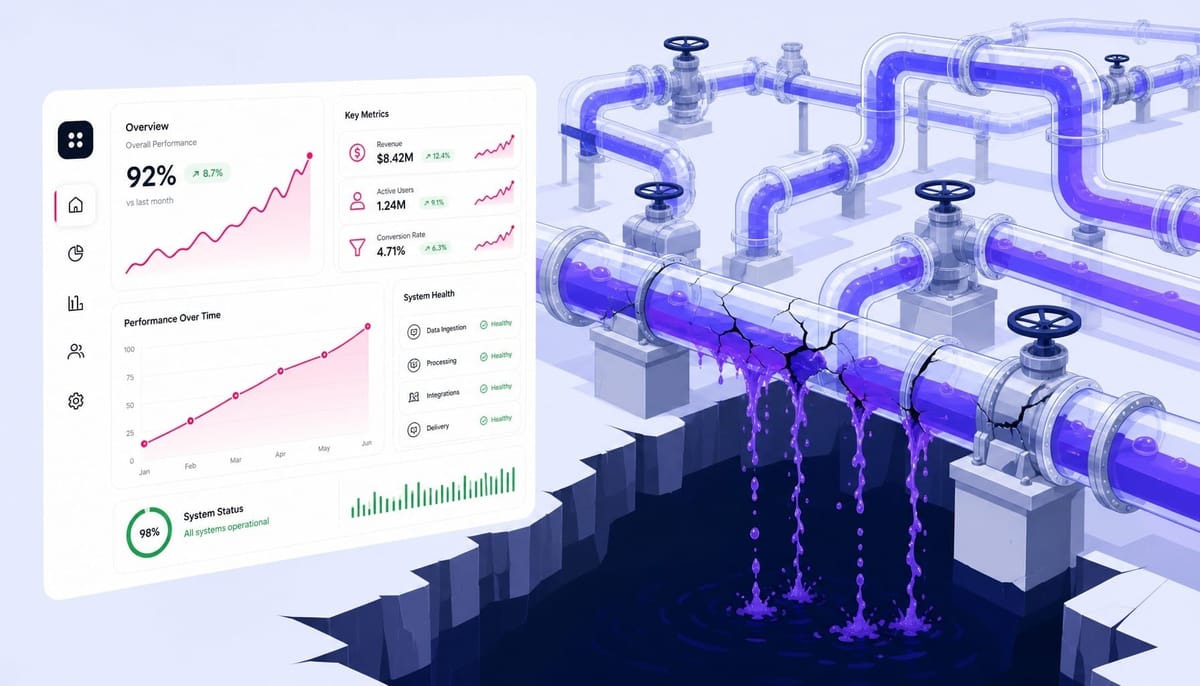
Your team is celebrating. Over the last quarter, you've driven down the cost-per-lead from your Google Ads campaigns by 40%. The charts are all up and to the right. Then you get to the pipeline review meeting. SQL volume from paid channels is flat. Worse, the sales team mentions that close rates on leads from paid search have actually declined.
The leads got cheaper because the algorithm learned to find people who are good at filling out forms—not people who are good at buying your software.
This isn't an ad copy or keyword problem. It's a feedback loop problem. The performance of your SaaS PPC campaigns is determined by the quality of the conversion signal you feed Google's bidding algorithm. Most SaaS teams are feeding it the wrong one.
This guide walks through how to rebuild that feedback loop. We'll cover the architecture for connecting your CRM to your ad platform, how to manage the low-conversion-volume challenge unique to B2B, and how to structure campaigns so your budget compounds into pipeline instead of vanishing into form fills.
Why Optimizing SaaS PPC for MQLs Trains Google to Find the Wrong People
When you set 'demo request submitted' or 'free trial signup' as your primary conversion action, Google's algorithm uses auction-time bidding signals to find more people who exhibit the behavior of filling out a form. This is not the same as finding people who will become paying customers.
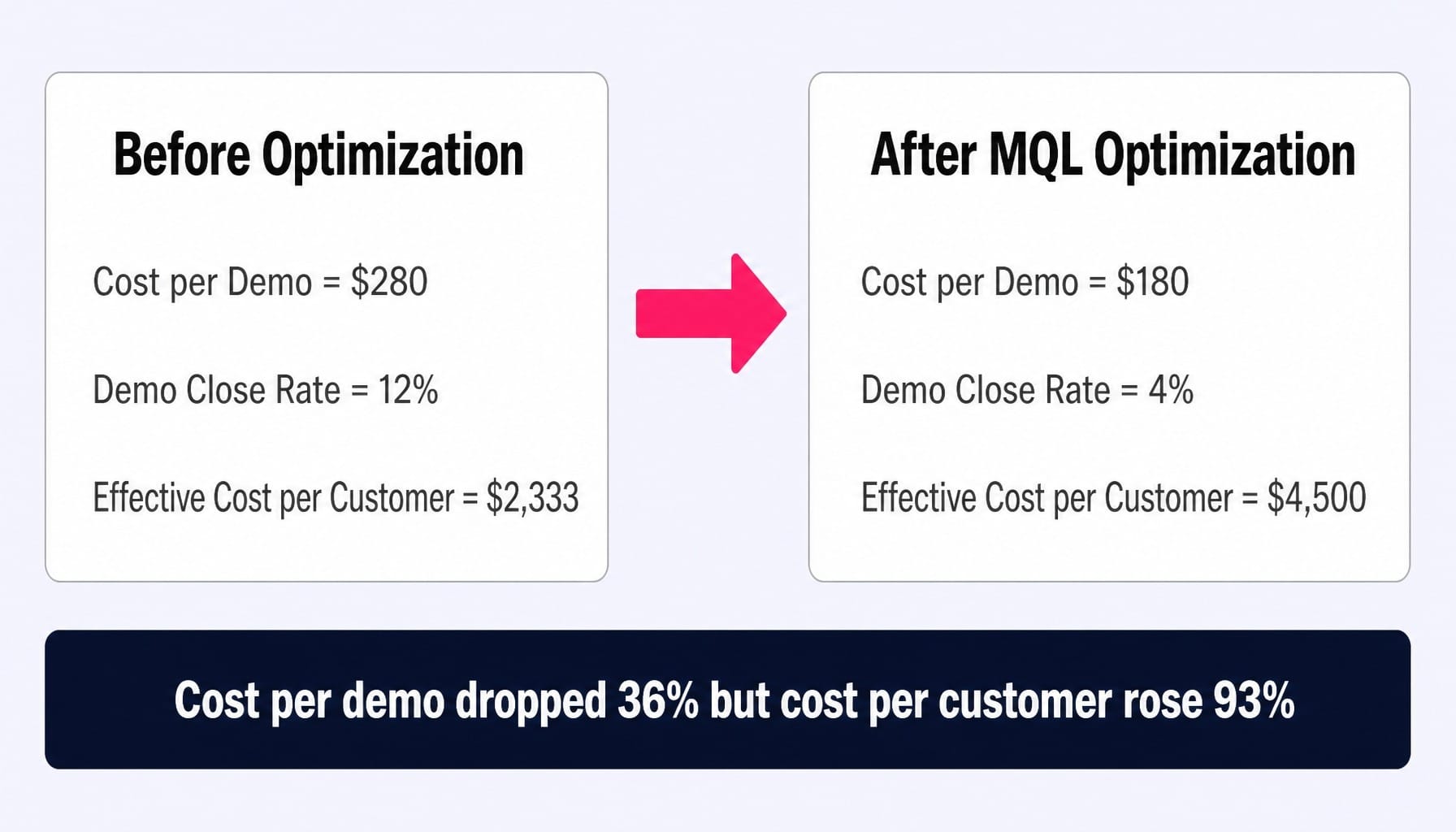
Let's walk through a scenario. A SaaS company selling compliance software to mid-market IT teams sets a target CPA (tCPA) bid strategy on demo requests. Over eight weeks, the cost per demo drops from $280 to $180. A clear win. But when they pull a report matching Google Click IDs (GCLIDs) to opportunity data in Salesforce, they find the truth: the new, cheaper $180 demos close at 4%, while the original $280 demos closed at 12%. The effective cost to acquire a customer actually went up. The algorithm got better at the wrong thing.
This happens because the correlation between an MQL and a closed deal in B2B SaaS is often weak. A typical MQL-to-SQL pass rate hovers between 15-30%, meaning 70-85% of the "conversions" you're feeding the algorithm are, from a revenue perspective, noise.
The signals that predict a form fill—browsing behavior, time of day, device type—are fundamentally different from the signals that predict a purchase, like company size, budget authority, and the urgency of their business pain. By optimizing for MQLs, you are inadvertently telling one of the world's most powerful machine learning systems to ignore business context and find you more cheap clicks. The single most consequential decision in your SaaS PPC setup is the conversion action you choose. It matters more than your keywords, ad copy, or budget.
Building a Conversion Architecture That Teaches Google What a Real SaaS Customer Looks Like
The fix isn't to stop tracking MQLs. It's to build a conversion architecture that gives Google progressively stronger signals about what a real customer looks like. This is done by creating a hierarchy of conversion actions that bridge the gap between your ad platform and your CRM.
This approach uses Google's primary and secondary conversion actions. Secondary actions (like a key page view or content download) provide observational data to the algorithm without directly steering bid optimization. Primary actions (like an SQL, a qualified opportunity, or a closed-won deal) are the signals you tell the algorithm to actively optimize for.
The challenge, of course, is volume. Google's own guidance suggests you need at least 30-50 conversions per month for a tCPA or tROAS strategy to work effectively. For many SaaS businesses, using 'closed-won' as a primary action is impossible—you simply don't have enough volume. This is where the hierarchy becomes your primary strategic tool.
Setting Up a Conversion Action Hierarchy in Google Ads
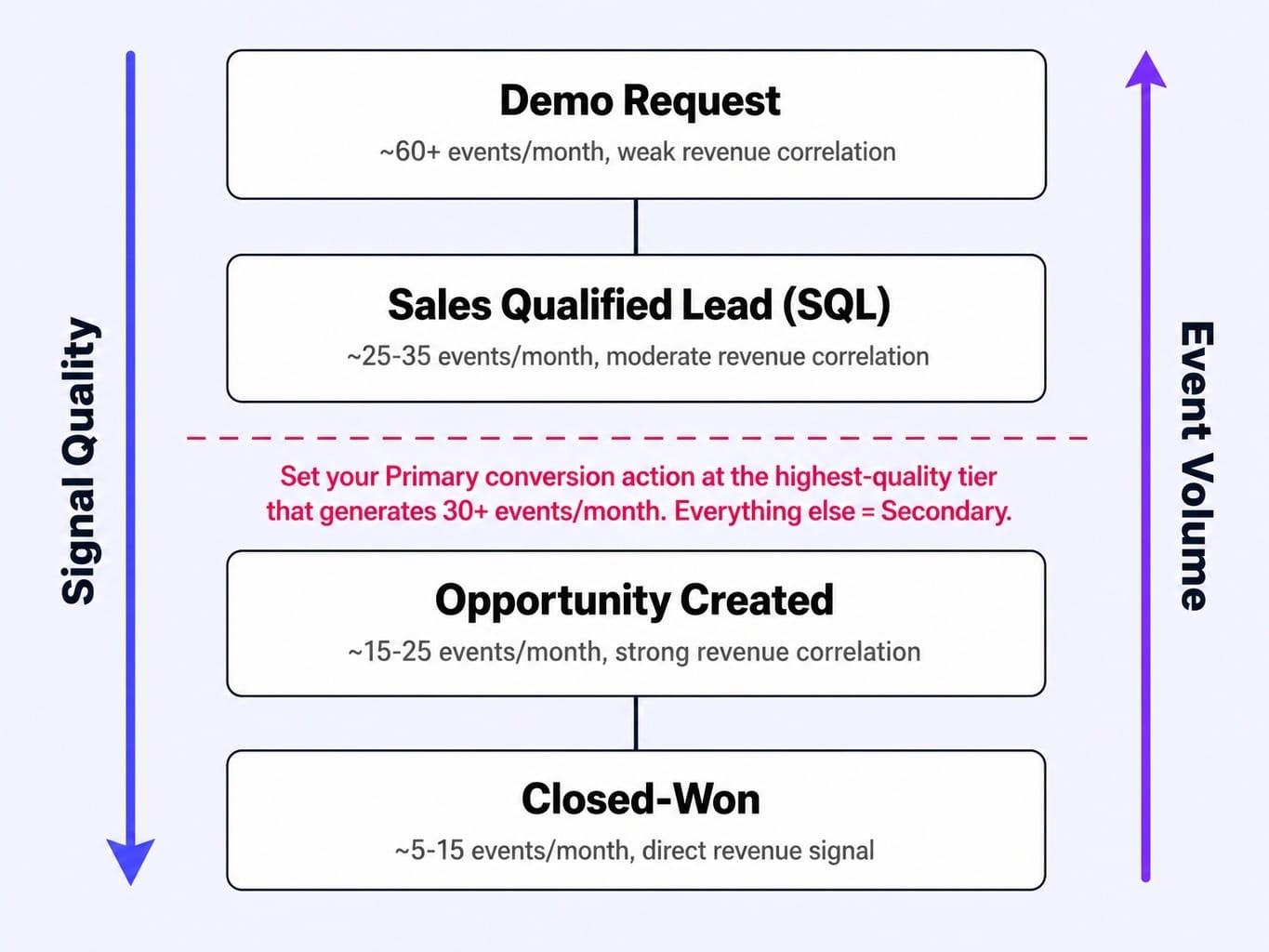
First, create multiple conversion actions in your Google Ads account, mapping to each meaningful stage of your funnel: Demo Request, Sales Qualified Lead (SQL), Opportunity Created, and Closed-Won.
Next, you make a strategic choice. Set only the highest-quality action for which you have sufficient volume as 'Primary' (this tells Google to include it in bidding optimizations). Set all other actions to 'Secondary' (observed for reporting, but not used for bidding).
This is a balancing act. If you only get 10 closed-won deals from paid search per month, that's not enough signal. The algorithm will be stuck in a perpetual learning phase or make poor decisions. In that case, you might set 'Opportunity Created' as your primary action, assuming that stage generates 25-30 events per month. This gives the algorithm a stronger, more qualified signal than a raw MQL, while still providing enough data to function. The right primary action depends entirely on your sales velocity, not a universal best practice.
Importing Offline Conversions from Your CRM
This entire system depends on one critical mechanism: closing the loop between the ad click and the downstream CRM event. This is done by importing offline conversions.
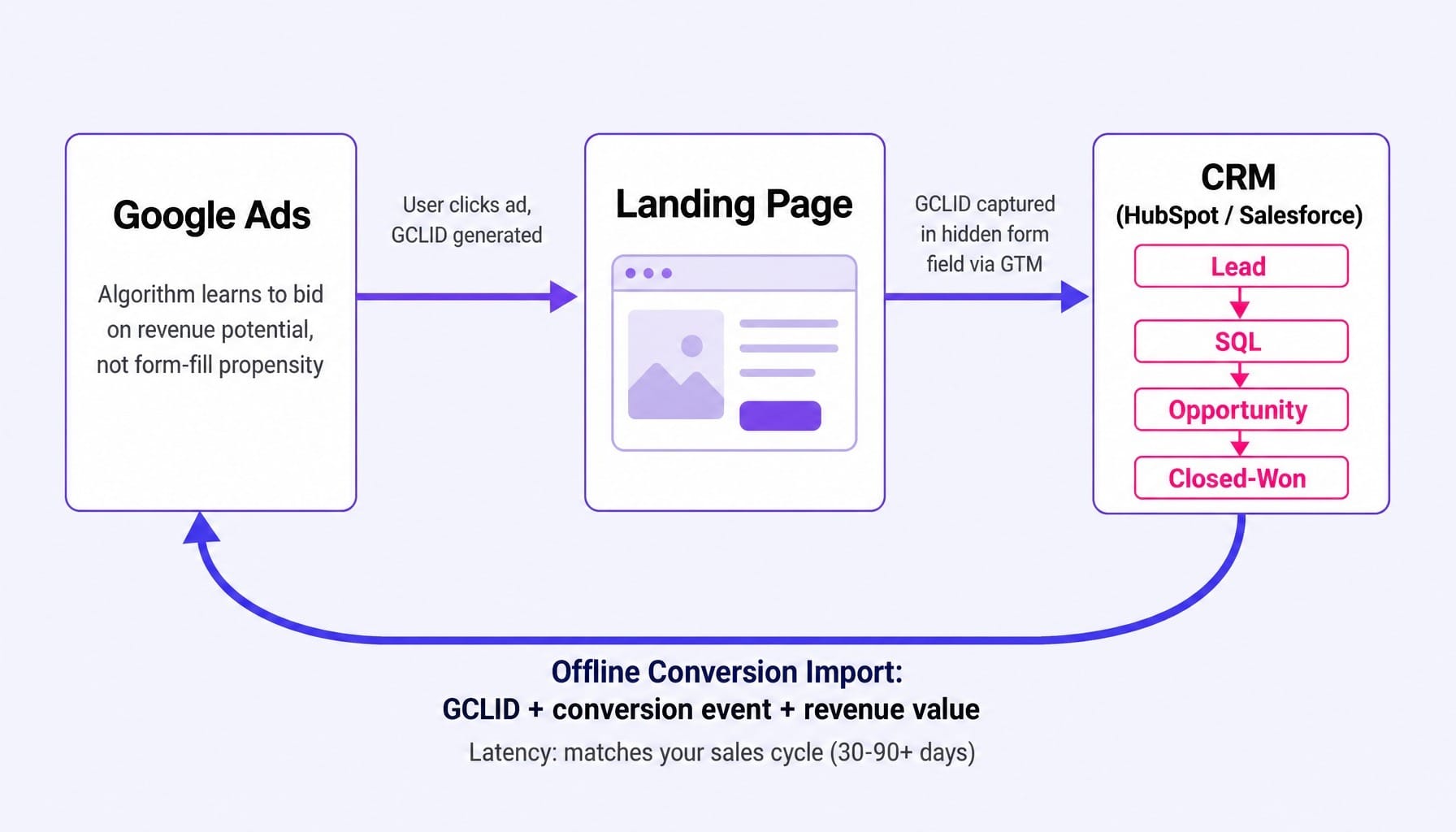
The mechanics rely on the GCLID. When a user clicks your ad, a unique GCLID is appended to the URL. You capture this ID in a hidden field on your landing page form (typically configured via Google Tag Manager) and pass it into your CRM along with the lead's information. It becomes a permanent part of their contact record in HubSpot or Salesforce.
Weeks or months later, when that lead becomes an SQL or a closed-won customer, your CRM pushes that event—along with its original GCLID—back to Google Ads. This tells Google, "The person who clicked this ad three months ago just became a customer worth $20,000."
This is the feedback that transforms your campaigns. The latency matters. If your sales cycle is 90 days, it will take the algorithm months to accumulate enough data to optimize effectively. But once it does, it starts bidding based on revenue potential, not form-fill propensity.
How to Run SaaS PPC Profitably With Fewer Than 30 Conversions Per Month
The most common constraint for B2B SaaS PPC is low conversion volume. If you're getting 12 demo requests per month across three campaigns, that's only four per campaign—nowhere near the 30-50 events Google recommends for its automated bidding to work reliably.
Teams typically make one of two mistakes here. They either consolidate all their campaigns into one to pool conversion data, which destroys their ability to segment by intent, or they revert to manual CPC bidding and lose all the power of Google's auction-time bidding signals.
There's a better, albeit imperfect, way: the micro-conversion ladder.
The goal is to identify an intermediate action that happens more frequently than your target conversion but still correlates strongly with pipeline quality. This becomes your temporary primary conversion action. Examples might include:
- A visit to your pricing page.
- Reaching the demo scheduling page (the step after the form is submitted).
- A second session from the same user within seven days.
Here's the rule of thumb: your primary conversion action should generate at least 30 events per month, per campaign. If it doesn't, move one step up the funnel until you find an action that does. The critical part is validation. Before you make this switch, pull a 90-day cohort analysis from your CRM to confirm that users who complete this micro-conversion are significantly more likely to become customers than those who don't.
For example, a SaaS company with only 15 demo requests per month might find that pricing page visits generate 45 events per month. They can set 'pricing page visit' as the primary conversion to give the algorithm enough data, while continuing to import demo-to-SQL data as a secondary action. It's a pragmatic compromise that gives the algorithm fuel without optimizing for a pure vanity metric.
Read more: Data-Driven CRO: Evolve Your Marketing Strategy for Revenue | Spike AI
Running Google Ads and LinkedIn Ads as a Unified SaaS PPC System
Most SaaS teams manage Google Ads and LinkedIn Ads in separate silos. They have different owners, different budgets, and different reports. This creates a massive blind spot. You can't see whether your next dollar is best spent capturing existing demand on Google or creating new demand on LinkedIn.
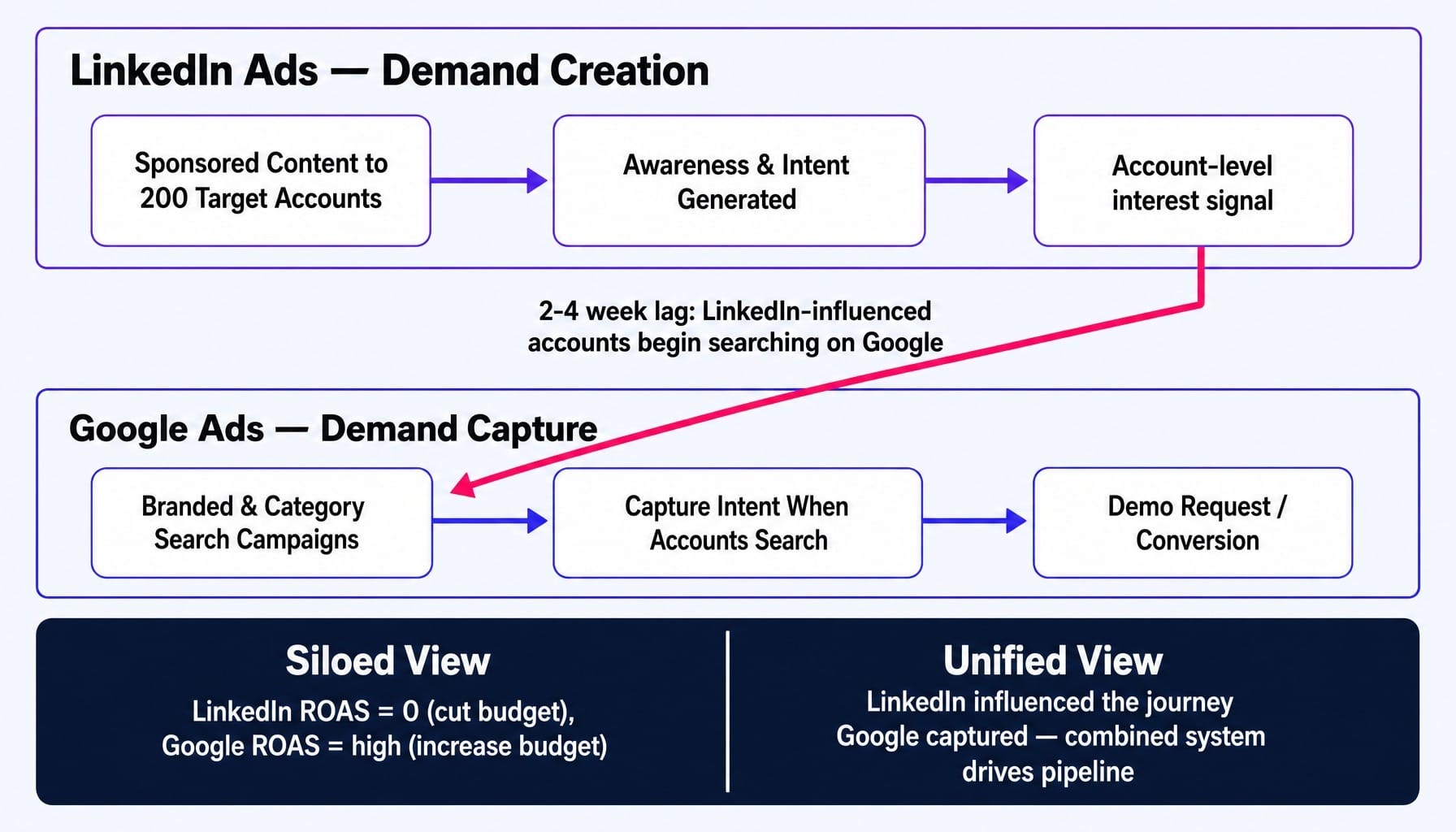
In B2B SaaS, these two platforms serve different roles in the same buying journey. They are sequential, not parallel. LinkedIn is for creating awareness and generating intent among highly specific accounts and job titles. Google is for capturing that intent when those same people start searching for solutions days or weeks later.
Consider this concrete example: a SaaS company targeting VP-level operations leaders runs a sponsored content campaign on LinkedIn to a specific list of 200 target accounts. Two weeks later, they see a measurable lift in branded searches and category-level queries coming from users at those companies.
If the team treats these as separate channels, their multi-touch attribution model will show LinkedIn spend produced zero direct conversions, while Google's ROAS looks great. They might even cut the LinkedIn budget. With a unified view from a tool like HockeyStack or Dreamdata, they see the full picture: LinkedIn influenced the journey that Google captured. The real optimization unit isn't the channel; it's the account's journey across both. Channel-level ROAS in B2B SaaS marketing is often a dangerous lie.
Protecting Your SaaS PPC Budget from Platform Cannibalization and Wasted Spend
Many SaaS teams have a nagging feeling their PPC budget is leaking, but they can't pinpoint the source. Two of the most common leaks are Performance Max campaigns quietly eating your branded search traffic and poor negative keyword management draining budget on irrelevant clicks. Both are fixable with proactive monitoring.
How Performance Max Cannibalizes Branded SaaS Search Campaigns
Performance Max (pMax) campaigns have access to all of Google's ad inventory, including Search. If you run pMax alongside a standard branded search campaign, the pMax campaign will often win the auction for your own brand name. Why? Because Google's algorithm sees branded clicks as easy, high-probability conversions, which inflates pMax's reported performance.
The diagnostic is simple: pull a search term report from your dedicated branded campaign and check your impression share month-over-month since launching pMax. If your branded campaign's impression share has bled out while pMax conversions have climbed, you've found cannibalization.
The fix is to add your brand terms as negative keywords to the pMax campaign. This is now possible through brand exclusion lists or campaign-level brand restrictions in the Google Ads interface. Be aware that pMax's reported ROAS is often artificially high because it takes credit for conversions that your cheaper, high-intent branded campaign would have captured anyway.
Building a Negative Keyword List That Actually Protects SaaS Ad Spend
Generic negative keyword lists don't work for SaaS. They miss the unique patterns of junk traffic that plague the industry. Simple terms like 'free,' 'download,' 'tutorial,' 'salary,' and 'login' attract clicks from users who will never buy.
The more insidious problem comes from broad match keywords triggering on adjacent-but-wrong intent. For instance, a project management SaaS bidding on 'project management' gets clicks from students searching for 'project management assignment help.' This is a slow, silent budget drain.
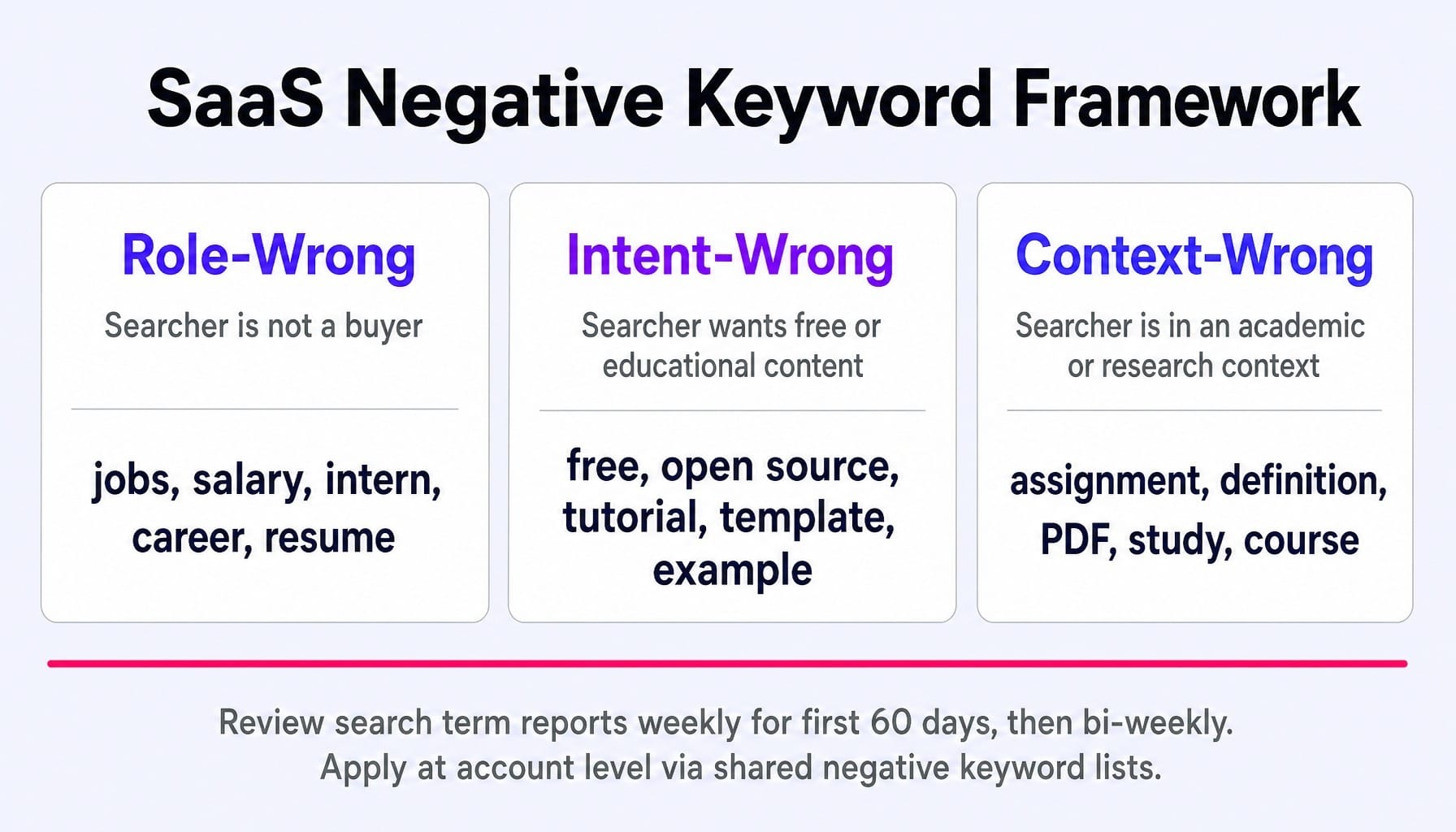
Institute a regular search term mining cadence: review your search term reports weekly for the first 60 days of a new campaign, then bi-weekly after that. Build a shared negative keyword list at the account level so your exclusions apply everywhere.
A simple framework for your list can help:
- Role-Wrong: jobs, salary, intern, career, resume
- Intent-Wrong: free, open source, tutorial, template, example
- Context-Wrong: assignment, definition, PDF, study, course
This creates a repeatable process, not just a static list, to protect your ad spend.
How to Allocate SaaS PPC Budget Between Demand Capture and Demand Generation
Every SaaS PPC budget has to manage a core tension: the split between demand capture and demand generation.
- Demand Capture: Bottom-of-funnel search campaigns targeting people already looking for your category, brand, or competitors.
- Demand Generation: Top- and mid-funnel campaigns (often on LinkedIn or YouTube) that create awareness and intent among your ICP who aren't actively searching yet.
Most teams default to 100% demand capture because it's easier to attribute and shows a clearer, faster ROAS. But this strategy has a ceiling. There are only so many people searching for your solution each month. Once you've captured that existing volume at an efficient CPA, the only way to grow is to create new demand.
Here's a starting heuristic: allocate 70% of your budget to demand capture (branded search, competitor conquesting, high-intent category keywords) and 30% to demand generation (LinkedIn account-based campaigns, content promotion to ICP audiences).
This isn't a static rule. Adjust it based on two key signals:
- If your branded search volume is flat quarter-over-quarter, you are likely under-investing in creating new demand. It's time to shift more budget toward demand generation.
- If your demand generation campaigns show no corresponding lift in branded search or direct traffic within 6-8 weeks, the targeting or creative is likely off.
This framework gives you a concrete starting point and the diagnostic signals needed to adjust your allocation as your market and brand mature.
When the Feedback Loop Needs to Run Faster Than Your Team Can Ship
This entire strategy hinges on a tightly integrated feedback loop between your ad platforms, your landing pages, and your CRM. But maintaining it is a constant effort. It requires weekly search term mining, continuous conversion action tuning, cross-channel attribution analysis, and—critically—optimizing the ad-to-landing-page message match.
For lean SaaS marketing teams, this is the exact bandwidth problem that causes the feedback loop to break. Insights pile up in a backlog, and the system decays. SaaS PPC isn't a channel you can "set and forget" for a quarter; it's a dynamic system that demands continuous adjustment to compound results.
This is the execution gap Spike AI is built to close. Instead of just giving you a dashboard or a list of recommendations, Spike AI's system identifies the highest-impact optimization across your PPC landing pages and conversion paths—and then ships the fix. A deployed change, every week. Things like improving your landing page experience score or tightening ad-to-landing-page message match are exactly the kinds of optimizations that compound when shipped weekly but stall when they sit in a backlog.
See how Spike AI keeps your SaaS PPC feedback loop running — without adding headcount.
Conclusion
The most important shift in thinking for any modern SaaS marketer is this: SaaS PPC is not an ad management problem; it's a systems problem. The quality of your feedback loop is what determines whether your ad spend compounds into predictable pipeline or dissipates into low-quality form fills.
The conversion signal you feed the algorithm matters more than your ad copy. The architecture connecting your CRM to your ad platform is the foundation that makes everything else work. The teams that win are those who treat paid search as a continuous system to be tuned, not a quarterly campaign to be managed.
As AI-driven bidding becomes ever more powerful in 2026, the teams that feed it the cleanest, most revenue-centric signal will pull away from the pack. The gap between optimizing for MQLs and optimizing for pipeline will only widen.
Frequently Asked Questions
What is a realistic cost per demo request for B2B SaaS PPC campaigns?
A typical range is $150–$500 for mid-market SaaS or $50–$150 for SMB-focused products, but cost per demo is the wrong metric to track in isolation. The only benchmark that matters is your cost per qualified opportunity. A $400 demo that closes at 15% is far cheaper than a $150 demo that closes at 3%. Work backward from your LTV and target LTV:CAC ratio to find your true allowable CPA.
How do you track SaaS PPC conversions when the sales cycle is 90 days or longer?
The solution is offline conversion import from your CRM. Set up GCLID capture on all your forms and store the ID in HubSpot or Salesforce. Then, schedule a weekly import of your key CRM events (like SQL, Opportunity, or Closed-Won) back into Google Ads. This effectively extends your attribution window to match your sales cycle and gives the algorithm a true signal of revenue.
Should SaaS companies bid on competitor brand names in Google Ads?
Yes, but with clear expectations. Competitor conquest campaigns have higher CPCs and lower conversion rates because searchers already have a preferred solution. They work best when your ad copy and landing page highlight a sharp, specific differentiator. Monitor close rates from these campaigns separately; if they are significantly below your account average, the spend may not justify the low-quality volume.
How should you structure a Google Ads account for a multi-product SaaS platform?
Create separate campaigns for each product line. Each product has unique keywords, value propositions, and potentially different ideal customer profiles. This structure allows you to set product-specific budgets and bidding targets that align with each product's individual unit economics. Within each campaign, use ad groups to segment by intent theme (e.g., category terms, competitor terms, feature-specific terms).
What landing page conversion rate should B2B SaaS companies target from PPC traffic?
A reasonable benchmark for a demo request landing page is 3-8%. Anything below 3% often indicates a message match problem between your ad and your page, or too much friction in your form. A rate above 10% is rare and could be a sign that you're attracting unqualified traffic with an offer that's too broad. Always measure conversion rate by campaign and keyword theme, not as a blended site-wide average.
What role does AI-generated ad copy play in SaaS PPC performance in 2026?
Google's responsive search ads already rely on AI to mix and match headlines and descriptions. For SaaS teams, this means providing the algorithm with a high volume of distinct, varied headlines is more important than crafting three "perfect" ones. AI tools can accelerate this process, but your strategic constraint is still message-to-market fit. Use AI for variation and speed; use human judgment for positioning and value proposition.