SaaS Video Marketing in 2026: Why Distribution Beats Production
TLDR
- Most SaaS video strategies fail by investing 80% of effort in production and 20% in distribution. Reverse this ratio to win.
- Stop making polished explainers. Raw, screen-recorded videos addressing specific use cases outperform them mid-funnel by building trust and velocity.
- Build a weekly creation cadence. One 30-minute screen recording per week compounds into a library of 50+ assets a year that fuels sales and organic traffic.
- Measure video pipeline influence, not just views. Integrate Wistia or Vidyard with your CRM to track which videos prospects watch before they buy.
- The highest-converting video placements for B2B SaaS are embedded on landing pages and in personalized sales emails, not just on a YouTube channel.
Your team just spent $15,000 and six weeks producing a polished 90-second explainer video. It has custom animation, a professional voiceover, and a slick soundtrack. You launch it on the homepage, publish it to YouTube, and watch it accumulate 400 views over three months with no measurable pipeline impact. You've probably been there.
The problem wasn't the video. It was the system—or lack thereof.
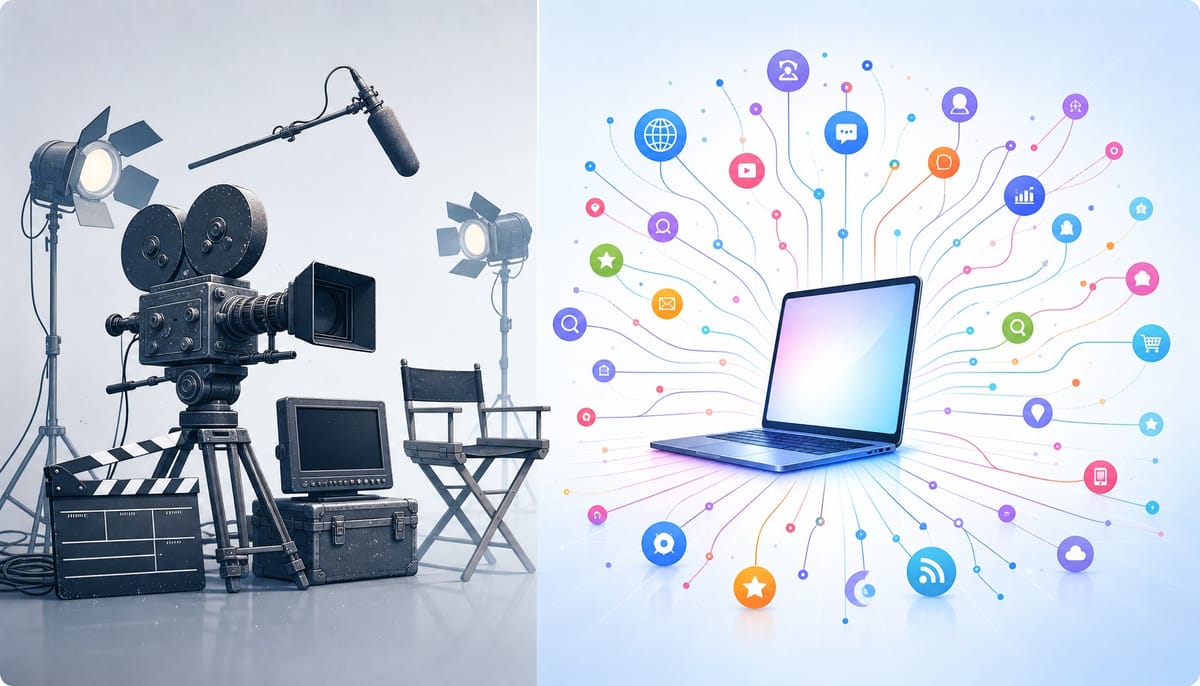
The central failure of most SaaS video marketing is treating it as a production problem instead of a distribution and measurement system. While 91% of businesses now use video, only a fraction can confidently attribute revenue to it. The teams that succeed invest 20% of their effort in creation and 80% in placement, repurposing, and measurement—the exact inverse of what most SaaS companies do.
This playbook isn't about making better videos. It's about building a better system around them. We'll cover the funnel-mapped video types that convert, the 5-step process for building a video engine, the distribution mechanics that drive pipeline, and the attribution model most teams skip entirely.
What Types of Videos Should a SaaS Company Create at Each Funnel Stage?
SaaS video marketing maps specific video formats to each stage of the buyer journey—awareness, consideration, and decision—so that each video serves a measurable conversion function rather than existing as a standalone creative asset. The mistake most teams make is producing awareness-stage content (like a general explainer video) when their funnel is actually leaking at the consideration or decision stage.
Not all videos are created equal. Vidyard's benchmark data shows that product demo videos have a 65% average completion rate, a stark contrast to the 40% for generic brand videos. This isn't because demos are inherently more interesting; it's because they are served to an audience with higher intent. Aligning the video format with the prospect's stage is the first step in building a system that works.
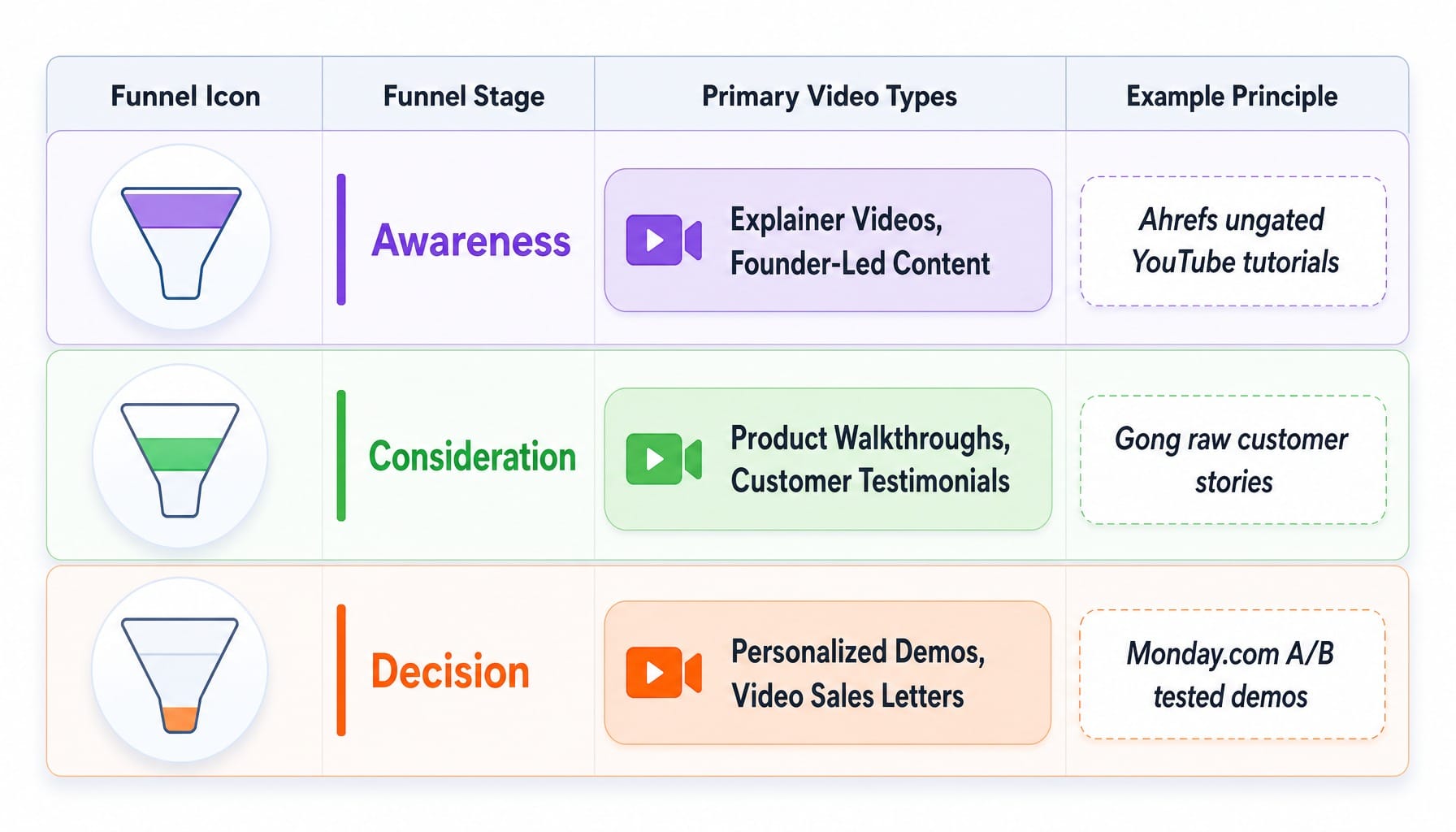
Awareness: Explainer Videos and Founder-Led Content
At the awareness stage, your video must answer one question in under 90 seconds: "What problem does this solve and for whom?" The canonical example is Slack's original explainer video, which was credited with driving early adoption by clearly articulating the pain of disorganized communication. It sold the problem before it sold the product.
For pre-Series A SaaS, however, the highest-ROI awareness channel is founder-led short-form video. Founders like Loom's Joe Thomas and formerly Drift's David Cancel built massive audiences through raw, authentic LinkedIn videos long before paid channels scaled. The transferable principle is simple: at the awareness stage, authenticity and specificity outperform production value. A $200 Loom recording from a founder that nails a specific customer pain point can easily outperform a $10,000 animated explainer that speaks to no one.
Consideration: Product Walkthroughs and Customer Testimonials
Here is where most teams blur a critical distinction. An explainer video answers "what does this do?" A product walkthrough answers "how would I actually use this in my workflow?" Walkthroughs are for prospects who understand the problem and are now evaluating the tool's usability. This is where you show the real UI, not a stylized animation. Interactive demo platforms like Navattic or Storylane even allow prospects to self-serve this experience.
Customer testimonials also belong here, but the most effective ones are not polished brand films. They are screen-recorded interviews where a customer walks through their actual dashboard, showing real data and real results. The goal of consideration-stage video is to reduce perceived risk, not just increase excitement. The transferable principle: your prospect must leave feeling "I can see myself using this," not just "this looks impressive."
Decision: Personalized Demo Videos and Video Sales Letters
At the decision stage, personalization beats polish. The most effective tactic here is the async video sales motion: replacing a portion of live demos with personalized, recorded walkthroughs using tools like Vidyard or Sendspark. Sales teams record 3-minute Loom videos addressing a specific prospect's use case and embed them in outreach emails. According to Vidyard, this single tactic can increase click-through rates by over 300%.
Another underused format is the video sales letter (VSL), a 5-8 minute video on a landing page that replaces long-form sales copy to directly address final objections and drive a conversion action. The transferable principle is directness. At this stage, the prospect is looking for a reason to choose you. A personalized video that speaks directly to their needs is the most efficient way to give them one.
The Overproduction Trap: Why Raw Videos Outperform Polished Ones Mid-Funnel
Let's run through a familiar scenario. A B2B SaaS company spends $25,000 and 12 weeks on a 90-second animated explainer. Custom illustrations, professional voiceover, the works. The video is beautiful. It sits on the homepage, gets embedded in one email campaign, and generates 1,200 views over six months. That's roughly $20 per view, with zero attributable pipeline.
Meanwhile, their head of product records a 4-minute screen capture on Loom, walking through a new feature. No editing, no music. She posts it on LinkedIn. It generates 15 inbound demo requests in a week.
This is the overproduction trap: the belief that video quality is primarily about production value rather than message specificity and distribution velocity.
Wistia's research confirms this. Videos shot on webcams have comparable engagement rates to professionally produced videos when the content is specific and useful. For videos under two minutes, engagement holds steady at over 70% regardless of production budget. The content's relevance, not its gloss, is what holds attention.
The real cost of overproduction isn't the budget. It's the opportunity cost. In the 12 weeks spent on that one polished video, the team could have shipped 15 raw screen recordings, each targeting a different use case, customer objection, or competitor comparison. You've been optimizing for the wrong variable. The goal isn't to create a perfect video; it's to build a library of useful assets that your sales and marketing teams can deploy systemically.
How to Build a SaaS Video Marketing System in 5 Steps
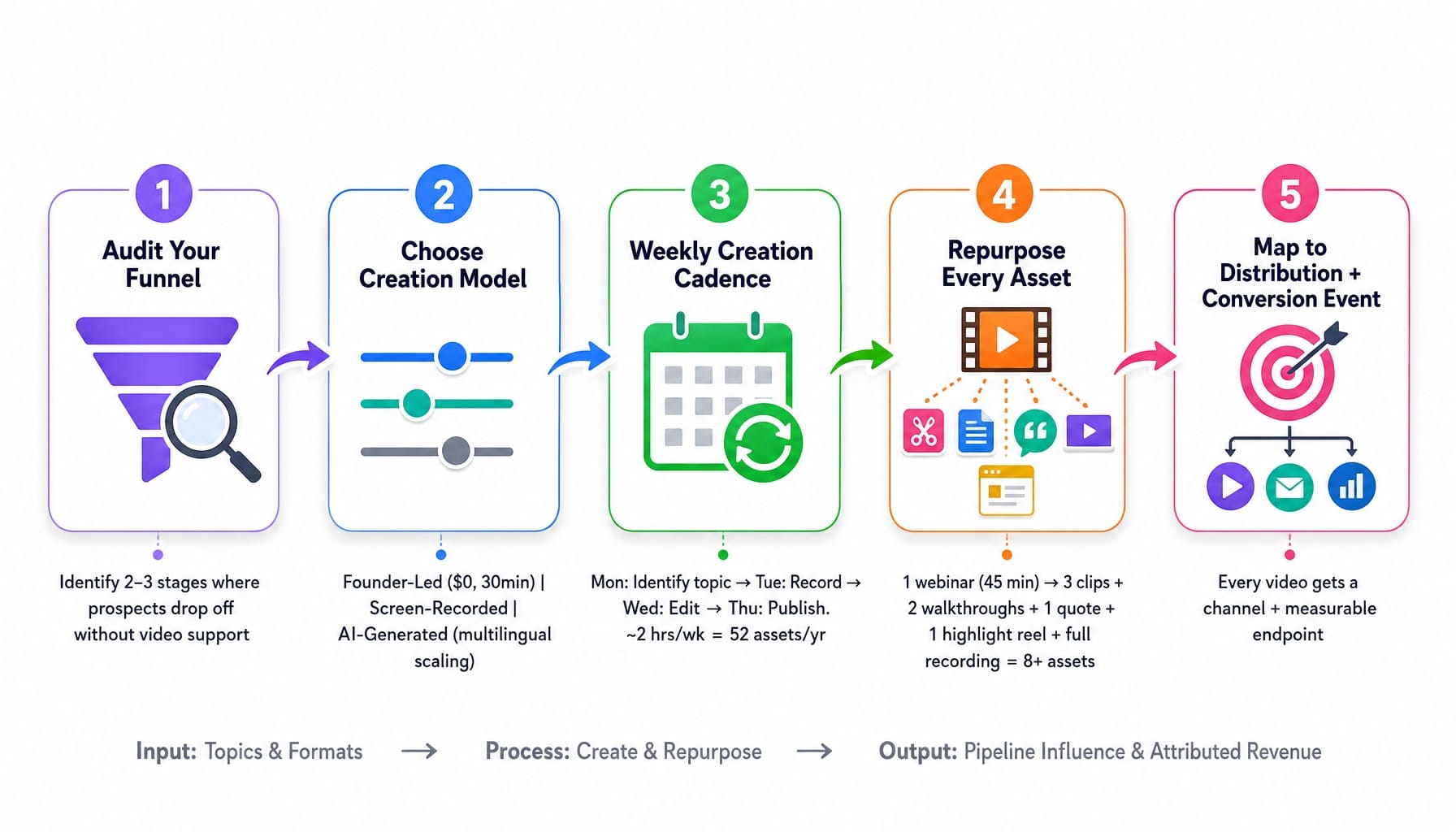
A SaaS video marketing strategy is not a content calendar—it is a system with inputs (topics, formats), a process (creation, repurposing), and outputs (pipeline influence, attributed revenue). Here's how to build it.
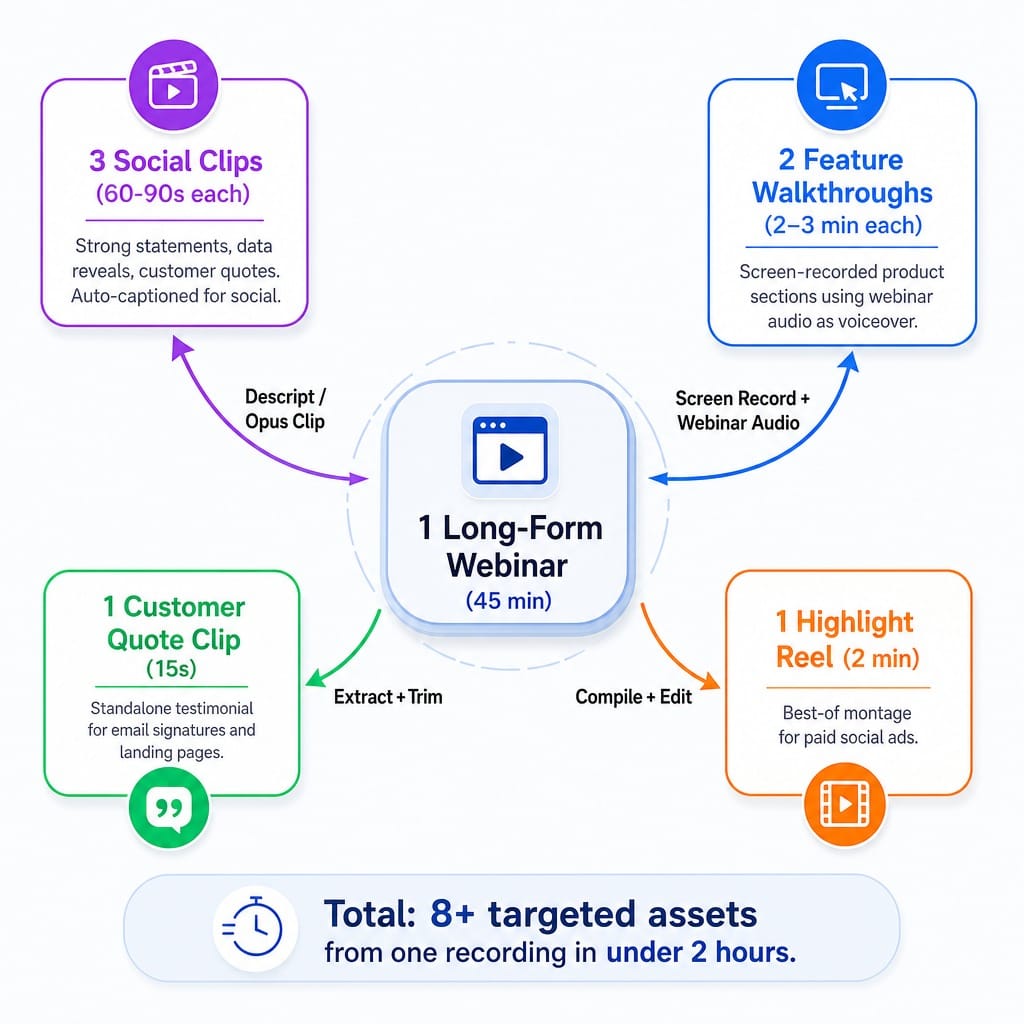
We'll use a single 45-minute customer webinar as a worked example, showing how one long-form asset can be systematically deconstructed into 8+ video assets and distributed across four channels.
Step 1: Audit Your Funnel for the Video Gap
First, map your current conversion funnel and identify where prospects drop off without video support. The goal is to find the 2-3 stages where video could most effectively reduce friction. Most teams skip this and default to making an explainer video, but if your biggest leak is prospects requesting demos and then ghosting, a personalized pre-demo video will have a far greater impact. The first video you make should address your biggest funnel leak, not the most obvious video type.
Step 2: Choose Your Creation Model—Founder-Led, Screen-Recorded, or AI-Generated
Next, choose a creation model based on your resources and the content's purpose.
- Founder-Led (Loom, Riverside): Best for early-stage companies where the founder is the brand. Costs $0 and takes 30 minutes per video.
- Screen-Recorded (Loom, Descript): Best for product walkthroughs and feature updates. Requires deep product knowledge but no on-camera presence.
- AI-Generated (HeyGen, Synthesia): Best for scaling multilingual content. A SaaS company can create the same product demo in eight languages using a synthetic spokesperson without re-recording. The common mistake is using AI for authenticity-dependent content like customer stories, where synthetic presenters feel uncanny and erode trust.
Step 3: Establish a Weekly Creation Cadence
The right cadence is weekly, not monthly or quarterly. The math is simple: one video per week creates a compounding library of 52 assets per year, each targeting a different use case, objection, or feature. Over 12 months, this library becomes a moat, fueling both organic traffic and sales enablement. A sample schedule:
- Monday: Identify topic from sales call recordings or support tickets.
- Tuesday: Record raw video (15-30 minutes).
- Wednesday: Edit in Descript (30 minutes).
- Thursday: Publish and distribute.
Total time investment: ~2 hours per week. This is achievable for a one-person marketing team.
Step 4: Build a Repurposing Workflow from Every Long-Form Video
This is where the system multiplies your effort. Take our 45-minute webinar. Using a tool like Descript or Opus Clip, you can automatically identify 3-5 high-engagement clips.
- Export 3 Clips (60-90s): Isolate moments with strong statements, data reveals, or customer quotes. Add auto-generated captions for social media.
- Create 2 Feature Walkthroughs (2-3m): Screen-record the specific product sections discussed in the webinar, using the webinar audio as a voiceover.
- Extract 1 Customer Quote (15s): Turn a powerful customer soundbite into a standalone testimonial clip for email signatures or landing pages.
- Compile 1 Highlight Reel (2m): Create a "best of" montage for paid social ads.
One 45-minute recording becomes 8+ targeted assets in under two hours.
Step 5: Map Every Video to a Distribution Channel and a Conversion Event
Before you publish, every video needs a primary distribution channel and a measurable conversion event—not just "views." Publishing a 4-minute walkthrough natively to LinkedIn is a waste; the platform's feed is optimized for a 3-second thumb-stop rate. That same video, however, can be a conversion powerhouse on a dedicated landing page. Distribution isn't just "posting"; it's channel-specific formatting with a measurable endpoint.
- LinkedIn Clip → Profile Visit → Website Click
- Landing Page Demo → Form Submission
- Email Video → Reply or Booking Link Click
Read more: How to Prioritize Marketing Channels With a Limited Budget And Resources (Framework for Lean Teams)
Where to Distribute SaaS Videos for Maximum Pipeline Influence
The highest-ROI distribution channels for SaaS video in 2026 are embedded landing page videos (for conversion), LinkedIn native video (for awareness and pipeline influence), and personalized video in email sequences (for sales acceleration). YouTube matters for SEO compounding but rarely drives direct B2B SaaS pipeline. This framing is deliberate; if you are measuring success by pipeline, your YouTube subscriber count is a vanity metric.
Landing Pages and Email: The Two Channels That Actually Convert
For B2B SaaS, the two highest-converting video placements are not on social media. They are:
- Embedded on landing pages, above the fold. Here, video replaces or supplements long-form copy. Wistia data shows this can increase conversion rates by over 80%. Use embed heatmaps to find the highest engagement zone on your page and place the video there—it's not always at the very top.
- Embedded in email sequences. Using tools like Vidyard or Sendspark, a video thumbnail in an email can increase click-throughs by 200-300%. The best-in-class motion is async video prospecting: sales reps record a 90-second personalized Loom addressing a prospect's specific pain point, embed the thumbnail, and track watch data as a video intent signal fed directly into HubSpot or your CRM.
Gated vs. Ungated Video: When to Capture Leads and When to Build Trust
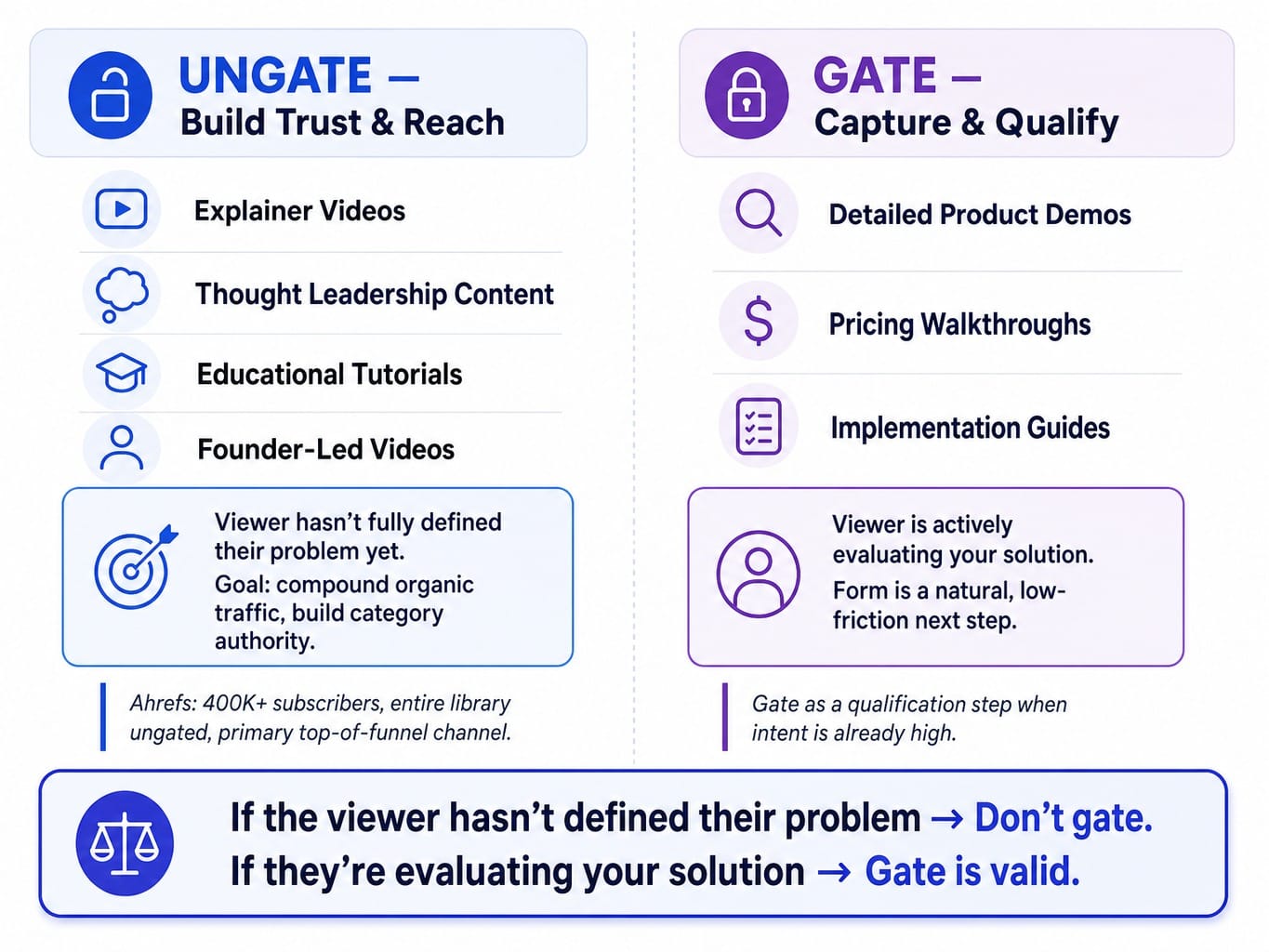
The debate is endless, but the framework is simple. Gate decision-stage videos where intent is high; never gate awareness-stage videos where friction destroys reach.
Gate detailed product demos, pricing walkthroughs, or implementation guides. The viewer is already evaluating your solution, and the form is a natural, low-friction next step to a conversation.
Never gate explainer videos, thought leadership content, or educational tutorials. The goal here is to build a video content moat—an ungated library that compounds organic traffic and positions your brand as the default educational resource in your category. Ahrefs is the canonical example. Their entire YouTube library is ungated, drives over 400,000 subscribers, and functions as their primary top-of-funnel acquisition channel.
The decision framework: if the viewer hasn't yet fully defined their problem, don't gate. If they are actively evaluating your solution, gating is a valid qualification step. This mirrors the broader B2B demand generation principle of building trust before capturing information.
How to Attribute Closed Revenue to a Specific Video Touchpoint
SaaS video marketing ROI is measured through a multi-touch attribution model that tracks three layers: engagement metrics (watch-through rate, CTA clicks), intent signals (which videos a prospect watched before a demo request), and pipeline attribution (which video touchpoints appeared in closed-won deal journeys).
Most teams fail here because they measure views and watch time but never connect that data to CRM records. The gap between 91% video adoption and ~30% confident ROI measurement is an integration problem.
The solution is a direct data sync. Platforms like Wistia and Vidyard can track individual viewer behavior by email address and sync that watch data to contact properties in HubSpot or Salesforce. This allows you to run a report showing that "prospects who watched the product demo video were 3x more likely to close."
This creates the concept of a Video MQL: a lead who has watched more than 60% of a consideration-stage video. This is a powerful lead scoring signal. If you can't tell me which video touchpoint appeared in your last 10 closed deals, you don't have a video strategy—you have a video hobby.
Read more: How to Build SaaS Marketing Attribution That Actually Drives Pipeline (Not Just Dashboards)
The key metrics to track are:
- View-Through Rate (VTR): What percentage of viewers finish the video?
- Mid-Roll CTA Click Rate: Are viewers acting on in-video prompts?
- Video Pipeline Influence: What percentage of closed revenue had a video touchpoint?
- First-Frame Hook: What percentage of viewers make it past the first 5 seconds?
When the Bottleneck Isn't Video—It's Everything Around It
You've now seen the system: funnel auditing, distribution optimization, landing page placement, CRM integration, and attribution modeling. The video itself is the easy part. The hard part is everything around it—optimizing the landing pages where videos live, ensuring the CTAs convert, and continuously reprioritizing which pages deserve attention.
This is the execution gap that stalls most marketing teams. You know the video needs a better landing page, but the fix is stuck in a backlog behind engineering tickets or competing priorities. Your team gets bogged down in execution, not strategy.
Spike AI is built to close that gap. It's not a video tool. It's the execution system that optimizes the conversion environment around your video content. Spike continuously identifies which pages are underperforming, prioritizes the highest-impact fix—whether it's a new CTA, a headline test, or a layout change—and ships it weekly. Your team can focus on creating compelling video content, confident that the infrastructure to convert that attention is improving automatically.
You handle the story. Spike AI handles the system that makes the story convert.
See how Spike AI optimizes the pages where your videos convert
How AI Video Generation Changes SaaS Marketing Workflows in 2026
AI video generation for SaaS marketing uses synthetic presenters, automated voiceovers, and template-based rendering to produce localized, personalized video content at a fraction of the time and cost of traditional production.
While tools exist for many functions, the most impactful use case for B2B SaaS in 2026 is multilingual scaling. Using a platform like HeyGen, Synthesia, or invideo Agent, a company can create the same product demo in eight or more languages from a single English recording. The workflow is straightforward: record one demo, upload the script and video, select target languages, and the platform generates localized versions with an AI lip-synced synthetic spokesperson, often in under 24 hours. This replaces a multi-week, multi-agency localization process.
However, it's critical to understand the limitations. Synthetic presenters work well for structured, informational content like demos, tutorials, and feature announcements. They feel uncanny and erode trust when used for authenticity-dependent content like customer stories, founder updates, or culture videos.
For creation and editing, tools like Descript use AI to remove filler words and generate instant transcripts, while platforms like Opus Clip can automatically identify and extract short-form clips from long-form recordings, drastically speeding up the repurposing workflow. The takeaway is that AI provides leverage for the 20% creation part of the equation, making the 80% distribution and measurement system even more critical as a competitive differentiator.
Conclusion
SaaS video marketing is not a creative discipline. It is a distribution and measurement system that happens to use video as its medium.
The teams that spend 80% of their effort on production and 20% on distribution will keep wondering why their beautiful videos don't generate pipeline. The teams that win will do the opposite. They will build a weekly creation cadence of raw, useful content. They will repurpose ruthlessly. They will distribute to the channels that actually convert—landing pages and email—and they will attribute every video touchpoint to pipeline in their CRM.
The barrier to video creation has collapsed to near-zero. The only remaining competitive advantage is the system you build around the video—how you distribute it, where you place it, and whether you can measure what it actually does for revenue. That system is what separates video marketing from video publishing.
Frequently Asked Questions
What is the ideal length for a SaaS product demo video?
Under two minutes for landing page demos targeting cold traffic, and 4-8 minutes for consideration-stage walkthroughs where intent is high. Monday.com's A/B testing showed demos under 90 seconds increased conversions by 20%, but this applies to top-of-funnel placement where brevity is key.
What video hosting platform is best for SaaS companies that need analytics?
Wistia and Vidyard are the dominant choices. Wistia excels at marketing-focused, embed-level analytics like heatmaps and CTA tracking. Vidyard is stronger for sales teams using personalized outreach, as it integrates viewer-level watch data directly into CRMs like HubSpot and Salesforce.
How often should a SaaS company publish new video content?
A weekly cadence is the minimum for compounding results. A single screen-recorded video per week—covering a feature, objection, or use case—takes under two hours to produce and builds a searchable library of 50+ assets within a year. Consistency matters more than production quality.
Can video replace traditional SaaS onboarding documentation?
Video supplements documentation but should not replace it. Short onboarding videos reduce time-to-value and support tickets, but users still need searchable text for specific troubleshooting. The best approach is a customer success video library organized by task, with text transcripts embedded below each video.
What is the difference between a product walkthrough and an explainer video?
An explainer video answers "what does this do and why should I care?"—it's a positioning tool for awareness. A product walkthrough answers "how would I actually use this?"—it's a consideration tool showing the real UI and workflows. Explainers sell the problem; walkthroughs sell the solution.